

while Loops
What you'll learn
- How a
whileloop repeats code as long as a condition is true - How to count and accumulate with a loop
- How to keep asking until the user gives a valid answer
- What an infinite loop is, and how to stop one
- The
while True+breakpattern
Why it matters
Computers are great at doing the same thing many times without getting bored or making mistakes. A game keeps running until the player quits. An ATM keeps asking for a PIN until it's correct or you run out of attempts. A download keeps waiting until it's finished. Loops let your program repeat work. The while loop repeats as long as a condition stays true.
Your first while loop
count = 1

while count <= 5:
    print(f"Count is {count}")
    count += 1

print("Done!")Count is 1
Count is 2
Count is 3
Count is 4
Count is 5
Done!The structure looks like an if:
while condition:
    body (runs again and again while the condition is True)
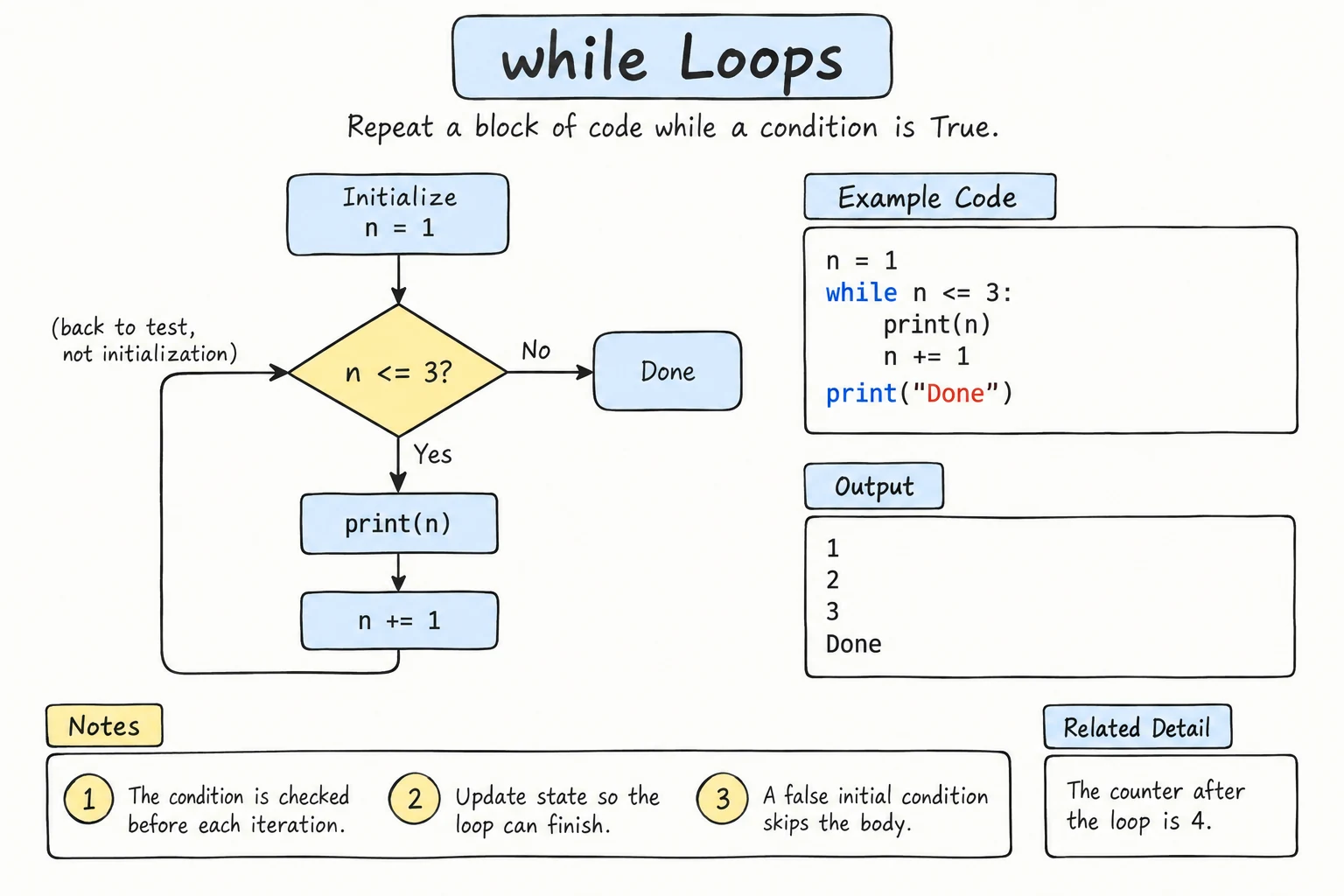
How Python runs it:
- Check the condition. If it's
False, skip the body and continue after the loop. - If it's
True, run the whole body. - Go back to step 1.
The condition is checked only at the top, once per iteration. If it becomes false halfway through the body, the rest of the body still runs.
Each run through the body is called an iteration. Here, the condition is checked 6 times: 5 times it's True, and on the 6th check (count is 6) it's False, so the loop ends.
Three parts of a counting loop
- Start:
count = 1, before the loop - Condition:
count <= 5, checked before every iteration - Update:
count += 1, inside the body, moving toward the end
Tracing a loop
When a loop confuses you, trace it with a table: one row per iteration.
total = 0
number = 1

while number <= 4:
    total += number
    number += 1

print(total)| Check | number | number <= 4 | total after body |
|---|---|---|---|
| 1 | 1 | True | 1 |
| 2 | 2 | True | 3 |
| 3 | 3 | True | 6 |
| 4 | 4 | True | 10 |
| 5 | 5 | False | (loop ends) |
10Loops that don't count
A while loop is most useful when you don't know in advance how many times to repeat. You just know when to stop:
savings = 100_000
goal = 1_000_000
months = 0

while savings < goal:
    savings = savings * 1.05 + 100_000   # 5% growth plus a monthly deposit
    months += 1

print(f"Goal reached after {months} months: {savings:,.0f} som")Goal reached after 8 months: 1,102,656 somNobody told the loop "run 8 times". It found that out by itself.
Repeating until the input is valid
A classic use: keep asking until the user types something acceptable.
age = int(input("Enter your age (1-120): "))

while age < 1 or age > 120:
    print("That doesn't look right. Try again.")
    age = int(input("Enter your age (1-120): "))

print(f"Thanks! You are {age}.")
Notice that input() appears twice: once before the loop, and once inside it to get a new answer. That duplication is fixed by the while True pattern below.
Stopping with a special value
Another pattern is a sentinel: a special value that means "stop".
total = 0
number = int(input("Enter a number (0 to finish): "))

while number != 0:
    total += number
    number = int(input("Enter a number (0 to finish): "))

print(f"Sum: {total}")
With the inputs 7, 5, 3, 2, 1, 0:
Sum: 18Infinite loops
If the condition never becomes false, the loop runs forever:
count = 1
while count <= 5:
    print(count)
    # forgot count += 1, so count is always 1
This prints 1 endlessly. If it happens to you:
- In a terminal, press Ctrl + C to stop the program.
- In the editor on this site, press Stop, or wait for the time limit.
Before running a loop, ask yourself: what makes the condition become false?
while True with break
Sometimes it's clearest to loop "forever" and leave from the middle with break:
while True:
    answer = input("Type 'quit' to exit: ").strip().lower()
    if answer == "quit":
        break
    print(f"You typed: {answer}")

print("Goodbye!")
With the inputs 7, 5, 3, 2, 1, 0, quit, it echoes each value, then prints Goodbye!.
break immediately ends the loop, no matter what the condition says. This removes the duplicated input() from the validation example, and it lets you fix another problem: int(input()) crashes if the user types twenty. Check the text with .isdecimal() first. It's True only when the string is not empty and every character is a digit that int() can convert:
while True:
    text = input("Enter your age (1-120): ").strip()
    if text.isdecimal() and 1 <= int(text) <= 120:
        break
    print("Please type a whole number from 1 to 120.")

age = int(text)
print(f"Thanks! You are {age}.")
Typing twenty, then 150, then 25:
Enter your age (1-120): twenty
Please type a whole number from 1 to 120.
Enter your age (1-120): 150
Please type a whole number from 1 to 120.
Enter your age (1-120): 25
Thanks! You are 25.
Short-circuiting from Logical Operators makes this safe: if text.isdecimal() is False, Python never runs int(text).
You'll learn more about break (and its partner continue) in the break, continue, and else lesson.
Try it
A number-guessing game with a fixed secret. Run it and type your guesses one at a time.
Common mistakes
1. Off-by-one conditions
count = 1
while count < 5:     # meant to count to 5
    print(count)
count += 11
2
3
4Decide whether the last value should be included: < 5 stops at 4, <= 5 stops at 5. Tracing the last iteration catches this.
2. Updating in the wrong place
count = 1
while count <= 3:
    count += 1
print(count) # meant to print 1, 2, 32
3
4The order of lines inside the body matters. Usually the update comes last.
3. Indenting the wrong lines
count = 1
while count <= 3:
    print(count)
count += 1 # not indented, so it's outside the loop1
1
1
... (forever, until you press Stop or Ctrl + C)count += 1 never runs, so the condition never changes. Everything that should repeat must be indented under while. If your program seems frozen, check the update first.
4. Converting input without checking it
age = int(input("Enter your age: ")) # the user types: twentyValueError: invalid literal for int() with base 10: 'twenty'Fix: loop with while True, check text.isdecimal(), and only then call int(), as in the validation example above.
Practice
1. Countdown
Print a countdown from 10 to 1, then Liftoff!.
Solution
n = 10
while n >= 1:
    print(n)
    n -= 1
print("Liftoff!")
2. Doubling
Start with 1 and keep doubling it while it's less than 1000. Print each value.
Solution
value = 1
while value < 1000:
    print(value)
    value *= 2
The last printed value is 512. The next double, 1024, fails the condition.
3. Count the digits
Without converting to a string, count how many digits a positive whole number has. Use // 10 in a loop. For number = 2026, print 4.
Solution
number = 2026
digits = 0

while number > 0:
    number //= 10     # remove the last digit
    digits += 1

print(digits)
Watch out: this prints 0 for number = 0. You could handle that case separately with an if.
4. PIN with limited attempts
The correct PIN is "1234". Ask for the PIN up to 3 times. Print Access granted if it's entered correctly, or Card blocked after 3 wrong attempts.
Solution
correct_pin = "1234"
attempts = 0
granted = False

while attempts < 3 and not granted:
    pin = input("PIN: ")
    attempts += 1
    if pin == correct_pin:
        granted = True
    else:
        print("Wrong PIN")

if granted:
    print("Access granted")
else:
    print("Card blocked")
The boolean granted is called a flag. It records that something happened inside the loop.
5. Collatz sequence
Start with a positive whole number n. While n isn't 1: if it's even, divide it by 2, otherwise set it to 3 * n + 1. Print every value, then how many steps it took. For n = 6, the sequence is 6 3 10 5 16 8 4 2 1 (8 steps).
Solution
n = 6
steps = 0

print(n, end=" ")
while n != 1:
    if n % 2 == 0:
        n //= 2
    else:
        n = 3 * n + 1
    steps += 1
    print(n, end=" ")

print()
print(f"Steps: {steps}")
Mathematicians believe this always reaches 1 for every starting number, but nobody has proved it yet!
Recap
while condition:repeats its body as long as the condition is true. The condition is checked before each iteration.- A counting loop needs a start, a condition, and an update.
- Use
whilewhen you don't know in advance how many repetitions you need: waiting for valid input, reaching a goal, or a sentinel value. - If the condition never becomes false, you get an infinite loop. Stop it with Ctrl + C.
while True:withbreakleaves a loop from the middle. Combine it with.isdecimal()to keep asking until the input is a valid number.