

The with Statement
What you'll learn
- Why clean-up code, like closing a file, must run even when something goes wrong
- What happens without
with, and howtry/finallydoes the same job - How to use several context managers in one
withstatement - Two useful built-in context managers:
tempfile.TemporaryDirectoryandcontextlib.suppress
Why it matters
Many tasks come in pairs: open a file and close it, create a temporary folder and delete it, change a setting and change it back. The second half is easy to forget, and it gets skipped when an error jumps out of your code halfway. An unclosed file can lose data that was never written to disk. The with statement guarantees the second half always happens. You have used it since Files and pathlib; now you will see what it actually does.
Life without with
Here is file handling the manual way, with an error in the middle:
file = open("orders.txt", "w", encoding="utf-8")
try:
    file.write("order 1: tea\n")
    quantity = int("three")          # an error in the middle
    file.close()                     # never reached
except ValueError:
    print("Something went wrong")

print("Closed?", file.closed)Something went wrong
Closed? FalseThe file is still open. Text you write is often kept in a memory buffer and only saved to disk when the file is closed, so a crash here can leave an empty or incomplete file.
The correct manual version uses finally, which you met in Handling Exceptions:
file = open("orders.txt", "w", encoding="utf-8")
try:
    file.write("order 1: tea\n")
    file.write("order 2: samsa\n")
finally:
    file.close()                     # runs no matter what

print("Closed?", file.closed)Closed? TrueThis is correct, but it takes extra lines every time, and it is easy to get wrong.
What with does
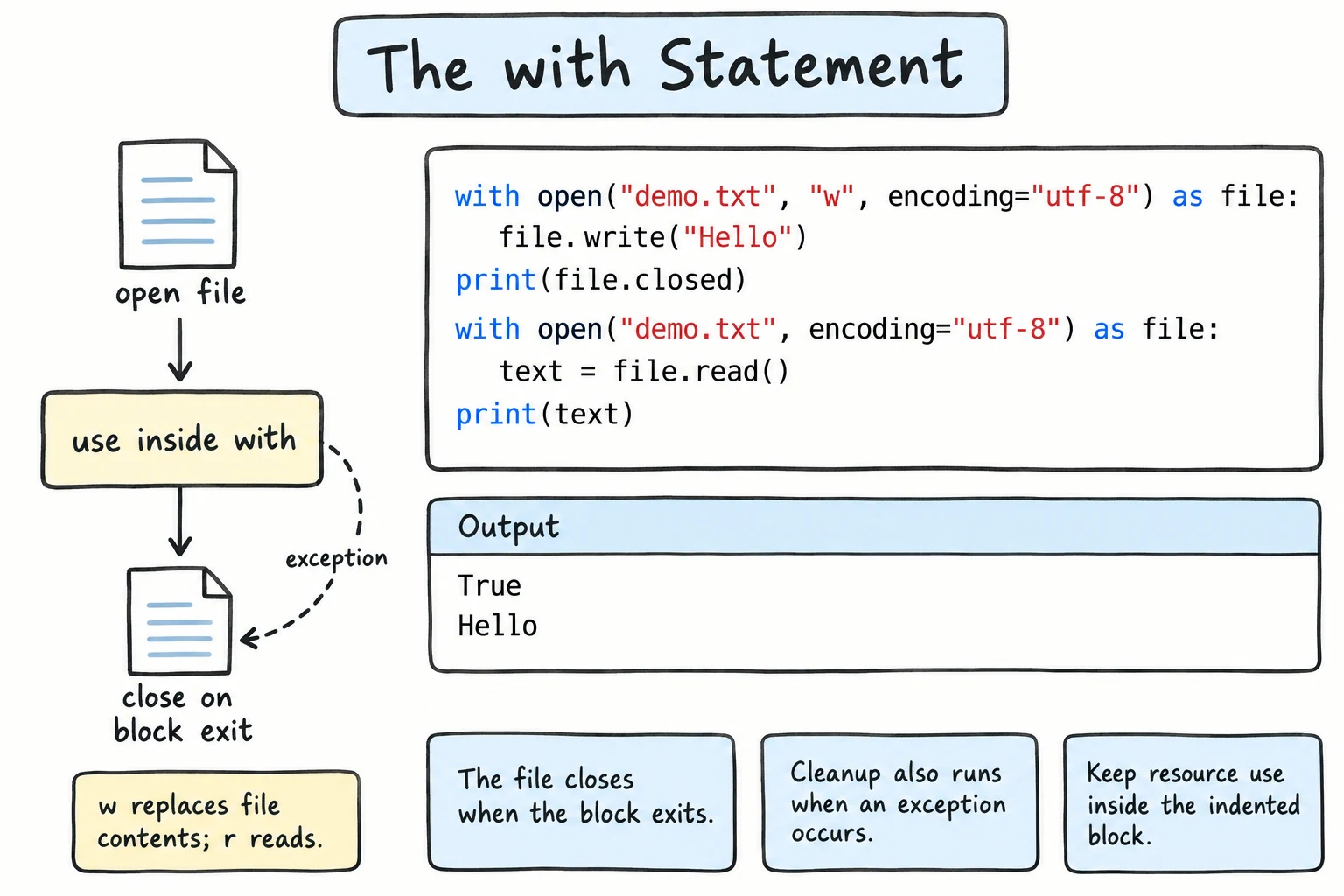
with does exactly the same job as the try/finally above. The object after with is a context manager: an object that knows how to set something up and how to clean it up.
with open(...) as file:        1. setup: open the file, name it "file"
    ...block...                2. your code runs
                               3. clean-up: close the file
                                  (also when the block raises an error,
                                   returns, or breaks out of a loop)
The clean-up happens even if an exception is raised inside the block. The exception still continues afterwards, so you can catch it:
try:
    with open("report.txt", "w", encoding="utf-8") as file:
        file.write("Sales report\n")
        total = 125000 / 0
except ZeroDivisionError:
    print("Calculation failed")

print("Closed?", file.closed)

with open("report.txt", encoding="utf-8") as file:
print("Saved text:", file.read().strip())Calculation failed
Closed? True
Saved text: Sales reportThe file was closed properly, and the line written before the error was saved. The variable file still exists after the block; it is just a closed file now.
How it works inside
A context manager has two special methods: __enter__ runs at the start of the block, and __exit__ at the end. Once you know classes (Classes and Objects) and double-underscore methods (Representing and Comparing Objects), you can write such a class yourself.
Several context managers at once
One with can manage several context managers, separated by commas. They are set up from left to right and cleaned up in reverse order. When the line gets long, wrap them in parentheses:
with open("names.txt", "w", encoding="utf-8") as file:
    file.write("aziza\nbekzod\n")

with (
    open("names.txt", encoding="utf-8") as source,
    open("greetings.txt", "w", encoding="utf-8") as target,
):
    for line in source:
        print(f"Salom, {line.strip().title()}!", file=target)

with open("greetings.txt", encoding="utf-8") as file:
print(file.read(), end="")Salom, Aziza!
Salom, Bekzod!Other context managers
with is not only for open(). Path.open() from Files and pathlib works the same way, and the standard library has many more. Two are especially handy.
tempfile.TemporaryDirectory
Creates a temporary folder and deletes it with everything inside when the block ends. It is perfect for scratch work and tests:
import tempfile
from pathlib import Path

with tempfile.TemporaryDirectory() as folder:
    work = Path(folder)
    (work / "draft.txt").write_text("temporary text", encoding="utf-8")
    print("Inside:", [p.name for p in work.iterdir()])
    print("Exists during the block:", work.exists())

print("Exists after the block:", work.exists())Inside: ['draft.txt']
Exists during the block: True
Exists after the block: FalseThe folder name is chosen by the system and differs on every run, so this example only prints file names.
contextlib.suppress
suppress(SomeError) ignores one specific exception inside the block. It is a short form of try/except SomeError: pass:
from contextlib import suppress
from pathlib import Path

Path("cache.txt").write_text("old data", encoding="utf-8")

with suppress(FileNotFoundError):
    Path("cache.txt").unlink()        # delete the file

with suppress(FileNotFoundError):
    Path("cache.txt").unlink()        # already gone: the error is ignored

print("Cache cleared:", not Path("cache.txt").exists())Cache cleared: TruePath.unlink() deletes a file. Use suppress only when ignoring the error is truly the right thing, like here, where "the file is already gone" is exactly what you wanted. As Handling Exceptions warned, hiding errors silently is usually a bad idea.
Going further: writing your own with @contextmanager
You can turn a function into a context manager with the @contextmanager decorator from contextlib (a decorator is the @ line above a function; it gives the function extra abilities):
from contextlib import contextmanager

@contextmanager
def section(title):
    print(f"--- {title} ---")      # setup
    try:
        yield                       # the with block runs here
    finally:
        print(f"--- end of {title} ---")   # clean-up

try:
    with section("Monthly report"):
        print("Revenue: 1,250,000 som")
        raise ValueError("expenses file is missing")
except ValueError as e:
print("Error:", e)--- Monthly report ---
Revenue: 1,250,000 som
--- end of Monthly report ---
Error: expenses file is missingThe code before yield is the setup, the with block runs at yield, and the code after it is the clean-up. The try/finally makes the clean-up run even when the block fails. yield is explained fully in Iterators and Generators.
Try it
Change the file name or its text, and try deleting a file that does exist.
Common mistakes
1. Using the file after the block
with open("notes.txt", "w", encoding="utf-8") as file:
    file.write("first line\n")

file.write("second line\n")ValueError: I/O operation on closed file.The file is closed as soon as the block ends. Put all work with the file inside the block, or open it again.
2. Returning a file object from inside with
def open_log():
    with open("app.log", "a", encoding="utf-8") as log:
        return log                 # closed as soon as the function returns

log = open_log()
log.write("started\n")ValueError: I/O operation on closed file.return ends the block, so the file is closed. Do the writing inside the function, or return the data instead of the file.
3. Using suppress too broadly
from contextlib import suppress

# Bad:
with suppress(Exception):
    total = 125000 / 0        # a real bug
    print("Payment sent")

print("Done")DoneA real bug was hidden: nothing says the payment failed. Suppress only a specific exception that you expect and can safely ignore.
Practice
1. Rewrite with with
Rewrite this code using with, and print whether the file is closed afterwards:
f = open("cities.txt", "w", encoding="utf-8")
f.write("Tashkent\nSamarkand\n")
f.close()
Solution
with open("cities.txt", "w", encoding="utf-8") as f:
    f.write("Tashkent\nSamarkand\n")

print(f.closed)True2. Copy with a filter
Create expenses.txt with the lines food 85000, taxi 25000, food 40000, books 120000. Using one with statement with two files, copy only the food lines into food.txt. Print food.txt.
Solution
with open("expenses.txt", "w", encoding="utf-8") as f:
    f.write("food 85000\ntaxi 25000\nfood 40000\nbooks 120000\n")

with open("expenses.txt", encoding="utf-8") as source, open("food.txt", "w", encoding="utf-8") as target:
    for line in source:
        if line.startswith("food"):
            target.write(line)

with open("food.txt", encoding="utf-8") as f:
print(f.read(), end="")food 85000
food 400003. Clear a cache
Write clear_cache(names) that deletes each file in names with Path.unlink(), ignores files that do not exist using suppress, and returns how many files it really deleted. Create page1.cache and page2.cache, then call it with ["page1.cache", "page9.cache", "page2.cache"], and again with the two real names.
Solution
from contextlib import suppress
from pathlib import Path

def clear_cache(names):
    removed = 0
    for name in names:
        with suppress(FileNotFoundError):
            Path(name).unlink()
            removed += 1
    return removed

Path("page1.cache").write_text("old", encoding="utf-8")
Path("page2.cache").write_text("old", encoding="utf-8")

print(clear_cache(["page1.cache", "page9.cache", "page2.cache"]))
print(clear_cache(["page1.cache", "page2.cache"]))2
0When unlink() raises inside the suppress block, the rest of that block (removed += 1) is skipped, so only real deletions are counted.
4. Work in a temporary folder
Inside tempfile.TemporaryDirectory(), create three files named day1.txt, day2.txt, day3.txt containing the numbers 120000, 95000, 143000. Read them back with glob, print the total, and after the block print whether the folder still exists.
Solution
import tempfile
from pathlib import Path

amounts = [120000, 95000, 143000]

with tempfile.TemporaryDirectory() as name:
    folder = Path(name)
    for day, amount in enumerate(amounts, start=1):
        (folder / f"day{day}.txt").write_text(str(amount), encoding="utf-8")

    total = sum(int(p.read_text(encoding="utf-8")) for p in folder.glob("day*.txt"))
    print(f"Total: {total:,} som")

print("Folder still exists:", folder.exists())Total: 358,000 som
Folder still exists: False5. Merge the price lists
Create tashkent.txt (tea 15000, plov 45000) and bukhara.txt (samsa 8000). For the cities ["tashkent", "samarkand", "bukhara"], copy every line of <city>.txt into all_prices.txt as Tashkent: tea 15000. There is no samarkand.txt: skip it without try/except, by putting suppress(FileNotFoundError) and open() in the same with. Print all_prices.txt.
Solution
from contextlib import suppress
from pathlib import Path

Path("tashkent.txt").write_text("tea 15000\nplov 45000\n", encoding="utf-8")
Path("bukhara.txt").write_text("samsa 8000\n", encoding="utf-8")

cities = ["tashkent", "samarkand", "bukhara"]
with open("all_prices.txt", "w", encoding="utf-8") as target:
    for city in cities:
        with suppress(FileNotFoundError), open(f"{city}.txt", encoding="utf-8") as source:
            for line in source:
                target.write(f"{city.title()}: {line}")

print(Path("all_prices.txt").read_text(encoding="utf-8"), end="")Tashkent: tea 15000
Tashkent: plov 45000
Bukhara: samsa 8000suppress is entered first, so when open() fails for samarkand.txt, the FileNotFoundError is raised inside it and ignored, and the loop moves on to the next city.
Recap
withruns setup at the start of a block and clean-up at the end, even when an error happens.- Without
with, you needtry/finallyto be safe, which is longer and easy to forget. - Combine several context managers with commas, or inside parentheses for long lines; they are cleaned up in reverse order.
tempfile.TemporaryDirectory()gives a scratch folder that is deleted afterwards.contextlib.suppress(SomeError)ignores one specific, expected exception.