

Logical Operators
What you'll learn
- How to combine conditions with
andandor - How to flip a condition with
not - The order in which
not,and, andorare evaluated - Short-circuit evaluation, and why it can prevent errors
- How
inandnot intest "is it one of these?", and how they avoid the classicx == "a" or "b"trap
Why it matters
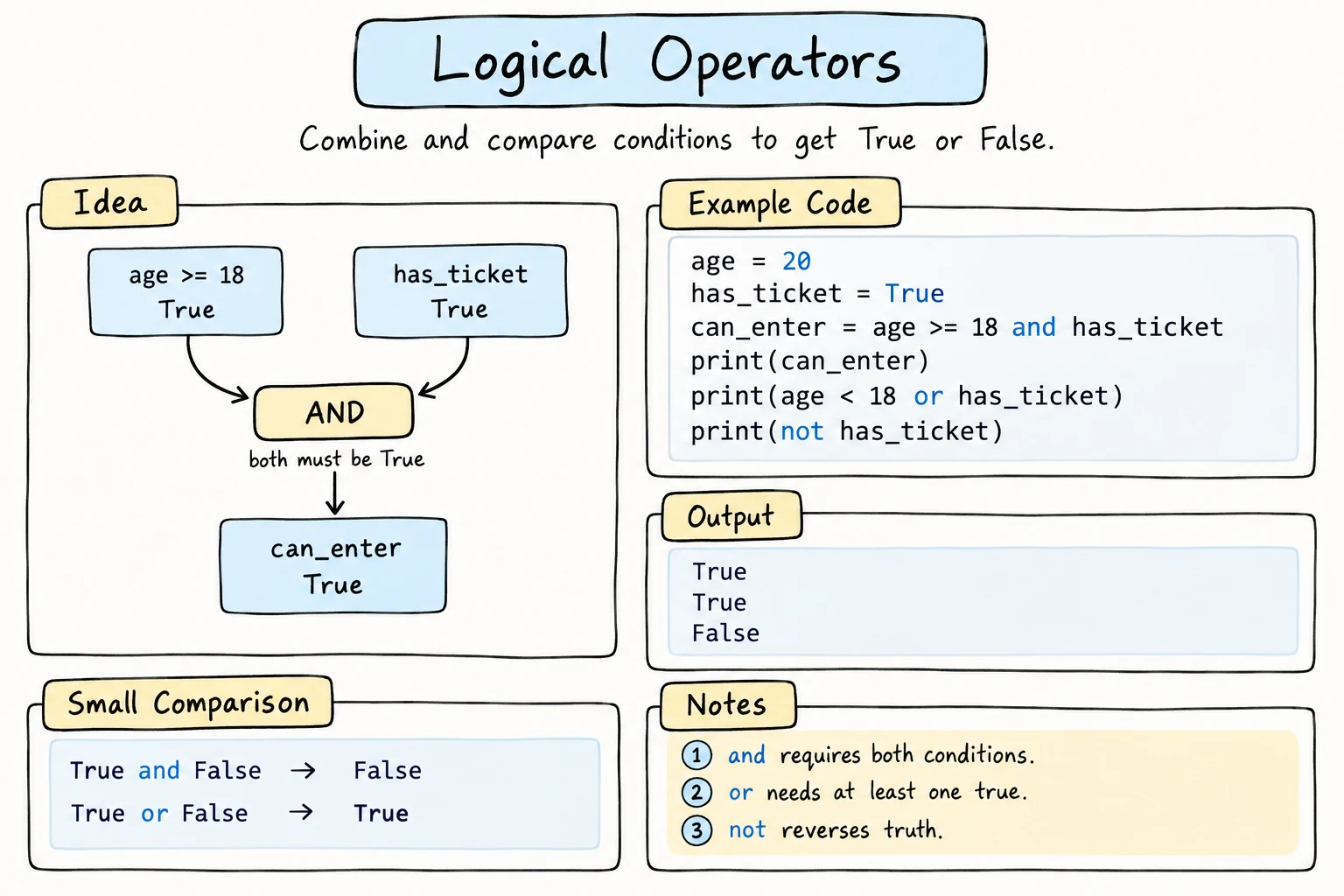
Real decisions rarely depend on just one thing. You can rent a car if you're at least 21 and have a license. The shop is closed on Saturday or Sunday. Show the login form if the user is not signed in. Logical operators let you express these conditions directly, instead of nesting if inside if.
and: both must be true
age = 25
has_license = True

if age >= 21 and has_license:
    print("You can rent a car.")
else:
print("Sorry, you can't rent a car.")You can rent a car.a and b is True only when both a and b are true:
a | b | a and b |
|---|---|---|
True | True | True |
True | False | False |
False | True | False |
False | False | False |
or: at least one must be true
day = "Sunday"

if day == "Saturday" or day == "Sunday":
print("It's the weekend!")It's the weekend!a or b is True when at least one of them is true:
a | b | a or b |
|---|---|---|
True | True | True |
True | False | True |
False | True | True |
False | False | False |
not: flip it
not turns True into False and False into True:
is_logged_in = False

if not is_logged_in:
print("Please log in.")Please log in.not reads well with truthy and falsy values: if not email: means "if the email is empty". For comparisons, prefer the direct operator: write x != 5 rather than not x == 5, and "a" not in text rather than not "a" in text.
Combining several operators
Precedence: not, then and, then or
Like * before + in math, Python evaluates not first, then and, then or. All comparisons (==, <, …) happen before any of them.
is_member = False
total = 120000
has_coupon = True

# and happens first: is_member or (total > 100000 and has_coupon)
if is_member or total > 100000 and has_coupon:
print("Discount applied")Discount appliedThat's correct here, but it's easy to misread. a or b and c always means a or (b and c). If you meant (a or b) and c, you must write the parentheses. Use parentheses whenever you mix and and or, even when they aren't required: is_member or (total > 100000 and has_coupon).
Ranges: chaining vs. and
hour >= 9 and hour < 18 is the same as the chained 9 <= hour < 18 from Booleans and Comparisons. For "outside a range", use or:
hour = 22
if hour < 9 or hour >= 18:
    print("The office is closed.")
in and not in: is it one of these?
You've used in with strings to look for a piece of text. It also checks whether a value is one of a group of values written in parentheses:
print("kent" in "Tashkent")
print("K" in "Tashkent")          # case matters

city = "Samarkand"
print(city in ("Tashkent", "Samarkand", "Bukhara"))
print(city not in ("Tashkent", "Bukhara"))True
False
True
Truecity in ("Tashkent", "Samarkand") means the same as city == "Tashkent" or city == "Samarkand", and not in is its opposite. ("Tashkent", "Samarkand", "Bukhara") is a tuple, a fixed group of values. You'll learn about it in Tuples and Unpacking. For now, x in (a, b, c) is a handy way to say "x is one of these".
The or trap
This looks right, but it's wrong:
color = "green"

if color == "red" or "blue":
print("Primary-ish color!") # prints for ANY colorPrimary-ish color!Python reads it as (color == "red") or ("blue"). The second part is just the string "blue", which is truthy, so the whole condition is always true.
Fix: repeat the comparison on both sides, or better, use in:
color = "green"

if color == "red" or color == "blue":
    print("Primary-ish color!")

if color in ("red", "blue"):        # cleaner
    print("Primary-ish color!")
Neither prints for "green".
Short-circuit evaluation
Python stops evaluating as soon as it knows the answer:
a and b: ifais false, the result isa, andbisn't evaluated.a or b: ifais true, the result isa, andbisn't evaluated.
That lets you guard against errors by putting the safety check first:
count = 0
total = 50

if count != 0 and total / count > 10:
    print("High average")
else:
print("No data or low average")No data or low averageBecause count != 0 is False, Python never runs total / count, so there's no ZeroDivisionError. If you swap the two sides, the program crashes.
and and or return values, not just booleans
Strictly speaking, and and or return one of their operands:
a or breturnsaifais truthy, otherwiseb.a and breturnsaifais falsy, otherwiseb.
This gives a neat trick for default values:
name = ""   # imagine: input("Name (optional): ").strip()

display_name = name or "Guest"
print(f"Welcome, {display_name}!")Welcome, Guest!If name is an empty string (falsy), you get "Guest". Be careful with numbers, though: 0 or 10 gives 10, even if 0 was a valid value.
Simplifying conditions
A few rewrites make conditions easier to read. These two pairs are always equivalent (De Morgan's laws):
| This | is the same as |
|---|---|
not (a and b) | not a or not b |
not (a or b) | not a and not b |
is_weekend = False
is_holiday = False

# Bad: hard to read
if not (is_weekend or is_holiday):
    print("Workday")

# Good: same logic, reads naturally
if not is_weekend and not is_holiday:
    print("Workday")
Also, don't compare booleans to True. Write if is_valid: rather than if is_valid == True:, and if not is_valid: rather than if is_valid == False:.
Naming parts of a long condition helps too:
age = 30
income = 9_000_000
has_debt = False

is_adult = age >= 18
earns_enough = income >= 5_000_000

if is_adult and earns_enough and not has_debt:
    print("Loan pre-approved")
Try it
Try different values and predict whether access is granted.
Common mistakes
1. x == a or b
answer = "no"

if answer == "yes" or "y":
print("You agreed!")You agreed!The "y" on its own is truthy, so the condition is always true. Fix: if answer in ("yes", "y"):.
2. and when you mean or
day = "Saturday"

if day == "Saturday" and day == "Sunday":   # can never be both!
    print("Weekend")
else:
print("Workday")WorkdayA variable can't equal two different values at once. Fix: or.
3. Guard on the wrong side
count = 0
total = 50

if total / count > 10 and count != 0:
print("High average")ZeroDivisionError: division by zeroThe division runs first, before the check has a chance to stop it. Fix: if count != 0 and total / count > 10:.
4. Using &&, ||, or !
age = 20
has_ticket = True

if age >= 18 && has_ticket:
print("Welcome") if age >= 18 && has_ticket:
^
SyntaxError: invalid syntaxOther languages use these symbols. In Python, they're words: and, or, not. (! doesn't exist on its own, although != does.)
Practice
1. Truth table check
Predict each result:
print(True and not False)
print(False or not True)
print(not (3 > 2 and 2 > 1))
print(5 > 3 or 1 / 0 > 0)
Solution
True
False
False
True
The last line doesn't crash: 5 > 3 is True, so or never evaluates 1 / 0.
2. Free museum entry
Entry to a museum is free for children under 7 and visitors 65 or older. Students also get in free, but not on weekends. Given age, is_student, and is_weekend, print Free entry or Please buy a ticket. Test with a 20-year-old student on a weekday (free) and on a weekend (ticket), and a 70-year-old on a weekend (free).
Solution
age = 20
is_student = True
is_weekend = False

is_free = age < 7 or age >= 65 or (is_student and not is_weekend)

if is_free:
    print("Free entry")
else:
print("Please buy a ticket")Free entryThe parentheses aren't required (and runs before or), but they show which parts belong together.
3. Leap year
A year is a leap year if it's divisible by 4, except years divisible by 100, which are only leap years if they're also divisible by 400. Given year, print whether it's a leap year. Test with 2024 (yes), 1900 (no), 2000 (yes), and 2026 (no).
Solution
year = 1900

is_leap = (year % 4 == 0 and year % 100 != 0) or year % 400 == 0

if is_leap:
    print(f"{year} is a leap year")
else:
    print(f"{year} is not a leap year")
4. Fix the bug
This program should print Valid answer only for "y", "yes", "n", or "no", in any capitalization. Right now it prints Valid answer for everything. Fix it.
answer = "maybe"

if answer.lower() == "y" or "yes" or "n" or "no":
    print("Valid answer")
else:
    print("Please answer yes or no")
Solution
answer = "maybe"

if answer.lower() in ("y", "yes", "n", "no"):
    print("Valid answer")
else:
    print("Please answer yes or no")
5. Password rules
A password is valid if all of these are true:
- it's at least 8 characters long,
- it isn't all letters (it contains at least one non-letter),
- it isn't all digits,
- it doesn't contain the word
"password"in any capitalization.
Given password, print Strong or a message explaining the first rule it breaks. Test with "abc", "abcdefgh", "12345678", "myPassword1", and "tea4two!".
Solution
password = "tea4two!"

if len(password) < 8:
    print("Too short: use at least 8 characters.")
elif password.isalpha():
    print("Add at least one number or symbol.")
elif password.isdigit():
    print("Don't use only numbers.")
elif "password" in password.lower():
    print("Don't use the word 'password'.")
else:
    print("Strong")
The elif chain stops at the first rule that fails, so each message matches the first problem.
Recap
andneeds both sides to be true,orneeds at least one, andnotflips a value.- Precedence is
not→and→or. Use parentheses when mixing them. x in ("a", "b")asks "is it one of these?".x == "a" or "b"is always true.- Short-circuiting:
andstops at the first falsy value andorat the first truthy one, so put safety checks first. value or defaultgives a fallback for empty values.- Simplify conditions with named booleans, De Morgan's laws, and
if flag:instead ofif flag == True:.