

Working with Lists and Sorting
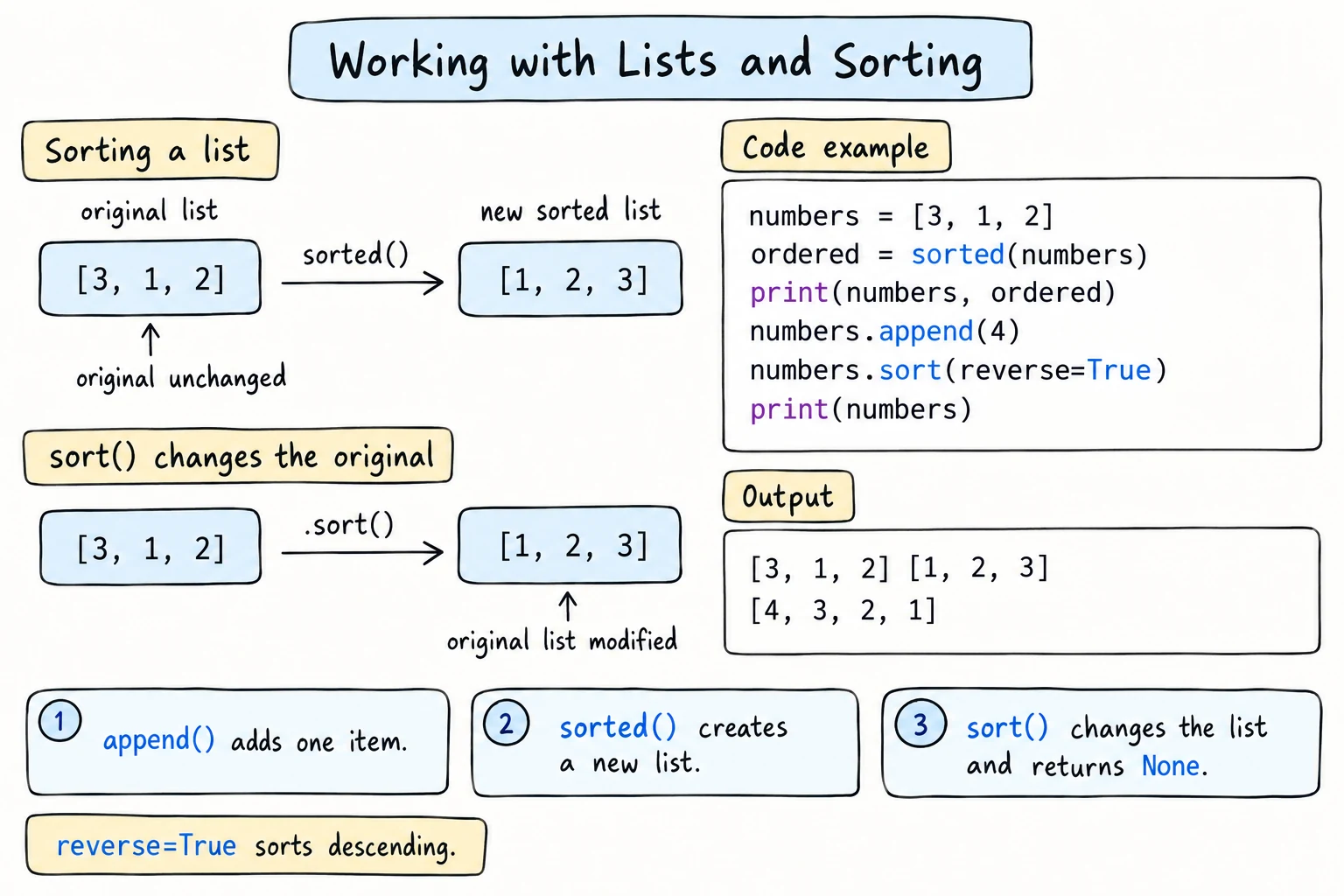
What you'll learn
- The difference between
list.sort()andsorted() - How to sort in reverse and with a key function
- How to sort text alphabetically regardless of capitals
- Built-ins for lists:
min,max,sum,len,reversed - Everyday list tasks: removing duplicates, finding positions, and joining into text
Why it matters
Once data is in a list, you usually want to organize it: rank scores from highest to lowest, list names alphabetically, show the cheapest products first. Python's sorting is fast, flexible, and takes just one line, once you know how to tell it what to sort by.
sort() vs sorted()
There are two ways to sort, and the difference matters:
scores = [72, 95, 58, 88]

ranked = sorted(scores)     # returns a NEW sorted list
print(ranked)
print(scores)               # original unchanged

scores.sort()               # sorts the list IN PLACE, returns None
print(scores)[58, 72, 88, 95]
[72, 95, 58, 88]
[58, 72, 88, 95]sorted(items) | items.sort() | |
|---|---|---|
| Changes the original? | No | Yes |
| Returns | a new list | None |
| Works on | any iterable: lists, strings, tuples, sets, dicts… | lists only |
Use sorted() when you want to keep the original order too. Use .sort() when you don't need it anymore.
sorted() works on any iterable (anything a for loop can go through), and always returns a list:
print(sorted("python"))
print(sorted((3, 1, 2)))['h', 'n', 'o', 'p', 't', 'y']
[1, 2, 3]Reverse order
Both accept reverse=True:
scores = [72, 95, 58, 88]

print(sorted(scores, reverse=True))

scores.sort(reverse=True)
print(scores)[95, 88, 72, 58]
[95, 88, 72, 58]Don't confuse this with .reverse(), which just flips the current order without sorting:
letters = ["b", "c", "a"]
letters.reverse()
print(letters)['a', 'c', 'b']Sorting text
Strings sort by code points (see Booleans and Comparisons), so all uppercase letters come before lowercase:
names = ["bekzod", "Aziza", "dilnoza", "Charos"]
print(sorted(names))['Aziza', 'Charos', 'bekzod', 'dilnoza']That's rarely what people expect. The fix is a key.
Sorting with a key
key= tells Python what to compare for each item. You pass a function, and Python calls it on every item and sorts by the results. The items themselves stay the same.
names = ["bekzod", "Aziza", "dilnoza", "Charos"]

print(sorted(names, key=str.lower)) # compare lowercase versions['Aziza', 'bekzod', 'Charos', 'dilnoza']Notice there are no parentheses after str.lower. You're handing over the function itself, for sorted to call, not calling it yourself.
Other useful keys:
words = ["banana", "fig", "cherry", "kiwi"]
print(sorted(words, key=len))                 # by length

temperatures = [-12, 5, -3, 8, 0]
print(sorted(temperatures, key=abs)) # by distance from zero['fig', 'kiwi', 'banana', 'cherry']
[0, -3, 5, 8, -12]When two items have the same key, like "banana" and "cherry" (both 6 letters), they keep their original relative order. Python's sort is stable.
You can combine key and reverse:
words = ["banana", "fig", "cherry", "kiwi"]
print(sorted(words, key=len, reverse=True))['banana', 'cherry', 'kiwi', 'fig']Custom keys
Soon you'll write your own key functions, including short one-line ones called lambdas (see Lambdas and Higher-Order Functions). For example, key=lambda p: p["price"] sorts products by price. To sort by several things, a key can return a pair: key=lambda p: (p["category"], p["price"]) sorts by category, then by price within each category.
min, max, sum, and friends
prices = [12000, 4500, 30000, 8000]

print(min(prices))
print(max(prices))
print(sum(prices))
print(sum(prices) / len(prices))4500
30000
54500
13625.0min and max also accept a key:
words = ["banana", "fig", "cherry", "kiwi"]
print(max(words, key=len))
print(min(words, key=len))banana
figIf several items tie, the first one wins.
More list methods
| Method | What it does |
|---|---|
lst.index(x) | position of the first x (ValueError if missing) |
lst.count(x) | how many times x appears |
lst.reverse() | reverse in place |
lst.copy() | shallow copy |
And some useful built-ins:
| Function | What it does |
|---|---|
len(lst) | number of items |
reversed(lst) | items in reverse order, for looping |
sorted(lst) | new sorted list |
any(...), all(...) | yes/no checks (see Comprehensions) |
Common list tasks
Is the list empty?
An empty list is falsy:
cart = []

if not cart:
    print("Your cart is empty")
Top N items
Sort, then slice:
scores = [72, 95, 58, 88, 64, 91]

top_three = sorted(scores, reverse=True)[:3]
print(top_three)[95, 91, 88]Removing duplicates while keeping order
visits = ["home", "about", "home", "shop", "about", "home"]

unique = []
for page in visits:
    if page not in unique:
        unique.append(page)

print(unique)['home', 'about', 'shop']For large lists, the Sets lesson shows faster ways.
Joining a list into text
.join() only works with strings. A common pattern is to collect the pieces as strings in a list, then join them once at the end:
numbers = [3, 1, 4, 1, 5]

parts = []
for n in numbers:
    parts.append(str(n))
print(", ".join(parts))3, 1, 4, 1, 5Comprehensions shows a one-line version: ", ".join(str(n) for n in numbers).
Sorting parallel lists together
If names and scores are in two separate lists, sort the pairs, so they stay together:
names = ["Aziza", "Bekzod", "Dilnoza"]
marks = [81, 94, 88]

for mark, name in sorted(zip(marks, names), reverse=True):
print(f"{name}: {mark}")Bekzod: 94
Dilnoza: 88
Aziza: 81zip(marks, names) produces pairs like (81, "Aziza"). Pairs sort by their first item, the mark, and only look at the second item when the marks are equal. You'll learn more about these pairs (tuples) in the next lesson.
Try it
Sort the product names in different ways. Try key=len, reverse=True, or sorting by price.
Common mistakes
1. Saving the result of .sort()
scores = [3, 1, 2]
scores = scores.sort()
print(scores)NoneFix: either scores.sort() on its own line, or scores = sorted(scores).
2. Sorting mixed types
values = [10, "5", 3]
values.sort()TypeError: '<' not supported between instances of 'str' and 'int'Python won't guess how to order a string against a number. Fix: convert everything to one type first.
3. Calling the key function
names = ["b", "A"]
sorted(names, key=str.lower())TypeError: unbound method str.lower() needs an argumentPass the function itself, without parentheses: key=str.lower.
4. min() or max() of an empty list
max([])ValueError: max() iterable argument is emptyCheck that the list isn't empty, or give a default: max(values, default=0).
Practice
1. Alphabetical guests
Print guests = ["zafar", "Aziza", "madina", "Bobur"] in alphabetical order, ignoring capitals, with each name capitalized.
Solution
guests = ["zafar", "Aziza", "madina", "Bobur"]

for guest in sorted(guests, key=str.lower):
    print(guest.capitalize())
2. Stats
For temps = [31, 35, 28, 37, 33, 26, 30], print the lowest, highest, average (1 decimal), and the temperatures sorted from hottest to coldest.
Solution
temps = [31, 35, 28, 37, 33, 26, 30]

print(f"Lowest: {min(temps)}")
print(f"Highest: {max(temps)}")
print(f"Average: {sum(temps) / len(temps):.1f}")
print(f"Hottest first: {sorted(temps, reverse=True)}")
3. Median
The median is the middle value of a sorted list. For an even number of items, it's the average of the two middle values. Calculate the median of [7, 1, 5, 3] (answer 4.0) and [9, 2, 6] (answer 6).
Solution
for values in [[7, 1, 5, 3], [9, 2, 6]]:
    ordered = sorted(values)
    middle = len(ordered) // 2

    if len(ordered) % 2 == 1:
        median = ordered[middle]
    else:
        median = (ordered[middle - 1] + ordered[middle]) / 2

    print(median)
4. Word frequency ranking
For text = "the cat and the dog and the bird", print each unique word with how many times it appears, most frequent first. Use .count() and a list of unique words.
Solution
text = "the cat and the dog and the bird"
words = text.split()

unique = []
for word in words:
    if word not in unique:
        unique.append(word)

for count, word in sorted(zip([words.count(w) for w in unique], unique), reverse=True):
print(f"{word}: {count}")the: 3
and: 2
dog: 1
cat: 1
bird: 1Words with the same count are sorted by the word itself in reverse, because pairs compare their second item when the first items are equal. [words.count(w) for w in unique] is a list comprehension, explained in Comprehensions. The Dictionaries lesson shows a more efficient way to count.
5. Leaderboard
Given:
players = ["ali", "Vali", "gani", "Sami", "Doni"]
points = [120, 95, 120, 150, 95]
Print a leaderboard sorted by points, highest first. When points are equal, sort by name alphabetically, ignoring case. Show ranks starting from 1:
1. Sami  150
2. ali   120
3. gani  120
4. Doni   95
5. Vali   95
Solution
players = ["ali", "Vali", "gani", "Sami", "Doni"]
points = [120, 95, 120, 150, 95]

pairs = sorted(zip(players, points), key=lambda pair: (-pair[1], pair[0].lower()))

for rank, (name, score) in enumerate(pairs, start=1):
    print(f"{rank}. {name:<5}{score:>4}")
lambda pair: ... is a tiny inline function (see Lambdas and Higher-Order Functions). The key returns a pair: minus the points, so higher points come first, then the lowercase name, which breaks ties. This is what people usually write. Another way uses stability: sort by name first, then sort(key=..., reverse=True) by points, and the names stay alphabetical within each points group.
Recap
sorted(items)returns a new list.items.sort()sorts in place and returnsNone.reverse=Truesorts descending..reverse()just flips the order.key=functionsorts by a computed value:key=str.lower,key=len,key=abs. Pass the function without(). The sort is stable, so equal keys keep their order.min,max,sum, andlensummarize lists, andmin/maxacceptkeyanddefault.- Top N:
sorted(items, reverse=True)[:n]. Keep related lists together by sortingzip()pairs.