

Input and Type Conversion
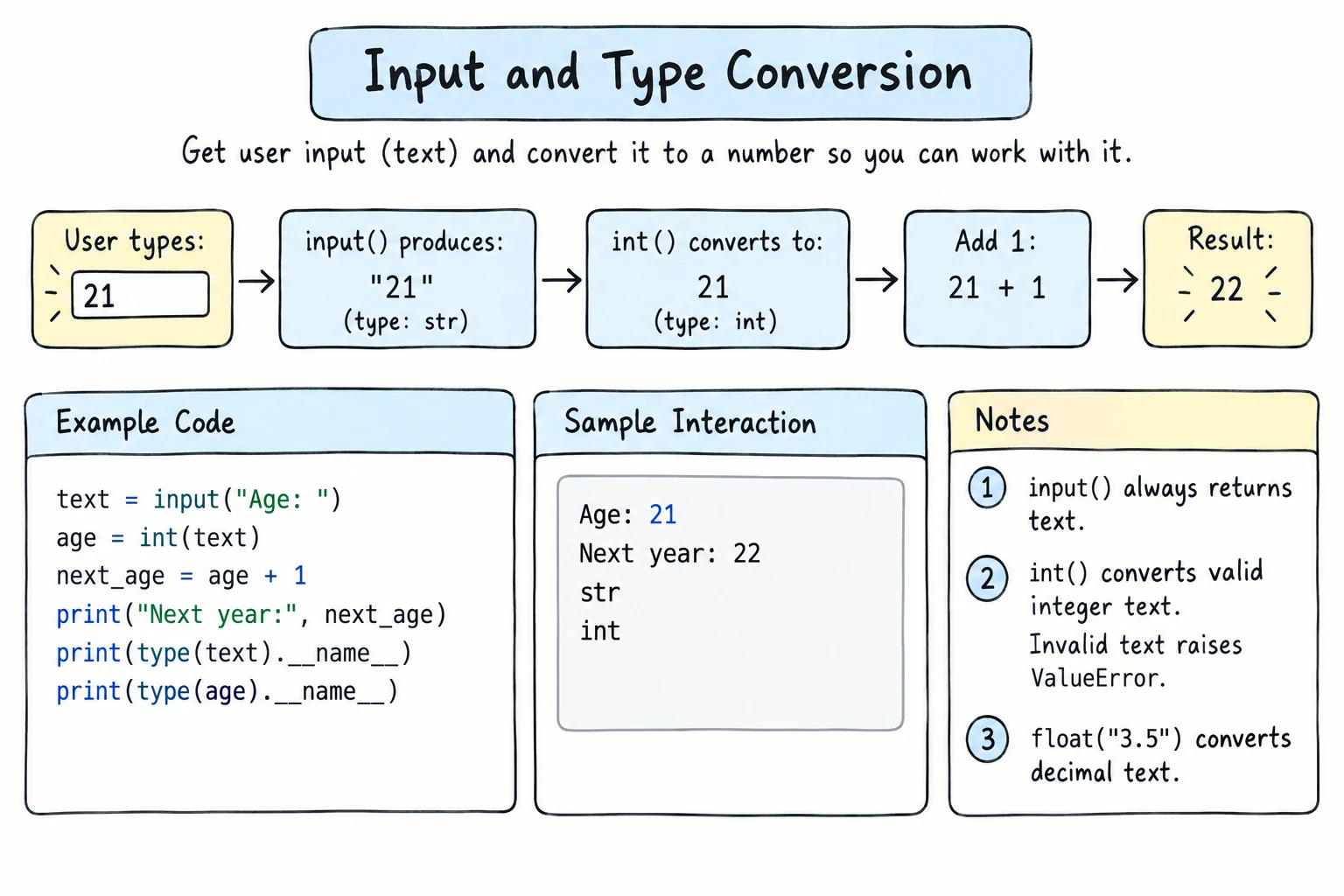
What you'll learn
- How to ask the user for information with
input() - Why
input()always gives you a string - How to convert values with
int(),float(), andstr() - What happens when a conversion fails, including decimal commas like
12,5 - How to clean text answers and build small interactive programs
Why it matters
So far, every value in your programs was written directly in the code. Real programs respond to their users: a calculator needs numbers, a quiz needs answers, a sign-up form needs a name. input() lets your program ask, and type conversion lets you turn the answers into data you can calculate with.
Asking for input
input() shows a message (the prompt), waits for the user to type something and press Enter, and returns what they typed:
name = input("What is your name? ")
print(f"Nice to meet you, {name}!")What is your name? Aziza
Nice to meet you, Aziza!End the prompt with a space so the user's typing doesn't stick to your question.
Running input() on this site
In the browser editors, input() works as it does in a terminal. The program stops, the question appears in the output, and you type your answer there and press Enter.
input() always returns a string
Even if the user types a number, you get text:
age = input("How old are you? ")
print(type(age))How old are you? 20
<class 'str'>That's a problem as soon as you try to do math:
age = input("How old are you? ")
print(age + 1)TypeError: can only concatenate str (not "int") to strAnd sometimes it's worse, because there's no error, just a wrong answer:
a = "5"
b = "3"
print(a + b)   # "53", not 8
The fix is to convert the string to a number (see Converting types below).
Cleaning text answers: .strip()
Users often type a stray space before or after their answer. You can't see it, but Python can, and the answer no longer matches:
city = input("City: ")      # the user types "  Samarkand "
print(city == "Samarkand")

city = city.strip()
print(city == "Samarkand")City: Samarkand
False
TrueFor text answers, it's a good habit to call .strip() straight away, and to chain .lower() or .title() if capitals don't matter:
city = input("City: ").strip().title()   # the user types "  samarkand "
print(f"Welcome to {city}!")City: samarkand
Welcome to Samarkand!Converting types
| Function | Converts to | Example | Result |
|---|---|---|---|
int() | whole number | int("42") | 42 |
float() | decimal number | float("3.5") | 3.5 |
str() | string | str(42) | "42" |
age_text = "20"
age = int(age_text)

print(age + 1)
print(type(age))21
<class 'int'>Usually you convert right away, by wrapping input() inside int() or float():
age = int(input("How old are you? "))
print(f"Next year you will be {age + 1}.")
Python runs the inside first: input() returns a string, then int() converts it.
int() vs float()
Use int() for things that are always whole (age, count, year) and float() for things that can have decimals (price, weight, temperature):
weight = float(input("Weight in kg: "))
height = float(input("Height in meters: "))

bmi = weight / height ** 2
print(f"BMI: {bmi:.1f}")
More conversions
print(int(3.99))       # float → int cuts off the decimals (no rounding)
print(round(3.99))     # use round() if you want rounding
print(float(7))        # int → float
print(int("  42  "))   # surrounding spaces are OK
print(int("-15"))      # a minus sign is OK
print(str(3.5) + "kg") # number → string, to join with text3
4
7.0
42
-15
3.5kgWhen conversion fails
If the text doesn't look like a number of the right kind, Python raises a ValueError:
int("twenty")ValueError: invalid literal for int() with base 10: 'twenty'Some cases surprise beginners:
| Expression | Result |
|---|---|
int("3.5") | ValueError: int() doesn't accept a decimal point in text |
int(float("3.5")) | 3: convert to float first, then int |
int("") | ValueError: the user just pressed Enter |
int("1,000") | ValueError: commas aren't allowed |
float("1e3") | 1000.0: scientific notation is accepted |
float("12,5") | ValueError: the decimal point must be a dot |
The last row matters in Uzbekistan and much of Europe, where people often write decimals with a comma. The error message for float() is worded a little differently from the int() one:
float("12,5")ValueError: could not convert string to float: '12,5'If your users may type a comma, replace it before converting:
weight_text = "12,5"
weight = float(weight_text.replace(",", "."))
print(weight)12.5For now, assume users type valid numbers. In Handling Exceptions you'll learn to catch these errors and ask again.
Putting it together
A small, complete interactive program:
print("=== Tip calculator ===")

bill = float(input("Bill amount: "))
tip_percent = int(input("Tip percent: "))
people = int(input("Number of people: "))

tip = bill * tip_percent / 100
total = bill + tip
per_person = total / people

print(f"Tip:        {tip:,.2f}")
print(f"Total:      {total:,.2f}")
print(f"Per person: {per_person:,.2f}")
Run it with the values 150000, 10, and 4:
=== Tip calculator ===
Bill amount: 150000
Tip percent: 10
Number of people: 4
Tip:        15,000.00
Total:      165,000.00
Per person: 41,250.00
The shape of this program is very common: input → convert → calculate → output.
Try it
Run the program and type two numbers when it asks.
Common mistakes
1. Doing math on input without converting
price = input("Price: ")   # the user types 50
print(price * 2)Price: 50
5050No error, just a wrong answer: a string times 2 repeats the string. Fix: convert when you read the value: price = float(input("Price: ")).
2. Using int() for decimal input
price = int(input("Price: ")) # user types 12.5ValueError: invalid literal for int() with base 10: '12.5'Fix: use float() when the value can have decimals.
3. Typing a decimal comma
weight = float(input("Weight in kg: ")) # user types 12,5ValueError: could not convert string to float: '12,5'Fix: tell users to type a dot, or accept both with float(input("Weight in kg: ").replace(",", ".")).
4. Forgetting the space in the prompt
name = input("Name:") # the user types AzizaName:AzizaThe typed text runs into the prompt. Fix: end the prompt with a space: input("Name: ").
Practice
1. Echo
Ask for the user's favorite food and print <food> is delicious!, with the food in uppercase.
Solution
food = input("Favorite food? ")
print(f"{food.upper()} is delicious!")
2. Birth year
Ask for the user's age and print the year they were born, assuming the current year is 2026 and their birthday has already passed this year.
Solution
age = int(input("Your age: "))
print(f"You were born in {2026 - age}.")
3. Unit converter
Ask for a distance in kilometers (it can have decimals) and print it in miles with 2 decimals. 1 km = 0.621371 miles.
Solution
km = float(input("Kilometers: "))
miles = km * 0.621371
print(f"{km} km = {miles:.2f} miles")
4. Predict the output
Without running it, what does each line print? One of them raises an error: which one, and why?
print(int("8") + 2)
print("8" + str(2))
print(int(9.9))
print(float("2") * 3)
print(int("9.9"))
Solution
1082: string joining9:int()cuts off the decimals6.0ValueError:int()can't convert a string that contains a decimal point. Useint(float("9.9"))instead.
5. Time until
Ask for a number of minutes (a whole number) and print it as days, hours, and minutes, like 1 days, 2 hours, 5 minutes for 1565.
Solution
total = int(input("Minutes: "))

days = total // (24 * 60)
remaining = total % (24 * 60)
hours = remaining // 60
minutes = remaining % 60

print(f"{days} days, {hours} hours, {minutes} minutes")
This combines input, int, //, %, and f-strings. You'll learn to write "1 day" instead of "1 days" with if in the next module.
Recap
input("prompt ")waits for the user and returns what they typed as a string.- Convert with
int(),float(), andstr(). Convert right away:int(input(...)). int(3.9)cuts off decimals. Useround()to round.- Invalid text like
int("3.5"),int("abc")orfloat("12,5")raises aValueError. Use.replace(",", ".")for decimal commas, and.strip()on text answers. - A common program shape is input → convert → calculate → output.