

Async and await
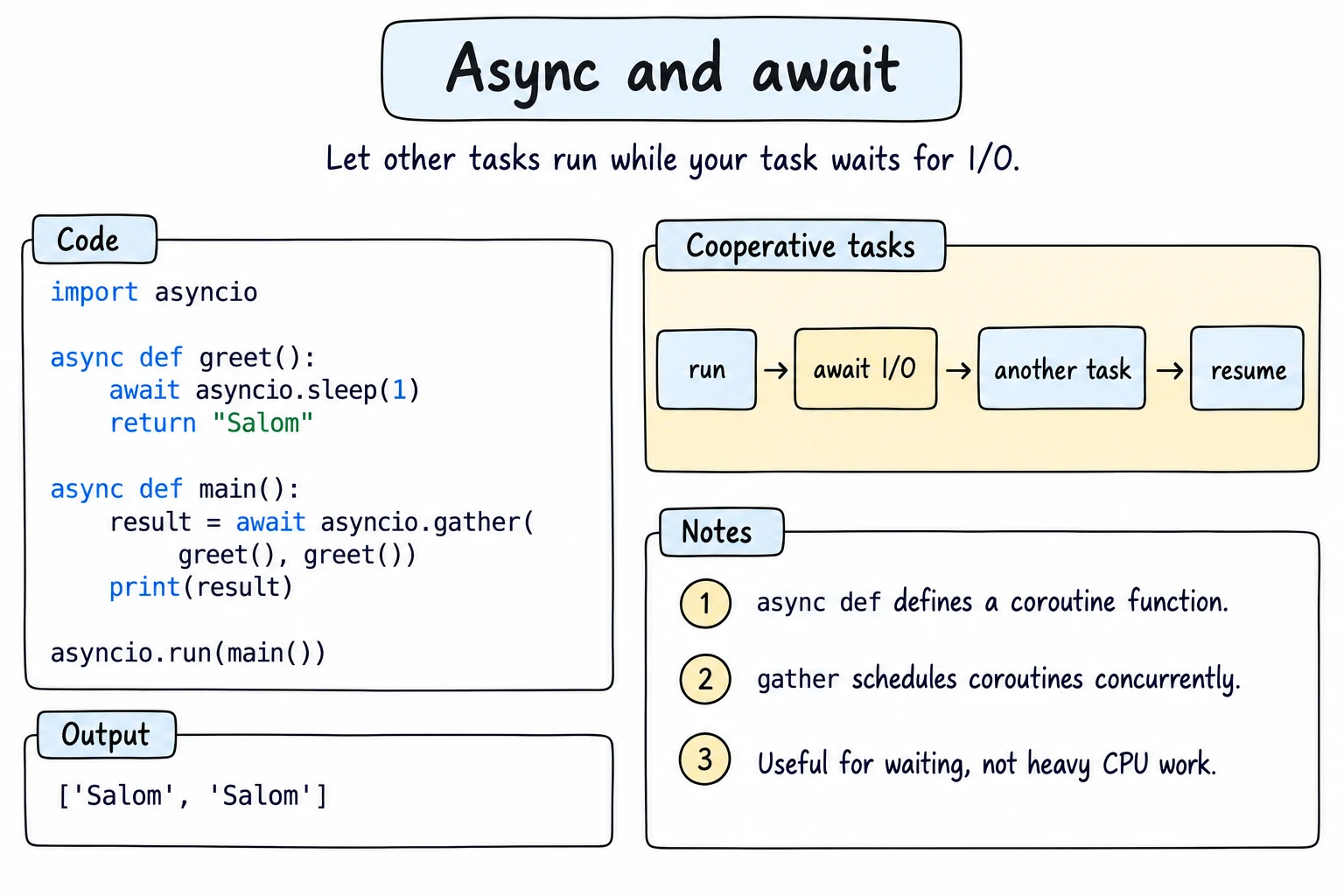
What you'll learn
- What a coroutine is, and what
awaitdoes while a program waits - How to run coroutines concurrently with
asyncio.gather,create_taskandTaskGroup - How to stop slow work with
asyncio.timeout - How producers and consumers share work through an
asyncio.Queue - When async helps (waiting on I/O) and when it does not (heavy calculations)
Why it matters
A currency app asks ten exchange offices in Tashkent for today's dollar rate. Each answer takes a second, and during that second the computer just waits. One office after another takes ten seconds; with async and await the program sends all ten requests at once and is done in about one.
Coroutines and await
Calling a function defined with async def does not run its body; it returns a coroutine object, much like a generator function (Iterators and Generators). The body runs when you await it. await means "pause here until this finishes, and let other work run meanwhile".
asyncio.sleep stands in for a slow network request:
import asyncio
import time

async def fetch_price(city, delay):
    await asyncio.sleep(delay)          # pretend to wait for a server
    return f"{city}: 12,650 som"

async def main():
    start = time.perf_counter()
    for city, delay in [("Tashkent", 0.1), ("Samarkand", 0.2), ("Bukhara", 0.3)]:
        print(await fetch_price(city, delay))
    print(f"took {time.perf_counter() - start:.1f} s")

await main()Tashkent: 12,650 som
Samarkand: 12,650 som
Bukhara: 12,650 som
took 0.6 sSomething has to start the first coroutine: the event loop, a scheduler that runs coroutines and, when one pauses at an await, switches to another that is ready.
Scripts vs this page
This site's editor, like Jupyter, already has an event loop running, so the examples end with a top-level await main(). In a normal .py file you start the loop yourself with asyncio.run():
import asyncio

async def main():
    print("Salom!")

if __name__ == "__main__":
    asyncio.run(main())
Running concurrently with gather
That loop finishes one request before starting the next. asyncio.gather starts them all at once and waits for every one. Results come back in the order you passed them:
import asyncio
import time

async def fetch_price(city, delay):
    await asyncio.sleep(delay)
    print(f"  {city} answered")
    return f"{city}: 12,650 som"

async def main():
    start = time.perf_counter()
    results = await asyncio.gather(
        fetch_price("Bukhara", 0.3),
        fetch_price("Tashkent", 0.1),
        fetch_price("Samarkand", 0.2),
    )
    print(results)
    print(f"took {time.perf_counter() - start:.1f} s")

await main() Tashkent answered
Samarkand answered
Bukhara answered
['Bukhara: 12,650 som', 'Tashkent: 12,650 som', 'Samarkand: 12,650 som']
took 0.3 sThe total is the longest wait (0.3 s), not the sum (0.6 s), and there is still only one thread.
Tasks and the event loop
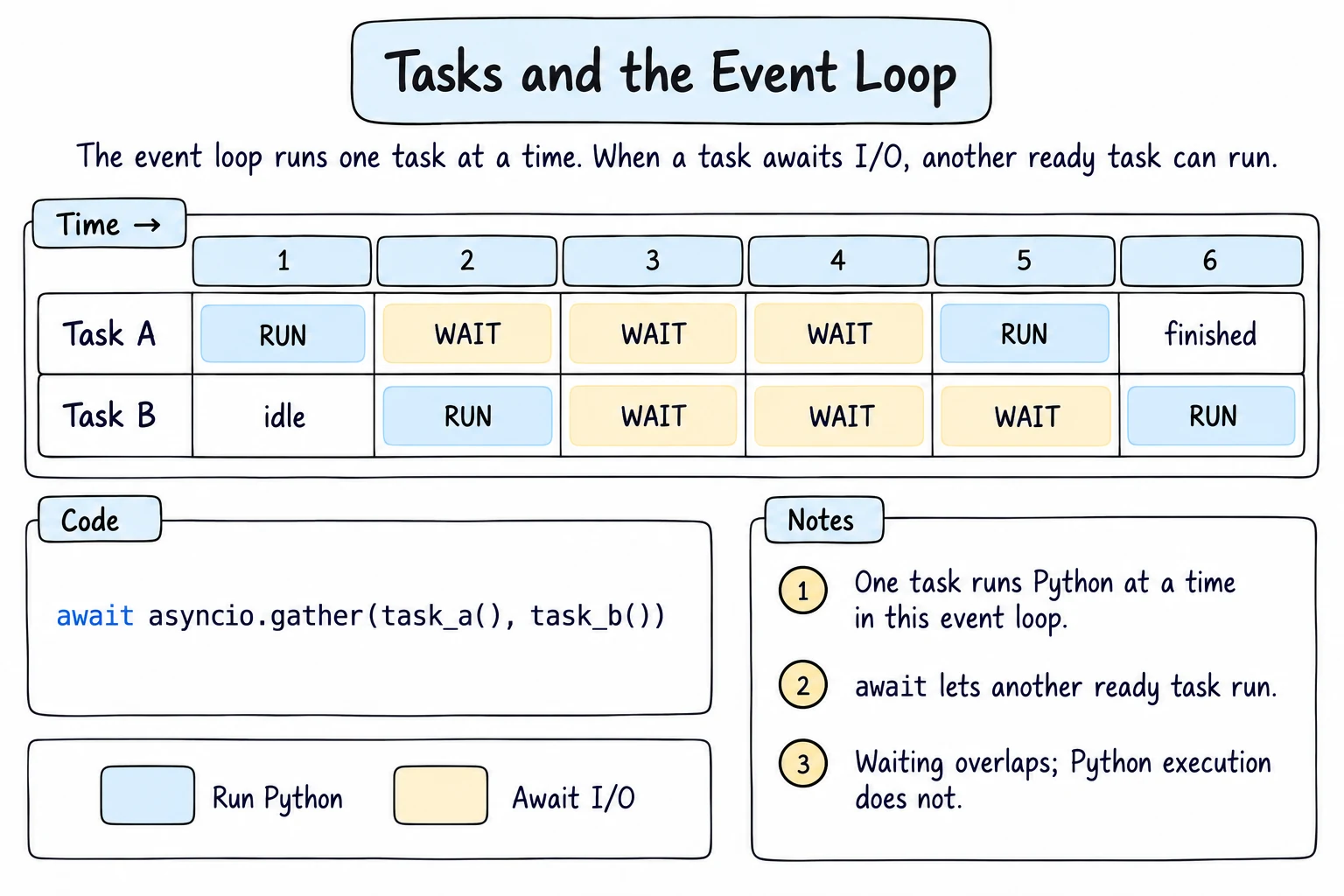
asyncio.create_task(coro) wraps a coroutine in a task that starts as soon as the current coroutine pauses. await the task later to get its result:
import asyncio

async def cook(dish, minutes):
    print(f"start {dish}")
    await asyncio.sleep(minutes / 100)
    print(f"{dish} ready")
    return dish

async def main():
    plov = asyncio.create_task(cook("plov", 20))
    samsa = asyncio.create_task(cook("samsa", 10))
    print("tasks created")
    await asyncio.sleep(0)            # pause once so the tasks can start
    print("setting the table")
    print("served:", await plov, await samsa)

await main()tasks created
start plov
start samsa
setting the table
samsa ready
plov ready
served: plov samsaNothing ran until main paused: coroutines switch only at await.
TaskGroup
asyncio.TaskGroup (Python 3.11+) is the safer way to start several tasks. Every task created in its async with block is awaited when the block ends; if one fails, the others are cancelled:
import asyncio

async def fetch_rate(office, delay):
    await asyncio.sleep(delay)
    if office == "Chorsu":
        raise ConnectionError(f"{office} is offline")
    return 12_650

async def main():
    async with asyncio.TaskGroup() as tg:
        a = tg.create_task(fetch_rate("Amir Temur", 0.1))
    print("rate:", a.result())

    try:
        async with asyncio.TaskGroup() as tg:
            tg.create_task(fetch_rate("Chorsu", 0.1))
            tg.create_task(fetch_rate("Yunusobod", 0.5))
    except* ConnectionError as group:
        print("failed:", group.exceptions[0])

await main()rate: 12650
failed: Chorsu is offlineSeveral tasks may fail, so errors arrive bundled in an ExceptionGroup; except* ConnectionError catches the ConnectionErrors in it, and group.exceptions lists them. The slow Yunusobod task was cancelled.
Timeouts
A server that never answers should not freeze your program. asyncio.timeout(seconds) (3.11+) cancels the work inside and raises TimeoutError:
import asyncio

async def fetch_price(city, delay):
    await asyncio.sleep(delay)
    return f"{city}: 12,650 som"

async def main():
    for city, delay in [("Tashkent", 0.05), ("Nukus", 1.0)]:
        try:
            async with asyncio.timeout(0.2):
                print(await fetch_price(city, delay))
        except TimeoutError:
            print(f"{city}: no answer in time")

await main()Tashkent: 12,650 som
Nukus: no answer in timeQueues: producers and consumers
An asyncio.Queue passes items between coroutines. A producer puts work in; consumers take it out with await queue.get(), which pauses while the queue is empty. A consumer calls task_done() after each item, and await queue.join() waits until every item is marked done:
import asyncio

async def producer(queue):
    for order in ["plov", "samsa", "lagman", "manti"]:
        await queue.put(order)
        print(f"placed {order}")

async def cook(name, seconds, queue):
    while True:
        order = await queue.get()
        await asyncio.sleep(seconds)
        print(f"{name} cooked {order}")
        queue.task_done()

async def main():
    queue = asyncio.Queue()
    cooks = [asyncio.create_task(cook(n, s, queue)) for n, s in [("Aziza", 0.1), ("Bobur", 0.25)]]
    await producer(queue)
    await queue.join()
    for c in cooks:
        c.cancel()

await main()placed plov
placed samsa
placed lagman
placed manti
Aziza cooked plov
Aziza cooked lagman
Bobur cooked samsa
Aziza cooked mantiFaster Aziza takes three orders. The cooks loop forever, so main cancels them.
async for and async with
An async def function containing yield is an async generator; you loop over it with async for message in chat.messages():, which may pause between items. Asynchronous context managers from Context Managers in Depth, such as TaskGroup or a database connection, are entered with async with, because connecting and disconnecting may both wait.
When async helps
Async helps with many network requests, database queries and downloads, and with servers holding thousands of connections. It does not help with heavy calculations or libraries that block (time.sleep, requests): they never reach an await, so nothing else runs. For CPU-heavy work, see Threads and Processes. Real programs make HTTP requests with async libraries such as aiohttp or httpx.
Try it
Add a fourth city, or change the timeout to 0.5 and see which cities now answer.
Common mistakes
1. Forgetting await
import asyncio

async def fetch_price(city):
    await asyncio.sleep(0.1)
    print(f"{city} price loaded")

async def main():
    fetch_price("Tashkent")        # Bad: no await
    print("done")

asyncio.run(main())RuntimeWarning: coroutine 'fetch_price' was never awaited
doneThe call only created a coroutine object; the body never ran. Fix: await fetch_price("Tashkent").
2. time.sleep inside a coroutine
import asyncio
import time

async def fetch_price(city):
    time.sleep(0.1)                # Bad: blocks the whole event loop
    return city

async def main():
    start = time.perf_counter()
    await asyncio.gather(fetch_price("Tashkent"), fetch_price("Samarkand"), fetch_price("Bukhara"))
    print(f"took {time.perf_counter() - start:.1f} s")

await main()took 0.3 stime.sleep never gives control back to the loop, so the three calls ran one after another. Fix: await asyncio.sleep(0.1), which takes 0.1 s in total.
3. Calling asyncio.run() inside a running loop
import asyncio

async def main():
    print("Salom")

asyncio.run(main()) # in this editor or in JupyterRuntimeError: asyncio.run() cannot be called from a running event loopOnly one loop can run per thread. Fix: on this page or in a notebook, use await main(); in a script, call asyncio.run() once, at the bottom.
4. Creating a task and forgetting it
async def main():
    asyncio.create_task(send_receipt("Dilnoza"))   # Bad: no reference, never awaited
    print("order saved")

asyncio.run(main())order savedThe receipt was never sent: asyncio.run() cancels unfinished tasks when main returns, and a task nobody references can even be garbage-collected mid-run. Fix: keep the task in a variable and await it, or create it in a TaskGroup.
Practice
1. Concurrent downloads
Write download(name, size) that sleeps size / 1000 seconds, prints finished NAME and returns size. gather downloads of lesson.mp4 (300), notes.pdf (50) and photo.jpg (120), then print the total.
Solution
import asyncio

async def download(name, size):
    await asyncio.sleep(size / 1000)
    print(f"finished {name}")
    return size

async def main():
    sizes = await asyncio.gather(
        download("lesson.mp4", 300),
        download("notes.pdf", 50),
        download("photo.jpg", 120),
    )
    print(f"total: {sum(sizes)} MB")

await main()finished notes.pdf
finished photo.jpg
finished lesson.mp4
total: 470 MB2. A timeout wrapper
Write with_timeout(coro, seconds, default) that returns the coroutine's result, or default after seconds. Test it with a 0.2 s limit on asyncio.sleep(0.05, result="rate: 12650") and on a 1 s sleep.
Solution
import asyncio

async def with_timeout(coro, seconds, default):
    try:
        async with asyncio.timeout(seconds):
            return await coro
    except TimeoutError:
        return default

async def main():
    print(await with_timeout(asyncio.sleep(0.05, result="rate: 12650"), 0.2, "no answer"))
    print(await with_timeout(asyncio.sleep(1, result="rate: 12650"), 0.2, "no answer"))

await main()rate: 12650
no answer3. Exam papers queue
A producer puts Aziza, Bobur, Dilnoza, Jasur into an asyncio.Queue, then None as a stop signal. A consumer prints checked NAME for each paper until it gets None, and returns the count. Print it.
Solution
import asyncio

async def producer(queue):
    for name in ["Aziza", "Bobur", "Dilnoza", "Jasur"]:
        await queue.put(name)
    await queue.put(None)

async def checker(queue):
    count = 0
    while True:
        name = await queue.get()
        if name is None:
            return count
        await asyncio.sleep(0.01)
        print(f"checked {name}")
        count += 1

async def main():
    queue = asyncio.Queue()
    async with asyncio.TaskGroup() as tg:
        tg.create_task(producer(queue))
        result = tg.create_task(checker(queue))
    print("papers checked:", result.result())

await main()checked Aziza
checked Bobur
checked Dilnoza
checked Jasur
papers checked: 44. At most two at a time
Run the orders [("plov", 0.4), ("samsa", 0.1), ("lagman", 0.2), ("manti", 0.2)] with gather, but at most two at once, using asyncio.Semaphore(2). Print start NAME, done NAME and the returned names.
Solution
import asyncio

async def prepare(name, seconds, limit):
    async with limit:
        print(f"start {name}")
        await asyncio.sleep(seconds)
        print(f"done {name}")
        return name

async def main():
    limit = asyncio.Semaphore(2)
    orders = [("plov", 0.4), ("samsa", 0.1), ("lagman", 0.2), ("manti", 0.2)]
    names = await asyncio.gather(*(prepare(n, s, limit) for n, s in orders))
    print(names)

await main()start plov
start samsa
done samsa
start lagman
done lagman
start manti
done plov
done manti
['plov', 'samsa', 'lagman', 'manti']A third order waits at async with limit until a running one releases the semaphore.
5. Retry with backoff
A flaky fetch_rate() raises ConnectionError twice, then returns 12650. Write retry(func, attempts, delay): on ConnectionError print attempt N failed, waiting D s, sleep, and double delay; re-raise after the last attempt. Try 4 attempts and 2 attempts, starting at delay=0.01, and print rate: 12650 or gave up: MESSAGE.
Solution
import asyncio

def make_flaky(failures):
    calls = 0
    async def fetch_rate():
        nonlocal calls
        calls += 1
        await asyncio.sleep(0.01)
        if calls <= failures:
            raise ConnectionError("server busy")
        return 12650
    return fetch_rate

async def retry(func, attempts, delay):
    for attempt in range(1, attempts + 1):
        try:
            return await func()
        except ConnectionError:
            if attempt == attempts:
                raise
            print(f"attempt {attempt} failed, waiting {delay} s")
            await asyncio.sleep(delay)
            delay *= 2

async def main():
    print("rate:", await retry(make_flaky(2), attempts=4, delay=0.01))
    try:
        await retry(make_flaky(2), attempts=2, delay=0.01)
    except ConnectionError as e:
        print("gave up:", e)

await main()attempt 1 failed, waiting 0.01 s
attempt 2 failed, waiting 0.02 s
rate: 12650
attempt 1 failed, waiting 0.01 s
gave up: server busymake_flaky is a closure (Closures and Decorators), so each run gets its own counter.
Recap
async defcreates a coroutine; calling it does nothing until it is awaited.- The event loop switches between coroutines only at
await; never block it withtime.sleepor long calculations. gather,create_taskandTaskGrouprun coroutines concurrently; the total time is the longest wait, not the sum.asyncio.timeoutraisesTimeoutError;asyncio.Queueconnects producers and consumers.- Scripts call
asyncio.run(main()); this page and notebooks useawait main(). - Async helps with waiting (I/O), not with CPU-heavy work.