

Reading Errors and Debugging
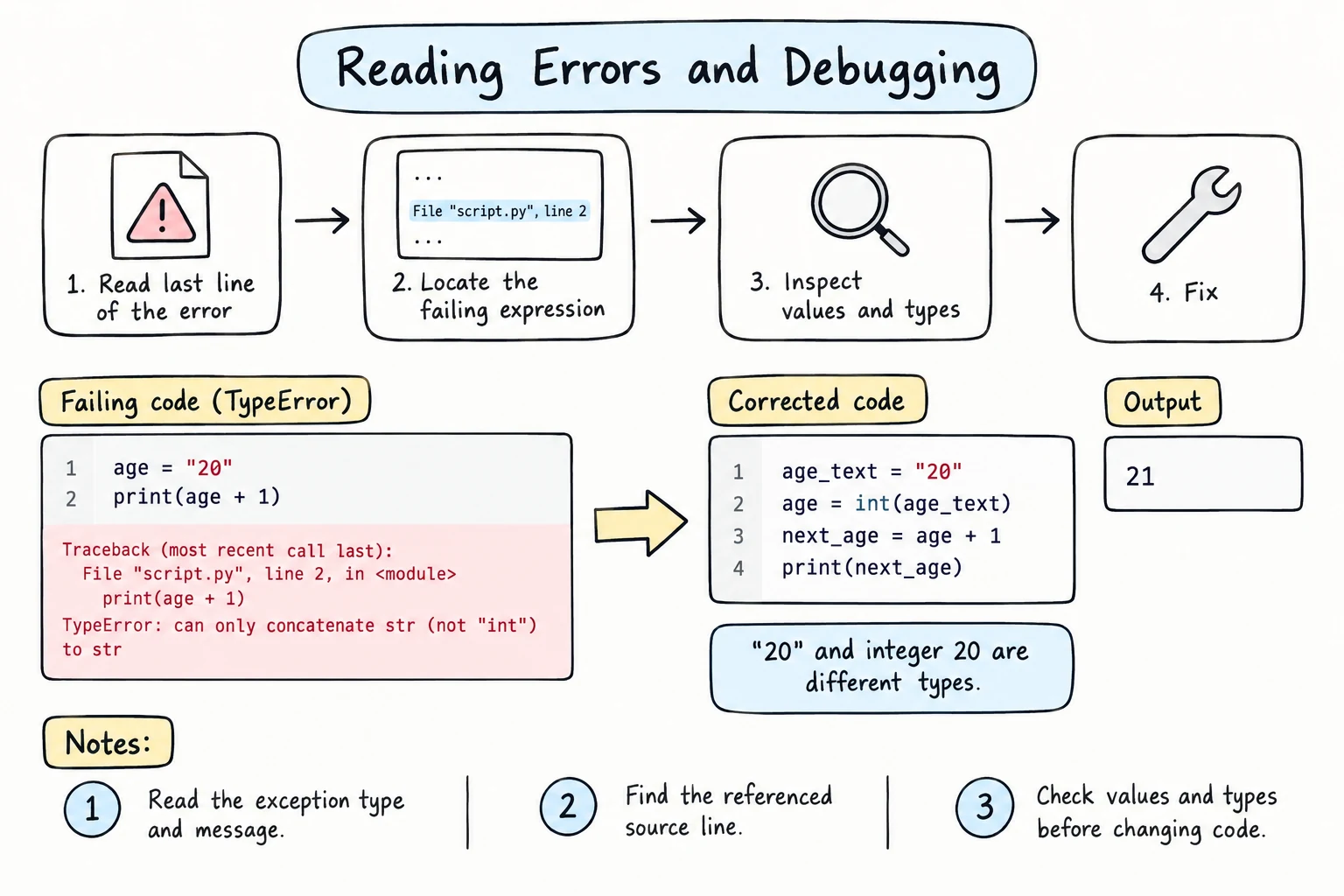
What you'll learn
- How to read a traceback, and which line to look at first
- The difference between syntax errors and runtime errors
- The most common error types and what usually causes them
- Logic errors: bugs with no error message
- A step-by-step debugging process you can use for any problem
Why it matters
Every programmer writes bugs every day. Experienced programmers don't make fewer mistakes, they find them faster. Python's error messages are detailed and often suggest the fix, and learning to read them turns a scary wall of red text into a helpful note.
Anatomy of an error message
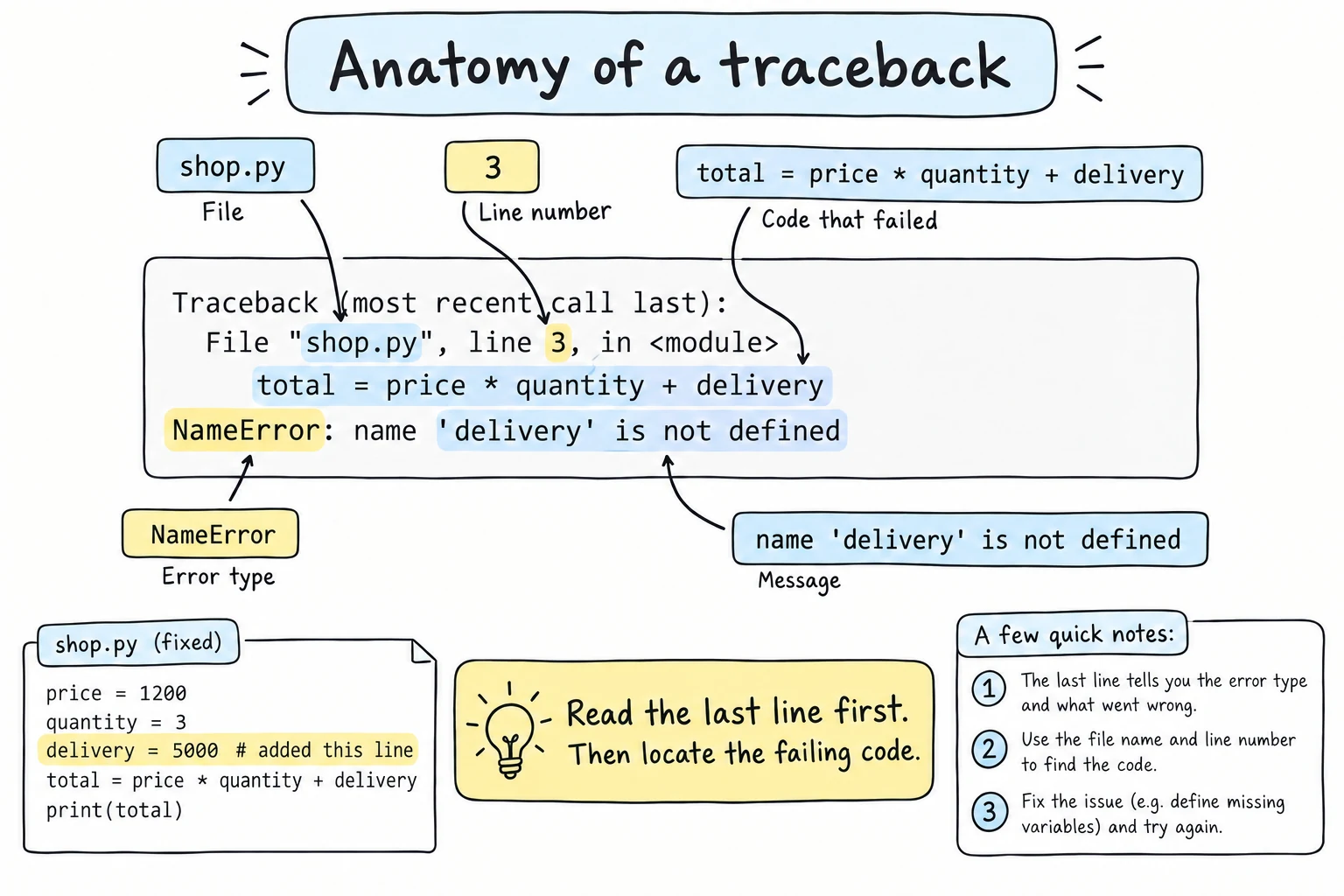
Save this as shop.py and run it:
price = 25000
quantity = input("How many? ")
total = price * quantity + delivery
print(total)
After typing 3, you get:
Traceback (most recent call last):
  File "shop.py", line 3, in <module>
    total = price * quantity + delivery
                               ^^^^^^^^
NameError: name 'delivery' is not defined
Read it from the bottom up:
| Part | What it tells you |
|---|---|
NameError | The type of error |
name 'delivery' is not defined | The message: what exactly went wrong |
^^^^^^^^ | Where on the line the problem is |
total = price * quantity + delivery | The line of code that failed |
File "shop.py", line 3 | The file and line number. On your computer you'll see the full path, such as File "/home/aziza/shop.py" |
Traceback (most recent call last) | The heading. Later, when functions call other functions, this lists every step |
Rule 1: read the last line first. It usually tells you what's wrong.
Fix that line by defining delivery = 5000 before it, and run again:
TypeError: can only concatenate str (not "int") to strProgress! quantity is a string, because input() returns text. price * quantity didn't fail (a number times a string repeats it), but adding delivery did. The failing line isn't always the mistake: the cause is on line 2, and the fix is quantity = int(input("How many? ")).
Two kinds of errors
Syntax errors: Python can't read your code
Python checks the grammar of the whole file before running anything. If something is malformed, nothing runs at all:
print("Start")
print("Hello"
print("End") File "demo.py", line 2
print("Hello"
^
SyntaxError: '(' was never closedNotice that Start was never printed. Since 3.10, Python reports an unclosed bracket on the line where it was opened, and an unclosed string on its own line. If the message is only a plain invalid syntax and the reported line looks fine, check the line above it too.
IndentationError and TabError are special kinds of syntax error.
Runtime errors (exceptions): something went wrong while running
The grammar was fine, but a line failed while it was running. Everything before that line already ran:
print("Start")
print(10 / 0)
print("End")Start
Traceback (most recent call last):
File "demo.py", line 2, in <module>
print(10 / 0)
~~~^~~
ZeroDivisionError: division by zeroThe errors you'll see most
| Error | Typical cause | Example |
|---|---|---|
SyntaxError | Missing ), ", or :; typo in a keyword | print("hi" |
IndentationError | Wrong or missing indentation | a line indented for no reason |
NameError | Variable not defined yet, or misspelled | print(totl) |
TypeError | Operation on the wrong type | "Age: " + 20 |
ValueError | Right type, unacceptable value | int("abc") |
ZeroDivisionError | Dividing by zero | 5 / 0 |
IndexError | Index past the end | "cat"[5] |
AttributeError | Method doesn't exist for that type | (42).upper() |
Python's messages often include a suggestion. Read it:
NameError: name 'pirnt' is not defined. Did you mean: 'print'?SyntaxError: invalid syntax. Perhaps you forgot a comma?Logic errors: the silent bugs
The hardest bugs produce no error at all. The program runs, but gives the wrong answer:
score1 = 80
score2 = 90
average = score1 + score2 / 2   # should be (score1 + score2) / 2
print(f"Average: {average}")Average: 125.0Python did exactly what you wrote. To catch logic errors, know what the right answer should be and check it. That's why this course keeps asking you to predict output before running.
A debugging process
When something is wrong, follow these steps instead of changing code randomly.
1. Read the error message carefully
Start with the last line: the error type and message. Then look at the line number and the ^ markers. For a plain invalid syntax on a line that looks fine, check the line above too.
2. Reproduce it reliably
Find the exact input that causes the problem. "It fails when I type 12.5" is much easier to fix than "it sometimes breaks".
3. Check your assumptions with print()
Most bugs come from a variable not holding what you think it holds. Print values and types at key points:
quantity = "3"          # imagine this came from input()
price = 25000

print(f"{quantity=}, {type(quantity)=}")   # debugging line
total = price * int(quantity)
print(f"{total=}") # debugging linequantity='3', type(quantity)=<class 'str'>
total=75000The = form from the F-Strings lesson is ideal here. Remove debugging prints when you're done.
Step through with a debugger
A debugger runs your program one line at a time and shows every variable as it changes. In Thonny, click Debug (the bug icon) instead of Run, then press F7 to step. In VS Code, click left of a line number to set a breakpoint, then press F5. You'll learn more in Debugging and Logging.
4. Change one thing at a time
Make one change, run again, and see what happened. If you change five things at once, you won't know which change mattered.
5. Shrink the problem
Remove or comment out code until you have the smallest program that still shows the bug. Often the cause becomes obvious, and a small example is what people need if you ask for help.
6. Explain it, search it, or take a break
Describe your code line by line to someone, or to a rubber duck (rubber duck debugging). "And here total is… oh, it's a string" finds many bugs. Still stuck? Search the error's last line, or take a ten-minute break.
Try it
This program has three bugs: one syntax error, one runtime error, and one logic error. Fix them one at a time, and run after each fix. It should print Area: 12.0 and Perimeter: 14.0.
Hints
SyntaxError: look for an unclosed parenthesis.TypeError: what type iswidth?- Wrong perimeter: which operation happens first?
Common mistakes
1. "Fixing" the error by changing the wrong thing
age = "20"   # was 20, changed to silence a TypeError
print("Age: " + age)
print("Next year:", age + 1)Age: 20
Traceback (most recent call last):
File "age.py", line 3, in <module>
print("Next year:", age + 1)
~~~~^~~
TypeError: can only concatenate str (not "int") to strTurning the number into a string fixed line 2 but moved the error to line 3. Fix: keep age = 20 and convert only where you need text: "Age: " + str(age). Understand why a change works before moving on.
2. Printing a value that only looks right
quantity = "3"
print(quantity)
print(f"{quantity=}")3
quantity='3'A plain print() shows 3 for both the string "3" and the number 3. Fix: debug with = (or !r), which puts strings in quotes.
Practice
1. Name the error
Without running, predict the type of error each line raises. Treat each line as its own program:
print("Hello)
print(undefined_name)
print(int("hello"))
print("5" + 5)
print(10 % 0)
print("abc"[3])
Solution
SyntaxError: unterminated stringNameErrorValueErrorTypeErrorZeroDivisionErrorIndexError
2. Read the traceback
Answer the questions about this traceback: Which line failed? What's the error type? What's the cause?
Traceback (most recent call last):
  File "grades.py", line 7, in <module>
    percent = points / max_points * 100
                       ^^^^^^^^^^
NameError: name 'max_points' is not defined. Did you mean: 'max_point'?
Solution
- Line 7 of
grades.py. NameError.- The variable is called
max_point(singular) somewhere earlier, but line 7 usesmax_points. Use the same name in both places.
3. Fix the greeting
This program should print Hello, Aziza! You are 21 next year. Find and fix all the bugs.
name = "aziza"
age = "20"
print(f"Hello, {name.title}! You are {age + 1} next year."
Solution
name = "aziza"
age = "20"
print(f"Hello, {name.title()}! You are {int(age) + 1} next year.")- Missing
)at the end →SyntaxError. age + 1with a stringage→TypeError.name.titlewithout()prints<built-in method title...>: a logic error with no message.
4. The silent bug
This code should convert 98.6 °F to °C (the answer is 37.0) but prints something else. Use a debugging print() to find the problem, then fix it.
fahrenheit = 98.6
celsius = fahrenheit - 32 * 5 / 9
print(round(celsius, 1))
Solution
It prints 80.8. Printing a piece, such as print(f"{32 * 5 / 9=}"), shows that 32 * 5 / 9 was calculated first: * and / come before -.
fahrenheit = 98.6
celsius = (fahrenheit - 32) * 5 / 9
print(round(celsius, 1))
5. Debug a receipt
This program has four bugs of different kinds. Fix them so it prints:
Items: 3
Subtotal: 45000
Discount: 4500.0
To pay: 40500.0item_count = "3"
unit_price = 15000
discount_rate = 10
subtotal = item_count * unit_price
discount = subtotal * discount_rate
to_pay = subtotal - discont
print("Items:", item_count)
print("Subtotal:", subtotal)
print("Discount:", discount)
print("To pay:" to_pay)Solution
item_count = 3
unit_price = 15000
discount_rate = 10

subtotal = item_count * unit_price
discount = subtotal * discount_rate / 100
to_pay = subtotal - discount

print("Items:", item_count)
print("Subtotal:", subtotal)
print("Discount:", discount)
print("To pay:", to_pay)- Missing comma in the last
print→SyntaxError(found first, before anything runs). discontis misspelled →NameError."3" * 15000builds a string of 15,000 threes without complaining. The program only crashes later, at the subtraction.item_countshould be the number3.subtotal * 10treats the rate as ×10, not 10%. Divide by 100.
Recap
- Read tracebacks from the bottom up: error type and message first, then the file and line.
- Syntax errors stop the whole file before it runs. Runtime errors happen when a line runs, after earlier lines have already run.
- Logic errors give wrong results with no message, so know the expected answer.
- Debugging process: read the message → reproduce it → print values (
f"{x=}") or step through with a debugger → change one thing at a time → shrink the problem → explain it.