

Threads and Processes
What you'll learn
- I/O-bound versus CPU-bound work, and what the GIL means for each
- How to start and
joina thread, and why shared data needs aLock - How to build a worker pool with
queue.Queue - How
ThreadPoolExecutorandProcessPoolExecutorrun many tasks - How to choose between threads, processes and asyncio
Why it matters
A shop bot in Tashkent checks prices on 50 websites. Each request waits a second for the network: almost a minute one by one, a few seconds with threads. Resizing thousands of photos needs processes instead, and the wrong tool gives no speed-up.
Run these on your computer
This site's editor cannot start threads or processes (RuntimeError: can't start new thread). Save examples without a Run button to a file and run them locally. Their output is from a real run; your timings and line order may differ.
I/O-bound, CPU-bound, and the GIL
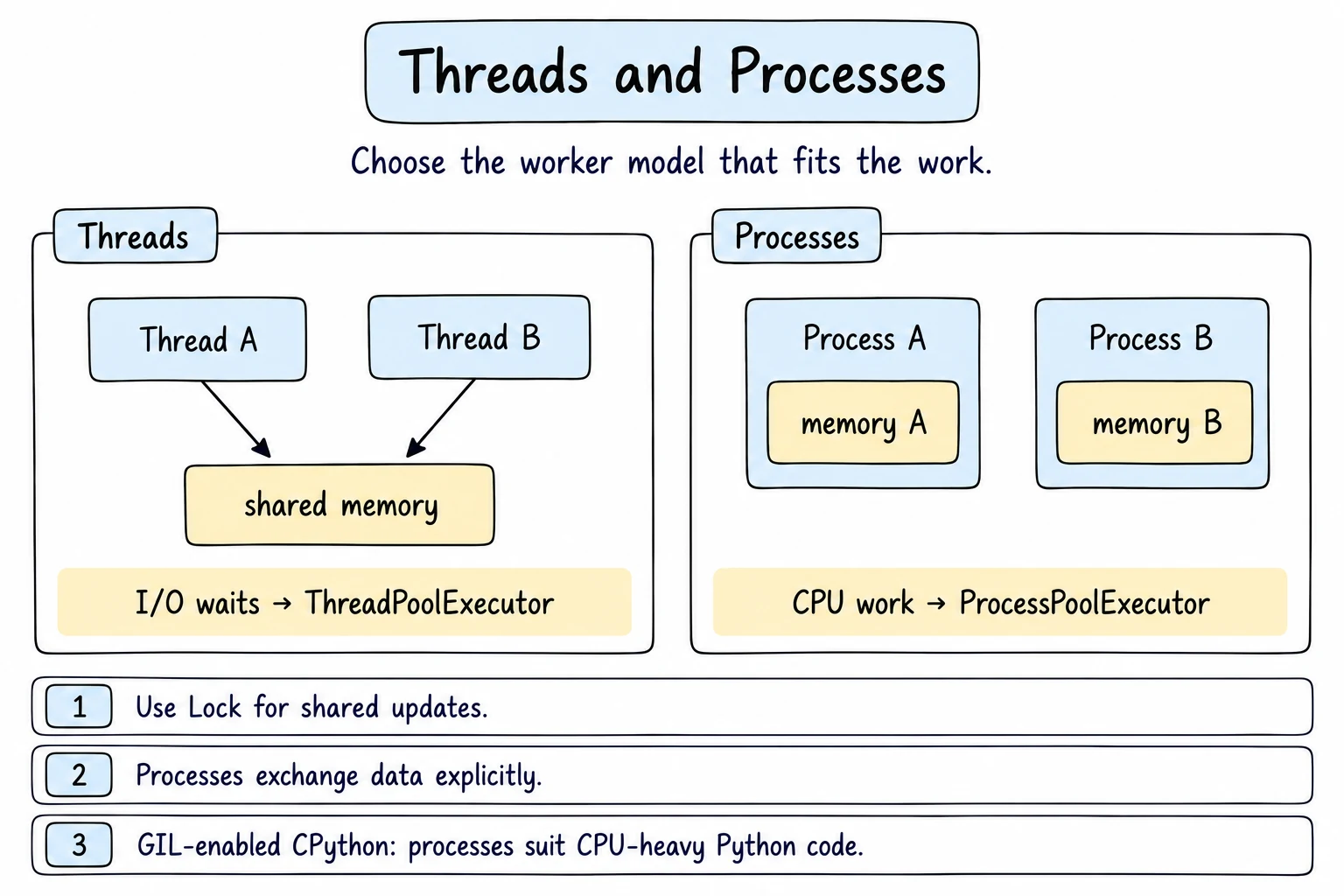
Work is I/O-bound when the program mostly waits (network, disk, database) and CPU-bound when it is busy computing (counting primes, compressing files).
CPython has a Global Interpreter Lock (GIL): only one thread runs Python code at a time. A thread that waits for I/O (or calls time.sleep) releases the GIL, so other threads can run.
- For I/O-bound work, threads help: the waits overlap.
- For CPU-bound work, threads give no speed-up. Use processes: each has its own interpreter and GIL, so they use several CPU cores.
Python 3.14 also offers an optional free-threaded build (python3.14t) without a GIL. The normal python3.14 still has the GIL, and this lesson assumes it.
Starting threads
threading.Thread(target=..., args=...) creates a thread. start() runs it; join() waits until it finishes.
import threading
import time


def download(city):
    time.sleep(1)  # pretend to wait for the network
    print(f"Done {city}")


start = time.perf_counter()
threads = [
    threading.Thread(target=download, args=(city,))
    for city in ["Tashkent", "Samarkand", "Bukhara"]
]
for thread in threads:
    thread.start()
for thread in threads:
    thread.join()
print(f"Took {time.perf_counter() - start:.1f} s")Done Tashkent
Done Samarkand
Done Bukhara
Took 1.0 sThree one-second downloads took one second. args is a tuple, hence the trailing comma. Done lines may come in another order.
Race conditions and Lock
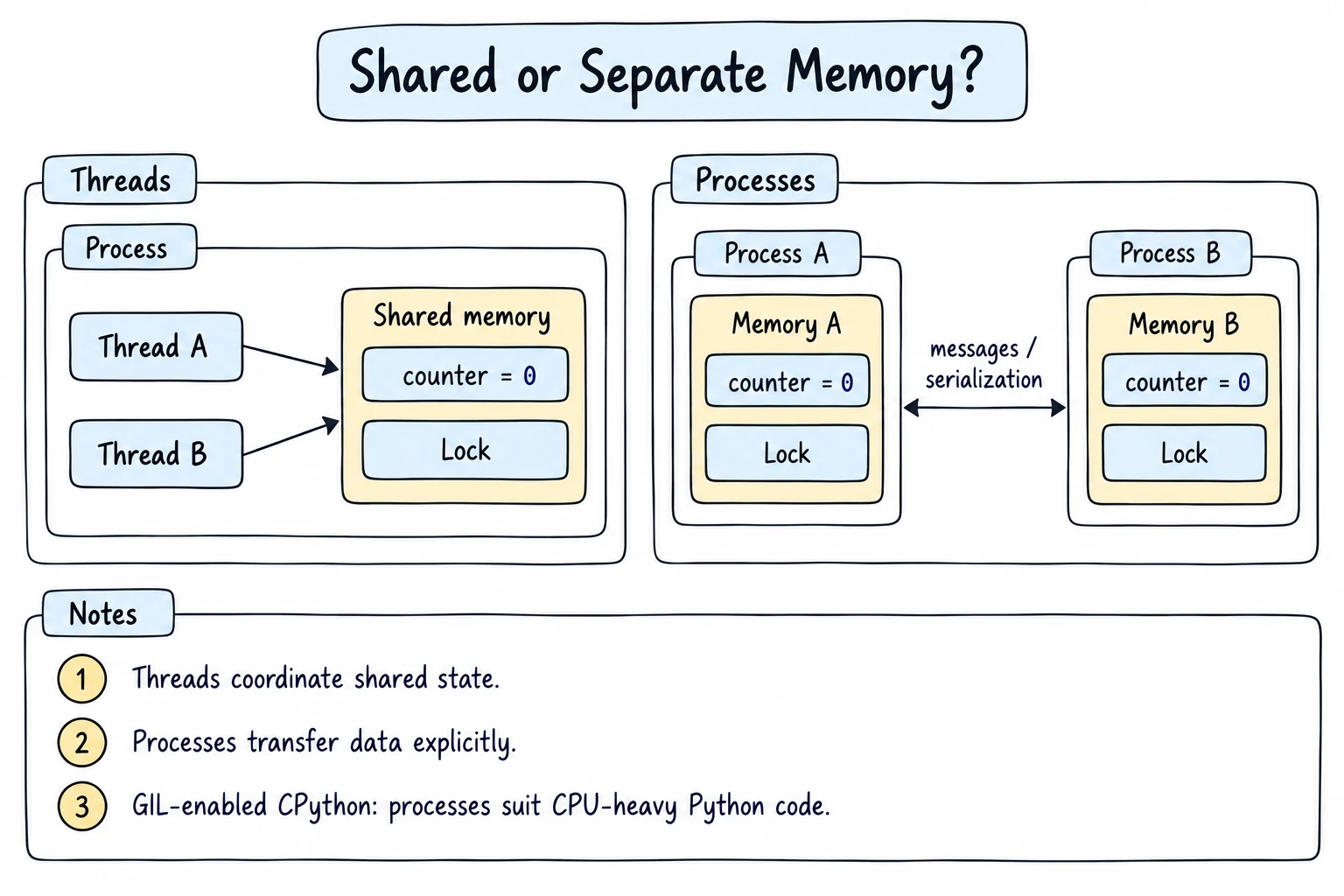
Threads share variables. When two threads read, change and write the same value, one can overwrite the other's update: a race condition. Four threads each add 1,000 to a balance; time.sleep(0) stands in for slow work between read and write:
import threading
import time

balance = 0


def deposit_many():
    global balance
    for _ in range(1_000):
        current = balance      # read
        time.sleep(0)          # let another thread run here
        balance = current + 1  # write


threads = [threading.Thread(target=deposit_many) for _ in range(4)]
for t in threads:
    t.start()
for t in threads:
    t.join()

print(f"Expected 4000, got {balance}")Expected 4000, got 1039The number changes every run; without sleep(0) the bug might appear once a week in production. A Lock lets one thread at a time into a block:
lock = threading.Lock()


def deposit_many():
    global balance
    for _ in range(1_000):
        with lock:
            current = balance
            time.sleep(0)
balance = current + 1Expected 4000, got 4000Worker pools with queue.Queue
queue.Queue is a thread-safe first-in, first-out queue: many threads can put and get without a lock. A classic design is a few workers pulling jobs from one queue:
import queue
import threading
import time

tasks = queue.Queue()
results = queue.Queue()


def worker():
    while True:
        order = tasks.get()
        if order is None:          # stop signal
            break
        time.sleep(0.1)            # packing takes time
        results.put(f"order {order} packed")


workers = [threading.Thread(target=worker) for _ in range(3)]
for w in workers:
    w.start()

for order in range(1, 7):
    tasks.put(order)
for _ in workers:
    tasks.put(None)                # one stop signal per worker

for w in workers:
    w.join()

packed = sorted(results.get() for _ in range(results.qsize()))
print("\n".join(packed))order 1 packed
order 2 packed
order 3 packed
order 4 packed
order 5 packed
order 6 packedSix 0.1 s orders took about 0.2 s.
ThreadPoolExecutor
concurrent.futures hides threads and queues. pool.map returns results in input order; submit returns a Future, a placeholder for a result that isn't ready yet, and as_completed yields futures as they finish:
import time
from concurrent.futures import ThreadPoolExecutor, as_completed

PAGES = {"tashkent.uz": 0.3, "samarkand.uz": 0.1, "bukhara.uz": 0.2}


def download(site):
    time.sleep(PAGES[site])        # pretend to wait for the network
    return f"{site}: {len(site) * 1000} bytes"


with ThreadPoolExecutor(max_workers=3) as pool:
    print(list(pool.map(download, PAGES)))

    futures = [pool.submit(download, site) for site in PAGES]
    for future in as_completed(futures):
print("finished", future.result())['tashkent.uz: 11000 bytes', 'samarkand.uz: 12000 bytes', 'bukhara.uz: 10000 bytes']
finished samarkand.uz: 12000 bytes
finished bukhara.uz: 10000 bytes
finished tashkent.uz: 11000 bytesThe with block joins all threads on exit. future.result() returns the value or re-raises the exception from the thread.
ProcessPoolExecutor for CPU work
ProcessPoolExecutor has the same interface, but each worker is a separate Python process:
import time
from concurrent.futures import ProcessPoolExecutor, ThreadPoolExecutor


def count_primes(limit):
    count = 0
    for n in range(2, limit):
        if all(n % d for d in range(2, int(n**0.5) + 1)):
            count += 1
    return count


if __name__ == "__main__":
    for executor_class in [ThreadPoolExecutor, ProcessPoolExecutor]:
        start = time.perf_counter()
        with executor_class(max_workers=2) as pool:
            results = list(pool.map(count_primes, [600_000, 600_000]))
        seconds = time.perf_counter() - start
        print(f"{executor_class.__name__}: {results} in {seconds:.1f} s")

    start = time.perf_counter()
    results = [count_primes(600_000), count_primes(600_000)]
print(f"plain loop: {results} in {time.perf_counter() - start:.1f} s")ThreadPoolExecutor: [49098, 49098] in 3.9 s
ProcessPoolExecutor: [49098, 49098] in 2.1 s
plain loop: [49098, 49098] in 3.6 sThreads were no faster than a plain loop; processes used two cores. (Starting processes costs time, so tiny tasks can get slower.)
Why if __name__ == "__main__":? On Windows, macOS, and Linux since 3.14, each new process imports your script to find count_primes. Without the guard, that import would start another pool, and Python stops with an error (see Common mistakes). For the same reason the function must be at the module's top level.
Threads, processes or asyncio?
| Work | Best tool | Why |
|---|---|---|
| Waiting on network or files, blocking code | Threads | GIL released while waiting |
| Thousands of connections, async libraries | asyncio (Async and await) | Very cheap tasks |
| Heavy computation in pure Python | Processes | Several cores |
| A few seconds of work, once | A plain loop | Simplest code |
A daemon thread (Thread(..., daemon=True)) is stopped abruptly when the program exits, which suits background helpers. thread.join(timeout=1) waits at most a second (check thread.is_alive() after), and future.result(timeout=2) raises TimeoutError if the result is late.
Try it
This worker runs in the main thread with a real queue and lock. Add two orders, then make the worker stop after three orders.
Common mistakes
1. Calling the function instead of passing it
import threading


def work():
    print("working in", threading.current_thread().name)


thread = threading.Thread(target=work())  # Bad: calls work() right now
thread.start()
thread.join()working in MainThreadwork() ran in the main thread and returned None, so the thread had no target. Fix: pass the function itself: Thread(target=work).
2. Forgetting join
import threading
import time

totals = []

def add_order(amount):
    time.sleep(0.1)
    totals.append(amount)

for amount in [15000, 32000, 8000]:
    threading.Thread(target=add_order, args=(amount,)).start()

# Bad: no join, so the threads are still sleeping
print(f"Total: {sum(totals)} som")Total: 0 somFix: join() every thread before reading results, or use a ThreadPoolExecutor in a with block.
3. Threads for CPU-bound work
with ThreadPoolExecutor(max_workers=2) as pool:  # Bad: CPU work
results = list(pool.map(count_primes, [600_000, 600_000]))ThreadPoolExecutor: [49098, 49098] in 3.9 s
plain loop: [49098, 49098] in 3.6 sOnly one thread runs Python code at a time. Fix: use ProcessPoolExecutor for CPU-bound work.
4. ProcessPoolExecutor without the main guard
from concurrent.futures import ProcessPoolExecutor


def square(n):
    return n * n


with ProcessPoolExecutor() as pool:
print(list(pool.map(square, [1, 2, 3])))RuntimeError:
An attempt has been made to start a new process before the
current process has finished its bootstrapping phase.
concurrent.futures.process.BrokenProcessPool: A process in the process pool was terminated abruptly while the future was running or pending.Fix: put the pool code under if __name__ == "__main__":, and keep square at the top level.
Practice
1. A queue of cities
Put "Tashkent", "Samarkand" and "Khiva" into a queue.Queue. Print its size, then take the cities out one by one and print each, and finally print whether the queue is empty.
Solution
import queue

cities = queue.Queue()
for city in ["Tashkent", "Samarkand", "Khiva"]:
    cities.put(city)

print("size:", cities.qsize())
while not cities.empty():
    print(cities.get())
print("empty:", cities.empty())size: 3
Tashkent
Samarkand
Khiva
empty: True2. Three greeting threads
Run locally: start one thread per name in ["Dilnoza", "Aziza", "Jasur"] that sleeps 0.1 s and stores "Salom, <name>!" in a shared dictionary. After joining, print the greetings sorted by name.
Solution
import threading
import time

greetings = {}


def greet(name):
    time.sleep(0.1)
    greetings[name] = f"Salom, {name}!"


threads = [threading.Thread(target=greet, args=(name,))
           for name in ["Dilnoza", "Aziza", "Jasur"]]
for thread in threads:
    thread.start()
for thread in threads:
    thread.join()

for name in sorted(greetings):
print(greetings[name])Salom, Aziza!
Salom, Dilnoza!
Salom, Jasur!3. A thread-safe counter class
Write a class SafeCounter with a value, a Lock, and increment(amount=1), which changes the value inside with self.lock. Call increment(2000) five times, then print the value and whether the lock is free.
Solution
import threading

class SafeCounter:
    def __init__(self):
        self.value = 0
        self.lock = threading.Lock()

    def increment(self, amount=1):
        with self.lock:
            self.value += amount

counter = SafeCounter()
for _ in range(5):
    counter.increment(2000)

print("value:", counter.value)
print("lock free:", not counter.lock.locked())value: 10000
lock free: True4. Parallel downloads
Run locally: FILES below maps file names to download seconds. With a ThreadPoolExecutor, "download" each file (sleep, return "<name>: <seconds * 5000> KB") and print results as they finish.
Solution
import time
from concurrent.futures import ThreadPoolExecutor, as_completed

FILES = {"report.pdf": 0.3, "photo.jpg": 0.1, "notes.txt": 0.2}


def download(name):
    time.sleep(FILES[name])
    return f"{name}: {int(FILES[name] * 5000)} KB"


with ThreadPoolExecutor(max_workers=3) as pool:
    futures = [pool.submit(download, name) for name in FILES]
    for future in as_completed(futures):
print(future.result())photo.jpg: 500 KB
notes.txt: 1000 KB
report.pdf: 1500 KB5. Futures by hand
Write fake_download(site) that returns a concurrent.futures.Future: for sites ending in .uz set the result f"{site}: OK", otherwise set the exception ValueError(f"unknown site {site}"). Then loop over ["kun.uz", "example.com", "gazeta.uz"] and print each result or the error.
Solution
from concurrent.futures import Future

def fake_download(site):
    future = Future()
    if site.endswith(".uz"):
        future.set_result(f"{site}: OK")
    else:
        future.set_exception(ValueError(f"unknown site {site}"))
    return future

for site in ["kun.uz", "example.com", "gazeta.uz"]:
    future = fake_download(site)
    try:
        print(future.result())
    except ValueError as error:
print("error:", error)kun.uz: OK
error: unknown site example.com
gazeta.uz: OKAn executor makes these calls for you.
Recap
- Threads speed up I/O-bound work; the GIL stops them speeding up CPU-bound work.
Thread(target=func, args=(...)), thenstart()andjoin().- Shared data changed by several threads needs a
Lock;queue.Queueis already thread-safe. pool.mapkeeps input order;as_completedyields futures as they finish.ProcessPoolExecutoruses several cores and needsif __name__ == "__main__":.- asyncio for many connections, threads for blocking I/O, processes for computation.