

Modules and Imports
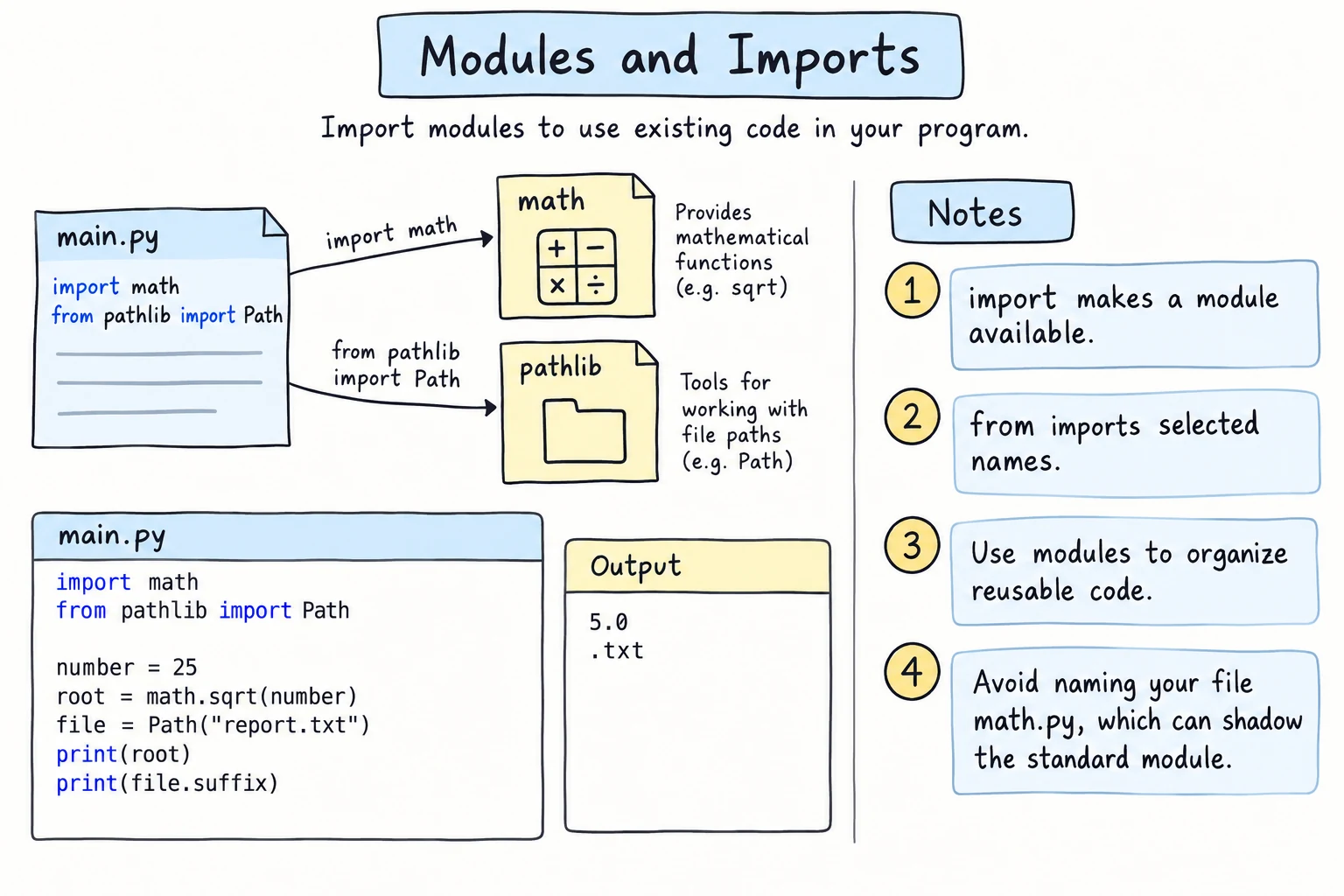
What you'll learn
- What a module is and why Python code is split into modules
- The three import styles:
import x,from x import y, andimport x as y - How to explore a module with
dir()andhelp() - How to write your own modules and packages, and split a program into files
- What
if __name__ == "__main__":means and when to use it
Why it matters
Real programs are split into files: a shop app might have one for products and one for payments. And nobody writes their own square root: Python ships with hundreds of tested modules, the standard library. Importing is how you use them.
What a module is
A module is simply a Python file. Its name is the file name without .py: math gives you mathematical functions, and a file you write called prices.py is a module named prices.
import math

print(math.sqrt(81))
print(math.pi)9.0
3.141592653589793import math gives you a name, math, that holds everything inside the module. You reach the contents with a dot: math.sqrt. Imports go at the top of the file, as PEP 8 recommends.
Three ways to import
import module
import random

random.seed(1)
print(random.randint(1, 6))2The module name in front shows where each name comes from. This is the default style.
from module import name
from math import sqrt, pi

print(sqrt(16))
print(round(pi, 2))4.0
3.14Now sqrt and pi are available directly, but the name math itself is not defined.
import module as alias
import statistics as st

scores = [78, 92, 85, 64]
print(st.mean(scores))79.75as gives the module a shorter name, as in import pandas as pd.
Avoid from module import *
The * imports every public name, which can silently replace your own variables:
e = "Elbek"            # a variable holding a student name
from math import *     # math has a constant named e...

print(e)2.718281828459045Your e was overwritten by math.e. With import math, this cannot happen.
Exploring a module
dir() lists the names inside a module. The full list is long, so filter it:
import math

names = [name for name in dir(math) if name.startswith("is")]
print(names)['isclose', 'isfinite', 'isinf', 'isnan', 'isqrt']help(math.isclose) shows the documentation for a function (in the interactive shell, press q to leave it).
Writing your own module
Multi-file examples run on your computer
The editor on this page runs one file at a time, so examples and exercises with several .py files have no Run button. Try them on your computer (put the files in one folder), or in the Python Lab, whose file browser lets you create several files.
Any .py file can be imported by another file in the same folder:
# greetings.py
DEFAULT_CITY = "Tashkent"

def hello(name):
    return f"Salom, {name}!"

def welcome(name, city=DEFAULT_CITY):
return f"Welcome to {city}, {name}."# main.py
import greetings
print(greetings.hello("Aziza"))
print(greetings.welcome("Bekzod", "Samarkand"))
print(greetings.DEFAULT_CITY)Run main.py from that folder:
python main.pySalom, Aziza!
Welcome to Samarkand, Bekzod.
TashkentEverything defined at the top level of greetings.py becomes an attribute of the greetings module. You write import greetings, not import greetings.py. A module runs only once per program; importing it again reuses the same module object.
How Python finds modules
Python searches the folder of the script you run, then the standard library, then installed packages (the list is sys.path). If none has the module:
import greetingzModuleNotFoundError: No module named 'greetingz'Usually that's a typo, or the file is in another folder.
if __name__ == "__main__":
Every module has a built-in variable called __name__. When you run a file directly, it is "__main__". When a file is imported, it is the module name, such as "greetings":
print(__name__)__main__Why does this matter? If greetings.py ended with a test line such as print(hello("Test")), then every import greetings would print Salom, Test! too. The fix is to put the program's work in a main() function and call it behind a check:
def total_price(prices):
    return sum(prices)

def main():
    basket = [15000, 8000, 3000]
    print(f"Total: {total_price(basket):,} som")

if __name__ == "__main__":
main()Total: 26,000 somRead it as "if this file is the program being run, do this". Imported from another file, __name__ is the module name, so you get total_price without the printing.
Splitting a program into files
Here is a small shop program in two files, in one folder:
# pricing.py
def apply_discount(amount, percent):
    return amount * (100 - percent) / 100

def format_som(amount):
return f"{amount:,.0f} som"# shop.py
from pricing import apply_discount, format_som
PRODUCTS = {"tea": 15000, "samsa": 8000, "juice": 12000}
def main():
order = ["tea", "samsa", "samsa"]
total = sum(PRODUCTS[item] for item in order)
print("Before discount:", format_som(total))
print("After 10% off: ", format_som(apply_discount(total, 10)))
if __name__ == "__main__":
main()python shop.pyBefore discount: 31,000 som
After 10% off: 27,900 somWhen the discount rules change, you know exactly which file to open.
Packages: modules in a folder
When a project has many modules, you group them into a folder called a package:
my_project/
├── main.py
└── shop/
    ├── __init__.py
    ├── pricing.py
    └── products.py
In main.py you then write from shop import pricing (and call pricing.format_som(...)) or from shop.products import PRODUCTS. The dot means "inside": shop.products is the products module inside the shop package. The __init__.py file marks the folder as a regular package; it can be empty, and it runs the first time the package is imported. Libraries use the same form: import matplotlib.pyplot as plt.
A short tour of the standard library
| Module | What it does |
|---|---|
math, random, statistics | calculations, random numbers, averages (math, random, and statistics) |
datetime, time | dates, times, durations (Dates and Times) |
collections, itertools | Counter, defaultdict, looping tools (collections and itertools) |
pathlib, csv, json, re | files, data formats, text patterns (later lessons) |
Third-party packages
Thousands of packages written by other people can be installed with a tool called pip. You'll install your first one in Testing with pytest, with python -m pip install pytest.
Try it
Experiment with the different import styles and explore what math and random contain.
Common mistakes
1. Naming your file like a standard module
Bekzod saves his dice game as random.py:
# random.py
import random

print(random.randint(1, 6))python random.pyAttributeError: module 'random' has no attribute 'randint' (consider renaming '/home/bekzod/dice/random.py' since it has the same name as the standard library module named 'random' and prevents importing that standard library module)Python looks in the script's own folder first, so import random imports Bekzod's file instead of the real module. Fix: rename the file to something like dice_game.py, and avoid names such as math.py, string.py, and json.py for your own files.
2. Mixing up the two import styles
from math import sqrt

print(math.sqrt(25))NameError: name 'math' is not defined. Did you forget to import 'math'?from math import sqrt defines only sqrt. The opposite mistake, import math followed by sqrt(25), gives NameError: name 'sqrt' is not defined. Fix: with import math write math.sqrt(25); with from math import sqrt write sqrt(25).
3. Adding .py to the import
import math.pyModuleNotFoundError: No module named 'math.py'; 'math' is not a packagePython reads the dot as "a module inside a package". Import by module name only: import math, or import greetings for your own greetings.py.
Practice
1. Circle calculator
Import only pi and sqrt from math. Print the area of a circle with radius 5 (2 decimals), then find the radius of a circle whose area is 100 (2 decimals).
Solution
from math import pi, sqrt

area = pi * 5 ** 2
print(f"{area:.2f}")

radius = sqrt(100 / pi)
print(f"{radius:.2f}")78.54
5.642. Explore a module
Using dir() and a comprehension, print how many names in the string module do not start with an underscore, and then print those names.
Solution
import string

public = [name for name in dir(string) if not name.startswith("_")]
print(len(public))
print(public)12
['Formatter', 'Template', 'ascii_letters', 'ascii_lowercase', 'ascii_uppercase', 'capwords', 'digits', 'hexdigits', 'octdigits', 'printable', 'punctuation', 'whitespace']Names starting with _ are internal. The public names include ready-made strings like digits and punctuation.
3. A converter module
Create a module converters.py with a function som_to_usd(som, rate=12600) and a quick self-test that runs only when the file is run directly. Then write app.py that imports the module and prints 1,000,000 som in dollars.
Solution
# converters.py
def som_to_usd(som, rate=12600):
    return som / rate

if __name__ == "__main__":
    assert som_to_usd(12600) == 1
print("converters.py: all checks passed")# app.py
import converters
print(f"{converters.som_to_usd(1_000_000):.2f} USD")python app.py79.37 USDRunning python converters.py prints the check message instead.
4. Which name wins?
Predict the output, then run the code to check.
from math import floor

def floor(x):
    return "my floor"

print(floor(3.7))

import math
print(math.floor(3.7))
Solution
my floor
3
The def floor line came after the import, so it replaced the imported floor. math.floor is still the real function, because it lives inside the math module. This is one more reason import math is the safer default.
5. Split a grade program
This single-file program mixes data, calculation, and printing:
scores = {"Aziza": [90, 85, 97], "Bekzod": [72, 64, 80], "Dilnoza": [88, 91, 79]}

for name, marks in scores.items():
    average = sum(marks) / len(marks)
    grade = "A" if average >= 85 else "B" if average >= 70 else "C"
    print(f"{name:<8} {average:5.1f}  {grade}")
Split it into two files with the same output: grading.py (functions average(marks) and letter(avg)) and report.py (the data and a main() function protected by the __name__ check).
Solution
# grading.py
def average(marks):
    return sum(marks) / len(marks)

def letter(avg):
    if avg >= 85:
        return "A"
    if avg >= 70:
        return "B"
return "C"# report.py
from grading import average, letter
SCORES = {"Aziza": [90, 85, 97], "Bekzod": [72, 64, 80], "Dilnoza": [88, 91, 79]}
def main():
for name, marks in SCORES.items():
avg = average(marks)
print(f"{name:<8} {avg:5.1f} {letter(avg)}")
if __name__ == "__main__":
main()python report.pyAziza 90.7 A
Bekzod 72.0 B
Dilnoza 86.0 Agrading.py has no printing, so another program can import and reuse it.
Recap
- A module is a
.pyfile.importruns it once and gives you access to its names. import math→math.sqrt();from math import sqrt→sqrt();import statistics as st→st.mean().- Avoid
from module import *. Explore modules withdir()andhelp(). - Your own files in the same folder are modules too, and a folder of modules is a package.
__name__is"__main__"when a file is run directly. Put the program's work underif __name__ == "__main__":.- Never name your files after standard modules like
random.pyormath.py.