

String Methods and Slicing
What you'll learn
- How to take parts of a string with slicing:
text[start:stop:step] - What a method is and how to call one
- The most useful string methods: case, stripping, replacing, searching, splitting, and joining
- Why methods return a new string instead of changing the old one
- How to chain several methods together
Why it matters
Real-world text is messy. Users type " aziza@EXAMPLE.com " with extra spaces and odd capitals, file names have extensions to extract, and dates arrive as "15/09/2026". Slicing and string methods are the everyday tools for cleaning text and pulling out the parts you need.
Slicing: taking part of a string
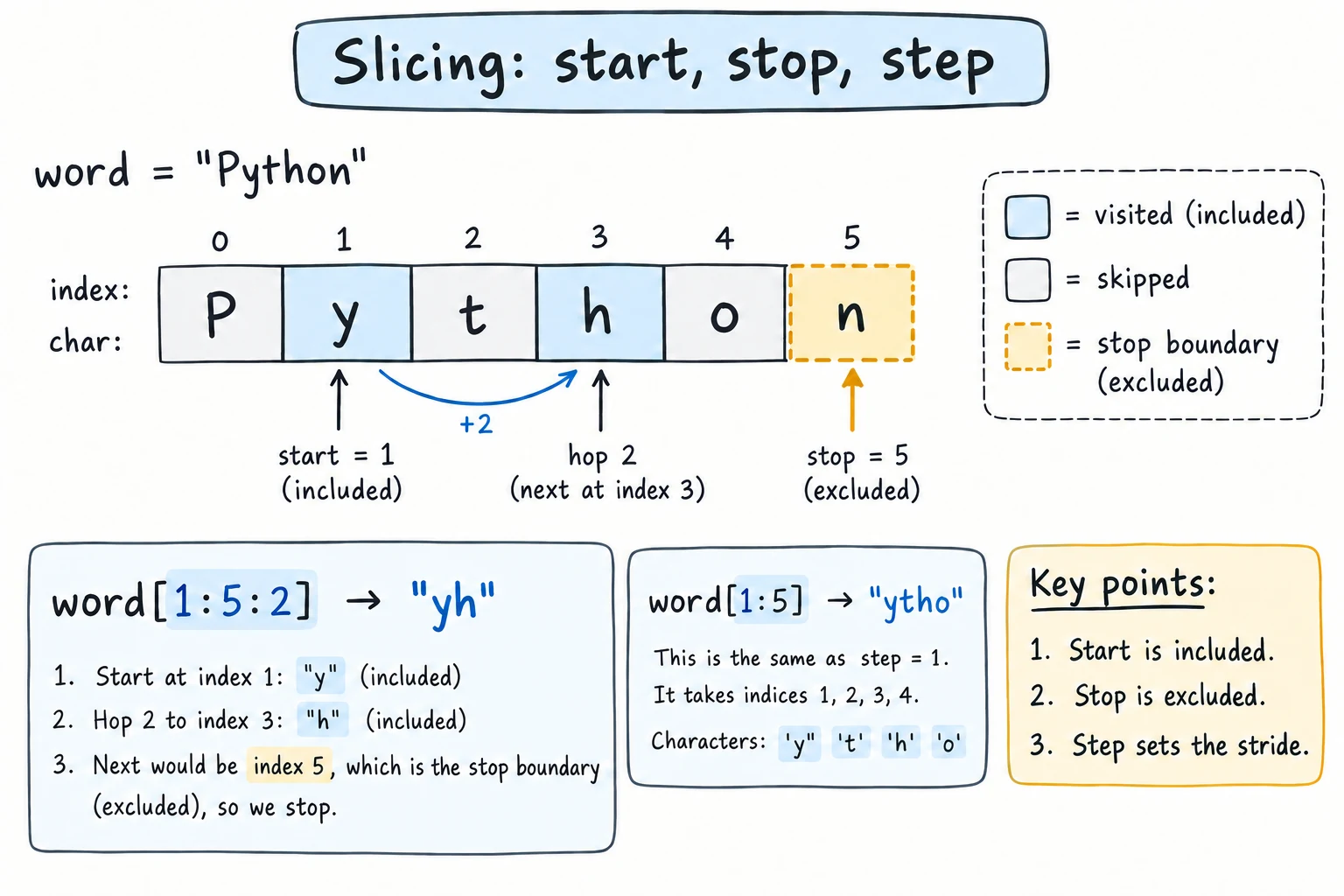
In the last lesson, text[i] got one character. A slice gets a range of characters:
text[start:stop]It starts at start and goes up to, but not including, stop.
It helps to think of the indexes as sitting between the characters. Then word[0:3] is everything between position 0 and position 3.
word = "Python"

print(word[0:3])   # characters 0, 1, 2
print(word[2:5]) # characters 2, 3, 4Pyt
thoLeaving out start or stop
- Leave out
startto begin at the beginning. - Leave out
stopto go to the end.
word = "Python"

print(word[:2])    # first 2 characters
print(word[2:])    # everything from index 2
print(word[-3:])   # last 3 characters
print(word[:]) # the whole stringPy
thon
hon
PythonA handy pattern: text[:n] is the first n characters, and text[-n:] is the last n.
Step
An optional third number is the step, how far to move each time:
digits = "0123456789"

print(digits[::2])    # every 2nd character
print(digits[1::2])   # every 2nd, starting at index 1
print(digits[::-1]) # step -1 goes backwards: reversed!02468
13579
9876543210text[::-1] is the standard Python way to reverse a string.
Slices never raise IndexError
Indexing past the end raises an error, but slicing just stops at the end:
word = "cat"
print(word[1:100])
print(word[5:10])at(The second line prints an empty string.)
What is a method?
A method is a function that belongs to a value. You call it with a dot after the value:
value.method_name(arguments)name = "aziza"
print(name.upper())
print(name.capitalize())AZIZA
AzizaCompare with the functions you already know: len(name) is a regular function that takes the string as an argument, while name.upper() is a method called on the string.
Methods return a new string
Strings are immutable (see Strings), so string methods never change the original. They return a new string:
name = "aziza"
name.upper()           # creates "AZIZA"... and throws it away
print(name)            # still "aziza"

name = name.upper()    # keep the result by assigning it
print(name)aziza
AZIZAThis is one of the most common beginner bugs, so remember: if you want to keep the result, assign it.
Changing case
| Method | Result for "hello WORLD" |
|---|---|
.upper() | "HELLO WORLD" |
.lower() | "hello world" |
.title() | "Hello World" |
.capitalize() | "Hello world" |
.swapcase() | "HELLO world" |
.lower() is especially useful for comparing text without caring about capitals:
answer = "YES"
print(answer.lower() == "yes")True(== checks whether two values are equal. You'll learn it properly in the next module.)
.title() isn't smart about words
.title() capitalizes every letter that follows a non-letter, including an apostrophe or the Uzbek ʻ:
print("don't stop".title())
print("oʻzbekiston".title())Don'T Stop
OʻZbekistonFor a single name or sentence, .capitalize() is often safer.
Removing extra spaces: strip
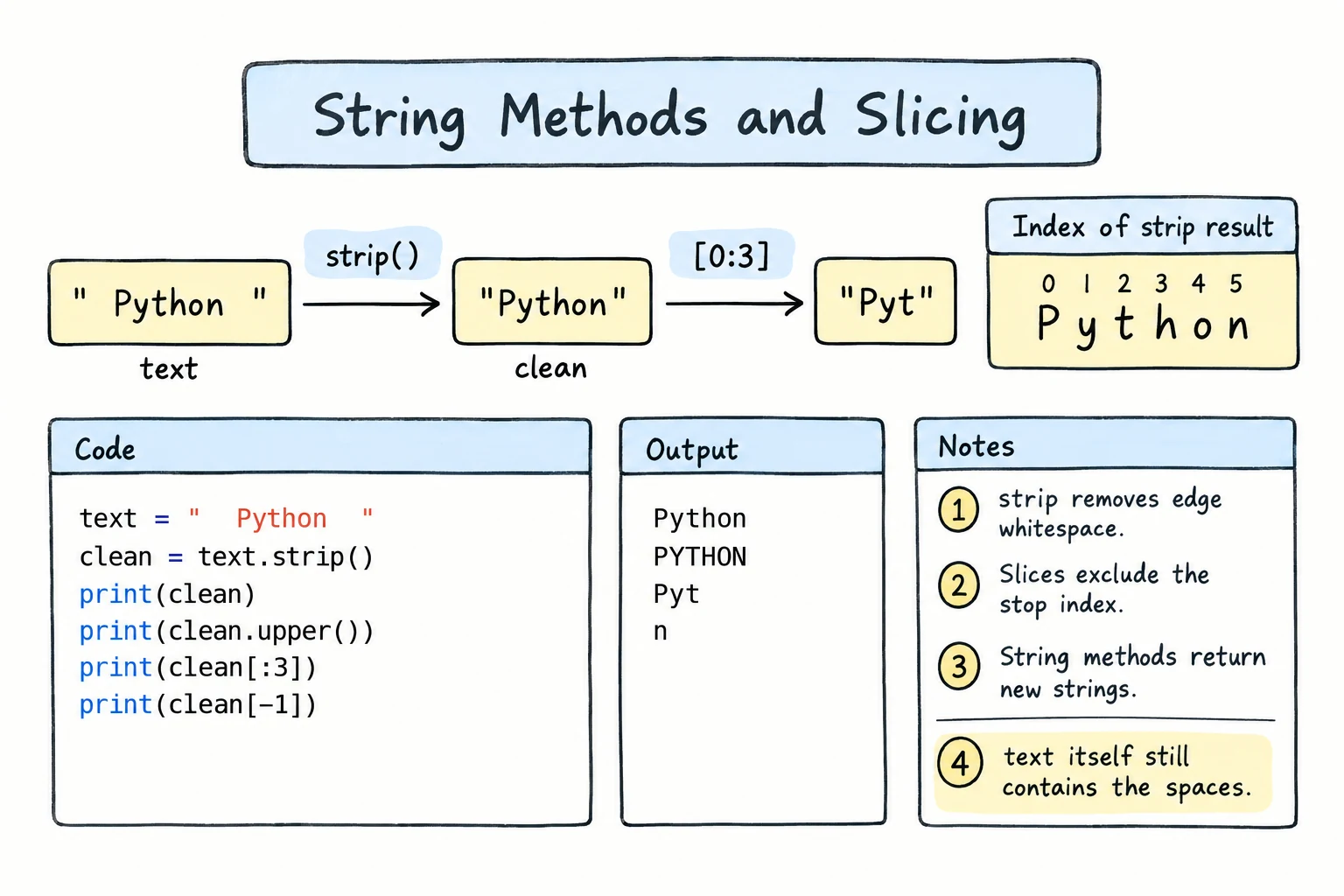
User input often has spaces or newlines around it. .strip() removes whitespace from both ends, but not from the middle:
raw = "   Tashkent  \n"

print("[" + raw.strip() + "]")
print("[" + raw.lstrip() + "]")   # left side only
print("[" + raw.rstrip() + "]") # right side only[Tashkent]
[Tashkent
]
[ Tashkent]You can also strip specific characters: "***sale***".strip("*") gives "sale".
Removing a prefix or suffix
.strip(".txt") does not remove the text ".txt". It removes any of the characters ., t and x from both ends, so "test.txt".strip(".txt") gives "es". To remove an exact piece from the start or the end, use .removeprefix() or .removesuffix(). They leave the string unchanged if the piece isn't there:
photo = "IMG_2026.jpg"

print(photo.removeprefix("IMG_"))
print(photo.removesuffix(".jpg"))
print(photo.removesuffix(".png"))2026.jpg
IMG_2026
IMG_2026.jpgReplacing text
.replace(old, new) replaces every occurrence:
date = "15/09/2026"
print(date.replace("/", "-"))

sentence = "I like tea. Tea is great."
print(sentence.replace("tea", "coffee")) # case-sensitive!15-09-2026
I like coffee. Tea is great.Searching
text = "banana bread and banana milk"

print(text.count("banana"))        # how many times
print(text.find("bread"))          # index of first match
print(text.find("apple"))          # -1 means not found
print(text.startswith("banana"))
print(text.endswith("milk"))2
7
-1
True
True.find()returns-1if the text isn't there..index()does the same job but raises aValueErrorwhen the text isn't found.- If you only need yes or no,
"bread" in textis simpler.
Splitting and joining
.split() breaks a string into a list of pieces. With no argument, it splits on any whitespace:
sentence = "Python is  really fun"
words = sentence.split()
print(words)
print(len(words))['Python', 'is', 'really', 'fun']
4Give it a separator to split on something else:
date = "15/09/2026"
parts = date.split("/")
print(parts)
print(parts[2]) # the year['15', '09', '2026']
2026Add a second argument, maxsplit, to stop after that many splits. The rest stays in one piece:
line = "Tashkent: capital: 3 million"
print(line.split(":", 1))['Tashkent', ' capital: 3 million']The square-bracket result is a list. You'll study lists in the Collections module. For now, you can get items from it with an index, just like characters in a string.
.join() does the opposite: it glues pieces together, with the string you call it on between them:
parts = ["15", "09", "2026"]
print("-".join(parts))
print(" | ".join(["tea", "coffee", "juice"]))15-09-2026
tea | coffee | juiceA split-then-join combination is a neat way to normalize spaces:
messy = "too    many     spaces"
print(" ".join(messy.split()))too many spacesChecking what's inside
These methods return True or False:
| Method | True when… | "2026" | "abc" | "abc1" |
|---|---|---|---|---|
.isdigit() | all characters are digits | True | False | False |
.isalpha() | all characters are letters | False | True | False |
.isalnum() | all characters are letters or digits | True | True | True |
.isupper() / .islower() | all letters are upper/lower case | False | False / True | False / True |
.isspace() | all characters are whitespace | False | False | False |
All of them return False for an empty string "".
.isdigit() isn't a full "is this a number?" check. It's False for "-5" and "3.5", because - and . aren't digits. It's also True for some characters that int() rejects, such as "²".
Chaining methods
Because each method returns a string, you can call another method on the result, one after another:
raw_email = "   Aziza.Karimova@EXAMPLE.com  "

email = raw_email.strip().lower()
print(email)

username = email.split("@")[0]
print(username.replace(".", " ").title())aziza.karimova@example.com
Aziza KarimovaRead chains from left to right: strip → lowercase → split at @ → take the first part.
Try it
Clean up the messy input and print a tidy greeting. Then try changing raw_name to something even messier.
Common mistakes
1. Not saving the result
city = "tashkent"
city.capitalize()
print(city)   # still "tashkent"
Fix: city = city.capitalize().
2. Forgetting the parentheses
name = "aziza"
print(name.upper)<built-in method upper of str object at 0x...>Without () you get the method itself, not its result. Fix: name.upper().
3. Off-by-one slices
code = "UZ-2026"
print(code[0:1])   # "U", not "UZ"
The stop index is not included. Fix: code[0:2], or simply code[:2].
4. .index() on missing text
print("hello".index("z"))ValueError: substring not foundFix: use .find(), which returns -1, or check with in first.
Practice
1. File extension
For filename = "report_final.pdf", print the extension pdf using .split().
Solution
filename = "report_final.pdf"
print(filename.split(".")[-1])
[-1] takes the last piece, so it also works for names like "archive.tar.gz" (giving gz). A name with no dot, like "README", has only one piece, so you get the whole name back.
2. Tidy name
Turn " dILNOZA " into "Dilnoza".
Solution
raw = "   dILNOZA   "
print(raw.strip().capitalize())
3. Phone number format
Given phone = "998901234567", use slicing to print +998 (90) 123-45-67.
Solution
phone = "998901234567"

formatted = ("+" + phone[:3] + " (" + phone[3:5] + ") "
             + phone[5:8] + "-" + phone[8:10] + "-" + phone[10:])
print(formatted)
Wrapping the expression in parentheses lets it continue on the next line.
4. Word stats
For text = "the quick brown fox jumps over the lazy dog", print:
- the number of words,
- how many times
"the"appears as text, - the sentence with each word capitalized,
- the sentence reversed.
Solution
text = "the quick brown fox jumps over the lazy dog"

print(len(text.split()))
print(text.count("the"))
print(text.title())
print(text[::-1])9
2
The Quick Brown Fox Jumps Over The Lazy Dog
god yzal eht revo spmuj xof nworb kciuq eht5. Mask an email
Hide most of the username in an email: keep the first 2 characters of the username, replace the rest with * (keeping the same length), and keep the domain. For "aziza.karimova@example.com", print az************@example.com.
Solution
email = "aziza.karimova@example.com"

at = email.find("@")
username = email[:at]
domain = email[at:]          # includes the "@"

masked = username[:2] + "*" * (len(username) - 2) + domain
print(masked)
email.split("@") would also work to separate the two parts.
Recap
text[start:stop:step]slices a string.stopis excluded, missing values mean "from the start" or "to the end", and[::-1]reverses.- Slices never raise
IndexError. - Methods are called with a dot:
text.method(). String methods return a new string, so assign the result to keep it. - Case:
upper,lower,title,capitalize. Cleaning:strip,replace,removeprefix,removesuffix. - Searching:
count,find(−1 if missing),index(error if missing),startswith,endswith. split(sep, maxsplit)turns a string into a list of pieces, and"sep".join(pieces)glues them back together.