

break, continue, and else
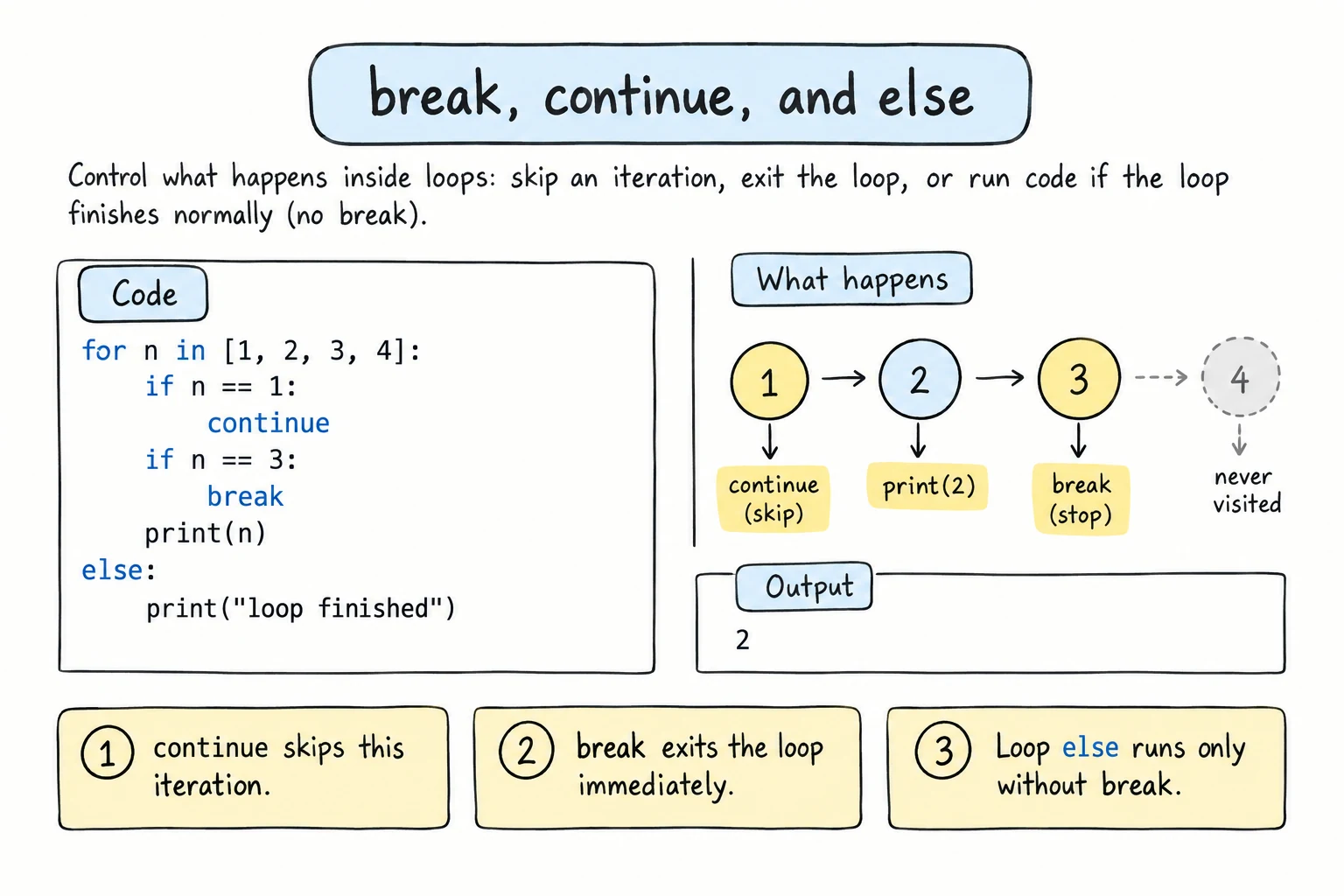
What you'll learn
- How to stop a loop early with
break - How to skip the rest of one iteration with
continue - What a loop's
elseblock does, and when it runs - How
breakbehaves in nested loops - How to choose between
break, a flag variable, and a loop condition
Why it matters
Loops don't always need to run to the end. When you're searching for something, you can stop as soon as you've found it. When some items are invalid, you can skip them. These small tools make loops faster, shorter, and easier to read.
break: stop the loop now
break ends the loop immediately. Python continues with the first line after the loop:
for n in range(1, 100):
    if n * n > 50:
        print(f"First number whose square is over 50: {n}")
        break
    print(f"{n} squared is {n * n}")

print("Loop finished")1 squared is 1
2 squared is 4
3 squared is 9
4 squared is 16
5 squared is 25
6 squared is 36
7 squared is 49
First number whose square is over 50: 8
Loop finishedWithout break, the loop would keep going to 99 for no reason.
break works the same in while loops. It's what makes the while True pattern from while Loops possible:
attempts = 0

while True:
    attempts += 1
    pin = input("PIN: ")
    if pin == "7":
        print("Unlocked")
        break
    if attempts == 3:
        print("Too many attempts")
breakcontinue: skip to the next iteration
continue skips the rest of the current iteration and jumps back to the top of the loop for the next item:
for n in range(1, 11):
    if n % 3 == 0:
        continue          # skip multiples of 3
    print(n, end=" ")
print()1 2 4 5 7 8 10continue is useful for skipping invalid or uninteresting items early, so the main code doesn't need extra indentation:
entries = ["42", "", "17", "abc", "8"]
total = 0

for entry in entries:
    if not entry.isdigit():
        print(f"Skipping invalid entry: {entry!r}")
        continue
    total += int(entry)

print(f"Total: {total}")Skipping invalid entry: ''
Skipping invalid entry: 'abc'
Total: 67({entry!r} shows the value with quotes, so an empty string is visible as ''.)
continue in a while loop
In a while loop, make sure the update happens before continue, or you'll skip it and loop forever:
n = 0
while n < 10:
    if n % 2 == 0:
        continue      # n never changes → infinite loop
    print(n)
    n += 1
break vs continue
| Statement | Effect |
|---|---|
break | Leave the loop completely |
continue | Skip the rest of this iteration, then go on with the next one |
pass | Do nothing; just a placeholder (the loop carries on normally) |
A loop's else block
Loops can have an else block. It runs when the loop finishes normally, meaning it wasn't stopped by break:
secret_word = "kiwi"
guesses = ["apple", "pear", "kiwi", "plum"]

for guess in guesses:
    if guess == secret_word:
        print(f"Found it: {guess}")
        break
else:
print("The secret word wasn't in the list.")Found it: kiwiChange secret_word to "mango", and the loop runs through every guess without breaking, so the else runs:
The secret word wasn't in the list.The best way to read for … else is "for … if no break". It's designed for searches: break when you find the thing, and else handles "not found".
A classic example, checking whether a number is prime:
number = 29

for divisor in range(2, number):
    if number % divisor == 0:
        print(f"{number} is not prime (divisible by {divisor})")
        break
else:
print(f"{number} is prime")29 is primeThis check is only right for numbers 2 and up. For number = 1, range(2, 1) is empty, the loop never breaks, and the else prints 1 is prime. In a real program, handle number < 2 with an if before the loop.
while loops can have an else too, with the same rule: it runs when the condition becomes false, not after a break. Here's the PIN check from while Loops again, without a flag:
correct_pin = "1234"
attempts = 0

while attempts < 3:
    pin = input("PIN: ")
    attempts += 1
    if pin == correct_pin:
        print("Access granted")
        break
    print("Wrong PIN")
else:
    print("Card blocked")
Typing 1111, 2222, 3333:
PIN: 1111
Wrong PIN
PIN: 2222
Wrong PIN
PIN: 3333
Wrong PIN
Card blocked
If you type 1234 at any point, break skips the else, so the card isn't blocked.
The flag alternative
Many programmers find loop else surprising. A flag variable does the same job and is easy for anyone to read:
number = 29
is_prime = True

for divisor in range(2, number):
    if number % divisor == 0:
        is_prime = False
        break

if is_prime:
    print(f"{number} is prime")
else:
    print(f"{number} is not prime")
Both are fine. Use whichever makes your code clearer.
Nested loops: break leaves only one loop
break and continue affect only the innermost loop they're in:
for row in range(1, 4):
    for col in range(1, 4):
        if col == 2:
            break            # leaves the inner loop only
        print(f"({row}, {col})")
print(f"Finished row {row}")(1, 1)
Finished row 1
(2, 1)
Finished row 2
(3, 1)
Finished row 3To stop both loops, use a flag that the outer loop checks:
target = 6
found = False

for row in range(1, 4):
    for col in range(1, 4):
        if row * col == target:
            print(f"{row} x {col} = {target}")
            found = True
            break
    if found:
break2 x 3 = 6In Return Values you'll learn a cleaner way: put the loops in a function and return from it.
Try it
This menu loop uses continue for invalid choices and break to quit. Run it and try choices like 1, 9, 2, q.
Common mistakes
1. break outside a loop
if True:
breakSyntaxError: 'break' outside loopbreak and continue only work inside for and while.
2. Misreading loop else
for letter in "abc":
    print(letter)
else:
print("The loop didn't run") # wrong idea of what else meansa
b
c
The loop didn't runThe else block doesn't mean "if the loop didn't run". It means "if the loop wasn't broken", so it runs after every normal finish, and also when the loop had zero iterations.
3. Skipping the update with continue
n = 0
while n < 5:
    if n == 2:
        continue      # jumps back to the check, n stays 2
    print(n)
n += 10
1
(then nothing: the loop spins forever until you press Stop)Fix: in while loops, update the counter before any continue.
4. Using break when a condition is clearer
# Bad: the loop condition is hidden inside the body
n = 1
while True:
    if n > 5:
        break
    print(n)
    n += 1

# Good: the condition says when the loop ends
n = 1
while n <= 5:
    print(n)
n += 11
2
3
4
5
1
2
3
4
5Both print the same numbers, but the second says in its first line when the loop stops. Use break when the exit point is naturally in the middle, like right after reading input.
Practice
1. First negative
Loop over numbers = [4, 8, 15, -3, 16, -42] and print the first negative number, then stop.
Solution
numbers = [4, 8, 15, -3, 16, -42]

for n in numbers:
    if n < 0:
        print(f"First negative: {n}")
        break
2. No vowels
Print the letters of "programming" without vowels, on one line, using continue.
Solution
for letter in "programming":
    if letter in "aeiou":
        continue
    print(letter, end="")
print()prgrmmng3. Sum until zero
Read numbers with input() in a while True loop and add them up. Stop when the user enters 0. Skip negative numbers with a message (don't add them).
Solution
total = 0

while True:
    number = int(input("Number (0 to stop): "))
    if number == 0:
        break
    if number < 0:
        print("Negative numbers are ignored.")
        continue
    total += number

print(f"Total: {total}")
4. Search with else
Given email_list = ["ali@mail.uz", "vali@mail.uz", "gani@mail.uz"] and wanted = "bek@mail.uz", print Registered if the email is in the list, otherwise Not registered. Use a for loop with else (not the in operator).
Solution
email_list = ["ali@mail.uz", "vali@mail.uz", "gani@mail.uz"]
wanted = "bek@mail.uz"

for email in email_list:
    if email == wanted:
        print("Registered")
        break
else:
    print("Not registered")
In real code, if wanted in email_list: is simpler. The loop version shows how searches work underneath.
5. Primes up to 50
Print all prime numbers from 2 to 50 on one line. Use a nested loop with break and else. As a speed-up, the inner loop only needs to check divisors up to the square root of the number (divisor * divisor <= n).
Solution
for n in range(2, 51):
    divisor = 2
    while divisor * divisor <= n:
        if n % divisor == 0:
            break
        divisor += 1
    else:
        print(n, end=" ")
print()2 3 5 7 11 13 17 19 23 29 31 37 41 43 47If n has a divisor, it must have one no bigger than its square root, so there's no need to check further.
Recap
breakleaves the loop immediately.continueskips to the next iteration.- Loop
elseruns only if the loop wasn't stopped bybreak. Read it as "if no break", which suits searches. - A flag variable is an easy-to-read alternative to loop
else. breakandcontinueaffect only the innermost loop.- In
whileloops, update your variables beforecontinue.