

Testing with assert
What you'll learn
- How
assertworks, with and without a message - How to write test functions using the arrange-act-assert pattern
- How to test return values, exceptions, and floating-point results
- How to run many tests with a small loop, and test objects safely
- What
assertshould never be used for
Why it matters
So far you have mostly checked programs by running them and reading the output. That does not work for a shop system with fifty functions, where changing one function can quietly break three others.
A test is a small piece of code that runs your code and checks the result for you, a thousand times for free. Tests catch a bug minutes after you create it, not weeks later when a customer in Samarkand gets the wrong bill. They also let you rewrite code without fear: if all tests still pass, you did not break anything.
The assert statement
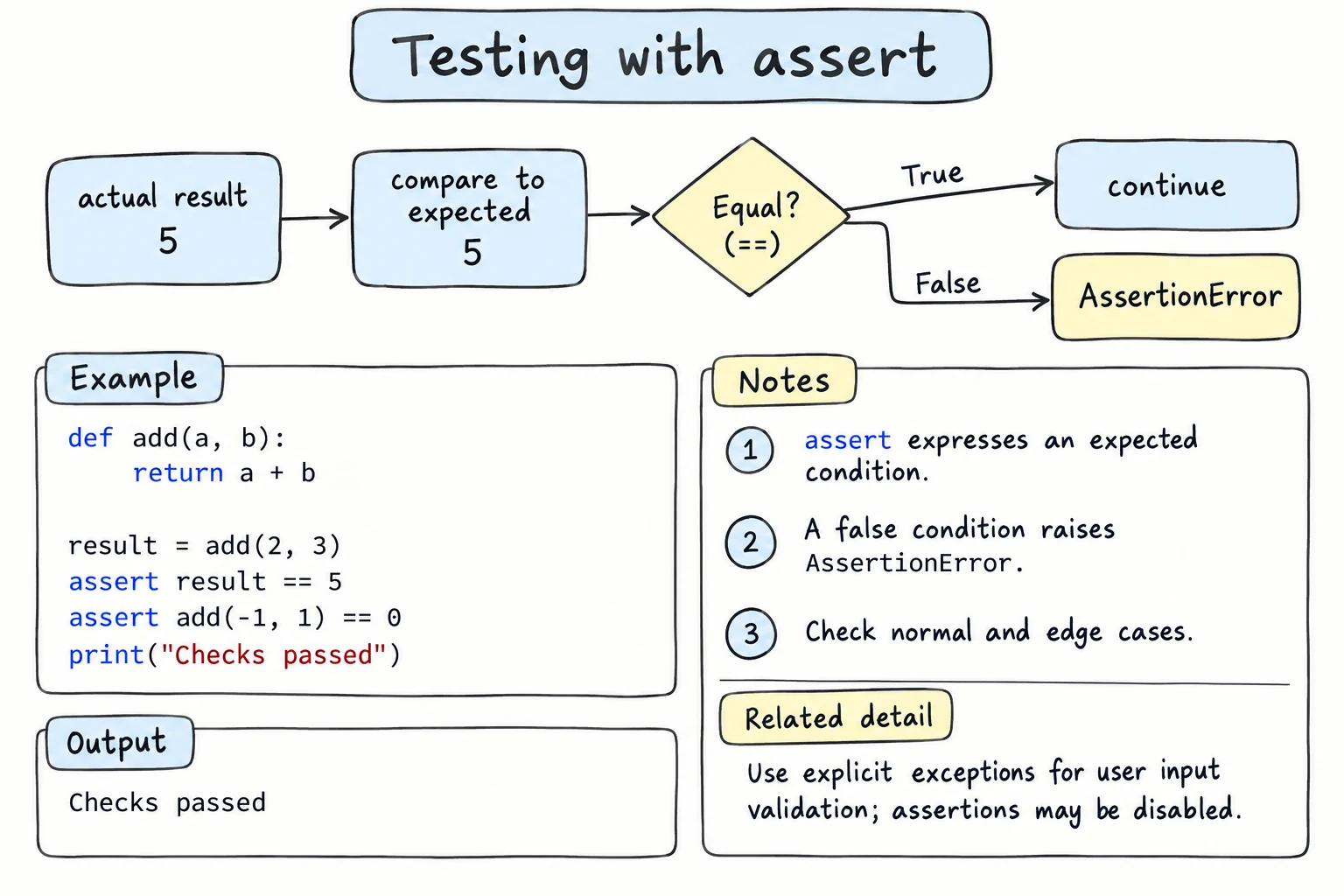
You already met assert in Return Values as a quick check. Now it becomes a tool. assert takes a condition. If the condition is true, nothing happens. If it is false, Python stops with an AssertionError.
def delivery_fee(order_total):
    if order_total >= 200000:
        return 0
    return 15000

assert delivery_fee(250000) == 0
assert delivery_fee(50000) == 15000
print("All checks passed")All checks passedSilence means success: the expected answers live in the code, so you no longer have to remember them. Now suppose someone changes >= to >. Add a message after a comma so the failure shows the actual result:
def delivery_fee(order_total):
    if order_total > 200000:     # changed >= to >
        return 0
    return 15000

result = delivery_fee(200000)
assert result == 0, f"expected 0, got {result}"Traceback (most recent call last):
File "shop.py", line 7, in <module>
assert result == 0, f"expected 0, got {result}"
^^^^^^^^^^^
AssertionError: expected 0, got 15000The traceback points to the exact check, and the message shows what went wrong: an order of exactly 200,000 som should be free, but it is not.
Writing test functions
Loose assert lines are hard to organize. The usual approach is to put checks into test functions. By convention their names start with test_ and describe one behavior. Most tests follow three steps:
- Arrange: prepare the input data.
- Act: call the code you are testing.
- Assert: check the result.
def average_grade(grades):
    return sum(grades) / len(grades)

def test_average_of_three_grades():
    grades = [80, 90, 100]            # arrange
    result = average_grade(grades)    # act
    assert result == 90               # assert

test_average_of_three_grades()
print("All tests passed")All tests passedA test function takes no arguments. It either finishes quietly (pass) or raises an error (fail). A good name tells you what broke.
You can only test what a function gives back. A function that prints its result leaves a test nothing to compare, which is one more reason for the habit from Return Values: functions calculate and return, the outer code prints.
Testing that an error is raised
Sometimes the correct behavior is an exception. An age of -3 should raise ValueError. To test that, call the function inside try and fail the test if no error appears:
def parse_age(text):
    age = int(text)
    if age < 0 or age > 150:
        raise ValueError(f"unrealistic age: {age}")
    return age

def test_parse_age_valid():
    assert parse_age("25") == 25

def test_parse_age_negative_raises():
    try:
        parse_age("-3")
    except ValueError as error:
        assert "unrealistic" in str(error)
    else:
        assert False, "expected ValueError for negative age"

test_parse_age_valid()
test_parse_age_negative_raises()
print("All tests passed")All tests passedThe else block runs only when no exception happened, which means the function forgot to complain, so assert False, "..." fails on purpose. Testing with pytest shows a one-line way to do this.
Comparing floats with math.isclose
Floats are stored in binary, so 0.1 + 0.2 is 0.30000000000000004, and assert 0.1 + 0.2 == 0.3 fails even though nothing is wrong. Write assert math.isclose(0.1 + 0.2, 0.3) instead: math.isclose() allows a tiny difference. For money, many programs avoid the problem by storing whole numbers (som or tiyin) instead of floats.
A tiny test runner
Calling every test by hand gets tedious, and the first failure stops everything. Functions are objects, so you can put them in a list and loop over them. Every function has a __name__ attribute holding its name.
def word_count(text):
    return len(text.split())

def test_simple_sentence():
    assert word_count("Tashkent is big") == 3

def test_empty_text():
    assert word_count("") == 0

def test_hyphenated_word():
    result = word_count("one-two")
    assert result == 2, f"expected 2, got {result}"

tests = [test_simple_sentence, test_empty_text, test_hyphenated_word]
passed = 0

for test in tests:
    try:
        test()
    except AssertionError as error:
        print(f"FAIL  {test.__name__}: {error}")
    else:
        print(f"PASS  {test.__name__}")
        passed += 1

print(f"{passed} of {len(tests)} tests passed")PASS test_simple_sentence
PASS test_empty_text
FAIL test_hyphenated_word: expected 2, got 1
2 of 3 tests passedThe runner reports each failure and moves on, so one run gives you the full picture. (Is "one-two" one word or two? The test makes you decide.)
Real testing tools are grown-up versions of this loop. The standard library has two, unittest and doctest. This course uses pytest, a popular third-party tool that runs exactly the plain assert tests you write here.
The limits of assert
assert has one important catch: Python can turn it off. With the -O (optimize) flag, every assert statement is skipped. Save these two lines as check.py:
assert 2 + 2 == 5, "math is broken"
print("finished")$ python check.py
Traceback (most recent call last):
File "check.py", line 1, in <module>
assert 2 + 2 == 5, "math is broken"
^^^^^^^^^^
AssertionError: math is broken
$ python -O check.py
finishedSo use assert in tests, but never to validate user input or outside data. For those, write if and raise ValueError(...), which always runs.
Try it
Fix the is_valid_phone function so all tests pass, then add a test of your own.
Common mistakes
1. Putting parentheses around assert
price = 15000
assert(price == 20000, "wrong price")
print("passed?")prices.py:2: SyntaxWarning: assertion is always true, perhaps remove parentheses?
assert(price == 20000, "wrong price")
passed?A non-empty tuple is always true, so the check never fails. Fix: assert price == 20000, "wrong price".
2. Testing printed output instead of returned values
def greet(name):
    print(f"Salom, {name}!")

assert greet("Dilnoza") == "Salom, Dilnoza!"Salom, Dilnoza!
AssertionErrorThe greeting appears, so the function looks right, but greet returns None, not the string. Fix: make the function return the text and print it outside.
3. Tests that share one object
class Wallet:
    def __init__(self):
        self.balance = 0

    def deposit(self, amount):
        self.balance += amount

wallet = Wallet()   # one object shared by every test

def test_deposit():
    wallet.deposit(5000)
    assert wallet.balance == 5000, f"got {wallet.balance}"

test_deposit()
test_deposit() # run again, as a test runner mightAssertionError: got 10000The first run changed the shared balance, so the same test now fails: shared objects make results depend on test order. Fix: create a fresh object inside each test (arrange), then act and assert.
Practice
1. Test a temperature converter
Write to_fahrenheit(celsius) that returns celsius * 9 / 5 + 32. Write a test function that checks 0 gives 32, 100 gives 212, and -40 gives -40. Call it and print "All tests passed".
Solution
def to_fahrenheit(celsius):
    return celsius * 9 / 5 + 32

def test_to_fahrenheit():
    assert to_fahrenheit(0) == 32
    assert to_fahrenheit(100) == 212
    assert to_fahrenheit(-40) == -40

test_to_fahrenheit()
print("All tests passed")All tests passed2. Assert with a helpful message
The function below has a bug. Write a test whose assert message shows the actual result, use the message to find the bug, and fix it.
def initials(full_name):
    parts = full_name.split()
    return parts[0][0] + parts[1][1]
Solution
def initials(full_name):
    parts = full_name.split()
    return parts[0][0] + parts[1][0]

def test_initials():
    result = initials("Farrukh Nazarov")
    assert result == "FN", f"expected 'FN', got {result!r}"

test_initials()
print("All tests passed")All tests passedWith the bug, the message says expected 'FN', got 'Fa', which points straight at the wrong index parts[1][1].
3. Test an exception
Write split_bill(total, people) that returns each person's share, and raises ValueError if people is less than 1. Write two tests: one for a normal split (90000 between 3 people gives 30000), and one that checks people=0 raises ValueError.
Solution
def split_bill(total, people):
    if people < 1:
        raise ValueError("people must be at least 1")
    return total / people

def test_split_bill_normal():
    assert split_bill(90000, 3) == 30000

def test_split_bill_zero_people_raises():
    try:
        split_bill(90000, 0)
    except ValueError:
        pass
    else:
        assert False, "expected ValueError"

test_split_bill_normal()
test_split_bill_zero_people_raises()
print("All tests passed")All tests passedWithout the check, people=0 would raise a less helpful ZeroDivisionError.
4. Test a shopping cart class
Write a class Cart with add(name, price) and total(). Write two tests: a new cart totals 0, and adding the same item twice counts it twice. Run them with a loop.
Solution
class Cart:
    def __init__(self):
        self.items = []

    def add(self, name, price):
        self.items.append((name, price))

    def total(self):
        return sum(price for name, price in self.items)

def test_new_cart_is_empty():
    assert Cart().total() == 0

def test_same_item_twice():
    cart = Cart()
    cart.add("bread", 5000)
    cart.add("bread", 5000)
    assert cart.total() == 10000

tests = [test_new_cart_is_empty, test_same_item_twice]
for test in tests:
    test()
print(f"PASS {test.__name__}")PASS test_new_cart_is_empty
PASS test_same_item_twice5. A better test runner
Extend the tiny test runner so it also catches other exceptions and reports them as ERROR with the exception type name. Try it on three tests (one passes, one fails an assert, one crashes with ZeroDivisionError) and print a summary like 1 passed, 1 failed, 1 errors.
Solution
def test_passes():
    assert len("Bukhara") == 7

def test_fails():
    assert "Samarkand".startswith("T"), "city should start with T"

def test_crashes():
    prices = []
    average = sum(prices) / len(prices)
    assert average == 0

tests = [test_passes, test_fails, test_crashes]
passed = failed = errors = 0

for test in tests:
    try:
        test()
    except AssertionError as error:
        print(f"FAIL   {test.__name__}: {error}")
        failed += 1
    except Exception as error:
        print(f"ERROR  {test.__name__}: {type(error).__name__}: {error}")
        errors += 1
    else:
        print(f"PASS   {test.__name__}")
        passed += 1

print(f"{passed} passed, {failed} failed, {errors} errors")PASS test_passes
FAIL test_fails: city should start with T
ERROR test_crashes: ZeroDivisionError: division by zero
1 passed, 1 failed, 1 errorsAssertionError is also an Exception, so its except must come first.
Recap
assert condition, messagedoes nothing when the condition is true and raisesAssertionErrorwhen it is false.- Put checks in
test_...functions that follow arrange, act, assert, one behavior per test, and test returned values. - Test exceptions with
try/except/else, and compare floats withmath.isclose. - A loop over test functions runs them all and reports every failure. Give every test its own fresh object.
assertis removed bypython -O, so never use it to validate user input.