

Operators and Containers
What you'll learn
- How
__add__and__mul__give objects arithmetic, and why they return a new object - Why unsupported types get
NotImplemented, and how__rmul__makes3 * pricework - How
__len__,__getitem__,__contains__, and__iter__make an object behave like a collection - How
__bool__(or__len__) decides whether an object is truthy - When an operator helps, and when a named method is clearer
Why it matters
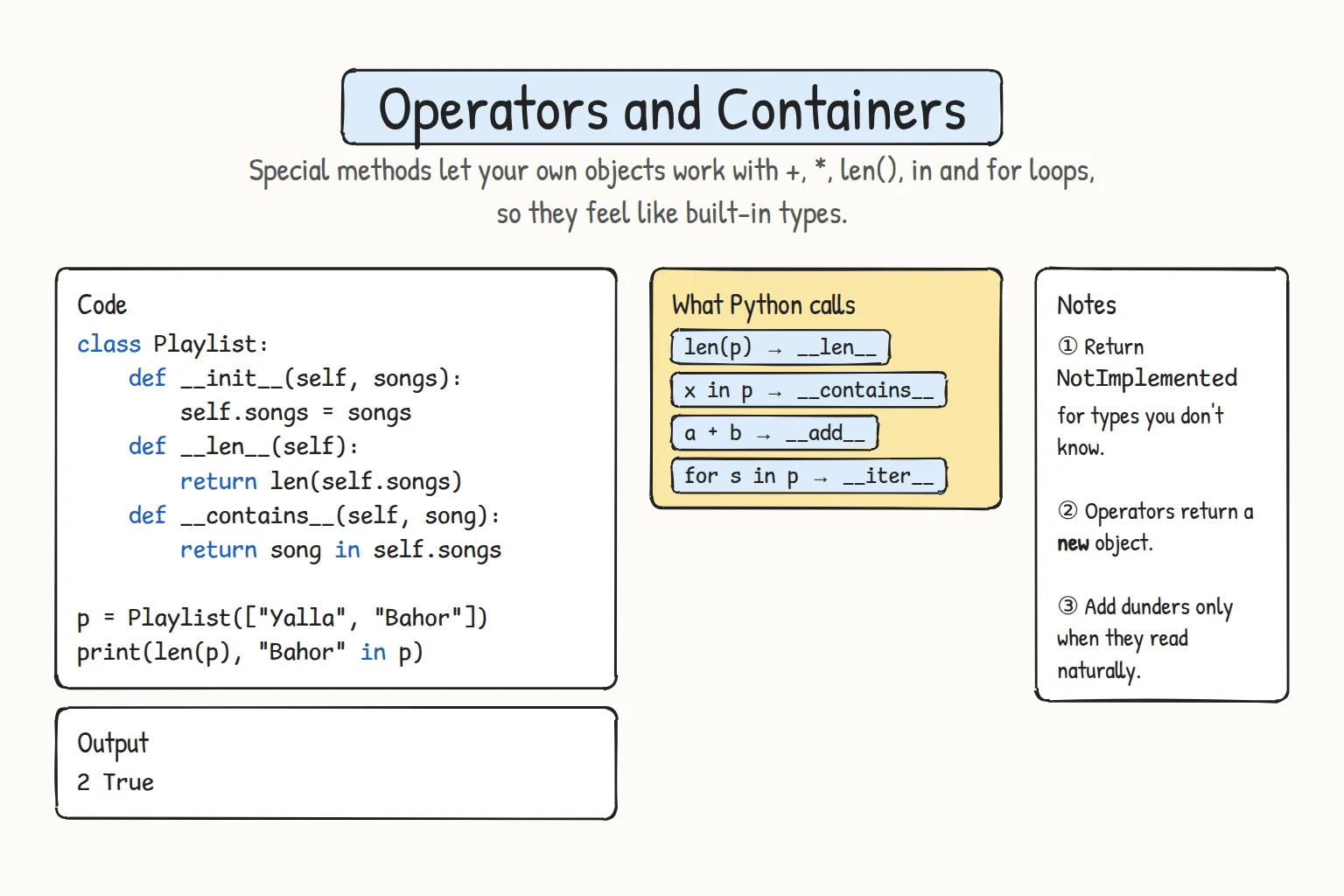
In Representing and Comparing Objects your classes learned to print and compare. The same idea goes further: + calls __add__, len() calls __len__, and for calls __iter__. So Money objects can add up with +, and a Playlist can work with len(), in, indexing, and for, just like a list.
Arithmetic: __add__, __mul__, and __rmul__
+ calls __add__, - calls __sub__, and * calls __mul__. They should return a new object and leave both operands unchanged, just like 3 + 4 doesn't change 3.
class Money:
    def __init__(self, amount, currency="som"):
        self.amount = amount
        self.currency = currency

    def __repr__(self):
        return f"Money({self.amount!r}, {self.currency!r})"

    def __add__(self, other):
        if not isinstance(other, Money):
            return NotImplemented
        if other.currency != self.currency:
            raise ValueError(f"Cannot add {self.currency} and {other.currency}")
        return Money(self.amount + other.amount, self.currency)

    def __mul__(self, factor):
        if not isinstance(factor, int):
            return NotImplemented
        return Money(self.amount * factor, self.currency)

    def __rmul__(self, factor):
        return self.__mul__(factor)        # makes 3 * price work, not only price * 3

tea = Money(15000)
samsa = Money(8000)

print(tea * 2 + 3 * samsa)
print(tea)                                  # unchanged
print(sum([tea, samsa], Money(0)))

for bad in [Money(10, "usd"), 500]:
    try:
        tea + bad
    except (ValueError, TypeError) as error:
print(type(error).__name__, error)Money(54000, 'som')
Money(15000, 'som')
Money(23000, 'som')
ValueError Cannot add som and usd
TypeError unsupported operand type(s) for +: 'Money' and 'int'3 * samsafirst triesint.__mul__(3, samsa), which returnsNotImplemented, so Python tries the reflected methodsamsa.__rmul__(3). (__radd__and the others work the same way.)- For an unsupported type like
500,__add__returnsNotImplemented. Python gives the other operand a chance, then raises a clearTypeError. Mixing currencies is the right type with a wrong value, so__add__raisesValueErroritself. sum()starts from0, and0 + teaisn't defined, so passMoney(0)as the start value.
Containers: __len__, __getitem__, __contains__, __iter__
A class holding a collection can act like a list:
| Syntax | Method |
|---|---|
len(obj) | __len__(self) |
obj[i] | __getitem__(self, i) |
x in obj | __contains__(self, x) |
for x in obj | __iter__(self) |
class Playlist:
    def __init__(self, songs=None):
        self._songs = [] if songs is None else list(songs)

    def add(self, song):
        self._songs.append(song)

    def __len__(self):
        return len(self._songs)

    def __getitem__(self, index):
        return self._songs[index]         # the list handles negatives and slices

    def __contains__(self, song):
        return song in self._songs

    def __iter__(self):
        return iter(self._songs)          # hand out the list's own iterator

mix = Playlist(["Samarkand Nights", "Desert Wind", "Silk Road"])
mix.add("Tashkent Rain")

print(len(mix), mix[0], "|", mix[-1], mix[1:3])
print("Silk Road" in mix, "Unknown Song" in mix)
for number, song in enumerate(mix, start=1):
print(f"{number}. {song}")4 Samarkand Nights | Tashkent Rain ['Desert Wind', 'Silk Road']
True False
1. Samarkand Nights
2. Desert Wind
3. Silk Road
4. Tashkent Rain__iter__ must return an iterator, which for pulls items from one by one; iter(self._songs) borrows the list's own. Then everything that loops works: for, enumerate(), sorted(), list() (Iterators and Generators goes deeper). Without __contains__, in still works by looping; write it when you can check faster or differently.
__bool__: truthiness
if obj: calls __bool__, and if there's none, __len__ (zero means false). Without either, every object is truthy. So an empty Playlist above is already falsy. __bool__ defines truthiness directly:
class BankAccount:
    def __init__(self, balance):
        self.balance = balance

    def __bool__(self):
        return self.balance > 0

print(bool(BankAccount(0)), bool(BankAccount(125000)))False TrueUse __bool__ only when "truthy" has one obvious meaning; often if account.balance > 0: is clearer.
Don't overuse special methods
Use an operator only when its meaning is obvious:
| Good fit | Poor fit |
|---|---|
money1 + money2: adding amounts | student + course to enroll a student: use student.enroll(course) |
vector * 2: scaling | cart * 2: duplicate? apply a coupon? Unclear |
A named method like cart.apply_coupon("NAVRUZ10") beats a clever operator nobody can guess. And when you mainly need __init__, __repr__, and __eq__, Dataclasses shows how @dataclass writes them for you.
Try it
Add a __sub__ method to Money and test it.
Common mistakes
1. Returning False instead of NotImplemented
class Money:
    def __init__(self, amount):
        self.amount = amount

    def __add__(self, other):
        if not isinstance(other, Money):
            return False          # Bad: pretends the addition gave a result
        return Money(self.amount + other.amount)

print(Money(100) + 50)FalseThe bug hides: Money(100) + 50 "works". Fix: return NotImplemented, and Python raises TypeError: unsupported operand type(s) for +: 'Money' and 'int'.
2. Changing self in an arithmetic method
class Point:
    def __init__(self, x, y):
        self.x = x
        self.y = y

    def __add__(self, other):
        self.x += other.x         # Bad: modifies the left operand
        self.y += other.y
        return self

start = Point(0, 0)
end = start + Point(1, 1)
print(start.x, start.y, end is start) # start should still be (0, 0)1 1 Truea + b should never change a. Fix: return Point(self.x + other.x, self.y + other.y).
3. __iter__ that returns a list
class Playlist:
    def __init__(self, songs):
        self._songs = list(songs)

    def __iter__(self):
        return self._songs        # a list, not an iterator

for song in Playlist(["Lazgi"]):
print(song)TypeError: iter() returned non-iterator of type 'list'A list is iterable, but not an iterator. Fix: return iter(self._songs).
Practice
1. Adding points
Write a Points(value) class with __repr__ (Points(15)) and an __add__ that returns a new Points, or NotImplemented for other types. Print Points(10) + Points(5) and the unchanged Points(10) on one line, then try Points(10) + 5 and print Error: with the message.
Solution
class Points:
    def __init__(self, value):
        self.value = value

    def __repr__(self):
        return f"Points({self.value})"

    def __add__(self, other):
        if not isinstance(other, Points):
            return NotImplemented
        return Points(self.value + other.value)

day1 = Points(10)
total = day1 + Points(5)
print(total, day1)
try:
    day1 + 5
except TypeError as error:
print("Error:", error)Points(15) Points(10)
Error: unsupported operand type(s) for +: 'Points' and 'int'2. A bookshelf
Write a Bookshelf(titles) class with __len__, __getitem__, and a __contains__ that ignores upper and lower case. For ["Days of the Past", "Python Basics", "Poems of Navoi"], print the length and first and last titles, then "python basics" in shelf and "World Atlas" in shelf, then bool() of the shelf and of Bookshelf([]).
Solution
class Bookshelf:
    def __init__(self, titles):
        self._titles = list(titles)

    def __len__(self):
        return len(self._titles)

    def __getitem__(self, index):
        return self._titles[index]

    def __contains__(self, title):
        return title.lower() in [t.lower() for t in self._titles]

shelf = Bookshelf(["Days of the Past", "Python Basics", "Poems of Navoi"])
print(len(shelf), shelf[0], shelf[-1])
print("python basics" in shelf, "World Atlas" in shelf)
print(bool(shelf), bool(Bookshelf([])))3 Days of the Past Poems of Navoi
True False
True FalseThere's no __bool__, so bool() uses __len__.
3. Distances that add up
Write a Distance(km) class with __repr__ (Distance(578)), d1 + d2, d * 2 and 2 * d, and a __radd__ that treats 0 + d as d, so sum() needs no start value. For legs of 308, 270, and 450 km, print Total: with the sum, Round trip: with 2 * total.
Solution
class Distance:
    def __init__(self, km):
        self.km = km

    def __repr__(self):
        return f"Distance({self.km!r})"

    def __add__(self, other):
        if not isinstance(other, Distance):
            return NotImplemented
        return Distance(self.km + other.km)

    def __radd__(self, other):
        if other == 0:                   # sum() starts with 0
            return self
        return NotImplemented

    def __mul__(self, factor):
        if not isinstance(factor, (int, float)):
            return NotImplemented
        return Distance(self.km * factor)

    __rmul__ = __mul__                   # the same function works for 2 * d

legs = [Distance(308), Distance(270), Distance(450)]
total = sum(legs)
print("Total:", total)
print("Round trip:", 2 * total)Total: Distance(1028)
Round trip: Distance(2056)__rmul__ = __mul__ reuses the same function under a second name.
4. Design a class: a shopping cart
Design a Cart class from this description:
add(name, price, quantity=1)adds a product (the same name again adds to its quantity).len(cart)is the total units,cart["Tea"]a product's quantity (0 if absent),inchecks for a product, looping gives names in the order added, an empty cart is falsy, andtotal()returns the price.
It must work with this driver code and print exactly this output:
cart = Cart()
print(bool(cart))
cart.add("Tea", 15000, 2)
cart.add("Samsa", 8000, 3)
cart.add("Tea", 15000)
print(len(cart), cart["Tea"], cart["Juice"])
print("Samsa" in cart, "Juice" in cart)
print(list(cart), cart.total())False
6 3 0
True False
['Tea', 'Samsa'] 69000Solution
class Cart:
    def __init__(self):
        self._lines = {}                # name -> [price, quantity]

    def add(self, name, price, quantity=1):
        if name in self._lines:
            self._lines[name][1] += quantity
        else:
            self._lines[name] = [price, quantity]

    def total(self):
        return sum(price * qty for price, qty in self._lines.values())

    def __len__(self):
        return sum(qty for _, qty in self._lines.values())

    def __getitem__(self, name):
        if name in self._lines:
            return self._lines[name][1]
        return 0

    def __contains__(self, name):
        return name in self._lines

    def __iter__(self):
        return iter(self._lines)

cart = Cart()
print(bool(cart))
cart.add("Tea", 15000, 2)
cart.add("Samsa", 8000, 3)
cart.add("Tea", 15000)
print(len(cart), cart["Tea"], cart["Juice"])
print("Samsa" in cart, "Juice" in cart)
print(list(cart), cart.total())
Without __bool__, __len__ makes an empty cart falsy.
5. Merging warehouse stock
Write an Inventory(counts=None) class wrapping a dictionary of item counts, with __repr__ (Inventory({'tea': 50})), a + that returns a new inventory with both counts added (originals unchanged), inv["tea"] (0 for unknown items), len() as the total units, and iteration over item names in alphabetical order.
Merge Tashkent ({"tea": 40, "samsa": 25}) and Samarkand ({"tea": 10, "bread": 30}) and print the result. Then print its length with its "tea" and "juice" counts, then list() of it with Tashkent's "bread" count, and finally "Stock" or "Empty" for Inventory().
Solution
class Inventory:
    def __init__(self, counts=None):
        self._counts = dict(counts or {})

    def __repr__(self):
        return f"Inventory({self._counts!r})"

    def __add__(self, other):
        if not isinstance(other, Inventory):
            return NotImplemented
        merged = dict(self._counts)
        for item, count in other._counts.items():
            merged[item] = merged.get(item, 0) + count
        return Inventory(merged)

    def __getitem__(self, item):
        return self._counts.get(item, 0)

    def __len__(self):
        return sum(self._counts.values())

    def __iter__(self):
        return iter(sorted(self._counts))

tashkent = Inventory({"tea": 40, "samsa": 25})
samarkand = Inventory({"tea": 10, "bread": 30})
total = tashkent + samarkand

print(total)
print(len(total), total["tea"], total["juice"])
print(list(total), tashkent["bread"])
print("Stock" if Inventory() else "Empty")Inventory({'tea': 50, 'samsa': 25, 'bread': 30})
105 50 0
['bread', 'samsa', 'tea'] 0
Empty__add__ copies self._counts before merging, so tashkent keeps no bread, and if Inventory(): falls back to __len__.
Recap
+,-, and*call__add__,__sub__, and__mul__, which return a new object.- Return
NotImplementedfor unsupported types; Python then tries reflected methods like__rmul__, or raisesTypeError. __len__,__getitem__,__contains__, and__iter__(usuallyreturn iter(self._items)) make a class behave like a container.if obj:uses__bool__, or__len__when there's no__bool__.- Use operators only when their meaning is obvious. Otherwise, a well-named method is clearer.