

Recursion
What you'll learn
- What it means for a function to call itself, and why that isn't an infinite loop
- The two parts every recursive function needs: a base case and a recursive case
- How Python keeps track of the calls on the call stack, and what
RecursionErrormeans - When a loop is simpler, and when recursion is the natural tool: nested data
Why it matters
A folder contains files and other folders, which contain files and other folders. A list can contain lists that contain lists. A family tree, a menu with submenus, a company org chart: the data is shaped like itself at every level. A for loop handles one level. To handle any depth, you write a function that solves the big problem by solving a smaller copy of the same problem, and calls itself to do it. That idea is recursion, and file managers, JSON parsers, and search engines all rely on it.
A function that calls itself
Nothing stops a function from calling the function it's defined in. Here is a countdown written without a loop:
def countdown(n):
    if n == 0:
        print("Liftoff!")
        return
    print(n)
    countdown(n - 1)

countdown(3)3
2
1
Liftoff!countdown(3) prints 3 and calls countdown(2), which prints 2 and calls countdown(1), which prints 1 and calls countdown(0). That call prints Liftoff! and returns without calling anything, so the chain stops. Each call works on a smaller version of the problem, and the smallest version is handled directly.
Base case and recursive case
Every recursive function has the same two parts:
- The base case is the smallest input, which the function answers without calling itself. In
countdown, that isn == 0. - The recursive case does a little work and then calls the function on a smaller input, moving toward the base case.
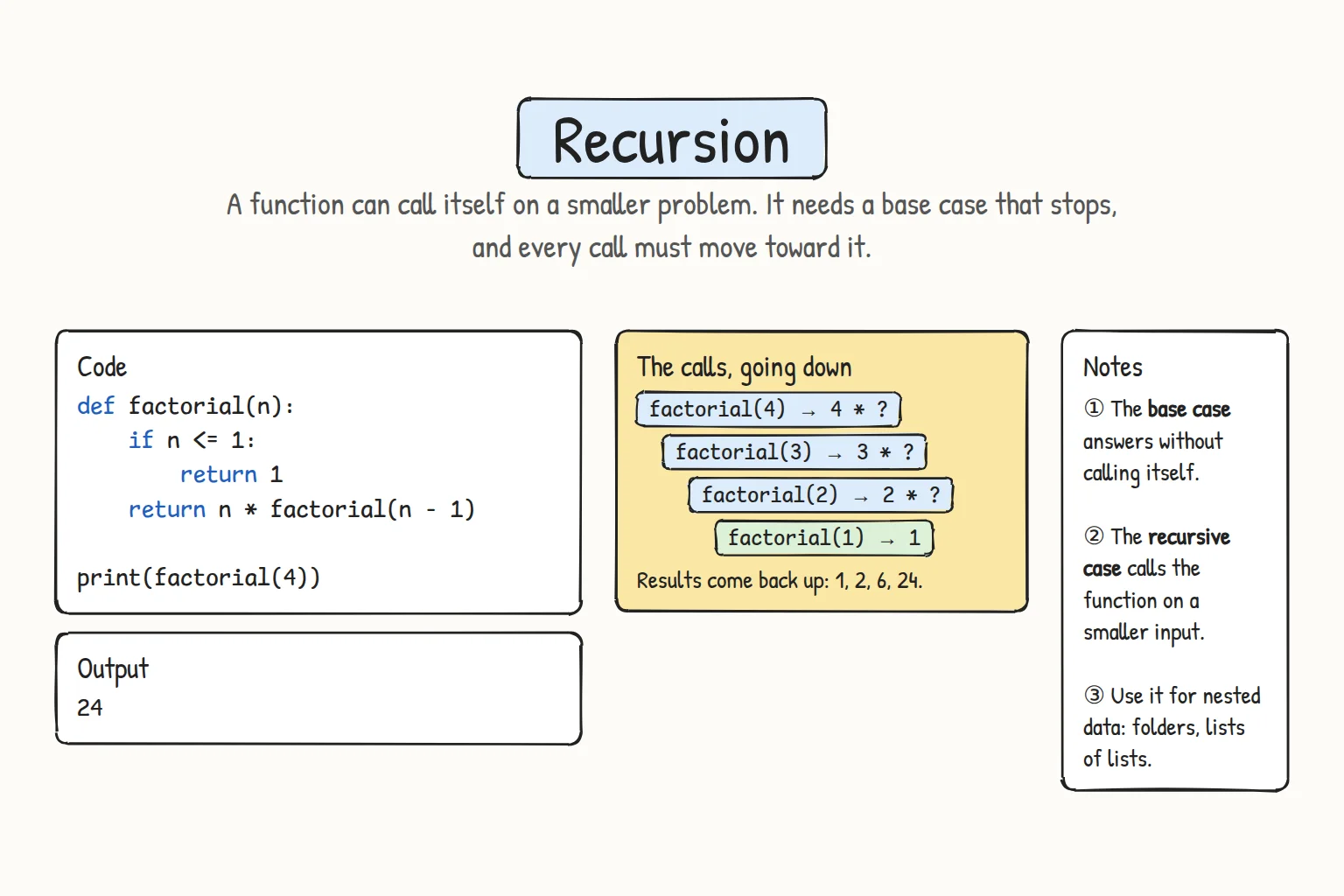
The classic example is the factorial. 5! is 5 × 4 × 3 × 2 × 1, and it can be described in terms of itself: 5! is 5 × 4!.
def factorial(n):
    if n <= 1:                      # base case
        return 1
    return n * factorial(n - 1)     # recursive case

print(factorial(5))
print(factorial(20))120
2432902008176640000Read the recursive case as a trust statement: "assume factorial(n - 1) already works, then my job is only to multiply by n." You don't trace all the calls in your head. You check that the base case is right and that each step moves toward it.
What happens on the call stack
When a function calls itself, the first call does not end. It waits, with its own local variables, until the inner call returns. Python keeps the waiting calls on the call stack, the same structure you saw in a traceback in Reading Errors and Debugging. Prints with indentation make the stack visible:
def factorial(n, depth=0):
    indent = "  " * depth
    print(f"{indent}factorial({n}) starts")
    if n <= 1:
        print(f"{indent}factorial({n}) returns 1")
        return 1
    result = n * factorial(n - 1, depth + 1)
    print(f"{indent}factorial({n}) returns {result}")
    return result

factorial(4)factorial(4) starts
factorial(3) starts
factorial(2) starts
factorial(1) starts
factorial(1) returns 1
factorial(2) returns 2
factorial(3) returns 6
factorial(4) returns 24The calls go down to the base case and the results come back up: 1, then 2 × 1, then 3 × 2, then 4 × 6. Each level has its own n, exactly as Variable Scope promised: locals belong to one call.
When there is no base case
If the function never reaches a base case, the stack grows until Python stops it:
def countdown(n):
    print(n)
    countdown(n - 1)   # no base case: n just keeps shrinking

countdown(3)3
2
1
0
-1
...
File "main.py", line 3, in countdown
countdown(n - 1) # no base case: n just keeps shrinking
~~~~~~~~~^^^^^^^
[Previous line repeated 996 more times]
RecursionError: maximum recursion depth exceededThe default limit is about 1,000 nested calls (sys.getrecursionlimit()). Python doesn't optimize recursion away, so a recursive function that counts to a million will fail where a loop wouldn't. That is the trade-off. Use recursion when the depth is small, like the depth of a folder tree, not the length of a list.
Recursion or a loop?
Everything countdown and factorial do, a for loop does more simply, and you should write the loop. Recursion earns its place when the data is nested to an unknown depth. Suppose an order can contain items or bundles, and a bundle can contain bundles:
def total(item):
    if isinstance(item, list):                     # a bundle: add up its parts
        return sum(total(part) for part in item)
    return item                                    # a single price

order = [15000, [8000, 8000], [12000, [5000, 5000]]]
print(total(order))53000isinstance(item, list) is True when item is a list, which is how total tells a bundle from a single price. A loop with if isinstance(...) inside would handle two levels, then three, and still be wrong for four. The recursive version handles any depth in three lines, because a bundle is just a smaller order. The same shape works for the nested dictionaries from Nested Data, such as a folder tree:
folder = {
    "docs": {"plan.md": 4, "notes.txt": 2},
    "photos": {"trip": {"bukhara.jpg": 3200, "khiva.jpg": 2900}, "cat.jpg": 800},
    "readme.md": 1,
}

def total_size(item):
    if isinstance(item, dict):                 # a folder: add up its contents
        return sum(total_size(child) for child in item.values())
    return item                                # a file: its size in KB

def show(item, name="/", depth=0):
    print("  " * depth + name)
    if isinstance(item, dict):
        for child_name, child in item.items():
            show(child, child_name, depth + 1)

show(folder)
print(total_size(folder), "KB")/
docs
plan.md
notes.txt
photos
trip
bukhara.jpg
khiva.jpg
cat.jpg
readme.md
6907 KBshow passes depth + 1 down so each level is indented one step more: the extra parameter carries information down the calls, while the return value of total_size carries information back up.
Try it
Change the order structure, add a deeper bundle, or make show print file sizes next to file names.
Common mistakes
1. A base case that doesn't stop the function
def countdown(n):
    if n == 0:
        print("Liftoff!")
    print(n)          # Bad: this line still runs when n == 0
    countdown(n - 1)  # ... and so does this one

countdown(2)2
1
Liftoff!
0
-1
...
RecursionError: maximum recursion depth exceededThe base case printed its message but didn't return, so the recursive call happened anyway. Fix: end the base case with return (or put the recursive case in an else).
2. Forgetting to return the recursive result
def factorial(n):
    if n <= 1:
        return 1
    n * factorial(n - 1)      # Bad: the result is computed and thrown away

print(factorial(5))TypeError: unsupported operand type(s) for *: 'int' and 'NoneType'Without return, the recursive case returns None, and the level above tries to multiply by it. Fix: return n * factorial(n - 1). This is the same "print or return" trap from Return Values, one level deeper.
3. Not moving toward the base case
def digit_sum(n):
    if n < 10:
        return n
    return n % 10 + digit_sum(n)     # Bad: same n every time

print(digit_sum(2026))RecursionError: maximum recursion depth exceededEvery recursive call must receive a smaller problem: n // 10 here, n - 1 in countdown, text[1:] for a string, a child folder for a tree. If the argument never changes, the base case is never reached.
Practice
1. Digit sum
Write digit_sum(n) that returns the sum of the digits of a non-negative integer using recursion, and print the results for 2026, 7, and 999999. Hint: n % 10 is the last digit and n // 10 is the rest.
Solution
def digit_sum(n):
    if n < 10:
        return n
    return n % 10 + digit_sum(n // 10)

print(digit_sum(2026), digit_sum(7), digit_sum(999999))10 7 54The base case is a single digit. Each call peels off the last digit and hands the rest to a smaller call.
2. Power
Write power(base, exponent) that computes base ** exponent for a non-negative exponent without using ** or a loop. Print power(2, 10), power(5, 3), and power(7, 0).
Solution
def power(base, exponent):
    if exponent == 0:
        return 1
    return base * power(base, exponent - 1)

print(power(2, 10), power(5, 3), power(7, 0))1024 125 1Anything to the power 0 is 1: that is the base case, and it also makes power(7, 0) work.
3. Reverse a string
Write reverse(text) that returns the string backwards, using recursion rather than slicing with [::-1]. Print repr(reverse(word)) for "Samarkand", "non", "a", and "".
Solution
def reverse(text):
    if len(text) <= 1:
        return text
    return reverse(text[1:]) + text[0]

for word in ["Samarkand", "non", "a", ""]:
print(repr(reverse(word)))'dnakramaS'
'non'
'a'
''A string of length 0 or 1 is already reversed. Otherwise, reverse everything after the first character, then put the first character at the end.
4. Flatten a nested list
Write flatten(items) that turns [1, [2, 3], [4, [5, [6]]], 7] into [1, 2, 3, 4, 5, 6, 7], whatever the depth. Print the result.
Solution
def flatten(items):
    flat = []
    for item in items:
        if isinstance(item, list):
            flat.extend(flatten(item))
        else:
            flat.append(item)
    return flat

print(flatten([1, [2, 3], [4, [5, [6]]], 7]))[1, 2, 3, 4, 5, 6, 7]The loop handles one level, and the recursive call handles whatever is inside a nested list. extend adds the flattened sublist's items one by one instead of adding the list itself.
5. Search a folder tree
Using the folder dictionary from the lesson, write count_files(folder) that returns the number of files at any depth, and find(folder, name) that returns the path to the first file or folder with that name (like /photos/trip/khiva.jpg), or None if it isn't there. Print count_files(folder), find(folder, "khiva.jpg"), and find(folder, "missing.txt").
Solution
def count_files(folder):
    count = 0
    for child in folder.values():
        if isinstance(child, dict):
            count += count_files(child)
        else:
            count += 1
    return count

def find(folder, name, path=""):
    for child_name, child in folder.items():
        current = f"{path}/{child_name}"
        if child_name == name:
            return current
        if isinstance(child, dict):
            found = find(child, name, current)
            if found:
                return found
    return None

folder = {
    "docs": {"plan.md": 4, "notes.txt": 2},
    "photos": {"trip": {"bukhara.jpg": 3200, "khiva.jpg": 2900}, "cat.jpg": 800},
    "readme.md": 1,
}
print(count_files(folder))
print(find(folder, "khiva.jpg"))
print(find(folder, "missing.txt"))6
/photos/trip/khiva.jpg
Nonefind passes the path built so far down to each recursive call and passes the answer back up as soon as one call finds it. The final return None covers the case where nothing matched at this level.
Recap
- A recursive function calls itself on a smaller version of the problem.
- It needs a base case that returns without recursing, and a recursive case that moves toward it.
- Each call waits on the call stack with its own local variables; results come back up level by level.
- A missing or unreachable base case gives
RecursionErrorafter about 1,000 calls, so recursion suits shallow depth, not long sequences. - Use a loop for simple repetition, and recursion for data that is nested to an unknown depth: lists of lists, folder trees, nested dictionaries.