

Nested Data
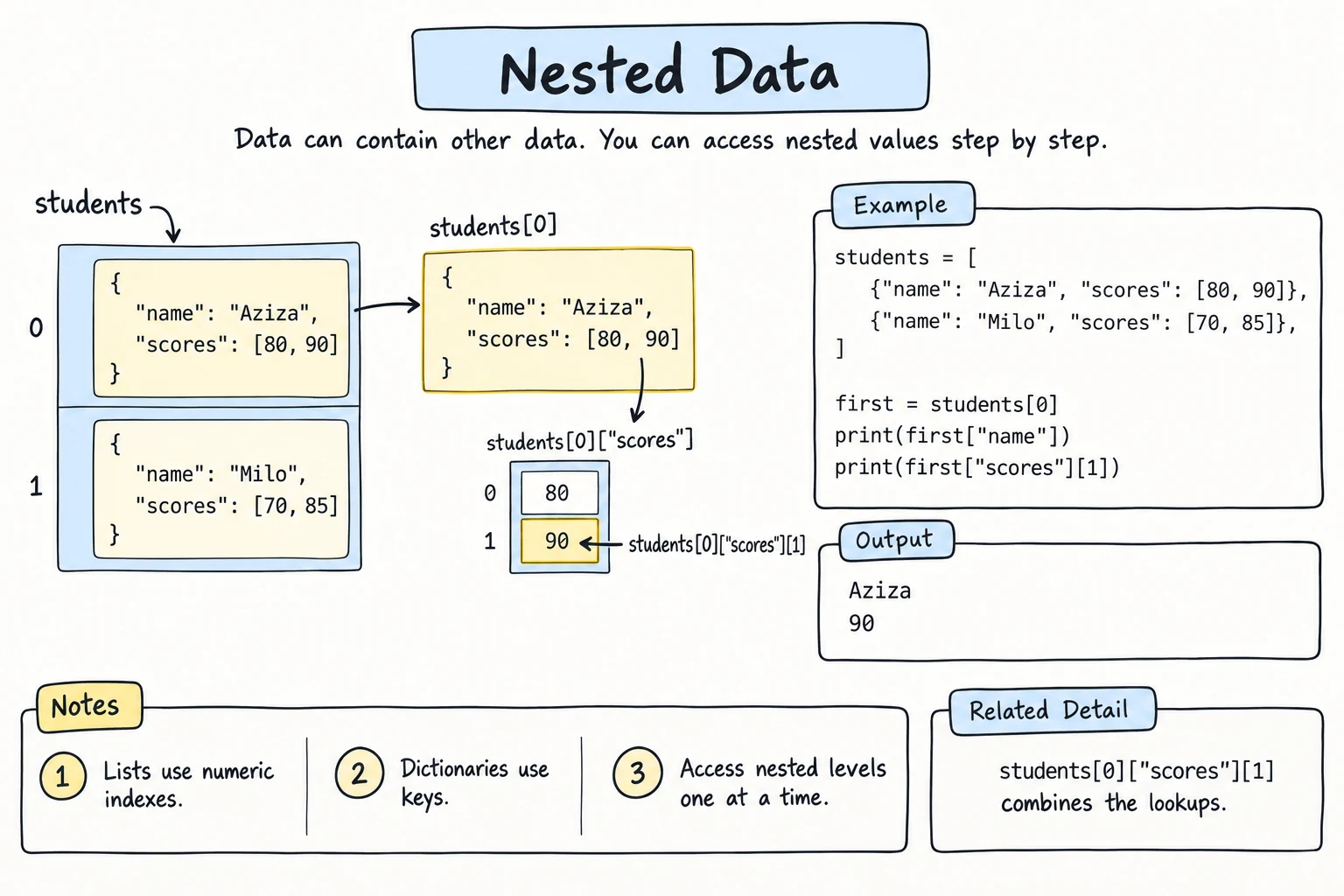
What you'll learn
- How to put collections inside collections
- The most common shapes: list of dictionaries, dictionary of lists, dictionary of dictionaries, and list of lists
- How to read and update values several levels deep
- How to loop through nested data and summarize it
- The shallow-copy and
[[0] * 3] * 3traps
Why it matters
Real data is rarely a flat list of numbers. A shop has products, each with a name, price, and tags. A school has classes of students with several grades. Data from websites and APIs (usually JSON) is nested in exactly this way, so once you can navigate nested structures, you can handle almost any data a program receives.
Shape 1: a list of dictionaries
Many records with the same fields. This is the most common shape: think of rows in a table.
students = [
    {"name": "Aziza", "age": 20, "city": "Tashkent"},
    {"name": "Bekzod", "age": 22, "city": "Samarkand"},
    {"name": "Dilnoza", "age": 19, "city": "Tashkent"},
]

print(students[1])             # one whole record
print(students[1]["name"])     # one field of one record

for student in students:       # one dictionary at a time
print(f"{student['name']:<8} {student['city']}"){'name': 'Bekzod', 'age': 22, 'city': 'Samarkand'}
Bekzod
Aziza Tashkent
Bekzod Samarkand
Dilnoza TashkentRead students[1]["name"] left to right: take students, get item 1 (a dictionary), then get its "name".
Sorting a list of dictionaries needs a key that picks the field:
students = [
    {"name": "Aziza", "age": 20},
    {"name": "Bekzod", "age": 22},
    {"name": "Dilnoza", "age": 19},
]

for s in sorted(students, key=lambda s: s["age"]):
print(s["name"], s["age"])Dilnoza 19
Aziza 20
Bekzod 22lambda s: s["age"] is a tiny function written inline: "given a student s, return s["age"]". sorted() calls it on each dictionary and sorts by the ages it gets back. Lambdas and Higher-Order Functions covers lambda properly.
Shape 2: a dictionary of lists
Several items grouped under each key.
grades = {
    "Aziza": [90, 85, 97],
    "Bekzod": [72, 64, 80],
}

grades["Aziza"].append(88)          # add a grade for Aziza
grades["Dilnoza"] = [79]            # add a new student

for name, scores in grades.items():
    average = sum(scores) / len(scores)
print(f"{name}: {scores} → {average:.1f}")Aziza: [90, 85, 97, 88] → 90.0
Bekzod: [72, 64, 80] → 72.0
Dilnoza: [79] → 79.0To build this shape from flat data, use the grouping pattern from Dictionaries:
orders = [("Aziza", "tea"), ("Bekzod", "coffee"), ("Aziza", "samsa")]

by_customer = {}
for customer, item in orders:
    by_customer.setdefault(customer, []).append(item)

print(by_customer){'Aziza': ['tea', 'samsa'], 'Bekzod': ['coffee']}Shape 3: a dictionary of dictionaries
Records you look up by a unique ID.
products = {
    "P001": {"name": "Notebook", "price": 15000, "stock": 40},
    "P002": {"name": "Pen", "price": 3000, "stock": 0},
    "P003": {"name": "Backpack", "price": 180000, "stock": 5},
}

print(products["P003"]["price"])

products["P002"]["stock"] += 25          # update one field
products["P004"] = {"name": "Ruler", "price": 5000, "stock": 12}

for code, info in products.items():
    status = "in stock" if info["stock"] > 0 else "SOLD OUT"
print(f"{code} {info['name']:<9} {info['price']:>8,} {status}")180000
P001 Notebook 15,000 in stock
P002 Pen 3,000 in stock
P003 Backpack 180,000 in stock
P004 Ruler 5,000 in stockUnlike a list of dictionaries, finding a record by ID needs no loop.
Shape 4: a list of lists (a grid)
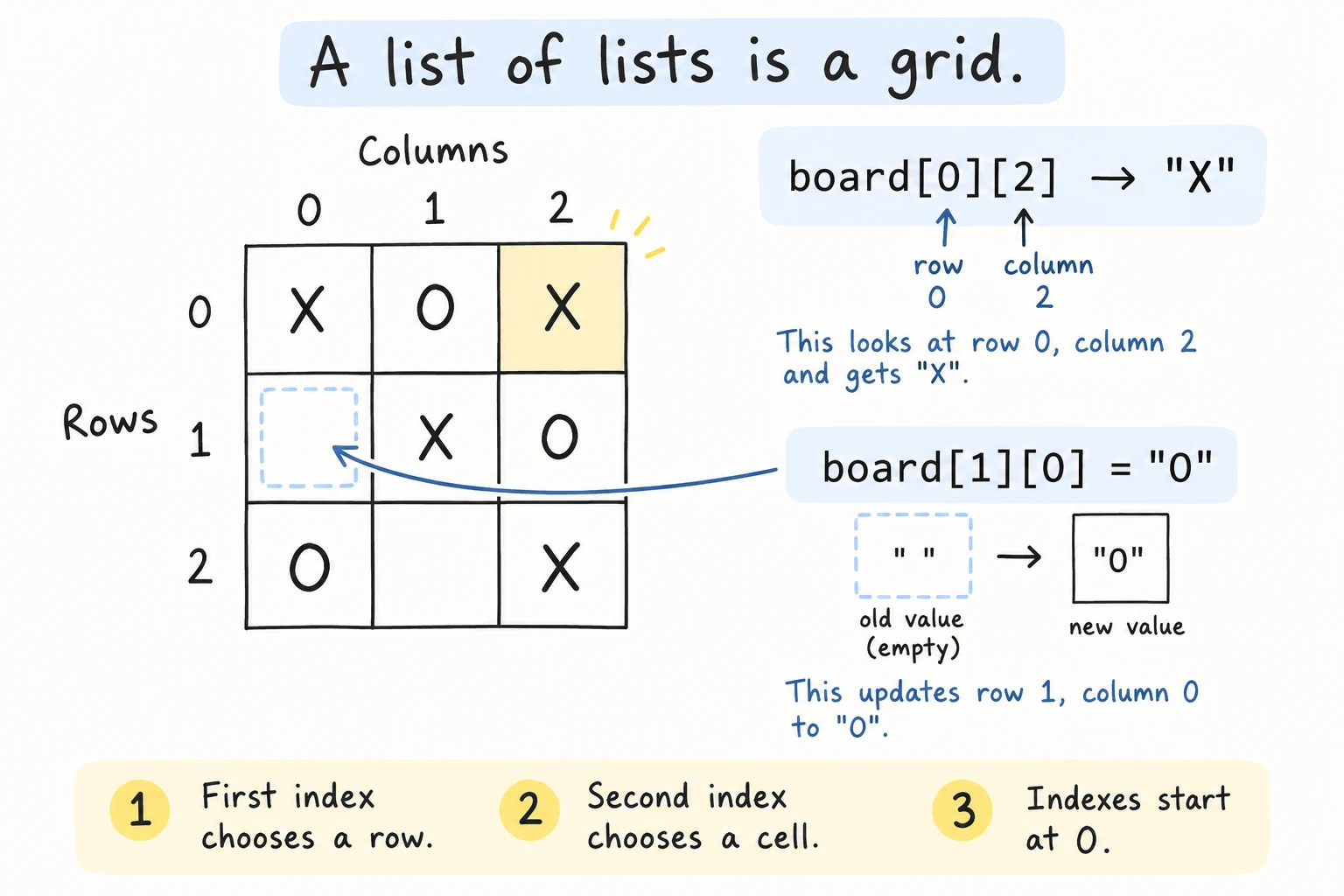
Rows and columns: a game board, a seating chart, or a table of numbers.
board = [
    ["X", "O", "X"],
    [" ", "X", "O"],
    ["O", " ", "X"],
]

print(board[0][2])     # row 0, column 2

board[1][0] = "O"      # place a mark

for row in board:
print(" | ".join(row))X
X | O | X
O | X | O
O | | Xboard[row][col]: the first index picks the row, and the second picks the item in that row.
Nested loops visit every cell:
matrix = [
    [1, 2, 3],
    [4, 5, 6],
]

total = 0
for row in matrix:
    for value in row:
        total += value

print(total)21Going deeper
Structures can nest as deep as needed. This looks like typical data from a web API:
order = {
    "id": 5012,
    "customer": {"name": "Aziza", "phone": "+998901234567"},
    "items": [
        {"product": "Tea", "qty": 2, "price": 15000},
        {"product": "Samsa", "qty": 4, "price": 8000},
    ],
    "delivery": {"address": {"city": "Tashkent", "street": "Amir Temur 1"}},
}

print(order["customer"]["name"])
print(order["items"][1]["product"])
print(order["delivery"]["address"]["city"])

total = 0
for item in order["items"]:
    total += item["qty"] * item["price"]
print(f"Order total: {total:,} som")Aziza
Samsa
Tashkent
Order total: 62,000 somWork out the path step by step
Check the type at each level: order is a dict → order["items"] a list → order["items"][1] a dict → ["product"] a string.
Missing keys deep inside
Chained .get() calls avoid a KeyError when parts may be missing. Give each level an empty dictionary as the default:
order = {"id": 5013, "customer": {"name": "Bekzod"}}

city = order.get("delivery", {}).get("address", {}).get("city", "unknown")
print(city)unknownPrinting nested data nicely
print() puts everything on one line. The pprint module ("pretty print") spreads it out. from pprint import pprint loads just the pprint function from that module (Modules and Imports explains this form):
from pprint import pprint

data = {"name": "Aziza", "scores": [90, 85, 97], "address": {"city": "Tashkent", "zip": "100000"}}
pprint(data, width=40){'address': {'city': 'Tashkent',
'zip': '100000'},
'name': 'Aziza',
'scores': [90, 85, 97]}The copying trap
.copy() makes a shallow copy: the outer container is new, but the inner lists and dictionaries are still shared:
original = {"name": "Aziza", "scores": [90, 85]}
shallow = original.copy()

shallow["name"] = "Changed"         # replacing a value: only the copy changes
shallow["scores"].append(100)       # changing a shared inner list: both see it

print(original)
print(shallow){'name': 'Aziza', 'scores': [90, 85, 100]}
{'name': 'Changed', 'scores': [90, 85, 100]}For a completely independent copy, import copy and use copy.deepcopy(original). It copies the inner lists and dictionaries too, at every level.
Try it
Explore the nested order data: add an item, change a quantity, or print the most expensive line.
Common mistakes
1. Wrong type at some level
students = [{"name": "Aziza"}, {"name": "Bekzod"}]
print(students["name"])TypeError: list indices must be integers or slices, not strstudents is a list, so it needs a number first: students[0]["name"]. Print type() one level at a time to find where the path goes wrong.
2. Building a grid with *
grid = [[0] * 3] * 3      # looks like 3 separate rows...
grid[0][0] = 1
print(grid)[[1, 0, 0], [1, 0, 0], [1, 0, 0]]* 3 repeated the same inner list three times. Fix: create a new row each time, with a list comprehension (the next lesson, Comprehensions, explains them):
grid = [[0] * 3 for _ in range(3)]
grid[0][0] = 1
print(grid)[[1, 0, 0], [0, 0, 0], [0, 0, 0]]3. Copying a grid with .copy()
grid = [[0, 0], [0, 0]]
backup = grid.copy()
grid[0][0] = 9
print(backup)[[9, 0], [0, 0]]The "backup" changed too. .copy() copied the outer list, but both lists hold the same row lists. Fix: copy.deepcopy(grid), or copy each row: [row.copy() for row in grid].
Practice
1. Book shelf
Given
books = [
    {"title": "Python Basics", "year": 2021, "pages": 320},
    {"title": "Data Science Intro", "year": 2019, "pages": 450},
    {"title": "Web with Python", "year": 2023, "pages": 280},
]
print the title of the second book, then the total number of pages of all books.
Solution
books = [
    {"title": "Python Basics", "year": 2021, "pages": 320},
    {"title": "Data Science Intro", "year": 2019, "pages": 450},
    {"title": "Web with Python", "year": 2023, "pages": 280},
]

print(books[1]["title"])

total_pages = 0
for book in books:
    total_pages += book["pages"]
print(total_pages)
2. Class averages
For classes = {"9A": [4, 5, 3, 5], "9B": [5, 5, 4], "9C": [3, 4, 4, 2, 5]}, print each class with its average grade (2 decimals).
Solution
classes = {"9A": [4, 5, 3, 5], "9B": [5, 5, 4], "9C": [3, 4, 4, 2, 5]}

for name, marks in classes.items():
    print(f"{name}: {sum(marks) / len(marks):.2f}")
3. Tic-tac-toe winner
Check every row and column of this board. Print the winning symbol if one holds three identical marks that aren't " ", otherwise No winner yet.
board = [
    ["X", "O", "O"],
    ["X", "O", " "],
    ["X", " ", "O"],
]
Solution
board = [
    ["X", "O", "O"],
    ["X", "O", " "],
    ["X", " ", "O"],
]

winner = None

for i in range(3):
    row = board[i]
    column = [board[r][i] for r in range(3)]
    for line in (row, column):
        if line[0] != " " and line[0] == line[1] == line[2]:
            winner = line[0]

print(f"Winner: {winner}" if winner else "No winner yet")Winner: X4. Inventory report
Using this dictionary of dictionaries, print the products that need restocking (stock below min_stock), and the total value of all stock (price × stock).
inventory = {
    "tea": {"price": 15000, "stock": 12, "min_stock": 20},
    "sugar": {"price": 9000, "stock": 50, "min_stock": 30},
    "coffee": {"price": 45000, "stock": 4, "min_stock": 10},
}
Solution
inventory = {
    "tea": {"price": 15000, "stock": 12, "min_stock": 20},
    "sugar": {"price": 9000, "stock": 50, "min_stock": 30},
    "coffee": {"price": 45000, "stock": 4, "min_stock": 10},
}

total_value = 0
for product, info in inventory.items():
    total_value += info["price"] * info["stock"]
    if info["stock"] < info["min_stock"]:
        need = info["min_stock"] - info["stock"]
        print(f"Restock {product}: order at least {need}")

print(f"Total stock value: {total_value:,} som")Restock tea: order at least 8
Restock coffee: order at least 6
Total stock value: 810,000 som5. Group and summarize
Turn these sales into a dictionary mapping each city to a dictionary with its number of sales and total amount. Print the cities by total, highest first.
sales = [
    {"city": "Tashkent", "amount": 120000},
    {"city": "Samarkand", "amount": 80000},
    {"city": "Tashkent", "amount": 45000},
    {"city": "Bukhara", "amount": 150000},
    {"city": "Samarkand", "amount": 30000},
]
Expected result:
Tashkent: 2 sales, 165,000 som
Bukhara: 1 sales, 150,000 som
Samarkand: 2 sales, 110,000 som
Solution
sales = [
    {"city": "Tashkent", "amount": 120000},
    {"city": "Samarkand", "amount": 80000},
    {"city": "Tashkent", "amount": 45000},
    {"city": "Bukhara", "amount": 150000},
    {"city": "Samarkand", "amount": 30000},
]

summary = {}
for sale in sales:
    city = sale["city"]
    if city not in summary:
        summary[city] = {"count": 0, "total": 0}
    summary[city]["count"] += 1
    summary[city]["total"] += sale["amount"]

ranked = sorted(summary.items(), key=lambda pair: pair[1]["total"], reverse=True)

for city, stats in ranked:
    print(f"{city}: {stats['count']} sales, {stats['total']:,} som")
summary.items() gives (city, stats) pairs, so the lambda key reaches into the inner dictionary with pair[1]["total"].
Recap
- Collections can contain other collections. Read access paths left to right:
data["items"][0]["price"]. - List of dicts for records with the same fields, dict of lists for groups, dict of dicts for records by ID, and list of lists for grids.
- Loop one level at a time, and use nested loops for grids. Chained
.get(key, {})handles optional parts, andpprintdisplays deep data. - Build grids with
[[0] * cols for _ in range(rows)], not[[0] * cols] * rows. .copy()is shallow, for dicts and grids alike. Usecopy.deepcopy()for fully independent nested copies.