

Closures and Decorators
What you'll learn
- What a closure is, and when an inner function needs
nonlocal - How to write a decorator step by step, with
*args,**kwargs, andfunctools.wraps - How decorators with arguments work, and in which order stacked decorators run
- How to use
functools.lru_cacheandfunctools.partial - How class decorators such as a registry (and
@dataclass) work
Why it matters
You have been using decorators for a while: @property in Properties and Encapsulation, @classmethod and @staticmethod in Class Attributes, Class Methods, and Static Methods, @contextmanager in The with Statement, and @pytest.mark.parametrize in Testing with pytest. Each time the @ line was a bit of magic. It isn't. A decorator is an ordinary function, and once you can write one, you can add logging, caching, retries, or checks to many functions without touching their code.
Closures and nonlocal
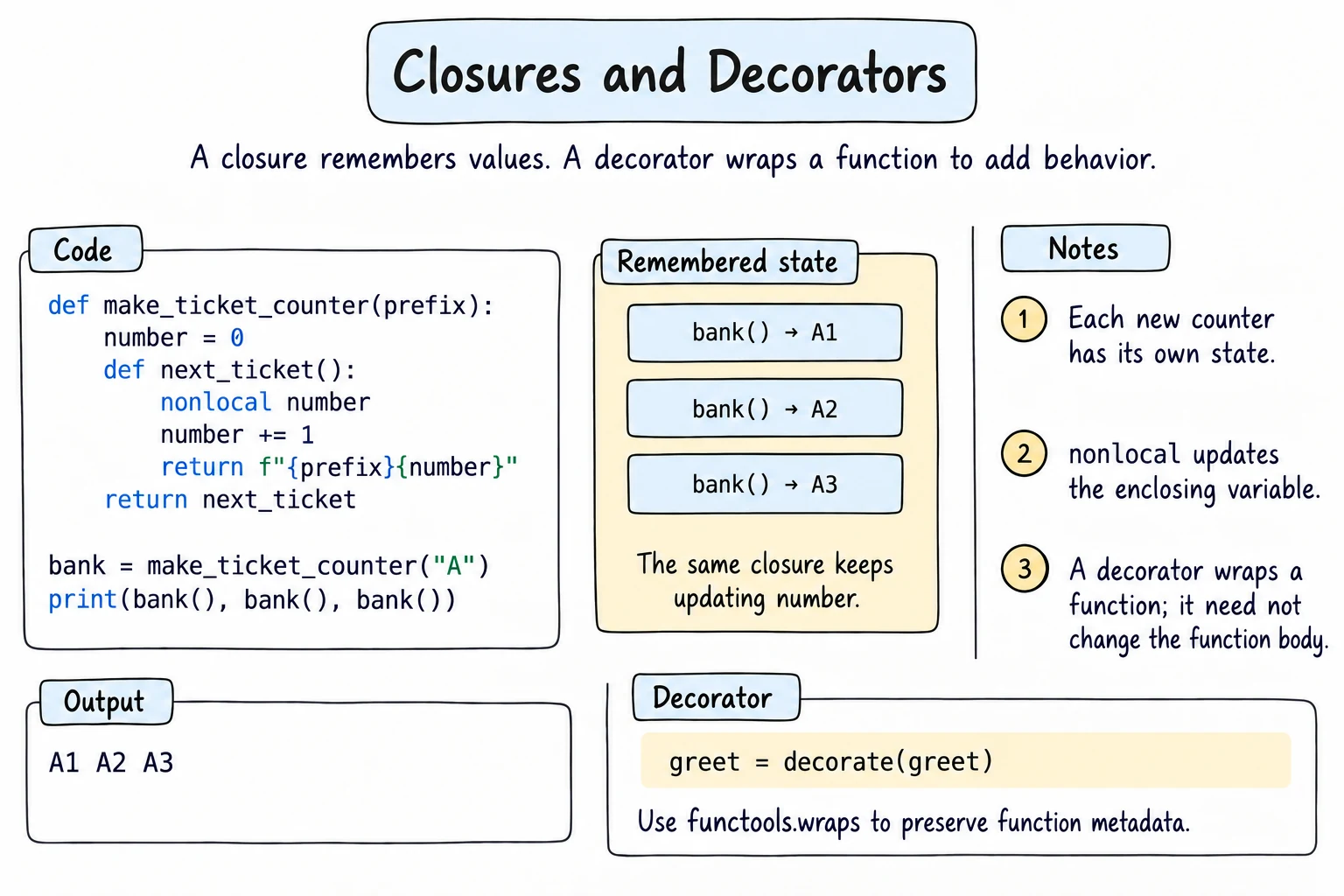
In Lambdas and Higher-Order Functions you saw that functions are values: you can pass them around and return them. When an inner function uses a variable of the function that created it, it keeps that variable alive after the outer function has finished. That is a closure:
def make_ticket_counter(prefix):
    number = 0

    def next_ticket():
        nonlocal number     # assign to the enclosing variable
        number += 1
        return f"{prefix}{number}"

    return next_ticket

bank = make_ticket_counter("A")
print(bank(), bank(), bank())

pharmacy = make_ticket_counter("B")   # a fresh, separate number
print(pharmacy())A1 A2 A3
B1Reading an enclosing variable, like prefix, needs nothing special, but assigning to it needs nonlocal, as Variable Scope explained. Each call to make_ticket_counter() creates its own number, so bank and pharmacy never interfere.
Writing a decorator step by step
A decorator is a function that takes a function and returns a new function, usually an inner wrapper that does something extra around the original call. To work with any function, the wrapper accepts *args, **kwargs, passes them on, and returns the result:
def announce(func):
    def wrapper(*args, **kwargs):
        print(f"Calling {func.__name__} with {args} {kwargs}")
        result = func(*args, **kwargs)
        print(f"{func.__name__} returned {result!r}")
        return result
    return wrapper

def add(a, b):
    return a + b

add = announce(add)          # decorating by hand
add(2, 3)

@announce                    # the same thing with @
def total_price(price, quantity=1):
    return price * quantity

total = total_price(15000, quantity=3)
print(total)Calling add with (2, 3) {}
add returned 5
Calling total_price with (15000,) {'quantity': 3}
total_price returned 45000
45000@announce above a def means exactly total_price = announce(total_price). The name now points to wrapper, and wrapper still reaches the original function through the closure variable func.
functools.wraps
Because the name points to wrapper, the decorated function reports the wrapper's __name__ and docstring instead of its own, and logging, help(), and pytest all read them. functools.wraps copies them from the original function onto the wrapper:
from functools import wraps

def plain(func):
    def wrapper(*args, **kwargs):
        return func(*args, **kwargs)
    return wrapper

def careful(func):
    @wraps(func)
    def wrapper(*args, **kwargs):
        return func(*args, **kwargs)
    return wrapper

@plain
def greet(name):
    """Return a greeting."""
    return f"Salom, {name}!"

@careful
def farewell(name):
    """Return a goodbye."""
    return f"Xayr, {name}!"

print(greet.__name__, greet.__doc__)
print(farewell.__name__, farewell.__doc__)wrapper None
farewell Return a goodbye.@wraps(func) is itself a decorator with an argument. Always use it.
Decorators with arguments
@retry(times=3) has parentheses, so retry(times=3) runs first and must return a decorator. That means one more level of nesting: a factory that returns a decorator that returns a wrapper:
from functools import wraps

def retry(times):
    def decorator(func):
        @wraps(func)
        def wrapper(*args, **kwargs):
            for attempt in range(1, times + 1):
                try:
                    return func(*args, **kwargs)
                except ConnectionError as error:
                    print(f"  attempt {attempt} failed: {error}")
            raise ConnectionError(f"gave up after {times} attempts")
        return wrapper
    return decorator

answers = iter(["timeout", "timeout", "1 USD = 12,650 som"])

@retry(times=3)
def fetch_rate():
    answer = next(answers)
    if answer == "timeout":
        raise ConnectionError(answer)
    return answer

print(fetch_rate()) attempt 1 failed: timeout
attempt 2 failed: timeout
1 USD = 12,650 somBy hand, this is fetch_rate = retry(times=3)(fetch_rate). times lives in the closure, so each decorated function has its own setting.
Stacking decorators
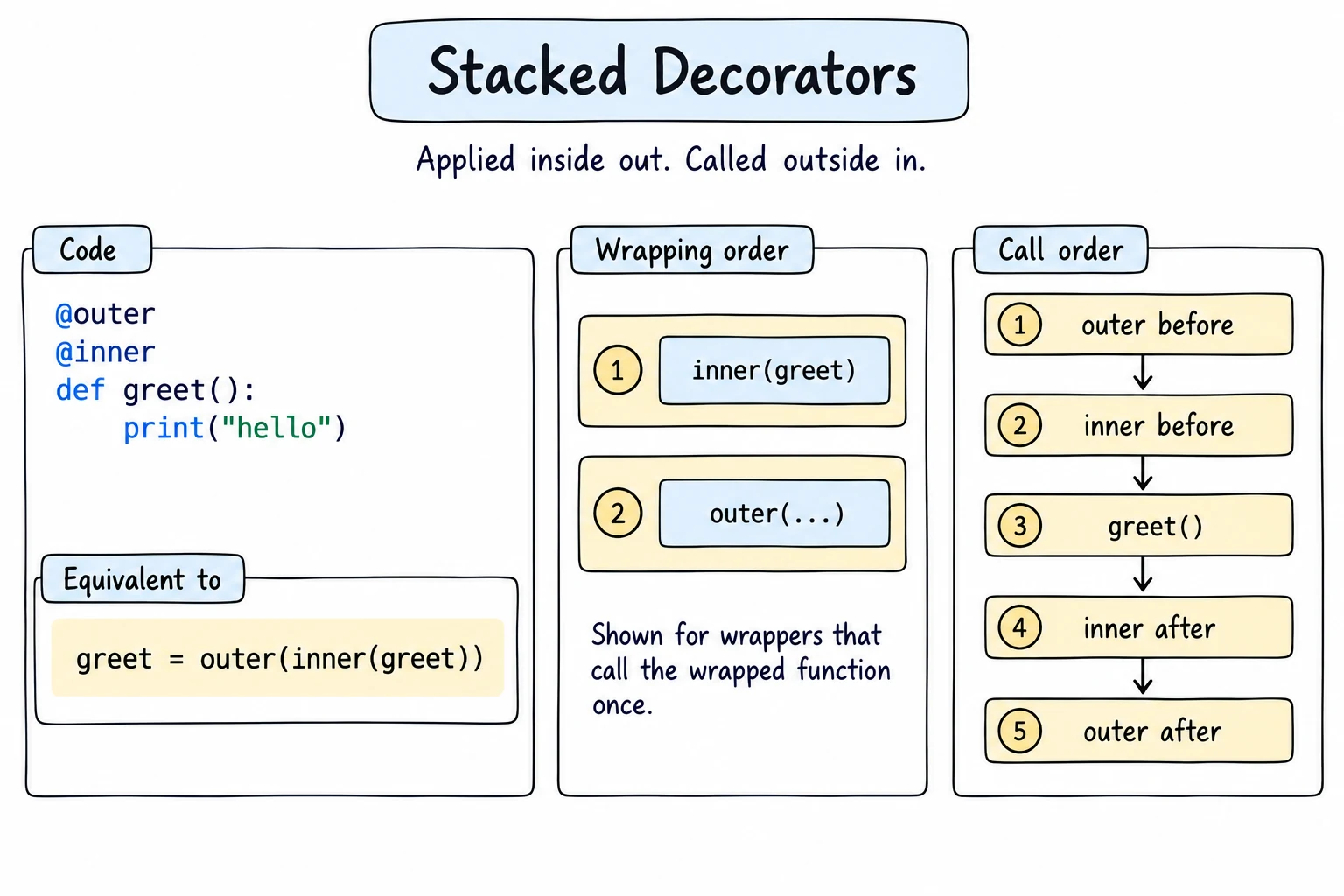
You can put several decorators on one function. They are applied bottom-up (the one nearest the def wraps first), so at call time the top one runs outermost:
from functools import wraps

def bold(func):
    @wraps(func)
    def wrapper(*args, **kwargs):
        return "<b>" + func(*args, **kwargs) + "</b>"
    return wrapper

def italic(func):
    @wraps(func)
    def wrapper(*args, **kwargs):
        return "<i>" + func(*args, **kwargs) + "</i>"
    return wrapper

@bold
@italic
def city(name):
    return name

print(city("Samarkand")) # bold(italic(city))<b><i>Samarkand</i></b>Order matters in real code too: put @retry outside @announce and every attempt is logged; swap them and only the whole retried call is.
lru_cache and partial
functools ships ready-made tools built on these ideas. lru_cache remembers earlier results, so a slow recursive Fibonacci becomes fast. Count the calls:
from functools import lru_cache

calls = 0

def fib(n):
    global calls
    calls += 1
    return n if n < 2 else fib(n - 1) + fib(n - 2)

print(fib(25), "calls:", calls)

calls = 0

@lru_cache(maxsize=None)
def fast_fib(n):
    global calls
    calls += 1
    return n if n < 2 else fast_fib(n - 1) + fast_fib(n - 2)

print(fast_fib(25), "calls:", calls)
print(fast_fib.cache_info())75025 calls: 242785
75025 calls: 26
CacheInfo(hits=23, misses=26, maxsize=None, currsize=26)@functools.cache is short for lru_cache(maxsize=None). Arguments must be hashable, and only cache functions whose result depends on nothing but their arguments.
partial, which you met in Lambdas and Higher-Order Functions, pre-fills some arguments and gives you a new function, so you don't have to write that closure yourself:
from functools import partial

def price_with_tax(price, rate):
    return round(price * (1 + rate))

with_vat = partial(price_with_tax, rate=0.12)
print(with_vat(100000))112000Class decorators
A decorator can receive a class too, do something with it, and return it. A common use is a registry that collects classes by name:
PAYMENT_METHODS = {}

def register(cls):
    PAYMENT_METHODS[cls.__name__.lower()] = cls
    return cls                  # give the class back unchanged

@register
class Cash:
    fee = 0

@register
class Card:
    fee = 0.01

print(list(PAYMENT_METHODS))
method = PAYMENT_METHODS["card"]()
print(type(method).__name__, method.fee)['cash', 'card']
Card 0.01Adding a payment method is now just a class with @register on top. @dataclass from Dataclasses is also a class decorator: it reads the annotations and adds __init__, __repr__, and __eq__ to the class before returning it.
Try it
Decorate another function with @count_calls, or make the wrapper also print the arguments.
Common mistakes
1. Forgetting to return the wrapper
def announce(func):
    def wrapper(*args, **kwargs):
        print("Calling", func.__name__)
        return func(*args, **kwargs)
    # Bad: no return wrapper

@announce
def greet(name):
    return f"Salom, {name}!"

print(greet("Aziza"))TypeError: 'NoneType' object is not callableThe decorator returned None, so greet is None. return wrapper() is just as wrong: it calls the function while decorating. Fix: end the decorator with return wrapper, no parentheses.
2. Forgetting @wraps
def logged(func):
    def wrapper(*args, **kwargs):
        return func(*args, **kwargs)
    return wrapper

@logged
def home():
    return "Home page"

@logged
def about():
    return "About us"

pages = {page.__name__: page for page in [home, about]}
print(list(pages))
print(pages["wrapper"]())['wrapper']
About usBoth functions are called wrapper, so the second one overwrote the first. Fix: put @wraps(func) above def wrapper.
3. Swallowing the return value
def announce(func):
    def wrapper(*args, **kwargs):
        print("Calling", func.__name__)
        func(*args, **kwargs)       # Bad: result is thrown away
    return wrapper

@announce
def total(prices):
    return sum(prices)

print("Total:", total([15000, 8000]))Calling total
Total: NoneFix: return func(*args, **kwargs), or save it in result and return it at the end.
4. Changing an outer variable without nonlocal
def make_counter():
    count = 0
    def counter():
        count += 1          # Bad: assignment makes count local
        return count
    return counter

tick = make_counter()
tick()UnboundLocalError: cannot access local variable 'count' where it is not associated with a valueFix: add nonlocal count as the first line of counter.
Practice
1. Log every call
Write a decorator @log_calls that prints log: NAME(ARGS) before each call and returns the result. Decorate add(a, b) and print add(2, 3).
Solution
from functools import wraps

def log_calls(func):
    @wraps(func)
    def wrapper(*args, **kwargs):
        print(f"log: {func.__name__}{args}")
        return func(*args, **kwargs)
    return wrapper

@log_calls
def add(a, b):
    return a + b

print(add(2, 3))log: add(2, 3)
52. Running total
Write make_wallet(balance) that returns a function spend(amount). Each call subtracts the amount and returns the new balance. Start at 100,000 som, spend 25,000 and then 40,000, and print each new balance.
Solution
def make_wallet(balance):
    def spend(amount):
        nonlocal balance
        balance -= amount
        return balance
    return spend

spend = make_wallet(100000)
print(spend(25000))
print(spend(40000))75000
350003. Memoize by hand
Without functools, write @memoize that stores results in a dictionary inside the closure. Decorate a recursive fib, count how many times its body runs, and print fib(30) and the count.
Solution
from functools import wraps

def memoize(func):
    cache = {}

    @wraps(func)
    def wrapper(n):
        if n not in cache:
            cache[n] = func(n)
        return cache[n]
    return wrapper

runs = 0

@memoize
def fib(n):
    global runs
    runs += 1
    return n if n < 2 else fib(n - 1) + fib(n - 2)

print(fib(30))
print("body ran", runs, "times")832040
body ran 31 timesThe recursive calls go through the decorated name fib, so they hit the cache too.
4. Repeat with an argument
Write @repeat(n) that calls the function n times and returns a list of all results. Decorate roll(), which returns the next number from iter([3, 6, 2]), with @repeat(3) and print the result.
Solution
from functools import wraps

def repeat(n):
    def decorator(func):
        @wraps(func)
        def wrapper(*args, **kwargs):
            return [func(*args, **kwargs) for _ in range(n)]
        return wrapper
    return decorator

dice = iter([3, 6, 2])

@repeat(3)
def roll():
    return next(dice)

print(roll())
print(roll.__name__)[3, 6, 2]
roll5. Type checks
Write @validate_types(**types), for example @validate_types(city=str, price=int). Before each call, check every named argument (passed by position or keyword) and raise TypeError with a clear message if the type is wrong. Hint: inspect.signature(func).bind(*args, **kwargs).arguments gives a dict of names to values. Print delivery("Bukhara", 30000), then call it with ("Nukus", "30000") and (42, 30000) and print Error: MESSAGE for each.
Solution
import inspect
from functools import wraps

def validate_types(**types):
    def decorator(func):
        signature = inspect.signature(func)

        @wraps(func)
        def wrapper(*args, **kwargs):
            arguments = signature.bind(*args, **kwargs).arguments
            for name, expected in types.items():
                if name in arguments and not isinstance(arguments[name], expected):
                    actual = type(arguments[name]).__name__
                    raise TypeError(f"{name} must be {expected.__name__}, got {actual}")
            return func(*args, **kwargs)
        return wrapper
    return decorator

@validate_types(city=str, price=int)
def delivery(city, price):
    return f"Delivery to {city}: {price:,} som"

print(delivery("Bukhara", 30000))
for args in [("Nukus", "30000"), (42, 30000)]:
    try:
        delivery(*args)
    except TypeError as error:
print("Error:", error)Delivery to Bukhara: 30,000 som
Error: price must be int, got str
Error: city must be str, got intbind matches arguments to parameters as Python would, so keyword calls are checked too.
Recap
- A closure is an inner function that remembers variables of its enclosing function; use
nonlocalto assign to them. - A decorator takes a function and returns a wrapper;
@decomeansfunc = deco(func). - Wrappers accept
*args, **kwargs, return the result, and use@wraps(func)to keep the name and docstring. - A decorator with arguments is a factory:
@retry(times=3)meansfunc = retry(times=3)(func). Stacked decorators apply bottom-up. lru_cachecaches results,partialpre-fills arguments, and class decorators such as a registry or@dataclassreceive and return a class.