

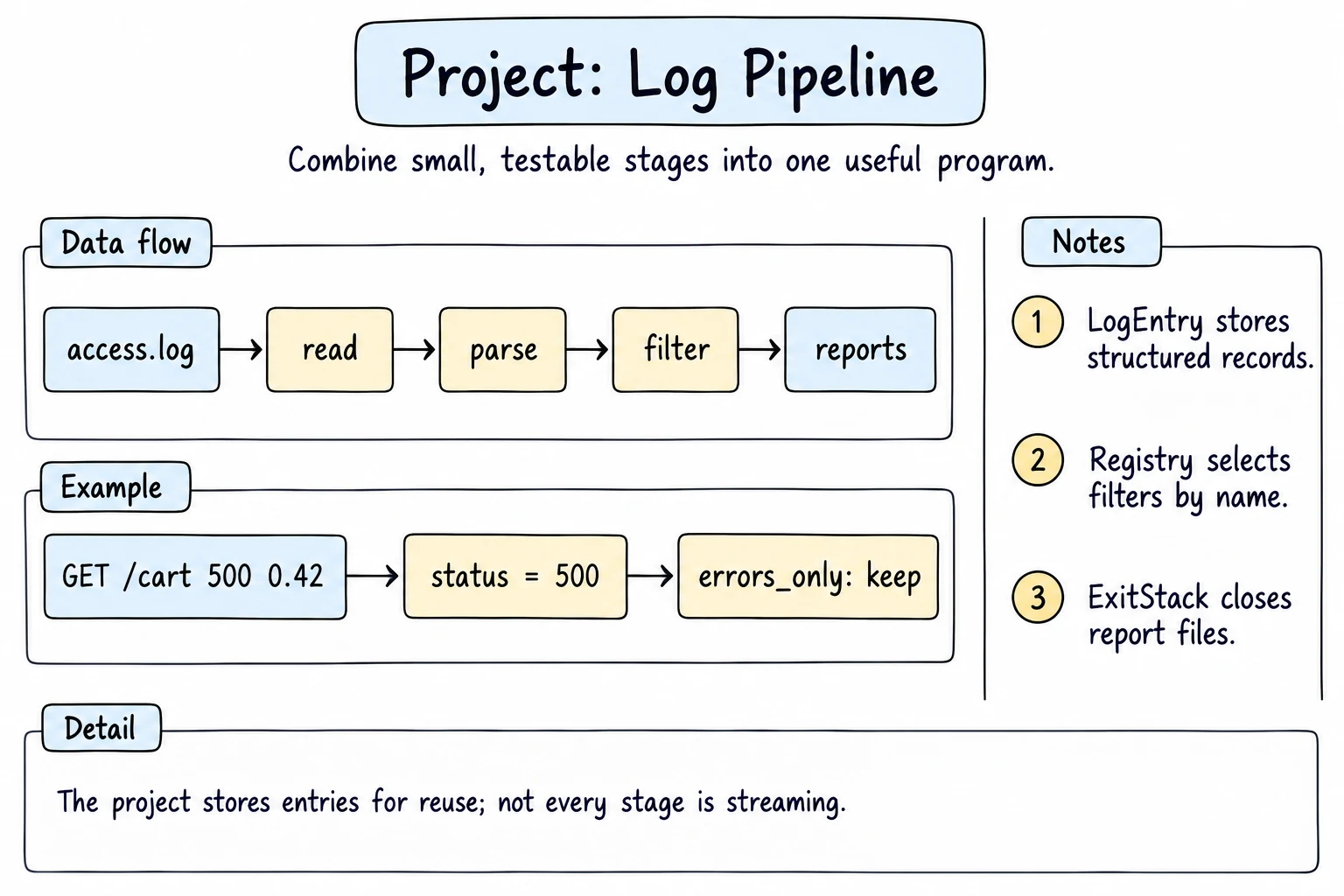
Project: Log Pipeline
What you'll learn
- How to build a lazy pipeline of generators that parses a log line by line
- How to register pipeline steps with a decorator and choose them by name
- How to swap behavior with strategy functions and write reports through context managers and
ExitStack - How to add an async stage with
asyncio.gatherand a semaphore to an otherwise normal program - How to test the pure parts of the pipeline with plain
assertand withpytest
Why it matters
Every web server writes an access log: one line per request, with the time, page, status code, and duration. When a Tashkent online shop suddenly gets slow, someone opens that log and asks: which pages fail, which are slow, and where do the bad requests come from? In this project you build logpipe, a small program that answers those questions, using every tool from this module together.
Goal and features
Your program reads an access log, skips broken lines, filters and groups the requests, looks up where they came from, and writes reports:
| Feature | Tools you will use | Lesson |
|---|---|---|
| Read a log of any size lazily | generators | Iterators and Generators |
| Immutable, compact records | @dataclass(frozen=True, slots=True) | Dataclasses, The Python Data Model |
| Filters chosen by name | a registry filled by a decorator | Closures and Decorators |
| Group by path, status, or hour | strategy functions | Pythonic Design Patterns |
| Reports that always close | @contextmanager, ExitStack | Context Managers in Depth |
| City lookup per IP | asyncio.gather, Semaphore | Async and await |
| Time each stage | a @timer decorator | Memory and Performance |
| Check the logic | asserts, pytest with tmp_path | Testing with pytest, Testing in Depth |
Design
A log line looks like 2026-09-16T10:03:21 GET /products/12 200 0.128 192.168.1.20. The fields are time, method, path, status code, duration in seconds, and client IP. The data flows through small stages:
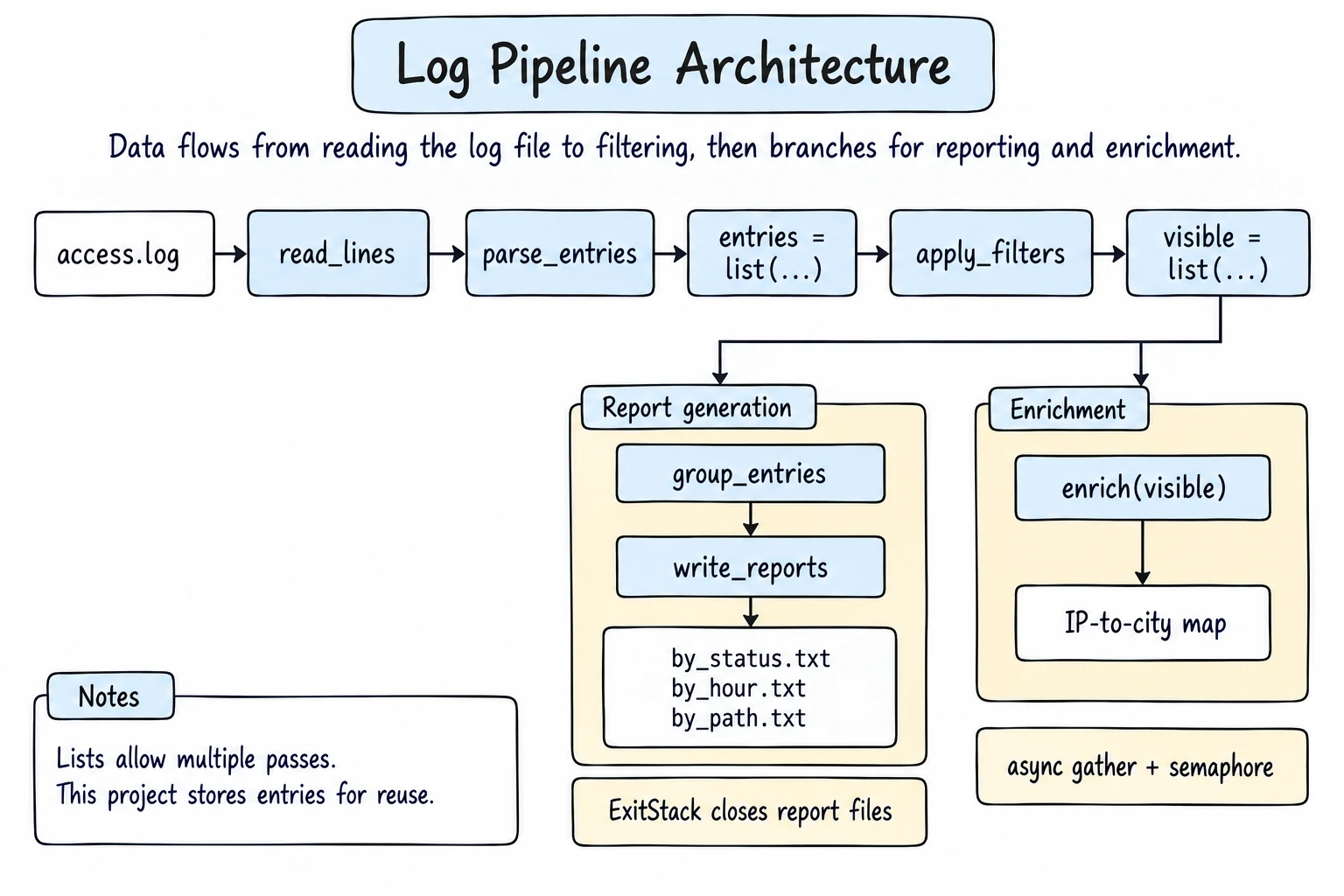
access.log
read_lines(path)generator: yields non-blank lines
parse_entries(lines, bad)generator: yieldsLogEntry, collects bad lines
apply_filters(entries, ["no_static", "errors_only"])names are looked up in theFILTERSregistry
group_entries(entries, key)keyisby_path,by_statusorby_hour
await enrich(entries)async: IP to city
report_file(path, title)context manager, one per report (ExitStack)
Stages are generators, so the same code handles a small sample and a 3 GB log. Parsing, filtering, and grouping are pure (values in, values out), so they are easy to test. Input and output live at the edges: reading the file, the geo service, and the reports.
Step 1: Create a sample log and read it lazily
A real user would point the program at a server's log file. To stay runnable, the program writes a sample log first, with a broken line and a blank line on purpose.
from pathlib import Path

SAMPLE_LOG = """\
2026-09-16T09:58:10 GET /products 200 0.084 10.0.0.5
2026-09-16T09:59:41 GET /static/app.css 200 0.012 10.0.0.5
2026-09-16T10:01:02 GET /products/12 200 0.128 192.168.1.20
2026-09-16T10:15:02 GET /cart

2026-09-16T10:18:40 POST /login 401 0.310 203.0.113.7
"""
Path("access.log").write_text(SAMPLE_LOG, encoding="utf-8")

def read_lines(path):
    with open(path, encoding="utf-8") as file:
        for line in file:
            line = line.strip()
            if line:
                yield line

lines = read_lines("access.log")
print(type(lines).__name__)
print(next(lines))
print(sum(1 for _ in lines), "more lines")generator
2026-09-16T09:58:10 GET /products 200 0.084 10.0.0.5
4 more linesCalling the generator function read_lines runs nothing yet. The file opens on the first next() and closes when the loop ends, because the with lives inside the generator. The blank line is skipped, so after next() 4 lines are left.
Step 2: Parse lines into frozen dataclasses
Each line becomes a LogEntry. It is frozen, so a filter cannot change an entry by accident (assignment raises FrozenInstanceError), and it uses slots=True, so thousands of entries store fields in fixed slots instead of a __dict__ each, which saves memory (The Python Data Model).
from dataclasses import dataclass
from datetime import datetime

@dataclass(frozen=True, slots=True)
class LogEntry:
    time: datetime
    method: str
    path: str
    status: int
    duration: float
    ip: str

    @property
    def hour(self):
        return self.time.strftime("%H:00")

def parse_line(line):
    parts = line.split()
    if len(parts) != 6:
        raise ValueError(f"expected 6 fields, got {len(parts)}: {line!r}")
    stamp, method, path, status, duration, ip = parts
    return LogEntry(datetime.fromisoformat(stamp), method, path,
                    int(status), float(duration), ip)

entry = parse_line("2026-09-16T10:03:21 GET /products/12 200 0.128 192.168.1.20")
print(entry)
print(entry.hour, entry.status + 1)
print(hasattr(entry, "__dict__"))LogEntry(time=datetime.datetime(2026, 9, 16, 10, 3, 21), method='GET', path='/products/12', status=200, duration=0.128, ip='192.168.1.20')
10:00 201
Falseparse_line converts types right away, so later stages compare numbers, never strings. It checks the field count before unpacking and raises a ValueError that includes the broken line.
One bad line must not stop the pipeline. A second generator catches the error, remembers the line, and moves on (the entry has only two fields here, to keep the block short):
from dataclasses import dataclass

@dataclass(frozen=True, slots=True)
class LogEntry:
    path: str
    status: int

def parse_line(line):
    parts = line.split()
    if len(parts) != 2:
        raise ValueError(f"expected 2 fields, got {len(parts)}: {line!r}")
    return LogEntry(parts[0], int(parts[1]))

def parse_entries(lines, bad_lines):
    for number, line in enumerate(lines, start=1):
        try:
            yield parse_line(line)
        except ValueError as error:
            bad_lines.append((number, str(error)))

bad_lines = []
print(list(parse_entries(["/products 200", "/cart", "/checkout 5OO"], bad_lines)))
print(bad_lines)[LogEntry(path='/products', status=200)]
[(2, "expected 2 fields, got 1: '/cart'"), (3, "invalid literal for int() with base 10: '5OO'")]int("5OO") (with the letter O) also raises ValueError, so the same except catches both kinds of broken line.
Step 3: A filter registry built with a decorator
You want to choose filters by name, for example from a command-line option --filter errors_only. A dictionary from names to functions does that, and a decorator factory fills it, so adding a filter means writing one decorated function:
from dataclasses import dataclass

@dataclass(frozen=True, slots=True)
class LogEntry:
    path: str
    status: int
    duration: float

FILTERS = {}

def filter_step(name):
    def register(func):
        if name in FILTERS:
            raise ValueError(f"filter {name!r} is already registered")
        FILTERS[name] = func
        return func
    return register

@filter_step("no_static")
def no_static(entry):
    return not entry.path.startswith("/static/")

@filter_step("errors_only")
def errors_only(entry):
    return entry.status >= 400

@filter_step("slow")
def slow(entry):
    return entry.duration >= 0.5

def apply_filters(entries, names):
    steps = [FILTERS[name] for name in names]
    for entry in entries:
        if all(step(entry) for step in steps):
            yield entry

entries = [
    LogEntry("/static/app.css", 200, 0.012),
    LogEntry("/checkout", 500, 1.912),
    LogEntry("/products/99", 404, 0.020),
]
print(sorted(FILTERS))
print([e.path for e in apply_filters(entries, ["errors_only"])])
print([e.path for e in apply_filters(entries, ["errors_only", "slow"])])['errors_only', 'no_static', 'slow']
['/checkout', '/products/99']
['/checkout']filter_step("slow") returns register, a closure that remembers name. register returns func unchanged, so errors_only stays a normal function you can test directly. apply_filters looks up the names before the loop, so a typo fails with a KeyError before the first entry is checked, not in the middle of a huge file. Registering a second filter named "slow" raises ValueError (see Common mistakes for why).
Step 4: Grouping strategies
Instead of an if mode == "path": ... elif ... chain, each way of grouping is a small strategy function that returns a key, and group_entries accepts whichever one you pass. No classes needed, as in Pythonic Design Patterns.
from collections import Counter, defaultdict
from dataclasses import dataclass
from datetime import datetime

@dataclass(frozen=True, slots=True)
class LogEntry:
    time: datetime
    path: str
    status: int
    duration: float

def by_path(entry):
    return entry.path

def by_status(entry):
    return str(entry.status)

def by_hour(entry):
    return entry.time.strftime("%H:00")

GROUPINGS = {"path": by_path, "status": by_status, "hour": by_hour}

def group_entries(entries, key):
    counts = Counter()
    total_time = defaultdict(float)
    for entry in entries:
        group = key(entry)
        counts[group] += 1
        total_time[group] += entry.duration
    return [(group, count, round(total_time[group] / count, 3))
            for group, count in sorted(counts.items(), key=lambda kv: (-kv[1], kv[0]))]

t = datetime.fromisoformat
entries = [
    LogEntry(t("2026-09-16T10:01:02"), "/products/12", 200, 0.128),
    LogEntry(t("2026-09-16T10:07:44"), "/checkout", 500, 1.912),
    LogEntry(t("2026-09-16T11:33:20"), "/checkout", 200, 0.910),
]
for name, strategy in GROUPINGS.items():
    print(name, group_entries(entries, strategy))
print("lambda", group_entries(entries, lambda e: e.status >= 400))path [('/checkout', 2, 1.411), ('/products/12', 1, 0.128)]
status [('200', 2, 0.519), ('500', 1, 1.912)]
hour [('10:00', 2, 1.02), ('11:00', 1, 0.91)]
lambda [(False, 2, 0.519), (True, 1, 1.912)]Each row is (group, count, average duration). The sort key (-count, group) puts the biggest groups first and breaks ties alphabetically, so the output is stable. The last line shows the payoff: a new grouping, even a one-off lambda, needs no change to group_entries.
Step 5: Reports through a context manager
A report file gets a header, the rows, and a footer. If something fails halfway, the file must still be closed, and a reader should see that the report is incomplete. A generator-based context manager handles all of this in one place, and ExitStack handles several reports at once:
from contextlib import contextmanager, ExitStack
from pathlib import Path

@contextmanager
def report_file(path, title):
    file = open(path, "w", encoding="utf-8")
    try:
        file.write(f"== {title} ==\n")
        yield file
    except Exception:
        file.write("!! report aborted\n")
        raise
    else:
        file.write("== end ==\n")
    finally:
        file.close()

try:
    with report_file("broken.txt", "requests by hour") as out:
        out.write("10:00  12\n")
        raise KeyError("hour")
except KeyError:
    print(Path("broken.txt").read_text(encoding="utf-8"), end="")
    print("closed:", out.closed)

groupings = {"status": ["200  14", "404   4"], "hour": ["10:00  13", "11:00  12"]}
with ExitStack() as stack:
    outputs = {name: stack.enter_context(report_file(f"by_{name}.txt", f"requests by {name}"))
               for name in groupings}
    for name, rows in groupings.items():
        outputs[name].write("\n".join(rows) + "\n")
    print("inside:", [out.closed for out in outputs.values()])

print("after:", [out.closed for out in outputs.values()])
print(Path("by_hour.txt").read_text(encoding="utf-8"), end="")== requests by hour ==
10:00 12
!! report aborted
closed: True
inside: [False, False]
after: [True, True]
== requests by hour ==
10:00 13
11:00 12
== end ==The except block writes the warning and re-raises, so the error is not hidden; finally closes the file in every case. The number of reports is only known at runtime, so nested with statements cannot work. ExitStack enters any number of context managers and exits them all, in reverse order, when its block ends, even if one report fails.
Step 6: An async enrichment stage
The team wants to know which city the bad requests come from, which means calling a geo-IP web service for each IP address. Network calls mostly wait, which is what async is good at: start many lookups and wait for them together. To avoid flooding the service, a semaphore allows at most three lookups at a time.
Here a dictionary and asyncio.sleep stand in for the web service. As in Async and await, the code on this page runs with top-level await, because the browser already has an event loop running:
import asyncio

GEO_DB = {"10.0.0.5": "Tashkent", "192.168.1.20": "Samarkand",
          "172.16.0.8": "Bukhara", "203.0.113.7": "Namangan"}

async def lookup_city(ip, limit, stats):
    async with limit:
        stats["active"] += 1
        stats["peak"] = max(stats["peak"], stats["active"])
        await asyncio.sleep(0.05)
        stats["active"] -= 1
        return GEO_DB.get(ip, "Unknown")

async def enrich(ips, max_parallel=3):
    ips = sorted(set(ips))
    limit = asyncio.Semaphore(max_parallel)
    stats = {"active": 0, "peak": 0}
    cities = await asyncio.gather(*(lookup_city(ip, limit, stats) for ip in ips))
    return dict(zip(ips, cities)), stats["peak"]

requests_from = ["192.168.1.20", "172.16.0.8", "203.0.113.7", "45.33.10.2",
                 "10.0.0.5", "172.16.0.8", "192.168.1.20"]
cities, peak = await enrich(requests_from)
print(cities)
print("peak parallel lookups:", peak){'10.0.0.5': 'Tashkent', '172.16.0.8': 'Bukhara', '192.168.1.20': 'Samarkand', '203.0.113.7': 'Namangan', '45.33.10.2': 'Unknown'}
peak parallel lookups: 3enrich looks up each unique IP once: seven requests, five lookups. asyncio.gather returns results in argument order, not finishing order, so zip(ips, cities) pairs them correctly. The peak counter proves the semaphore works.
In a normal script there is no running loop, and top-level await is a SyntaxError. Put the work in async def main() and start it with asyncio.run():
async def main():
    cities, peak = await enrich(requests_from)
    print(cities)

if __name__ == "__main__":
    asyncio.run(main())
Step 7: Time every stage with a decorator
Which stage is slow? A @timer decorator records how long each call took. A normal wrapper around a coroutine function would only time how long it takes to create the coroutine (almost zero), so the decorator returns an async wrapper for coroutines:
import asyncio
import time
from functools import wraps
from inspect import iscoroutinefunction

TIMINGS = {}

def timer(func):
    if iscoroutinefunction(func):
        @wraps(func)
        async def async_wrapper(*args, **kwargs):
            start = time.perf_counter()
            try:
                return await func(*args, **kwargs)
            finally:
                TIMINGS[func.__name__] = time.perf_counter() - start
        return async_wrapper

    @wraps(func)
    def wrapper(*args, **kwargs):
        start = time.perf_counter()
        try:
            return func(*args, **kwargs)
        finally:
            TIMINGS[func.__name__] = time.perf_counter() - start
    return wrapper

@timer
def parse(n):
    return [str(i) for i in range(n)]

@timer
async def enrich(n):
    await asyncio.sleep(0.2)
    return n

parse(10_000)
await enrich(3)
for name, seconds in TIMINGS.items():
print(f"{name:<8} {round(seconds, 1)} s")parse 0.0 s
enrich 0.2 sYour numbers may differ slightly. finally records the time even when a stage raises. Raw seconds change on every run, so the full program compares each stage with a time budget of 2 seconds and prints ok or SLOW.
The full program
Here is everything together, with a longer sample log. To use it as a script, save it as logpipe.py, replace the last line with asyncio.run(main()), and remove the line that writes the sample.
import asyncio
import time
from collections import Counter, defaultdict
from contextlib import ExitStack, contextmanager
from dataclasses import dataclass
from datetime import datetime
from functools import wraps
from inspect import iscoroutinefunction
from pathlib import Path

SAMPLE_LOG = """\
2026-09-16T09:58:10 GET /products 200 0.084 10.0.0.5
2026-09-16T09:59:41 GET /static/app.css 200 0.012 10.0.0.5
2026-09-16T10:01:02 GET /products/12 200 0.128 192.168.1.20
2026-09-16T10:03:21 GET /products/12 200 0.131 192.168.1.20
2026-09-16T10:04:05 POST /cart 201 0.240 192.168.1.20
2026-09-16T10:05:17 GET /products/99 404 0.020 172.16.0.8
2026-09-16T10:07:44 POST /checkout 500 1.912 192.168.1.20
2026-09-16T10:09:30 GET /static/logo.png 200 0.009 172.16.0.8
2026-09-16T10:12:55 GET /products 200 0.091 203.0.113.7
2026-09-16T10:15:02 GET /cart
2026-09-16T10:18:40 POST /login 401 0.310 203.0.113.7
2026-09-16T10:25:11 GET /products/12 200 0.140 198.51.100.4
2026-09-16T10:31:26 POST /checkout 200 0.870 198.51.100.4
2026-09-16T10:44:09 GET /admin 403 0.015 45.33.10.2
2026-09-16T11:02:14 GET /products 200 0.088 172.16.0.8
2026-09-16T11:05:50 POST /cart 201 0.230 172.16.0.8
2026-09-16T11:06:31 POST /checkout 502 2.405 172.16.0.8
2026-09-16T11:14:48 GET /products/12 200 0.133 45.33.10.2
2026-09-16T11:20:05 GET /wp-login.php 404 0.018 45.33.10.2
2026-09-16T11:20:06 GET /.env 404 0.017 45.33.10.2
2026-09-16T11:33:20 POST /checkout 200 0.910 10.0.0.5
2026-09-16T11:48:33 POST /cart 201 0.225 203.0.113.7
2026-09-16T11:52:08 GET /products/99 404 0.021 203.0.113.7
2026-09-16T11:58:46 POST /checkout 500 1.650 203.0.113.7
"""

GEO_DB = {
    "10.0.0.5": "Tashkent",
    "192.168.1.20": "Samarkand",
    "172.16.0.8": "Bukhara",
    "203.0.113.7": "Namangan",
    "198.51.100.4": "Tashkent",
}

TIMINGS = {}


def timer(func):
    if iscoroutinefunction(func):
        @wraps(func)
        async def async_wrapper(*args, **kwargs):
            start = time.perf_counter()
            try:
                return await func(*args, **kwargs)
            finally:
                TIMINGS[func.__name__] = time.perf_counter() - start
        return async_wrapper

    @wraps(func)
    def wrapper(*args, **kwargs):
        start = time.perf_counter()
        try:
            return func(*args, **kwargs)
        finally:
            TIMINGS[func.__name__] = time.perf_counter() - start
    return wrapper


@dataclass(frozen=True, slots=True)
class LogEntry:
    time: datetime
    method: str
    path: str
    status: int
    duration: float
    ip: str

    @property
    def hour(self):
        return self.time.strftime("%H:00")


def read_lines(path):
    with open(path, encoding="utf-8") as file:
        for line in file:
            line = line.strip()
            if line:
                yield line


def parse_line(line):
    parts = line.split()
    if len(parts) != 6:
        raise ValueError(f"expected 6 fields, got {len(parts)}: {line!r}")
    stamp, method, path, status, duration, ip = parts
    return LogEntry(datetime.fromisoformat(stamp), method, path,
                    int(status), float(duration), ip)


def parse_entries(lines, bad_lines):
    for number, line in enumerate(lines, start=1):
        try:
            yield parse_line(line)
        except ValueError as error:
            bad_lines.append((number, str(error)))


FILTERS = {}


def filter_step(name):
    def register(func):
        if name in FILTERS:
            raise ValueError(f"filter {name!r} is already registered")
        FILTERS[name] = func
        return func
    return register


@filter_step("no_static")
def no_static(entry):
    return not entry.path.startswith("/static/")


@filter_step("errors_only")
def errors_only(entry):
    return entry.status >= 400


@filter_step("slow")
def slow(entry):
    return entry.duration >= 0.5


def apply_filters(entries, names):
    steps = [FILTERS[name] for name in names]
    for entry in entries:
        if all(step(entry) for step in steps):
            yield entry


def by_path(entry):
    return entry.path


def by_status(entry):
    return str(entry.status)


def by_hour(entry):
    return entry.hour


GROUPINGS = {"path": by_path, "status": by_status, "hour": by_hour}


def group_entries(entries, key):
    counts = Counter()
    total_time = defaultdict(float)
    for entry in entries:
        group = key(entry)
        counts[group] += 1
        total_time[group] += entry.duration
    return [(group, count, round(total_time[group] / count, 3))
            for group, count in sorted(counts.items(), key=lambda kv: (-kv[1], kv[0]))]


async def lookup_city(ip, limit, stats):
    async with limit:
        stats["active"] += 1
        stats["peak"] = max(stats["peak"], stats["active"])
        await asyncio.sleep(0.05)
        stats["active"] -= 1
        return GEO_DB.get(ip, "Unknown")


@timer
async def enrich(entries, max_parallel=3):
    ips = sorted({entry.ip for entry in entries})
    limit = asyncio.Semaphore(max_parallel)
    stats = {"active": 0, "peak": 0}
    cities = await asyncio.gather(*(lookup_city(ip, limit, stats) for ip in ips))
    return dict(zip(ips, cities)), stats["peak"]


@contextmanager
def report_file(path, title):
    file = open(path, "w", encoding="utf-8")
    try:
        file.write(f"== {title} ==\n")
        yield file
    except Exception:
        file.write("!! report aborted\n")
        raise
    else:
        file.write("== end ==\n")
    finally:
        file.close()


@timer
def load(path, bad_lines):
    return list(parse_entries(read_lines(path), bad_lines))


@timer
def write_reports(entries, names):
    paths = []
    with ExitStack() as stack:
        for name in names:
            path = f"by_{name}.txt"
            out = stack.enter_context(report_file(path, f"requests by {name}"))
            for group, count, avg in group_entries(entries, GROUPINGS[name]):
                out.write(f"{group:<16}{count:>3}{avg:>8.3f}s\n")
            paths.append(path)
    return paths


async def main():
    Path("access.log").write_text(SAMPLE_LOG, encoding="utf-8")

    bad_lines = []
    entries = load("access.log", bad_lines)
    print(f"Parsed {len(entries)} entries, skipped {len(bad_lines)}")
    for number, message in bad_lines:
        print(f"  line {number}: {message}")

    visible = list(apply_filters(entries, ["no_static"]))
    problems = list(apply_filters(visible, ["errors_only"]))
    print(f"Without static files: {len(visible)}, errors: {len(problems)}")

    cities, peak = await enrich(visible)
    print(f"Looked up {len(cities)} IPs, at most {peak} at a time")

    print("Errors by city:", Counter(cities[e.ip] for e in problems).most_common())

    print("\nSlow requests:")
    for entry in apply_filters(visible, ["slow"]):
        print(f"  {entry.hour}  {entry.method:<5}{entry.path:<12}{entry.duration:.3f}s  {cities[entry.ip]}")

    paths = write_reports(visible, ["status", "hour", "path"])
    print()
    print(Path(paths[0]).read_text(encoding="utf-8"), end="")
    print("Saved:", ", ".join(paths))

    print("\nTimings:")
    for name, seconds in TIMINGS.items():
        print(f"  {name:<14}{'ok' if seconds < 2 else 'SLOW'}")


await main()Parsed 23 entries, skipped 1
line 10: expected 6 fields, got 3: '2026-09-16T10:15:02 GET /cart'
Without static files: 21, errors: 9
Looked up 6 IPs, at most 3 at a time
Errors by city: [('Namangan', 3), ('Unknown', 3), ('Bukhara', 2), ('Samarkand', 1)]
Slow requests:
10:00 POST /checkout 1.912s Samarkand
10:00 POST /checkout 0.870s Tashkent
11:00 POST /checkout 2.405s Bukhara
11:00 POST /checkout 0.910s Tashkent
11:00 POST /checkout 1.650s Namangan
== requests by status ==
200 9 0.286s
404 4 0.019s
201 3 0.232s
500 2 1.781s
401 1 0.310s
403 1 0.015s
502 1 2.405s
== end ==
Saved: by_status.txt, by_hour.txt, by_path.txt
Timings:
load ok
enrich ok
write_reports okRead main() top to bottom to see the whole pipeline. load() calls list() on the generators because the entries are used several times afterwards; visible and problems are lists for the same reason.
Testing the pure functions
Pure functions need no files and no event loop to test. In a real project the tests go into test_logpipe.py with from logpipe import ...; here the functions are repeated so the block runs on its own:
from collections import Counter
from dataclasses import dataclass
from datetime import datetime

@dataclass(frozen=True, slots=True)
class LogEntry:
    time: datetime
    method: str
    path: str
    status: int
    duration: float
    ip: str

def parse_line(line):
    parts = line.split()
    if len(parts) != 6:
        raise ValueError(f"expected 6 fields, got {len(parts)}: {line!r}")
    stamp, method, path, status, duration, ip = parts
    return LogEntry(datetime.fromisoformat(stamp), method, path,
                    int(status), float(duration), ip)

def errors_only(entry):
    return entry.status >= 400

def slow(entry):
    return entry.duration >= 0.5

def group_counts(entries, key):
    counts = Counter(key(entry) for entry in entries)
    return sorted(counts.items(), key=lambda kv: (-kv[1], kv[0]))

LINE = "2026-09-16T10:07:44 POST /checkout 500 1.912 192.168.1.20"

def test_parse_line_converts_types():
    entry = parse_line(LINE)
    assert (entry.status, entry.duration, entry.time.hour) == (500, 1.912, 10)

def test_parse_line_rejects_missing_fields():
    try:
        parse_line("2026-09-16T10:15:02 GET /cart")
    except ValueError as error:
        assert "got 3" in str(error)
    else:
        assert False, "expected ValueError"

def test_filters_boundaries():
    assert errors_only(parse_line(LINE.replace(" 500 ", " 400 ")))
    assert not errors_only(parse_line(LINE.replace(" 500 ", " 399 ")))
    assert slow(parse_line(LINE.replace("1.912", "0.500")))

def test_grouping_sorts_by_count_then_name():
    entries = [parse_line(LINE.replace(" 500 ", f" {s} ")) for s in (404, 200, 404, 500)]
    assert group_counts(entries, lambda e: e.status) == [(404, 2), (200, 1), (500, 1)]
    assert group_counts([], lambda e: e.status) == []

for test in [test_parse_line_converts_types, test_parse_line_rejects_missing_fields,
             test_filters_boundaries, test_grouping_sorts_by_count_then_name]:
    test()
print("passed:", test.__name__)passed: test_parse_line_converts_types
passed: test_parse_line_rejects_missing_fields
passed: test_filters_boundaries
passed: test_grouping_sorts_by_count_then_nameThe tests check boundaries (399 against 400, exactly 0.5), where off-by-one bugs live. File reading and reports need a real folder: on your own computer, pytest's tmp_path fixture from Testing with pytest gives each test a fresh one:
# test_logpipe.py
import pytest
from logpipe import read_lines, report_file


def test_read_lines_skips_blank_lines(tmp_path):
    log = tmp_path / "access.log"
    log.write_text("a\n\n  \nb\n", encoding="utf-8")
    assert list(read_lines(log)) == ["a", "b"]


def test_report_file_marks_aborted_report(tmp_path):
    path = tmp_path / "report.txt"
    with pytest.raises(KeyError):
        with report_file(path, "t") as out:
            raise KeyError("hour")
    assert out.closed
assert path.read_text(encoding="utf-8").endswith("!! report aborted\n")$ pytest -q test_logpipe.py
.. [100%]
2 passed in 0.01sTry it
A small version of the pipeline runs here. Change ACTIVE to ["slow"] or ["errors_only", "slow"], and change GROUP_BY to lambda entry: entry.method.
Common mistakes
1. Unpacking a line with a missing field
line = "2026-09-16T10:15:02 GET /cart"
stamp, method, path, status, duration, ip = line.split()ValueError: not enough values to unpack (expected 6, got 3)One truncated line stops the whole pipeline. Fix: check len(parts), raise a clear ValueError, and catch it in parse_entries to record and skip the line.
2. A duplicate filter name silently overwrites the first one
FILTERS = {}

def filter_step(name):
    def register(func):
        FILTERS[name] = func
        return func
    return register

@filter_step("slow")
def slow(duration):
    return duration >= 0.5

@filter_step("slow")          # copied, meant to be "very_slow"
def very_slow(duration):
    return duration >= 2.0

print(FILTERS["slow"].__name__, FILTERS["slow"](0.9))very_slow FalseNo error, but slow now silently drops requests between 0.5 and 2 seconds. Fix: in the decorator, raise a ValueError when name in FILTERS, as in Step 3.
3. Consuming a generator twice
def parse_entries(lines):
    for line in lines:
        yield line.split()

entries = parse_entries(["/products 200", "/checkout 500", "/cart 404"])
errors = [e for e in entries if int(e[1]) >= 400]
paths = [e[0] for e in entries]
print(len(errors), "errors")
print(paths)2 errors
[]The first comprehension used up the generator, so the second gets nothing, with no error. Fix: when results are needed more than once, make a list once (entries = list(...)), as load() does.
4. Forgetting to await the enrichment coroutine
async def main():
    cities = enrich(problems)          # Bad: missing await
print(cities.get("10.0.0.5"))AttributeError: 'coroutine' object has no attribute 'get'
RuntimeWarning: coroutine 'enrich' was never awaitedCalling an async def function only creates a coroutine; none of its code runs. Fix: write cities, peak = await enrich(problems) (enrich returns a tuple).
Challenges
These extend the project. Try each one before opening the hints.
1. A command-line interface
Run the pipeline as python logpipe.py access.log --filter errors_only --group-by path. This needs a terminal, so do it on your own computer.
Hints
- Use
argparsewithadd_argument("--filter", action="append", default=[], choices=sorted(FILTERS));choicesrejects unknown names for free. - Parse arguments in
main()and pass plain values to the pure functions.
2. A JSON report
Also save report.json with each grouping as a list of objects like {"group": "/checkout", "count": 5, "avg_duration": 1.549}.
Hints
- Build dictionaries from the rows of
group_entrieswith a comprehension, thenjson.dumps(data, indent=2). report_fileadds a header and footer that would break JSON, so usePath.write_text.
3. Top-N and time windows
Print the five slowest requests and the number of errors in each 15-minute window.
Hints
heapq.nlargest(5, entries, key=lambda e: e.duration)keeps only five items, without sorting everything.- A window key is just another strategy:
entry.time.replace(minute=entry.time.minute // 15 * 15, second=0).
4. Filters from a plugin module
Put a suspicious filter (paths like /.env) in security_filters.py, registered with @filter_step, and load it with --plugin security_filters.
Hints
- Move
FILTERSandfilter_stepintoregistry.py, so the program and the plugin share one dictionary. importlib.import_module(name)runs the plugin, and its decorators register the filters.
5. Streaming mode for huge files
Add --stream: never call list() on the entries, compute all groupings in one pass, and compare peak memory with tracemalloc on a generated 200,000-line log.
Hints
- Update one
Counterper grouping for each entry.itertools.teelooks tempting, but it buffers items like a list. tracemalloc.start(), run the pipeline, thentracemalloc.get_traced_memory()[1]is the peak, as in Memory and Performance.- Collect the unique IPs for the async stage in a set during the pass; it stays small.
Recap
- Chain generators so each stage handles one item at a time and the program scales to huge files.
- Parse lines early into a frozen, slotted dataclass: typed, immutable, memory-friendly records.
- A decorator-filled registry adds steps by name; guard it against duplicate names.
- Strategy functions replace
if/elifchains, and context managers withExitStackclose any number of outputs cleanly. - An async stage with
gatherand aSemaphorespeeds up I/O waits, as long as every coroutine is awaited. - Keep logic pure and I/O at the edges; test pure parts with plain asserts, the rest with
pytestandtmp_path.