

Dataclasses
What you'll learn
- How
@dataclasswrites__init__,__repr__, and__eq__for you - How to give fields defaults, and why lists need
field(default_factory=list) - How to validate and compute values in
__post_init__ - How
frozen=True,order=True, andkw_only=Truechange a dataclass - How to turn dataclasses into dictionaries and JSON with
asdict()
Why it matters
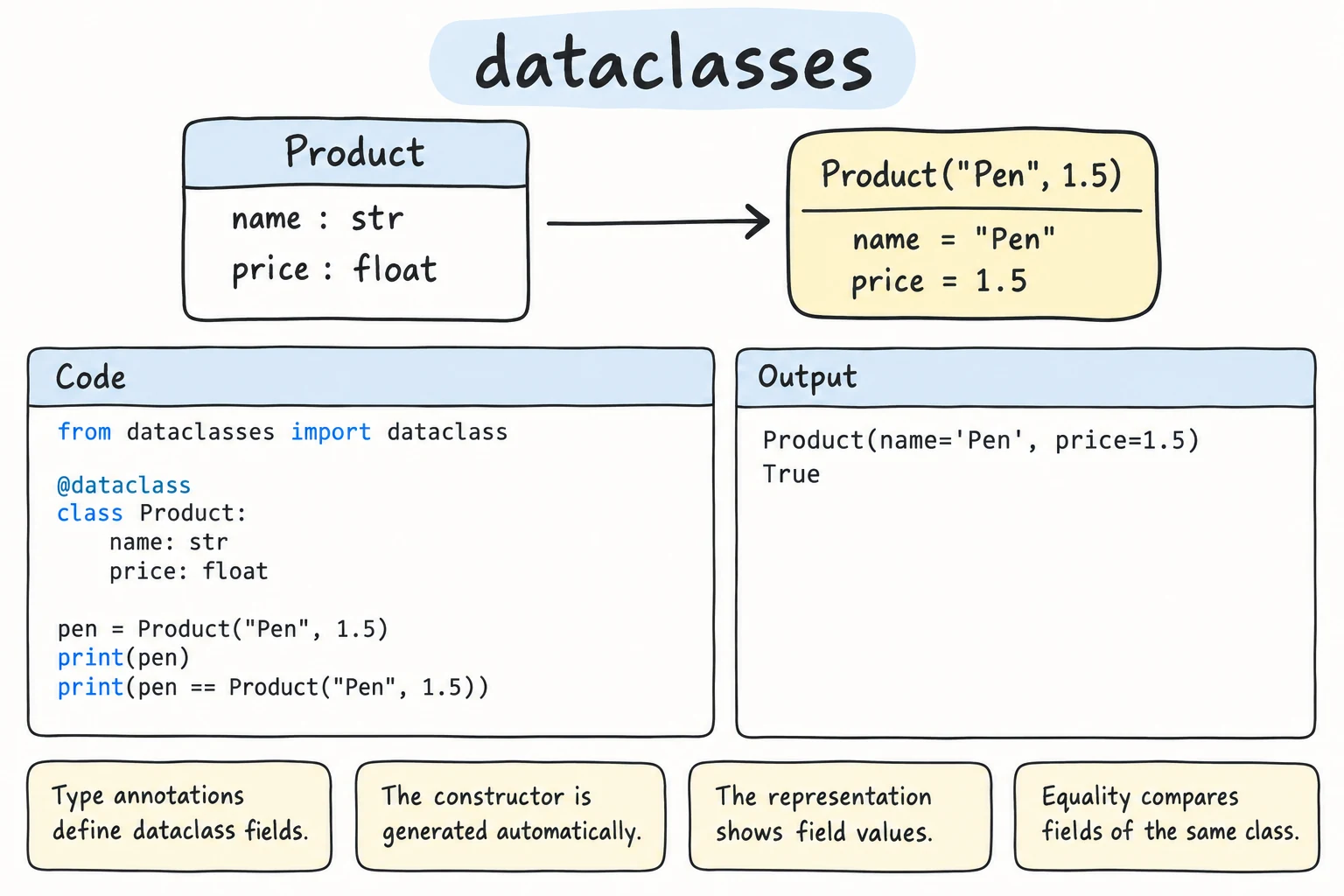
Many classes mainly hold data: a product, a GPS point, an exam result. For each you have written the same boilerplate: __init__, __repr__, and __eq__, all updated whenever a field is added. The dataclasses module writes that code for you, and modern Python uses it everywhere.
Before and after
In Module 09 a product class took a dozen lines. The dataclass version:
from dataclasses import dataclass


@dataclass
class Product:
    name: str
    price: int
    quantity: int = 0


a = Product("Notebook", 15000, 40)
print(a)
print(a == Product("Notebook", 15000, 40))
print(Product("Pen", 3000))Product(name='Notebook', price=15000, quantity=40)
True
Product(name='Pen', price=3000, quantity=0)@dataclass reads the fields and generates __init__, __repr__, and __eq__. Each field is name: type, with a type annotation (see Type Hints). The annotation is required, since it marks a field, but Python does not check the type: Product("Pen", "cheap") works. Fields with defaults come after fields without them. A dataclass is still a class, so you can add methods and properties.
Mutable defaults and default_factory
Giving every student an empty list of grades the obvious way fails:
from dataclasses import dataclass

@dataclass
class Student:
    name: str
grades: list = []ValueError: mutable default <class 'list'> for field grades is not allowed: use default_factoryOne list would be shared by every object (the def f(items=[]) trap). Fix: field(default_factory=...) calls a function to make a new value for each object:
from dataclasses import dataclass, field


@dataclass
class Student:
    name: str
    grades: list = field(default_factory=list)


aziza = Student("Aziza")
bekzod = Student("Bekzod")
aziza.grades.append(95)
print(aziza)
print(bekzod)Student(name='Aziza', grades=[95])
Student(name='Bekzod', grades=[])Any function with no arguments works: list, dict, set, or your own.
Validation with __post_init__
The generated __init__ just stores values. To check or compute something right after that, define __post_init__. It runs automatically at the end of __init__:
from dataclasses import dataclass, field


@dataclass
class BankTransfer:
    sender: str
    receiver: str
    amount: int
    fee: int = field(init=False)      # computed, not passed in

    def __post_init__(self):
        if self.amount <= 0:
            raise ValueError(f"Amount must be positive, got {self.amount}")
        self.fee = max(1_000, round(self.amount * 0.005))


print(BankTransfer("Aziza", "Bekzod", 2_500_000))
try:
    BankTransfer("Farrukh", "Aziza", -50)
except ValueError as error:
print("Rejected:", error)BankTransfer(sender='Aziza', receiver='Bekzod', amount=2500000, fee=12500)
Rejected: Amount must be positive, got -50__post_init__ can validate, clean, and compute values. field(init=False) means "a field, but not an __init__ parameter".
Frozen dataclasses
Some values should never change, like a GPS coordinate. frozen=True makes fields read-only (point.lat = 0 raises FrozenInstanceError), and frozen objects can be dictionary keys and set members:
from dataclasses import dataclass, replace


@dataclass(frozen=True)
class Point:
    lat: float
    lon: float


cities = {Point(41.31, 69.28): "Tashkent", Point(39.65, 66.96): "Samarkand"}
print(cities[Point(39.65, 66.96)])
print(len({Point(41.31, 69.28), Point(41.31, 69.28)}))

moved = replace(Point(41.31, 69.28), lon=69.30)   # a changed COPY
print(moved)Samarkand
1
Point(lat=41.31, lon=69.3)To "change" a frozen object, replace() makes a new one. Validating in __post_init__ and then freezing gives objects that can never become invalid by accident.
Sorting with order=True
order=True adds < and friends, comparing fields in order, like tuples:
from dataclasses import dataclass, field


@dataclass(order=True)
class Task:
    priority: int
    title: str = field(compare=False)


tasks = [Task(3, "Water the plants"), Task(1, "Pay the bills"), Task(2, "Buy non")]
for task in sorted(tasks):
    print(task.priority, task.title)

print(Task(1, "a") == Task(1, "b"))1 Pay the bills
2 Buy non
3 Water the plants
Truecompare=False leaves title out of sorting, but look at the last line: it also leaves it out of == and hashing, so two different tasks are equal. Hide a field only when it should not make objects different. Otherwise sort with key=, as in Practice 4.
Converting to dictionaries and JSON
asdict() turns a dataclass, including nested ones, into plain dictionaries for json:
import json
from dataclasses import dataclass, field, asdict


@dataclass
class Item:
    name: str
    price: int


@dataclass
class Order:
    customer: str
    items: list = field(default_factory=list)


order = Order("Dilnoza", [Item("Green tea", 25_000), Item("Honey", 90_000)])
text = json.dumps(asdict(order))
print(text)

loaded = json.loads(text)
restored = Order(loaded["customer"], [Item(**item) for item in loaded["items"]])
print(restored == order){"customer": "Dilnoza", "items": [{"name": "Green tea", "price": 25000}, {"name": "Honey", "price": 90000}]}
TrueGoing back is manual: Item(**item) unpacks each dictionary into keyword arguments.
Inheritance and keyword-only fields
A child dataclass's fields come after the parent's, which breaks the "defaults last" rule when a parent field has a default (Mistake 4). With kw_only=True every field is passed by name, so order no longer matters:
from dataclasses import dataclass


@dataclass(kw_only=True)
class Employee:
    name: str
    salary: int
    city: str = "Tashkent"


@dataclass(kw_only=True)
class Contractor(Employee):
    agency: str


print(Contractor(name="Bekzod", salary=9_000_000, agency="IT Park Staffing"))Contractor(name='Bekzod', salary=9000000, city='Tashkent', agency='IT Park Staffing')field(kw_only=True) does the same for a single field.
More options, and when to use a dataclass
Two more options are worth knowing. @dataclass(slots=True) uses less memory, and assigning a misspelled attribute (s.dark_mdoe = True) raises AttributeError instead of silently creating it. field(repr=False) hides a field, like a password hash, from repr.
Data from JSON can stay a dict briefly, but once it moves around your program, make it a dataclass. Use a normal class when __init__ does real work or the object is mostly behavior.
Try it
Add a discount_percent field with a default of 0, validate that it is between 0 and 90 in __post_init__, and use it in the total property.
Common mistakes
1. Forgetting the annotation
from dataclasses import dataclass

@dataclass
class Book:
    title: str
    pages = 100            # no annotation: NOT a field

print(Book("Days Gone By"))Book(title='Days Gone By')Without : int, pages is just a class attribute. Fix: pages: int = 100.
2. Writing __init__ yourself
from dataclasses import dataclass

@dataclass
class Point:
    x: int
    y: int

    def __init__(self, x, y):       # replaces the generated one
        self.x = x                  # forgot y

print(Point(1, 2))AttributeError: 'Point' object has no attribute 'y'Fix: remove your __init__ and put extra logic in __post_init__.
3. Assigning to a frozen field in __post_init__
from dataclasses import dataclass

@dataclass(frozen=True)
class Money:
    amount: float

    def __post_init__(self):
        self.amount = round(self.amount, 2)

Money(10.456)dataclasses.FrozenInstanceError: cannot assign to field 'amount'Frozen means frozen, even in __post_init__. Fix: to validate, raise an error instead. To normalize a field, the documented idiom bypasses the freeze once, during creation: object.__setattr__(self, "amount", round(self.amount, 2)) gives Money(amount=10.46).
4. A parent default followed by a child field
from dataclasses import dataclass

@dataclass
class Employee:
    name: str
    city: str = "Tashkent"

@dataclass
class Contractor(Employee):
agency: strTypeError: non-default argument 'agency' follows default argument 'city'Fix: give agency a default, or use kw_only=True as shown above.
Practice
1. Book record
Create a dataclass Book with title, author, year, and available (default True). Print one book, and check that two books with the same values are equal.
Solution
from dataclasses import dataclass


@dataclass
class Book:
    title: str
    author: str
    year: int
    available: bool = True


a = Book("Days Gone By", "Abdulla Qodiriy", 1926)
b = Book("Days Gone By", "Abdulla Qodiriy", 1926)
print(a)
print(a == b)Book(title='Days Gone By', author='Abdulla Qodiriy', year=1926, available=True)
True2. Playlist with a default list
Create a dataclass Playlist with name and songs (default: a new empty list) and a method add(song). Add two songs to a "Morning" playlist and show that an "Evening" playlist is still empty.
Solution
from dataclasses import dataclass, field


@dataclass
class Playlist:
    name: str
    songs: list = field(default_factory=list)

    def add(self, song):
        self.songs.append(song)


morning = Playlist("Morning")
evening = Playlist("Evening")
morning.add("Song A")
morning.add("Song B")
print(morning)
print(evening)Playlist(name='Morning', songs=['Song A', 'Song B'])
Playlist(name='Evening', songs=[])3. Temperature range
Create a frozen dataclass TempRange with low and high. In __post_init__, raise ValueError if low > high. Add a property span. Print the span of TempRange(22, 41), the length of a set holding (22, 41), (-5, 10), and (22, 41) again, and the error for TempRange(30, 10).
Solution
from dataclasses import dataclass


@dataclass(frozen=True)
class TempRange:
    low: float
    high: float

    def __post_init__(self):
        if self.low > self.high:
            raise ValueError(f"low {self.low} is above high {self.high}")

    @property
    def span(self):
        return self.high - self.low


print(TempRange(22, 41).span)
print(len({TempRange(22, 41), TempRange(-5, 10), TempRange(22, 41)}))

try:
    TempRange(30, 10)
except ValueError as error:
print("Error:", error)19
2
Error: low 30 is above high 104. Design from a description: exam leaderboard
A school in Bukhara stores exam results: a name, a score from 0 to 100 (reject anything else), and minutes taken. The leaderboard sorts by highest score, then fewer minutes. Design the dataclass, print a ranked leaderboard for Aziza (92, 55), Bekzod (97, 80), and Dilnoza (92, 41) using sorted() with a key= (hint: a key can return a tuple, and -score puts the highest first).
Solution
from dataclasses import dataclass


@dataclass
class Result:
    name: str
    score: int
    minutes: int

    def __post_init__(self):
        if not 0 <= self.score <= 100:
            raise ValueError(f"Score out of range for {self.name}: {self.score}")


results = [Result("Aziza", 92, 55), Result("Bekzod", 97, 80), Result("Dilnoza", 92, 41)]
for rank, r in enumerate(sorted(results, key=lambda r: (-r.score, r.minutes)), start=1):
print(f"{rank}. {r.name:<8} {r.score:>3} {r.minutes} min")1. Bekzod 97 80 min
2. Dilnoza 92 41 min
3. Aziza 92 55 minTuples compare item by item: first -score, then minutes.
5. Save and load a contact book
Create a dataclass Contact (name, phone, tags list default empty) and a dataclass ContactBook (a list of contacts) with save(path), which writes JSON using asdict, and a @classmethod load(path) that rebuilds the objects. Save a book with two contacts, load it, and print the second contact and whether both books are equal.
Solution
import json
from dataclasses import dataclass, field, asdict


@dataclass
class Contact:
    name: str
    phone: str
    tags: list = field(default_factory=list)


@dataclass
class ContactBook:
    contacts: list = field(default_factory=list)

    def save(self, path):
        with open(path, "w", encoding="utf-8") as f:
            json.dump(asdict(self), f, indent=2, ensure_ascii=False)

    @classmethod
    def load(cls, path):
        with open(path, encoding="utf-8") as f:
            data = json.load(f)
        return cls([Contact(**c) for c in data["contacts"]])


book = ContactBook([Contact("Aziza", "+998901234567", ["family"]), Contact("Bekzod", "+998935551122")])
book.save("contacts.json")

copy = ContactBook.load("contacts.json")
print(copy.contacts[1])
print("Equal after loading:", copy == book)Contact(name='Bekzod', phone='+998935551122', tags=[])
Equal after loading: TrueGenerated __eq__ compares nested lists of dataclasses too.
Recap
@dataclassgenerates__init__,__repr__, and__eq__from annotated fields. Defaults go last.- Use
field(default_factory=list)for mutable defaults. A plain[]raisesValueError. __post_init__runs after__init__: validate, clean, and compute fields there.frozen=Truemakes objects read-only and hashable.order=Truemakes them sortable;compare=Falsealso hides a field from==.kw_only=Truemakes fields keyword-only, which fixes default ordering in inheritance.asdict()converts to dictionaries for JSON. Rebuild objects withClass(**data).