

for Loops and range()
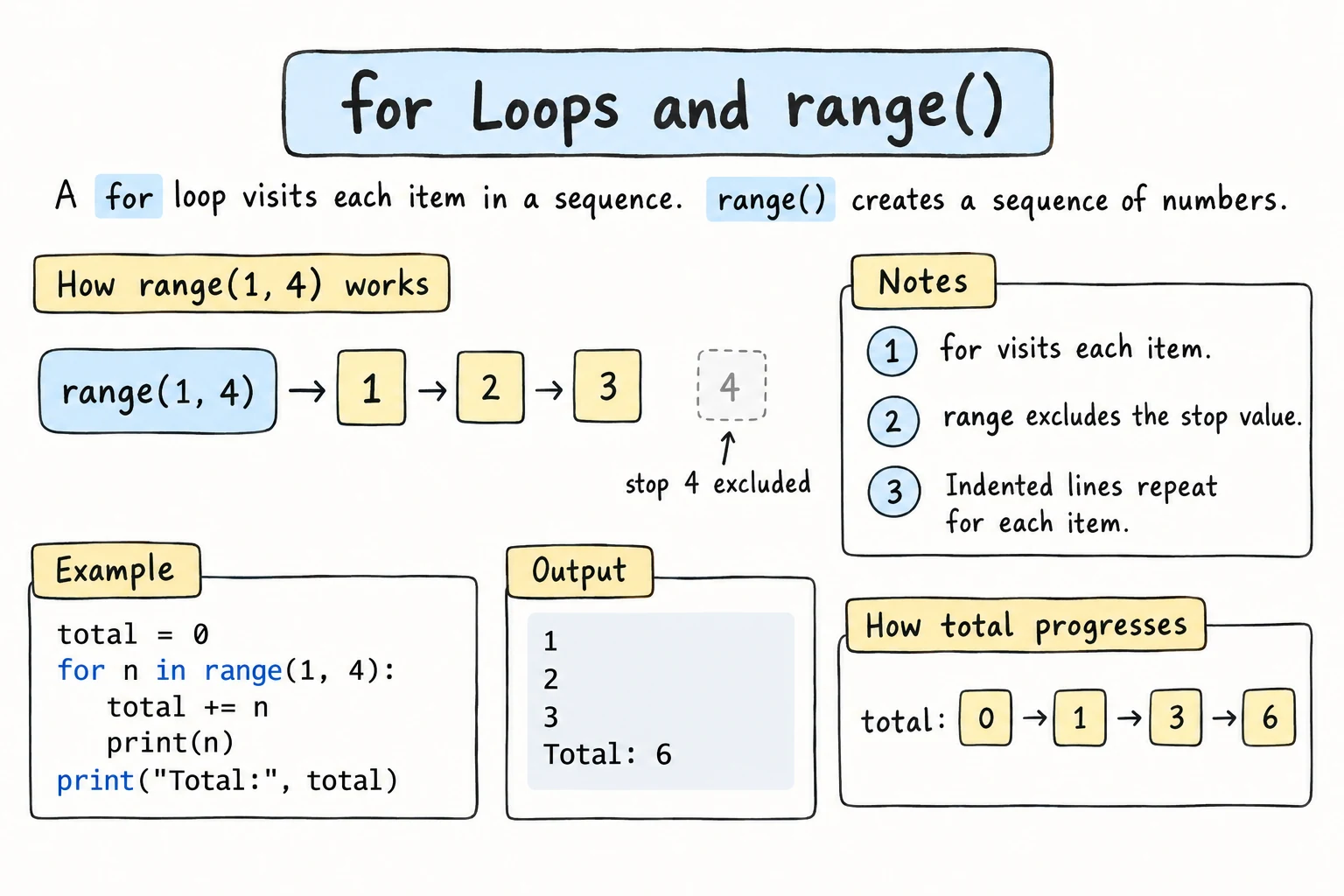
What you'll learn
- How a
forloop visits each item in a sequence - How to loop over the characters of a string and the items of a list
- How to generate numbers with
range(stop),range(start, stop), andrange(start, stop, step) - How to build up a result inside a loop
- How nested loops work, and when to choose
foroverwhile
Why it matters
Most repetition in programs is "do something for each thing": for each student, calculate a grade; for each line in a file, check for errors; for each day in a month, add up sales. The for loop is built exactly for this. It's the loop you'll use most often in Python.
Looping over a sequence
for letter in "Python":
print(letter)P
y
t
h
o
nThe structure:
for variable in sequence:
    body
On each iteration, Python takes the next item from the sequence, puts it in the loop variable (letter), and runs the body. When there are no items left, the loop ends. There's no counter to update and no condition to get wrong.
It works the same way with a list, like the ones .split() returns:
fruits = ["apple", "banana", "cherry"]

for fruit in fruits:
print(f"Fruit: {fruit}")Fruit: apple
Fruit: banana
Fruit: cherry(Lists get their own lesson, Lists. For now, a list is a sequence of values in square brackets.)
Choose a loop variable name that describes one item: for fruit in fruits, for word in words, for student in students.
range(): looping over numbers
To repeat something a certain number of times, or to loop over numbers, use range().
range(stop)
range(5) produces 0, 1, 2, 3, 4: five numbers, starting at 0, stopping before 5.
for i in range(5):
print(i)0
1
2
3
4If you just need to repeat something, the loop variable can be ignored. By convention, it's then named _:
for _ in range(3):
    print("Hip hip hooray!")
range(start, stop)
for day in range(1, 8):
    print(f"Day {day}")
This prints Day 1 to Day 7. As with slicing, the start is included and the stop is not.
range(start, stop, step)
for n in range(0, 21, 5):
    print(n, end=" ")
print()

for n in range(10, 0, -2):
    print(n, end=" ")
print()0 5 10 15 20
10 8 6 4 2A negative step counts down. The stop is still excluded, so range(10, 0, -2) never reaches 0.
| Call | Numbers |
|---|---|
range(4) | 0 1 2 3 |
range(2, 6) | 2 3 4 5 |
range(1, 10, 3) | 1 4 7 |
range(5, 0, -1) | 5 4 3 2 1 |
range(3, 3) | (nothing) |
range is lazy
range(1_000_000) doesn't create a million numbers in memory. It produces each one when the loop asks for it. To see the numbers, convert it: list(range(5)) gives [0, 1, 2, 3, 4].
Building a result in a loop
A very common pattern is to create a variable before the loop and update it inside:
total = 0

for n in range(1, 101):
    total += n

print(f"1 + 2 + ... + 100 = {total}")1 + 2 + ... + 100 = 5050The same idea works for counting, and for building strings:
sentence = "the quick brown fox jumps over the lazy dog"
vowel_count = 0
consonants = ""

for char in sentence:
    if char in "aeiou":
        vowel_count += 1
    elif char != " ":
        consonants += char

print(f"Vowels: {vowel_count}")
print(f"Consonants only: {consonants}")Vowels: 11
Consonants only: thqckbrwnfxjmpsvrthlzydgYou'll see more of these patterns in Common Loop Patterns.
Inside or outside the loop?
Indentation decides whether a line runs every iteration or once:
for n in range(1, 4):
    print(f"Processing {n}")   # inside: runs 3 times
print("All done") # outside: runs once, after the loopProcessing 1
Processing 2
Processing 3
All doneNested loops
A loop inside a loop runs the entire inner loop for each iteration of the outer loop:
for row in range(1, 4):
    for col in range(1, 4):
        print(f"{row * col:3}", end="")
print() # new line after each row 1 2 3
2 4 6
3 6 9The outer loop runs 3 times, and each time the inner loop runs 3 times, so the body of the inner loop runs 3 × 3 = 9 times.
Nested loops can also draw shapes. The outer loop picks the row, and the inner loop prints that many stars on it:
height = 4
for row in range(1, height + 1):
    for star in range(row):
        print("*", end="")
print()*
**
***
****end="" keeps the stars on one line, and the empty print() ends the row. For a line of identical characters, print("*" * row) does the inner loop's job in one expression.
for or while?
Use for when… | Use while when… |
|---|---|
| you loop over the items of a sequence | you don't know how many repetitions you'll need |
| you know how many times to repeat | you repeat until something happens (valid input, a goal reached) |
| examples: each character, each number from 1 to 100 | examples: a game loop, retrying a password |
If you can use for, prefer it. It's shorter, and a for over a range always ends, so you can't forget to update a counter.
Try it
Change size to draw a bigger multiplication table, or change the format width 4.
Common mistakes
1. Forgetting that stop is excluded
for n in range(1, 10):     # meant 1 to 10
print(n, end=" ")1 2 3 4 5 6 7 8 9range(1, 10) stops before 10. To include 10, write range(1, 11). With a variable n: range(1, n + 1).
2. Looping over a number
for i in 5:
print(i)TypeError: 'int' object is not iterableFix: for i in range(5):.
3. Resetting the result inside the loop
for n in range(1, 4):
    total = 0          # reset every iteration!
    total += n
print(total) # meant 1 + 2 + 33Fix: create total = 0 before the loop.
4. Counting down without a negative step
for n in range(10, 0):
    print(n)
print("Liftoff!")Liftoff!No error, and no countdown either: the default step is +1, and you can't get from 10 to 0 by adding. Fix: range(10, 0, -1). A step of zero is an error instead:
for n in range(10, 0, 0):
print(n)ValueError: range() arg 3 must not be zeroPractice
1. Even numbers
Print all even numbers from 2 to 20 on one line, separated by spaces. Use the step of range, not if.
Solution
for n in range(2, 21, 2):
    print(n, end=" ")
print()
2. Spell it out
For word = "loop", print each letter in uppercase with its position, like 1: L.
Solution
word = "loop"
position = 1

for letter in word:
    print(f"{position}: {letter.upper()}")
    position += 1
In Common Loop Patterns you'll learn enumerate(), which gives you the position automatically.
3. Factorial
The factorial of n (written n!) is 1 × 2 × 3 × … × n. Calculate 10! with a loop. The answer is 3628800.
Solution
n = 10
result = 1

for i in range(1, n + 1):
    result *= i

print(f"{n}! = {result}")
For a product, start at 1, not 0, or everything becomes zero.
4. Pyramid
Print a centered pyramid of height 4:
   *
  ***
 *****
*******
Solution
height = 4

for row in range(1, height + 1):
    spaces = " " * (height - row)
    stars = "*" * (2 * row - 1)
    print(spaces + stars)
Work out the pattern first: row 1 has 3 spaces and 1 star, row 2 has 2 spaces and 3 stars, and so on.
5. FizzBuzz
For the numbers 1 to 30: print Fizz for multiples of 3, Buzz for multiples of 5, FizzBuzz for multiples of both, and the number itself otherwise.
Solution
for n in range(1, 31):
    if n % 15 == 0:
        print("FizzBuzz")
    elif n % 3 == 0:
        print("Fizz")
    elif n % 5 == 0:
        print("Buzz")
    else:
        print(n)
The % 15 check must come first. Otherwise, 15 would match % 3 and print only Fizz. This is the "order matters" rule from elif again, and it's a famous interview question.
Recap
for item in sequence:runs the body once for each item: characters of a string, items of a list, or numbers fromrange.range(stop)starts at 0.range(start, stop, step)includes the start and excludes the stop, and a negative step counts down.- Create result variables before the loop and update them inside.
- Indentation decides what repeats. Code after the loop runs once.
- Nested loops run the whole inner loop for each outer iteration.
- Prefer
forwhen looping over items or a known count, andwhilewhen repeating until something happens.