

Handling Exceptions
What you'll learn
- How
tryandexceptstop an error from crashing your program - How to catch specific exceptions and read the message with
as e - What
elseandfinallyadd, and why a bareexcept:is a bad idea - How the exception hierarchy works and how errors travel up through calls
- EAFP versus LBYL, and a retry loop for user input
Why it matters
Real programs meet bad data all the time: a user types abc where you expected a number, a file was deleted, a product code is not in the dictionary. So far, each of these has crashed your program. Exception handling lets you say: "try this, and if this particular thing goes wrong, do that instead."
try and except
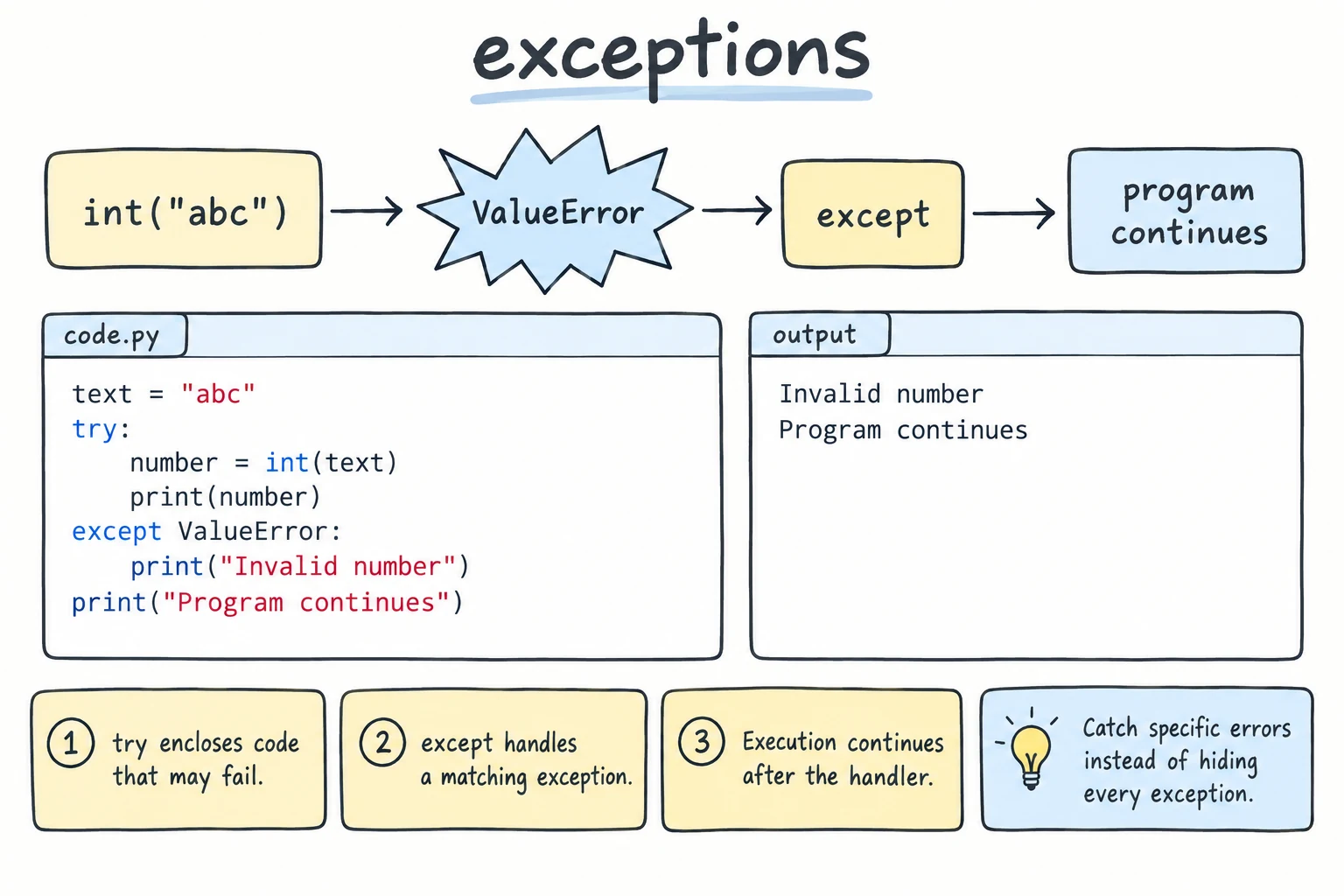
When Python cannot do what a line asks, it raises an exception: an object that describes the problem, such as ValueError: invalid literal for int() with base 10: '15 000'. If nothing handles it, the program stops with a traceback (see Reading Errors and Debugging). Put the risky code inside try, and Python jumps to the matching except block instead of crashing:
text = "15 000"

try:
    price = int(text)
    print(f"Price: {price} som")
except ValueError:
    print(f"'{text}' is not a whole number")

print("The program keeps going")'15 000' is not a whole number
The program keeps goingint(text) raises ValueError, so the rest of try is skipped, the except block runs, and the program continues. Without an exception, except is skipped.
Catching specific exceptions
Always name the exception you expect. Four appear constantly: ValueError (right type, wrong value, like int("abc")), ZeroDivisionError (100 / 0), KeyError (a missing dictionary key) and FileNotFoundError (opening a file that does not exist). A specific except does not hide other errors, so a typo in your code still shows up.
One try can have several except blocks. Python checks them from top to bottom and runs the first one that matches. Writing except ValueError as e stores the exception object in e, and printing e shows its message:
def split_bill(total_text, people_text):
    try:
        total = int(total_text)
        people = int(people_text)
        share = total / people
    except ValueError as e:
        return f"Not a whole number: {e}"
    except ZeroDivisionError:
        return "There must be at least one person"
    return f"Each person pays {share:,.0f} som"

print(split_bill("240000", "4"))
print(split_bill("240k", "4"))
print(split_bill("240000", "0"))Each person pays 60,000 som
Not a whole number: invalid literal for int() with base 10: '240k'
There must be at least one personWhen two exceptions need the same handling, list them in a tuple: except (TypeError, ZeroDivisionError):. except Exception as e catches almost any error. Use it at the top level of a program, where you report any problem and keep going; inside normal functions it is a wide net that can catch bugs you would rather see.
else and finally
A try statement has two more optional parts: else runs only if the try block raised no exception, and finally runs always.
def read_amount(text):
    try:
        amount = int(text)
    except ValueError:
        print(f"  '{text}' rejected")
    else:
        print(f"  {amount:,} som accepted")
    finally:
        print("  check finished")

read_amount("50000")
read_amount("fifty") 50,000 som accepted
check finished
'fifty' rejected
check finishedWhy else instead of more lines in try? It keeps try small, so you only catch errors from the line you expect to fail.
finally is for clean-up, such as closing a connection. It runs even after a return or an error nobody catches. The order is always try, except, else, finally.
Why a bare except: is bad
except: with no type catches everything, including errors caused by your own bugs:
# Bad:
prices = {"tea": 15000}
try:
    total = prices["tea"] * quantty     # typo!
except:
    print("Product not found")
This prints Product not found, which is a lie: the real problem is a NameError from the misspelled quantity. A bare except: even catches KeyboardInterrupt, so Ctrl+C cannot stop a stuck loop. Write except KeyError: instead.
The exception hierarchy
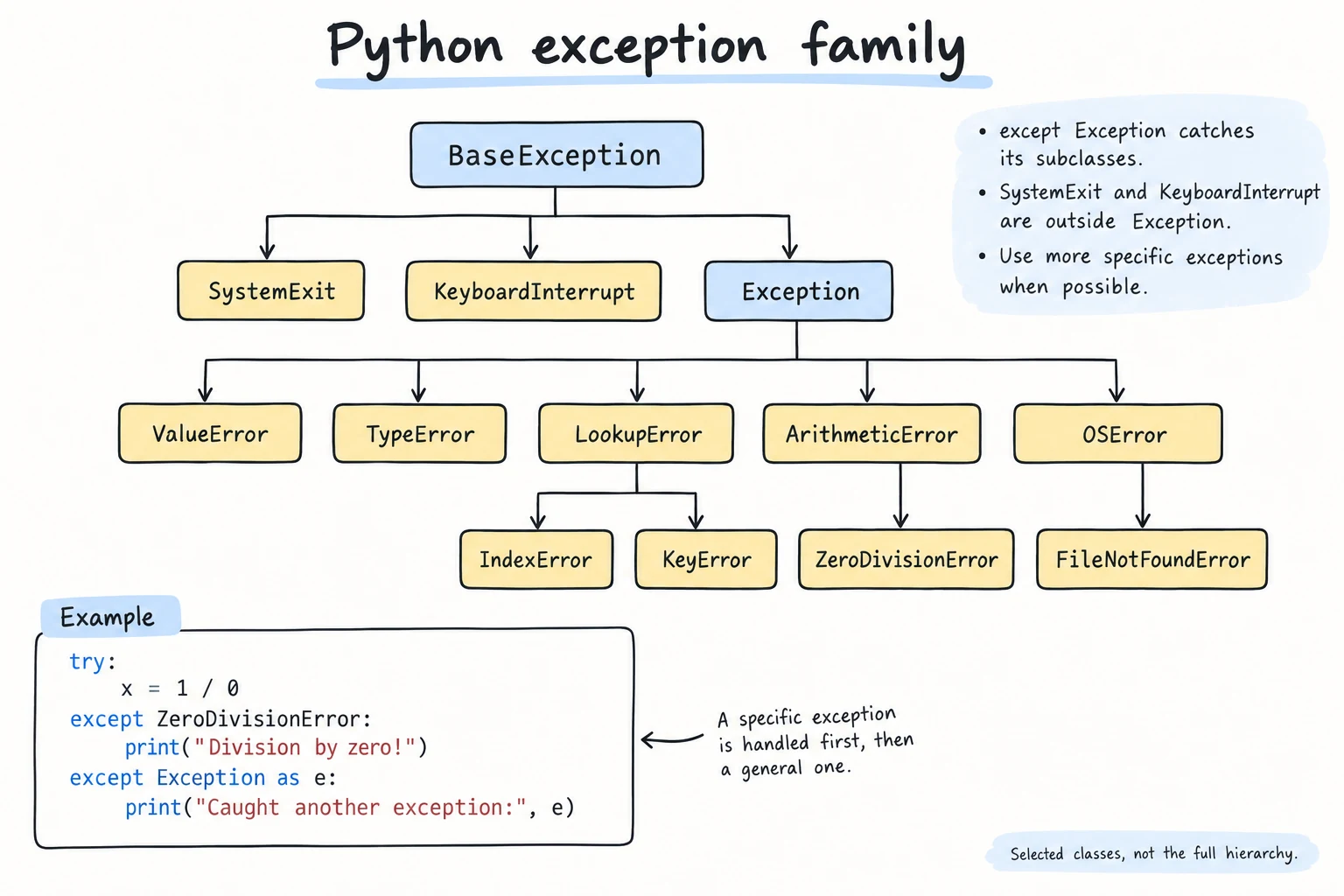
Exception types form a family tree. Catching a parent also catches its children:
BaseExceptionKeyboardInterruptSystemExitExceptionArithmeticErrorZeroDivisionError
LookupErrorIndexErrorKeyError
OSErrorFileNotFoundError
ValueErrorTypeError
Catching Exception catches nearly everything a normal program raises. BaseException also catches KeyboardInterrupt and SystemExit, which is almost never what you want.
data = {"cities": ["Tashkent", "Samarkand"]}

for key, index in [("cities", 1), ("cities", 5), ("towns", 0)]:
    try:
        print(data[key][index])
    except LookupError as e:
print(f"Not found: {type(e).__name__}")Samarkand
Not found: IndexError
Not found: KeyErrorOne except LookupError handled both a missing key and a bad index, and type(e).__name__ shows which one it was. Order matters when you combine parents and children: put the more specific except first, or it will never run.
How exceptions travel up
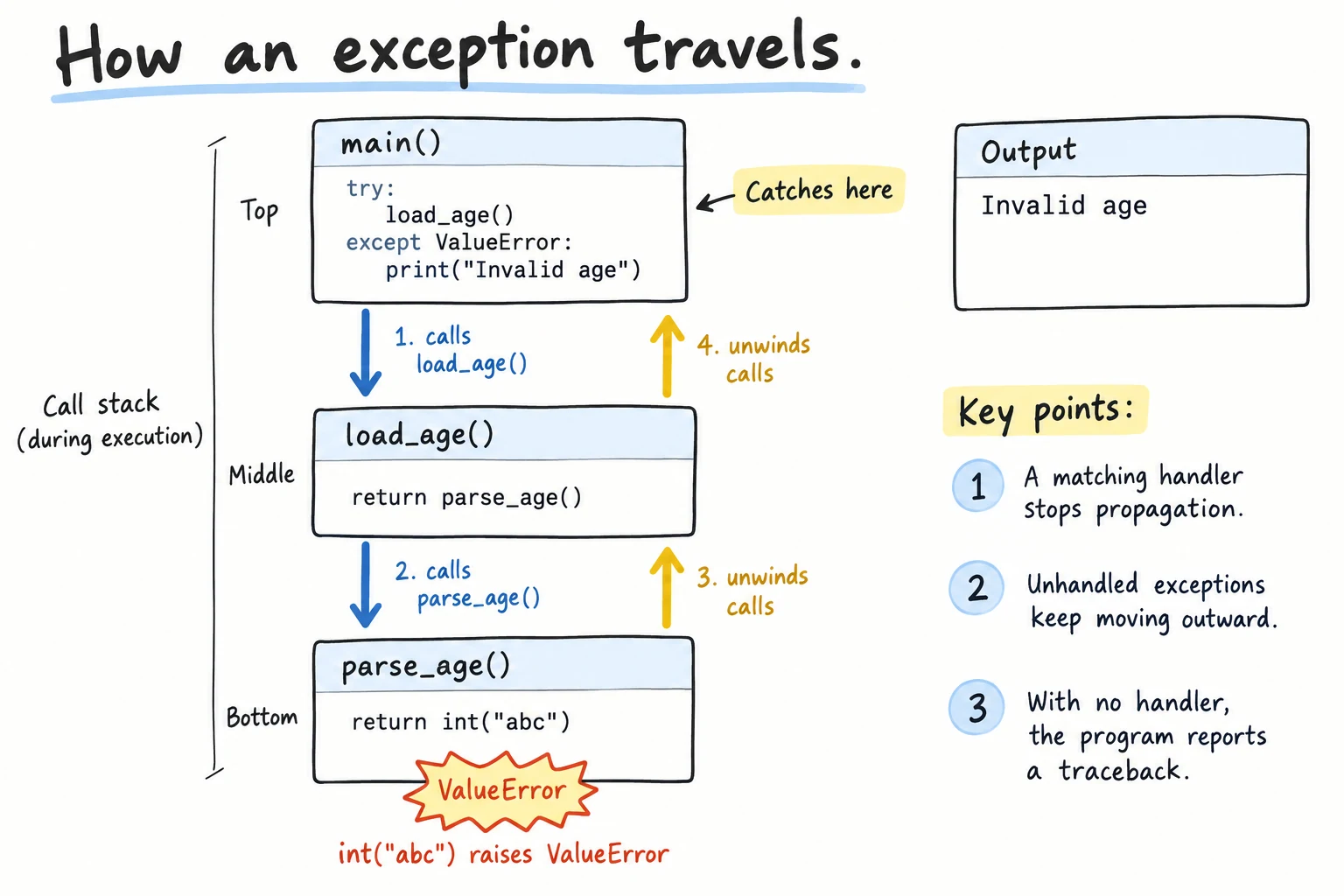
If a function does not catch an exception, it moves to the caller, then to the caller's caller, and so on. (A traceback shows this path; read it from the bottom, where the error happened.) That means you can catch the exception at whichever level knows what to do about it. Here print_receipt decides:
def unit_price(total, quantity):
    return total / quantity

def order_line(product, total, quantity):
    price = unit_price(total, quantity)
    return f"{product}: {price:,.0f} som each"

def print_receipt(lines):
    for product, total, quantity in lines:
        try:
            print(order_line(product, total, quantity))
        except ZeroDivisionError:
            print(f"{product}: quantity is zero, line skipped")

print_receipt([("Tea", 45000, 3), ("Samsa", 16000, 0), ("Juice", 24000, 2)])Tea: 15,000 som each
Samsa: quantity is zero, line skipped
Juice: 12,000 som eachEAFP and LBYL
LBYL ("Look Before You Leap") checks first, as in if product in stock:. EAFP ("Easier to Ask Forgiveness than Permission") just tries and catches the exception. Python code often prefers EAFP when a check is hard to write: "is this string a valid float?" is tricky ("-3.5", "1e3", " 7 "), but try: float(text) answers it perfectly.
Retry until the input is valid
Combining while True, try, and break gives a loop that keeps asking until the user types something usable:
while True:
    try:
        people = int(input("How many people? "))
        break                       # only reached if int() succeeded
    except ValueError:
        print("Please type a whole number, like 4")

print(f"Table for {people}")How many people? four
Please type a whole number, like 4
How many people? 7
Table for 7If int() fails, break is skipped and the loop asks again. On this site, each question appears in the output and the program waits for your answer, so the loop keeps asking until you type a valid value (here, 7). The Input Validation lesson builds this idea into reusable helper functions.
Try it
Run it and enter a product and a quantity when it asks. Try bad ones like cake, abc or 0.
Common mistakes
1. Catching the wrong exception type
try:
    age = int("twenty")
except TypeError:
print("Invalid age")ValueError: invalid literal for int() with base 10: 'twenty'int("twenty") raises ValueError, not TypeError, so the except does not match. Run the risky code once without try to see which exception it really raises.
2. Putting too much code inside try
# Bad:
text = "50000"
try:
    amount = int(text)
    sessions = int("two")      # a different bug
except ValueError:
print("Invalid amount")Invalid amountThe amount was fine; the ValueError came from another line. Keep only the line you expect to fail in try, and move the rest to else.
3. Silently swallowing errors
# Bad:
try:
    balance = int("1 000 000")
except ValueError:
    pass
print(f"Balance: {balance}")NameError: name 'balance' is not definedThe real error is gone, and the program fails later with a confusing message. When you catch an exception, show a message or use a default.
Practice
1. Safe division
Write safe_divide(a, b) that returns a / b, or the string "undefined" when b is 0. Test it with (10, 4) and (5, 0).
Solution
def safe_divide(a, b):
    try:
        return a / b
    except ZeroDivisionError:
        return "undefined"

print(safe_divide(10, 4))
print(safe_divide(5, 0))2.5
undefined2. Parse prices
Given raw = ["15000", "8,000", "22000", "free", "5000"], add up every item that converts to int. Print a message for each invalid item, then the total.
Solution
raw = ["15000", "8,000", "22000", "free", "5000"]

total = 0
for item in raw:
    try:
        total += int(item)
    except ValueError:
        print(f"Invalid price: {item}")

print(f"Total: {total:,} som")Invalid price: 8,000
Invalid price: free
Total: 42,000 som3. Grade lookup
With grades = {"Aziza": [90, 85], "Bekzod": []}, write average_for(name) that returns the average as a string. Return different messages for a missing student (KeyError) and a student with no grades (ZeroDivisionError). Test "Aziza", "Bekzod" and "Farrukh".
Solution
grades = {"Aziza": [90, 85], "Bekzod": []}

def average_for(name):
    try:
        scores = grades[name]
        avg = sum(scores) / len(scores)
    except KeyError:
        return f"{name}: no such student"
    except ZeroDivisionError:
        return f"{name}: no grades yet"
    return f"{name}: {avg:.1f}"

for name in ["Aziza", "Bekzod", "Farrukh"]:
print(average_for(name))Aziza: 87.5
Bekzod: no grades yet
Farrukh: no such student4. Where did it fail?
Loop over ["12", "x", "7"] and convert each value with int() inside try. Print bad value: ... on a ValueError, use else to print converted ... only on success, and use finally to print done with ... for every value.
Solution
for value in ["12", "x", "7"]:
    try:
        number = int(value)
    except ValueError:
        print(f"bad value: {value}")
    else:
        print(f"converted {number}")
    finally:
print(f"done with {value}")converted 12
done with 12
bad value: x
done with x
converted 7
done with 75. Robust calculator
Read numbers with input() until the user types quit. Skip anything that is not a number with a short message. At the end, print the total and the average, or No numbers entered if there were none.
Solution
numbers = []

while True:
    text = input("Number (or quit): ").strip()
    if text == "quit":
        break
    try:
        numbers.append(float(text))
    except ValueError:
        print(f"'{text}' is not a number")

try:
    average = sum(numbers) / len(numbers)
except ZeroDivisionError:
    print("No numbers entered")
else:
print(f"Total: {sum(numbers)}, average: {average:.2f}")Number (or quit): 7
Number (or quit): 5
Number (or quit): five
'five' is not a number
Number (or quit): 3
Number (or quit): quit
Total: 15.0, average: 5.00Recap
tryholds code that might fail;except SomeError as ehandles that specific error, and a tuple handles several.elseruns only on success.finallyruns every time and is for clean-up.- Avoid bare
except:and silentpass: they hide real bugs. - Exceptions form a hierarchy and travel up through callers: catch them (specific first) at the level that knows what to do.
while True+try+breakmakes a retry-until-valid input loop.