

Variables
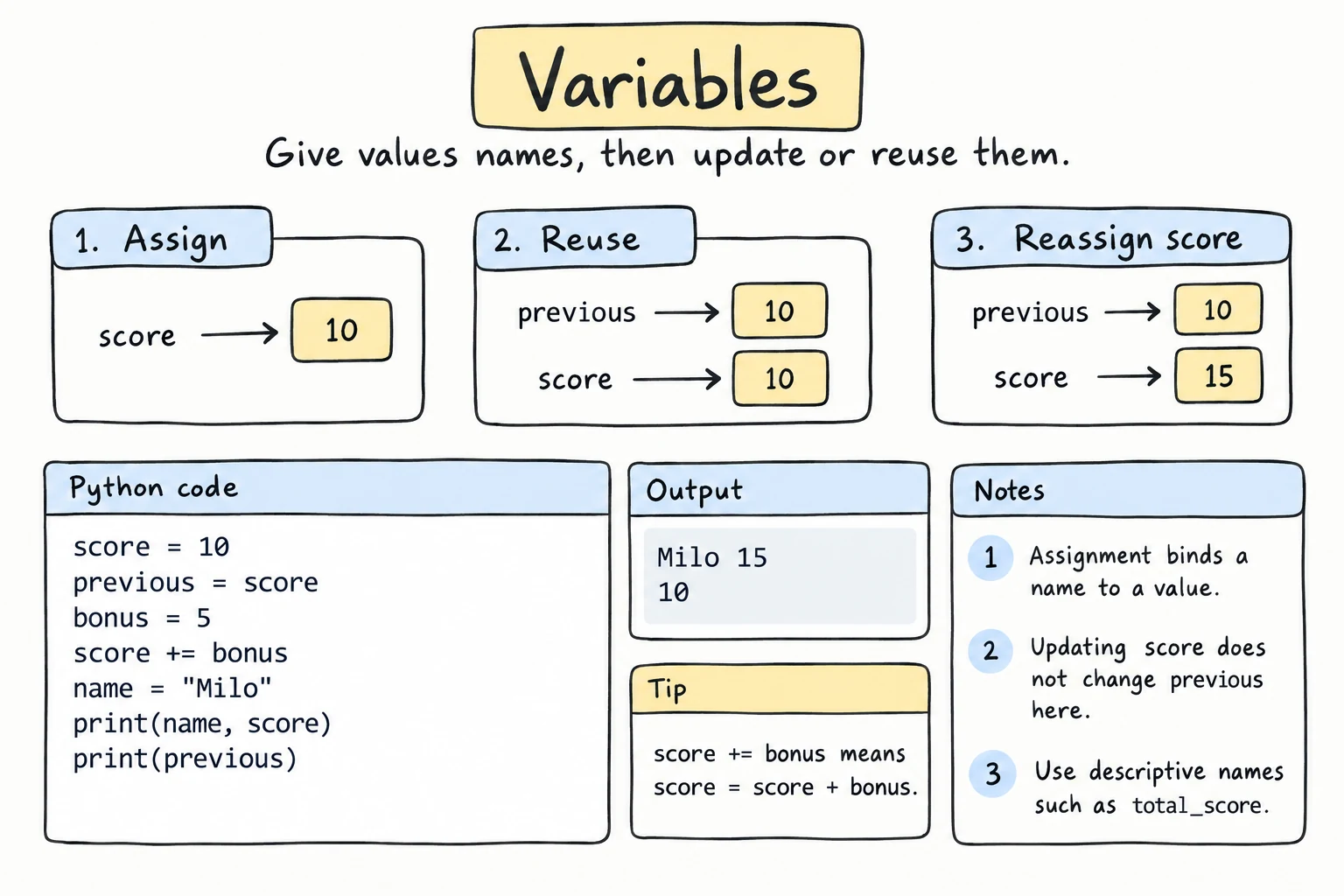
What you'll learn
- How to create a variable with
=and use it later - What happens when you reassign a variable
- The rules and conventions for naming variables
- How to assign several variables at once and swap two values
- How to check a value's type with
type()
Why it matters
Programs work with information: a user's name, a price, a score, today's temperature. A variable gives a value a name, so you can use it, change it, and combine it with other values. Almost every line of code you write from now on will use variables.
Creating a variable
Write a name, an equals sign, and a value:
city = "Samarkand"
population = 580000

print(city)
print(population)Samarkand
580000= is the assignment operator. It doesn't mean "equals" as in math. Read it as "make this name refer to this value":
city = "Samarkand"→ "letcityrefer to the textSamarkand"
Python first works out the value on the right side, then attaches the name on the left to it:
price = 12000
quantity = 3
total = price * quantity   # right side is calculated first: 36000

print("Total:", total)
Reassigning: variables can change
A variable can be pointed at a new value at any time. The old value is forgotten:
score = 10
print(score)

score = 25
print(score)10
25A very common pattern is updating a variable using its own current value:
steps = 1000
steps = steps + 500    # take the current value, add 500, store it back
print(steps)1500This is so common that Python has a shortcut, +=. There are matching shortcuts for other operators too:
steps = 1000
steps += 500    # same as: steps = steps + 500
steps -= 200    # same as: steps = steps - 200
steps *= 2      # same as: steps = steps * 2
print(steps)2600Names are labels, not boxes
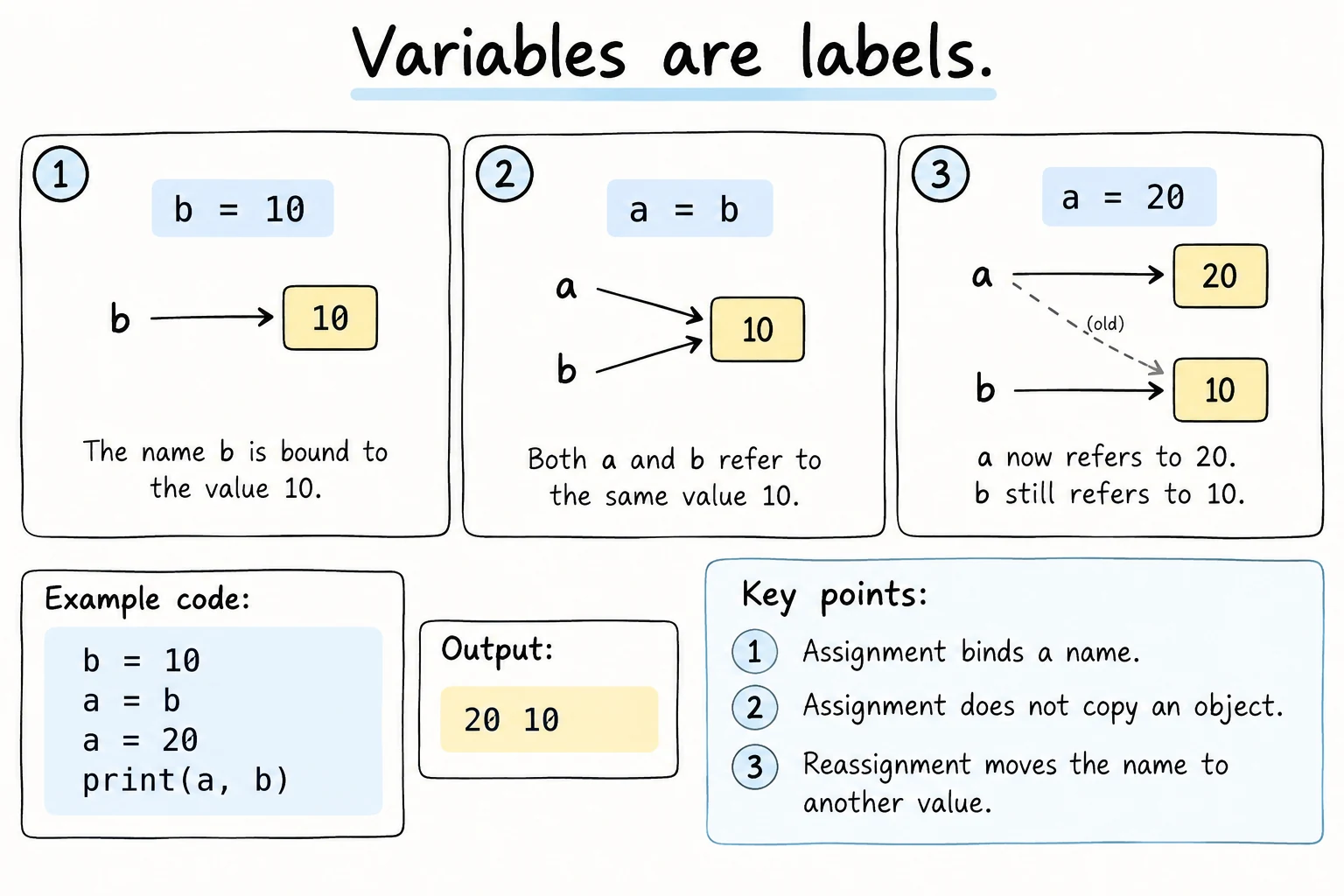
You'll often hear variables described as "boxes that hold values". For Python, a better picture is a name tag attached to a value. Two names can be attached to the same value:
a = "hello"
b = a        # b now refers to the same value as a
a = "bye"    # move the tag a to a new value; b is unchanged

print(a)
print(b)bye
hellob = a doesn't create a link between the names. It makes b refer to whatever a refers to at that moment. Moving a later doesn't move b.
This picture becomes important when you learn about lists, which can be changed in place.
Naming rules
Python requires these rules:
- Names may contain letters, digits, and underscores (
_). - A name can't start with a digit.
- No spaces or symbols like
-,!,@. - Names are case-sensitive:
age,Age, andAGEare three different variables. - You can't use Python's keywords, words with a special meaning such as
if,for,class,True, andNone.
| Name | Valid? | Why |
|---|---|---|
user_name | ||
total2 | Digits are fine after the first character | |
_hidden | Underscore at the start is allowed | |
2nd_place | Starts with a digit | |
user-name | - means minus | |
first name | Space | |
class | Keyword |
To see all keywords, run import keyword and print(keyword.kwlist).
Naming conventions
These are not enforced by Python, but every Python programmer follows them (see Comments and Code Style):
- Use
snake_case: lowercase words joined by underscores, likemonthly_salary. - Choose descriptive names:
temperature_cis better thant. Short names likeiorxare fine for tiny, obvious uses. - Use
UPPER_CASEfor constants, values you don't intend to change:MAX_ATTEMPTS = 3. - Don't use the names of built-in functions, like
print,input,list,str,sum, ortype, as variable names (see Common mistakes).
MAX_ATTEMPTS = 3
attempts_left = MAX_ATTEMPTS
attempts_left -= 1
print("Attempts left:", attempts_left)
Several variables at once
You can assign several names in one line, matching values left to right:
name, age, city = "Dilnoza", 22, "Bukhara"
print(name, age, city)
This gives a neat way to swap two values, with no temporary variable needed:
left = "tea"
right = "coffee"

left, right = right, left

print(left, right)coffee teaPython evaluates the whole right side (right, left → "coffee", "tea") before assigning anything, which is why the swap works.
You can also give several names the same value:
x = y = 0
print(x, y)
Every value has a type
Values come in different types: whole numbers, decimal numbers, text, and more. The built-in type() function tells you which:
print(type(42))
print(type(3.14))
print(type("hello"))
print(type(True))<class 'int'>
<class 'float'>
<class 'str'>
<class 'bool'>| Type | Name | Example |
|---|---|---|
int | integer (whole number) | 42, -7, 0 |
float | floating-point (decimal) number | 3.14, -0.5, 2.0 |
str | string (text) | "hello", '42' |
bool | boolean (true/false) | True, False |
NoneType | "no value" | None (the only value of this type) |
None means "nothing here yet". Use it when a variable needs to exist before you know its value:
best_score = None
print(best_score)
print(type(best_score))None
<class 'NoneType'>None is not 0 and not an empty string. It's a separate value that says "unknown" or "not set". You'll meet it again with functions and if statements.
In Python the variable has no fixed type. The value does. The same name can refer to a number now and a string later:
thing = 5
print(type(thing))
thing = "five"
print(type(thing))
That flexibility is convenient, but reusing one name for different kinds of data makes code confusing. Keep one meaning per variable.
The next lessons cover numbers, strings, and booleans in detail.
Try it
Change the values, add a discount variable, and print the final price.
Common mistakes
1. Using a variable before creating it (or misspelling it)
total_price = 500
print(total_prise)NameError: name 'total_prise' is not defined. Did you mean: 'total_price'?Python reads top to bottom, so a variable must be assigned before it's used, and spelled exactly the same way.
2. Invalid names
2nd_place = "Bekzod"SyntaxError: invalid decimal literalThe message is confusing, but the cause is the name starting with a digit. Fix: second_place.
3. Mixing up the sides
5 = xSyntaxError: cannot assign to literal here. Maybe you meant '==' instead of '='?The name goes on the left, the value on the right: x = 5.
4. Hiding a built-in function
print = "Hello"
print("Hi")TypeError: 'str' object is not callableAfter print = "Hello", the name print refers to a string instead of the function. Fix: choose another name, like message. In the REPL, restart Python to get print back.
Practice
1. Trace the values
Without running it, write down what this prints. Then run it to check.
a = 4
b = a * 2
a = 10
b += a
print(a, b)
Solution
10 18b becomes 8 (4 × 2). Then a changes to 10, which doesn't affect b. Then b += a makes b equal to 8 + 10 = 18.
2. Personal info
Create variables for your first name, birth year, and city. Print one sentence using all three, for example Aziza was born in 2004 and lives in Tashkent.
Solution
first_name = "Aziza"
birth_year = 2004
city = "Tashkent"

print(first_name, "was born in", birth_year, "and lives in", city)
3. Swap
Swap the values of morning and evening so the program prints evening: coffee and morning: tea on separate lines. Don't retype the strings.
morning = "coffee"
evening = "tea"
# your code here
Solution
morning = "coffee"
evening = "tea"

morning, evening = evening, morning

print("evening:", evening)
print("morning:", morning)
4. Fix the names
This code won't run. Fix every name so it runs and follows the conventions, without changing what it prints.
1st-item = "pen"
Item Price = 3000
class = 2
print(1st-item, Item Price * class)
Solution
first_item = "pen"
item_price = 3000
quantity = 2
print(first_item, item_price * quantity)1st-itemstarts with a digit and uses-.Item Pricecontains a space and uses capitals.classis a keyword.
5. Savings tracker
Start with savings = 0. Using only += and -= on separate lines, record these events, and print savings after each one:
- You receive 200,000 som.
- You spend 45,000 som.
- You receive 150,000 som.
- You spend 80,000 som.
The final balance should be 225000.
Solution
savings = 0

savings += 200000
print("After income:", savings)

savings -= 45000
print("After spending:", savings)

savings += 150000
print("After income:", savings)

savings -= 80000
print("After spending:", savings)
Printing after every step is a simple habit that makes bugs easy to spot.
Recap
name = valuecreates or updates a variable. The right side is evaluated first.- Reassigning replaces the old value.
+=,-=, and*=update a variable using its current value. - Names are labels for values.
b = amakesbrefer to the same value asaat that moment. It doesn't link the two names. - Names use letters, digits, and
_, can't start with a digit, are case-sensitive, and can't be keywords. Usesnake_case. a, b = b, aswaps two values.type(value)shows the type of a value.