

What Is Python?
What you'll learn
- What a programming language is and where Python fits
- What people build with Python
- How Python runs your code
- Why Python is a good first language, and what it's less suited for
- How to run your very first line of Python, right on this page
Why it matters
A computer does exactly what it's told, nothing more. A programming language is a way to write those instructions so that both people and computers can understand them. Python is one of the most widely used programming languages in the world. It powers websites, scientific research, and AI tools, and people also use it for small scripts that save a few hours of boring work every week.
Learning Python first gives you a language you can keep using long after this course.
A programming language in one example
Here is a complete Python program:
print("Hello! I'm learning Python.")Output:
Hello! I'm learning Python.print is a built-in function: a named action Python already knows. The text inside quotes is the value you give it. You'll learn exactly how this works in the next few lessons. For now, notice how little there is to it: one line, with no setup code around it.
A slightly bigger program still reads almost like English:
prices = [1.20, 2.50, 0.99]
total = sum(prices)

if total > 4:
    print("That's more than 4 dollars.")
else:
    print("Under 4 dollars.")
Even without knowing Python, you can probably guess what this does. That readability is Python's biggest strength. (The square-bracket list and if/else get their own lessons later, so don't worry about the details yet.)
A short history
- Guido van Rossum started working on Python in the late 1980s and released it in 1991.
- The name comes from the British comedy show Monty Python's Flying Circus, not the snake.
- Python 3 came out in 2008 and fixed long-standing design problems. It wasn't fully compatible with Python 2.
- Python 2 reached end of life on January 1, 2020. Everything you learn here is Python 3.
- Python is free and open source. It's developed by an open community of core developers and contributors, and the Python Software Foundation looks after it.
- A new version comes out every October: 3.13 in 2024, 3.14 in 2025, and so on. Each version gets fixes and security updates for about five years.
Old tutorials
If you see code like print "hello" (with no parentheses), it's Python 2. It won't run in Python 3. See Common mistakes below.
What people build with Python
| Area | Examples | Popular tools |
|---|---|---|
| Automation and scripting | Renaming 1,000 files, filling spreadsheets, sending reports | Standard library |
| Data analysis | Cleaning data, statistics, charts | pandas, NumPy, Matplotlib |
| Machine learning and AI | Image recognition, language models, recommendations | PyTorch, scikit-learn |
| Web development | Websites and APIs | Django, Flask, FastAPI |
| Science and education | Simulations, research code, teaching programming | Jupyter notebooks, SciPy |
| Testing and DevOps | Test suites, deployment scripts, server tools | pytest, Ansible |
You don't need any of those tools yet. This course teaches the core language and the standard library, the large set of modules that comes with every Python install. Every tool in the table is built on top of that.
How Python runs your code
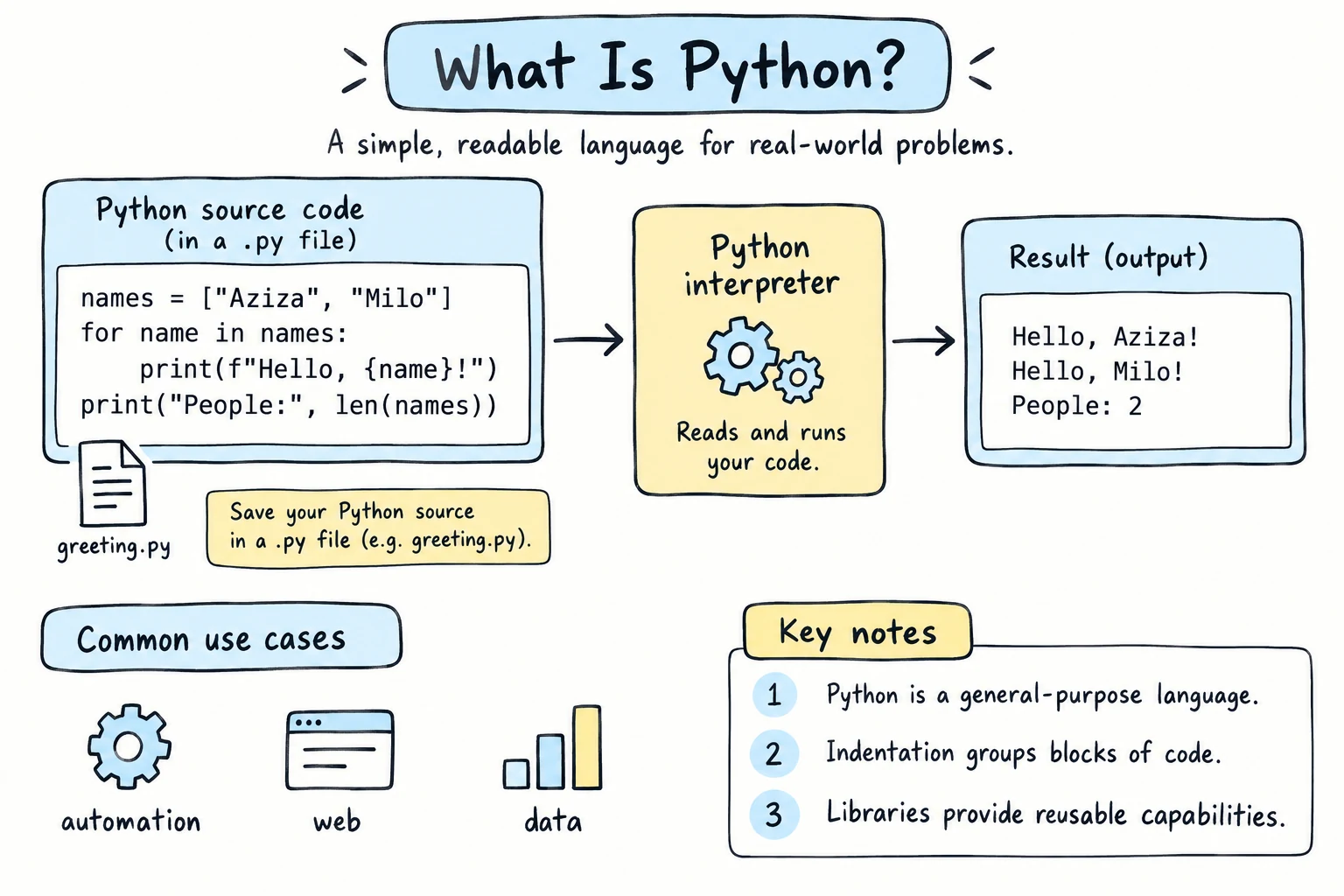
You write Python code as plain text, usually in a file ending in .py. A program called the Python interpreter reads that text and carries out the instructions:
- Read your source code, e.g.
hello.py. - Check and translate it into a simpler internal form called bytecode. If there's a syntax mistake, Python stops here and tells you where.
- Run the bytecode one instruction at a time. If something goes wrong while running, Python shows an error message called a traceback.
This all happens in a fraction of a second when you run a program. Two things follow from it:
- You get feedback fast. Edit, run, see the result, repeat. You don't have to build or compile anything separately.
- Errors show up when the line runs. Python checks the grammar of the whole file first, but a misspelled name on line 50 is only caught when line 50 actually runs.
The standard interpreter is called CPython (it's written in C). It's what you'll install in the next lesson. The code runner on this site uses Pyodide, a version of CPython that runs inside your web browser.
Why Python is a good first language
- Readable. Code blocks are marked by indentation, not curly braces, so programs look clean and similar to each other.
- Quick to start. One line is a complete program.
- "Batteries included." Files, dates, math, random numbers, JSON, and much more are built in.
- Huge community. Almost any question you have has already been answered, and there are libraries for almost anything.
- It grows with you. The same language is used by beginners and by large companies.
Python has trade-offs too:
- Speed. Pure Python is slower than languages like C, Rust, or Go. In practice, the heavy lifting in libraries like NumPy is done in fast compiled code, so this rarely matters when you're learning.
- Mobile apps and browser front ends are usually built with other languages (Swift, Kotlin, JavaScript).
- Types are checked at run time. Python won't stop you from mixing up a number and a text value until that line runs. Tests and type hints, which come later in the course, help with this.
Try it
This editor runs real Python in your browser. Press ▶ Run and see the output. Then change the text, add a second print line, and run it again.
Python has a small hidden poem about good code design. Run this:
import thisYou'll see The Zen of Python, 19 short lines that describe how Python code is meant to feel. "Readability counts." is one of them.
Common mistakes
1. Following a Python 2 tutorial
print "hello"SyntaxError: Missing parentheses in call to 'print'. Did you mean print(...)?Fix: in Python 3, print is a function and always needs parentheses: print("hello"). If a tutorial uses the old style, find a newer one.
2. Changing capitalization
Print("hi")NameError: name 'Print' is not defined. Did you mean: 'print'?Python is case-sensitive: print, Print, and PRINT are three different names. Only print exists.
3. Forgetting a closing quote
print("Hi)SyntaxError: unterminated string literal (detected at line 1)Text values need a quote at both ends: "Hi".
Error messages are your friends
Every error above tells you what went wrong and often suggests a fix. Read the last line of an error message first. You'll learn to read the full message in the Reading Errors and Debugging lesson.
Practice
1. Your first message
In the editor above, make Python print your name and the city you live in, on two separate lines.
Solution
print("My name is Aziza.")
print("I live in Tashkent.")
Each print call puts its output on a new line.
2. Predict, then run
Before you run it, write down what you think this prints. Then run it and compare.
print("5 + 5")
print(5 + 5)
Solution
5 + 5
10
With quotes, "5 + 5" is just text, printed as it is. Without quotes, 5 + 5 is a calculation, so Python prints the result. This difference between text and numbers comes up all the time.
3. Fix the program
This program has three mistakes. Fix it so it runs and prints two lines.
Print("Python was released in 1991)
print "It is named after Monty Python."
Solution
print("Python was released in 1991")
print("It is named after Monty Python.")Print→print(capitalization)- The closing
"was missing after1991 printneeds parentheses (the Python 2 style doesn't work)
4. Explore the Zen
Run import this. Find the line about how many ways there should be to do something, and the line about errors. Write each one down, then explain one of them in your own words.
Solution
- "There should be one-- and preferably only one --obvious way to do it."
- "Errors should never pass silently."
For example, the second one means a program shouldn't quietly ignore problems. It's better to stop with a clear error than to keep going with wrong data.
5. Let Python do the math
How many minutes are there in a week? Don't work it out yourself. Print a line that shows a label and lets Python calculate the number from 7 days, 24 hours and 60 minutes. Use the second line in the Try it editor as a model.
Solution
print("Minutes in a week:", 7 * 24 * 60)Minutes in a week: 10080The label is text in quotes, so it prints as it is. The calculation has no quotes, so Python works it out first. * means multiply.
Recap
- A programming language is a precise way to give instructions to a computer. Python is known for being readable.
- Python was created by Guido van Rossum and released in 1991. Always use Python 3.
- People use Python for automation, data, AI, the web, science, and education.
- The interpreter reads your
.pyfile, translates it, and runs it, so you can edit, run, and repeat quickly. - Python is case-sensitive, and error messages usually point you to the fix.