

Representing and Comparing Objects
What you'll learn
- What special methods ("dunder methods") are and how Python calls them for you
- How
__str__and__repr__control whatprint(), f-strings, and lists show - How
__eq__defines equality, and why it needs a matching__hash__for sets and dictionaries - How
__lt__andfunctools.total_orderingmake objects sortable, and when a key function is better
Why it matters
Your classes don't yet behave like built-in types: print(book) shows <__main__.Book object at 0x...>, and identical books aren't ==. Special methods plug your objects into Python's syntax, so a list of books prints readably, duplicates disappear in a set, and sorted() knows the order.
How Python uses special methods
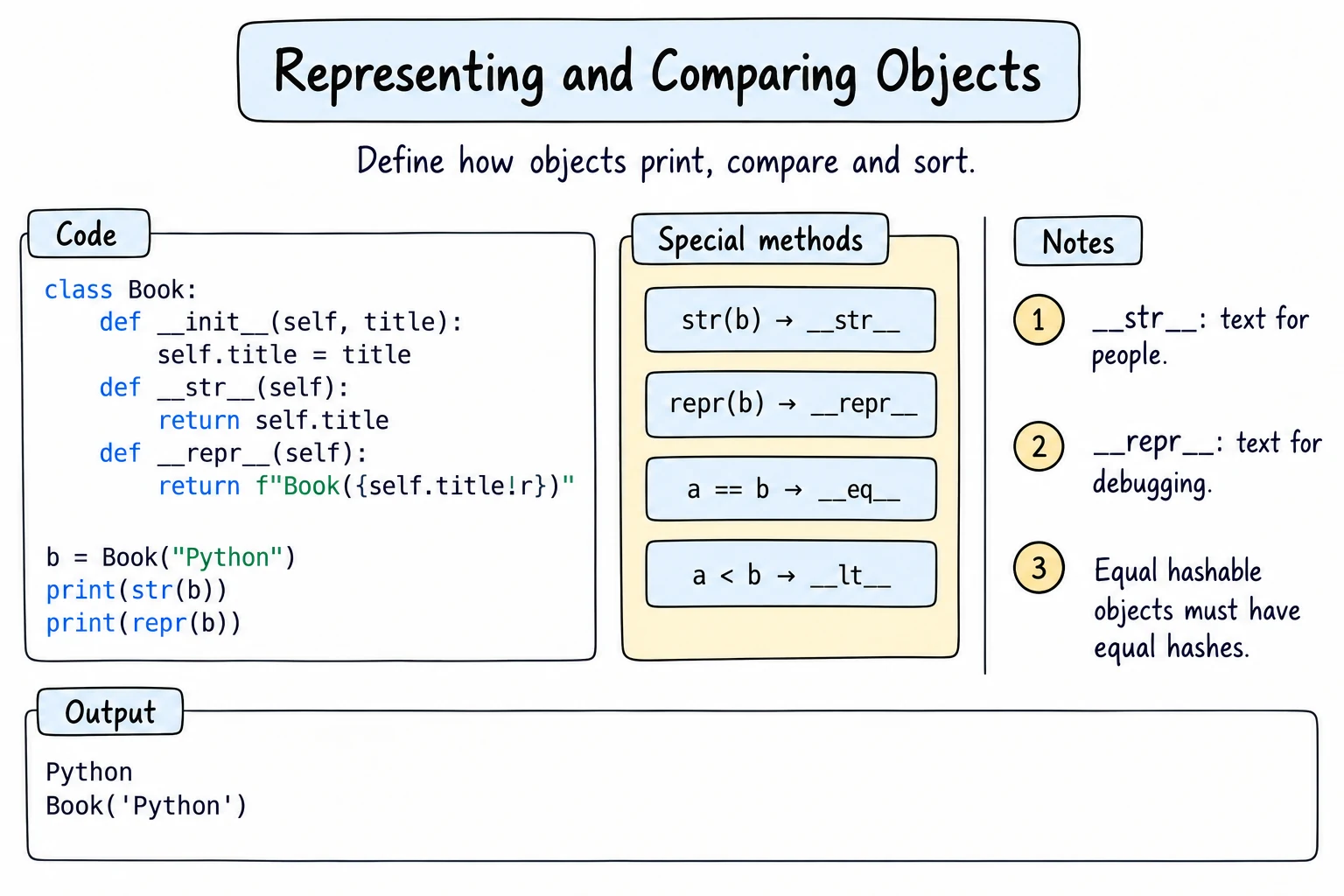
Special methods, or dunder methods ("double underscore"), have two underscores on both sides, like __init__. Python calls them for certain syntax. len(word) calls word.__len__(), and a == b calls a.__eq__(b). Define one in your class, and that syntax works on your objects. Rule: define the special method, but use the normal syntax everywhere else: len(playlist), not playlist.__len__().
__str__ and __repr__: text for people and for programmers
Python has two ways to turn an object into text:
| Method | Called by | Goal |
|---|---|---|
__str__ | print(obj), str(obj), f"{obj}" | readable text for users |
__repr__ | repr(obj), f"{obj!r}", the console, items in containers | unambiguous text for programmers |
class Book:
    def __init__(self, title, author, year):
        self.title = title
        self.author = author
        self.year = year

    def __str__(self):
        return f"{self.title} by {self.author} ({self.year})"

    def __repr__(self):
        return f"Book({self.title!r}, {self.author!r}, {self.year!r})"

book = Book("Silk Road Stories", "Dilnoza Karimova", 2024)
print(book)                       # uses __str__
print([book]) # lists use __repr__ (so does f"{book!r}")Silk Road Stories by Dilnoza Karimova (2024)
[Book('Silk Road Stories', 'Dilnoza Karimova', 2024)]The __repr__ text is code that recreates the book (!r adds the quotes). If you write only one, write __repr__: without __str__, print() uses __repr__ too.
__eq__: what "equal" means
By default, == on your objects checks identity, as you saw in Classes and Objects. __eq__ lets you define equality by value:
class Book:
    def __init__(self, isbn, title):
        self.isbn = isbn
        self.title = title

    def __eq__(self, other):
        if not isinstance(other, Book):
            return NotImplemented
        return self.isbn == other.isbn     # same ISBN = same book

a = Book("978-1", "Python Basics")
b = Book("978-1", "Python Basics (paperback)")
c = Book("978-2", "Silk Road Stories")

print(a == b, a == c, a != c)
print(a == "978-1")True False True
False!= works automatically. For an unrelated type, return the special value NotImplemented (not False, and don't raise): Python then tries the other object's method, and finally falls back to identity (False).
__hash__: equal objects in sets and dictionaries
Sets and dictionary keys need a hash, a number computed from the object, and equal objects must have equal hashes. Defining __eq__ therefore removes the default hash, and putting such a Book in a set raises TypeError: cannot use 'Book' as a set element (unhashable type: 'Book'). Add a __hash__ that hashes the same attributes __eq__ compares:
class Book:
    def __init__(self, isbn, title):
        self.isbn = isbn
        self.title = title

    def __eq__(self, other):
        if not isinstance(other, Book):
            return NotImplemented
        return self.isbn == other.isbn

    def __hash__(self):
        return hash(self.isbn)

donations = [Book("978-1", "Python Basics"), Book("978-2", "Silk Road Stories"),
             Book("978-1", "Python Basics")]
unique = set(donations)
print(len(unique), Book("978-2", "?") in unique)2 TrueHash only what never changes
If a hash changes while the object is in a set or dictionary, Python can't find it anymore. Hash only fixed attributes, like an ISBN.
Ordering: __lt__ and total_ordering
< calls __lt__ ("less than"), and with it sorted(), min(), and max() work on your objects. Writing all six comparison methods is tedious, so the functools.total_ordering decorator fills in <=, >, and >= when you provide __eq__ and __lt__:
from functools import total_ordering

@total_ordering
class Version:
    def __init__(self, text):
        self.parts = tuple(int(p) for p in text.split("."))

    def __repr__(self):
        return f"Version({'.'.join(map(str, self.parts))!r})"

    def __eq__(self, other):
        if not isinstance(other, Version):
            return NotImplemented
        return self.parts == other.parts

    def __lt__(self, other):
        if not isinstance(other, Version):
            return NotImplemented
        return self.parts < other.parts      # tuples compare item by item

v1, v2 = Version("3.9.2"), Version("3.10.0")
print(v1 < v2, v2 >= v1, max(v1, v2))
print(sorted([Version("1.2"), Version("1.10"), Version("1.9")]))True True Version('3.10.0')
[Version('1.2'), Version('1.9'), Version('1.10')]As strings, "3.10.0" < "3.9.2" would be True; tuples of numbers compare correctly. __lt__ must agree with __eq__ (see Common mistakes).
__lt__ or a key function?
Define __lt__ only for one obvious natural order, like versions or dates. For other orders, use a key function: sorted(group, key=lambda s: s.name).
Writing __init__, __repr__, and __eq__ by hand is repetitive; in Dataclasses you'll see @dataclass, which generates them for you.
Try it
Add a __str__ and a __hash__ to Money, and test them.
Common mistakes
1. __str__ that doesn't return a string
class Product:
    def __init__(self, name, price):
        self.name = name
        self.price = price

    def __str__(self):
        print(f"{self.name}: {self.price} som")    # prints instead of returning

print(Product("Tea", 15000))Tea: 15000 som
TypeError: __str__ returned non-string (type NoneType)The text appears first, so it looks as if __str__ worked, but it returned None and the outer print() failed. Fix: return the text.
2. __lt__ that disagrees with __eq__
from functools import total_ordering

@total_ordering
class Result:
    def __init__(self, subject, score):
        self.subject = subject
        self.score = score

    def __eq__(self, other):
        return (self.subject, self.score) == (other.subject, other.score)

    def __lt__(self, other):
        return self.score < other.score          # Bad: ignores subject

a = Result("Math", 88)
b = Result("Physics", 88)
print(a == b, a < b, b < a)
print(a > b, b > a)False False False
True Truea and b are neither equal nor ordered, so the generated > says both a > b and b > a. Fix: compare the same attributes in both, such as (self.score, self.subject), or sort by score with a key function.
Practice
1. Readable books
Give a LibraryBook(title, author, shelf) class a __str__ returning Python Basics (Farrukh Aliev), shelf B3 and a __repr__ returning LibraryBook('Python Basics', 'Farrukh Aliev', 'B3'). Print that book, its repr(), and a list of it and LibraryBook("Poems of Navoi", "Alisher Navoi", "A1").
Solution
class LibraryBook:
    def __init__(self, title, author, shelf):
        self.title = title
        self.author = author
        self.shelf = shelf

    def __str__(self):
        return f"{self.title} ({self.author}), shelf {self.shelf}"

    def __repr__(self):
        return f"LibraryBook({self.title!r}, {self.author!r}, {self.shelf!r})"

book = LibraryBook("Python Basics", "Farrukh Aliev", "B3")
print(book)
print(repr(book))
print([book, LibraryBook("Poems of Navoi", "Alisher Navoi", "A1")])Python Basics (Farrukh Aliev), shelf B3
LibraryBook('Python Basics', 'Farrukh Aliev', 'B3')
[LibraryBook('Python Basics', 'Farrukh Aliev', 'B3'), LibraryBook('Poems of Navoi', 'Alisher Navoi', 'A1')]2. Unique map points
Write a Place(name, lat, lon) class where places with equal coordinates are equal and hashable. Put Place("Registan", 39.6547, 66.9758), Place("Registan Square", 39.6547, 66.9758), and Place("Ark of Bukhara", 39.7778, 64.4103) in a set; print its length, then whether the two Registan places are ==.
Solution
class Place:
    def __init__(self, name, lat, lon):
        self.name = name
        self.lat = lat
        self.lon = lon

    def __eq__(self, other):
        if not isinstance(other, Place):
            return NotImplemented
        return (self.lat, self.lon) == (other.lat, other.lon)

    def __hash__(self):
        return hash((self.lat, self.lon))

visited = {
    Place("Registan", 39.6547, 66.9758),
    Place("Registan Square", 39.6547, 66.9758),
    Place("Ark of Bukhara", 39.7778, 64.4103),
}
print(len(visited))
print(Place("Registan", 39.6547, 66.9758) == Place("Registan Square", 39.6547, 66.9758))2
True__hash__ uses exactly the attributes that __eq__ compares, packed in a tuple.
3. Comparable durations
Write a Duration(minutes) class with __repr__ (Duration(250)), __eq__, and __lt__, decorated with @total_ordering. For the trips Duration(130), Duration(95), and Duration(250), print the sorted list and the longest trip. Then print Duration(95) >= Duration(90) and Duration(60) != Duration(60) on one line.
Solution
from functools import total_ordering

@total_ordering
class Duration:
    def __init__(self, minutes):
        self.minutes = minutes

    def __repr__(self):
        return f"Duration({self.minutes})"

    def __eq__(self, other):
        if not isinstance(other, Duration):
            return NotImplemented
        return self.minutes == other.minutes

    def __lt__(self, other):
        if not isinstance(other, Duration):
            return NotImplemented
        return self.minutes < other.minutes

trips = [Duration(130), Duration(95), Duration(250)]
print(sorted(trips))
print(max(trips))
print(Duration(95) >= Duration(90), Duration(60) != Duration(60))[Duration(95), Duration(130), Duration(250)]
Duration(250)
True False4. Design a class: sign-ups without duplicates
Some students sign up for a club twice. Design a Student(student_id, name, grade) class where students with the same ID are equal, can go in a set, and print like Student(4, 'Bekzod', 10). It needs no natural order. It must work with this driver code:
signups = [Student(17, "Dilnoza", 9), Student(4, "Bekzod", 10), Student(17, "Dilnoza", 9)]
unique = set(signups)
print(len(unique))
print(sorted(unique, key=lambda s: s.name))
print(Student(4, "Bekzod", 11) in unique, Student(4, "Bekzod", 10) == "Bekzod")2
[Student(4, 'Bekzod', 10), Student(17, 'Dilnoza', 9)]
True FalseSolution
class Student:
    def __init__(self, student_id, name, grade):
        self.student_id = student_id
        self.name = name
        self.grade = grade

    def __repr__(self):
        return f"Student({self.student_id!r}, {self.name!r}, {self.grade!r})"

    def __eq__(self, other):
        if not isinstance(other, Student):
            return NotImplemented
        return self.student_id == other.student_id

    def __hash__(self):
        return hash(self.student_id)

signups = [Student(17, "Dilnoza", 9), Student(4, "Bekzod", 10), Student(17, "Dilnoza", 9)]
unique = set(signups)
print(len(unique))
print(sorted(unique, key=lambda s: s.name))
print(Student(4, "Bekzod", 11) in unique, Student(4, "Bekzod", 10) == "Bekzod")
5. Exam results from two teachers
Write a Result(student, subject, score) class whose __eq__, __hash__, and @total_ordering __lt__ all use the tuple (score, student, subject).
Teacher A has Math results Aziza 88, Bekzod 95, Dilnoza 88; teacher B has Bekzod 95, Farrukh 72. Put both lists in one set and print its length, then the student of the set's max() and min() on one line. Finally, using a key function, print a ranking (highest score first, names A to Z on ties) as 1. Bekzod 95 (name padded to 8).
Solution
from functools import total_ordering

@total_ordering
class Result:
    def __init__(self, student, subject, score):
        self.student = student
        self.subject = subject
        self.score = score

    def _key(self):
        return (self.score, self.student, self.subject)

    def __eq__(self, other):
        if not isinstance(other, Result):
            return NotImplemented
        return self._key() == other._key()

    def __hash__(self):
        return hash(self._key())

    def __lt__(self, other):
        if not isinstance(other, Result):
            return NotImplemented
        return self._key() < other._key()

teacher_a = [Result("Aziza", "Math", 88), Result("Bekzod", "Math", 95), Result("Dilnoza", "Math", 88)]
teacher_b = [Result("Bekzod", "Math", 95), Result("Farrukh", "Math", 72)]

combined = set(teacher_a + teacher_b)       # the duplicate disappears
print(len(combined))
print(max(combined).student, min(combined).student)
ranking = sorted(combined, key=lambda r: (-r.score, r.student))
for place, r in enumerate(ranking, start=1):
print(f"{place}. {r.student:<8} {r.score}")4
Bekzod Farrukh
1. Bekzod 95
2. Aziza 88
3. Dilnoza 88
4. Farrukh 72One _key() feeds all three methods, so they always agree. The ranking needs a different order, so it uses a key function.
Recap
- Special (dunder) methods connect your objects to Python syntax:
a == bcallsa.__eq__(b). Define them, but use the normal syntax. __repr__gives code-like text for programmers (used by!rand containers);__str__gives friendly text forprint(). Write at least__repr__.__eq__defines equality (returnNotImplementedfor other types). It removes hashing, so add__hash__on the same unchanging attributes.__lt__and__eq__with@total_orderinggive all comparisons, if both compare the same attributes. For other sort orders, use a key function.