

The match Statement
What you'll learn
- How
matchandcasechoose between options, and when a plainif/elifis better - How to match several values in one case with
| - How to handle "anything else" with
_ - How to capture parts of a value into variables
- How to add extra conditions with guards
Why it matters
Many programs check one value against a list of possibilities: a menu choice, a command, a day of the week, an HTTP status code. You can do this with a long if/elif chain, but Python 3.10 added match, which is often clearer. It can also look inside values, which if statements can't do as neatly.
Version note
match requires Python 3.10 or newer. On older versions, it's a SyntaxError.
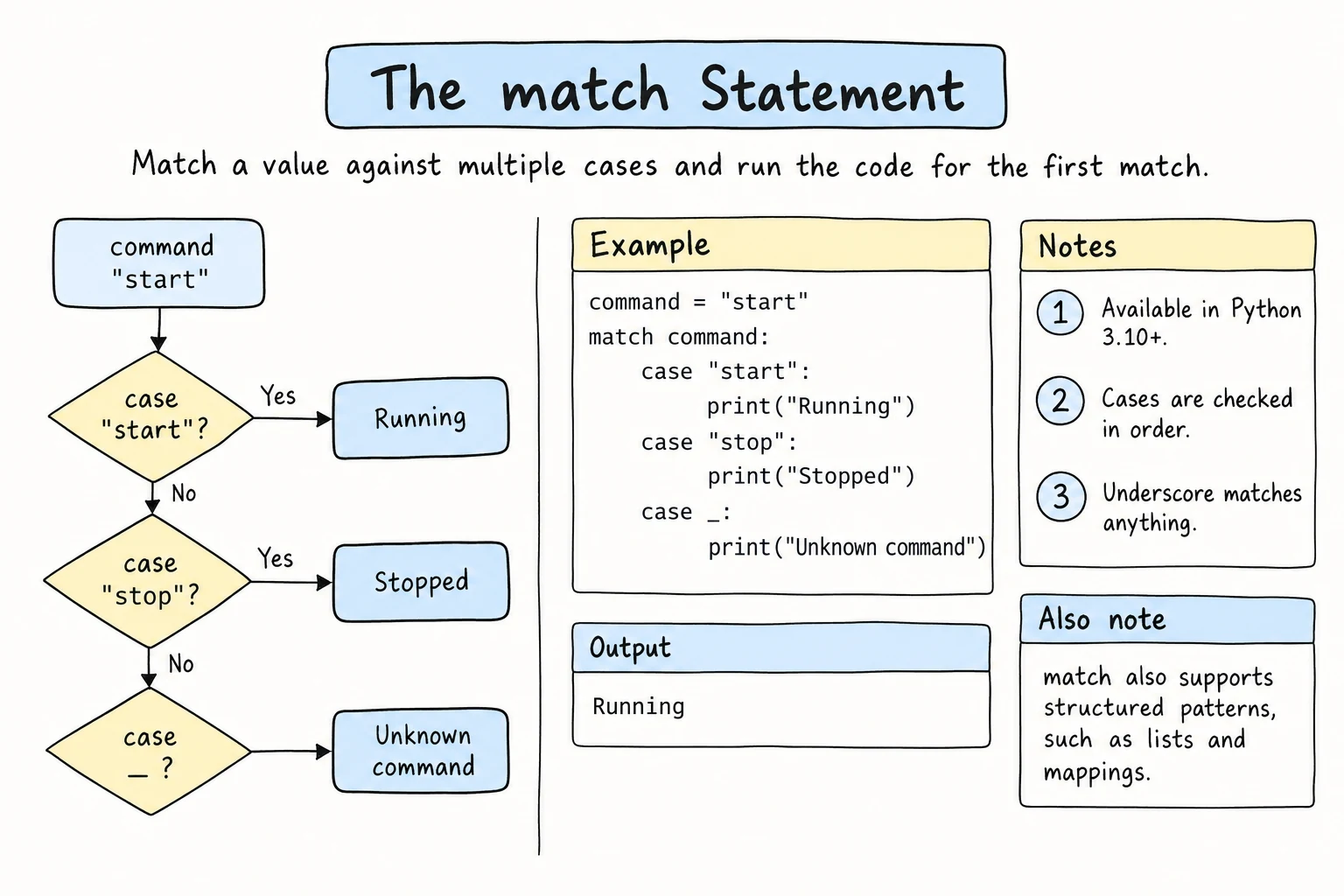
A first example
command = "stop"

match command:
    case "start":
        print("Starting the engine...")
    case "stop":
        print("Stopping.")
    case "pause":
        print("Paused.")
    case _:
print(f"Unknown command: {command}")Stopping.How it works:
- Python evaluates the value after
match(herecommand). - It tries each
casefrom top to bottom. - It runs the block of the first pattern that matches, and skips the rest.
case _:matches anything, so it's the "otherwise" branch, likeelse.
The same logic with if/elif:
command = "stop"

if command == "start":
    print("Starting the engine...")
elif command == "stop":
    print("Stopping.")
elif command == "pause":
    print("Paused.")
else:
    print(f"Unknown command: {command}")
For simple value checks, the two are equally good. match avoids repeating command == on every line.
No _, no fallback
If no case matches and there's no case _:, nothing happens: no error, no output. Add case _: whenever an unexpected value is possible.
Several values in one case: |
| means "or" inside a pattern:
day = "Sunday"

match day:
    case "Saturday" | "Sunday":
        print("Weekend!")
    case "Monday" | "Tuesday" | "Wednesday" | "Thursday" | "Friday":
        print("Workday.")
    case _:
print("That's not a day.")Weekend!Numbers work too:
status = 404

match status:
    case 200 | 201:
        print("Success")
    case 301 | 302:
        print("Redirect")
    case 404:
        print("Not found")
    case 500:
        print("Server error")
    case _:
print(f"Other status: {status}")Not foundCapturing a value
A plain name in a pattern doesn't compare against a variable. It captures the value into that name. This is useful in the final case:
choice = "7"

match choice:
    case "1":
        print("New game")
    case "2":
        print("Load game")
    case other:
print(f"'{other}' is not a menu option")'7' is not a menu optioncase other: matches anything, like _, but also stores the value in other. Use _ when you don't need the value.
Guards: extra conditions with if
Add if condition after a pattern. The case matches only if the pattern matches and the condition is true:
temperature = -4

match temperature:
    case 0:
        print("Exactly freezing")
    case t if t < 0:
        print(f"{t}°C: below freezing, watch for ice")
    case t if t > 35:
        print(f"{t}°C: extreme heat")
    case t:
print(f"{t}°C: normal")-4°C: below freezing, watch for iceRange checks like this are often just as clear with if/elif. Guards shine when combined with the patterns below.
Matching commands with several words
match can look inside a sequence of values. A common use is a text command split into words with .split() (which you met in String Methods and Slicing):
line = "go north"

match line.split():
    case ["go", direction]:
        print(f"You walk {direction}.")
    case ["take", item]:
        print(f"You pick up the {item}.")
    case ["look"]:
        print("You see a dark forest.")
    case ["quit" | "exit"]:
        print("Goodbye!")
    case _:
print("I don't understand.")You walk north.["go", direction]matches a list of exactly two words where the first is"go", and captures the second word indirection.["look"]matches exactly one word,"look".["quit" | "exit"]matches one word that's either"quit"or"exit".
Try changing line to "take lamp", "look", "go", or "dance wildly". "go" alone doesn't match ["go", direction], because two words are required.
With plain if statements, this example would need several checks of length and content. match has more patterns than this lesson shows, including ones for dictionaries and objects (see PEP 636 under Further reading). You'll meet the square brackets properly in Lists, and you'll match names like Color.RED in Enums.
match or if?
| Situation | Better choice |
|---|---|
| One value compared against several fixed options (menu, command, code) | match |
| Structured values, like split commands | match |
Ranges and comparisons (score >= 90) | if/elif |
| Conditions involving different variables | if/elif |
| Only one or two options | if/else |
match doesn't replace if. It's another tool that makes certain choices easier to read.
Try it
Run it and type a command when it asks, like go east, take key, look, or jump. Then add a new command, such as drop <item>. The case []: pattern matches an empty line: "".split() has no words at all.
Common mistakes
1. Expecting a name to compare against a variable
expected = "yes"
answer = "no"

match answer:
    case expected:            # captures! doesn't compare with the variable
        print("Matched")
    case _:
print("Not matched")SyntaxError: name capture 'expected' makes remaining patterns unreachableA bare name captures any value. Here Python notices that the next case can never run and refuses to run the code.
If the bare name is the last case, there is no error at all, which is worse:
expected = "yes"
answer = "no"

match answer:
    case "maybe":
        print("Not sure")
    case expected:            # matches anything and overwrites expected
        print("Matched", expected)

print(expected)Matched no
noThe case matched "no", and expected now holds "no" instead of "yes". Fix: compare against the value directly (case "yes":), or use if answer == expected:. A dotted name such as case Color.RED: is different: it is compared as a value, not captured. You'll use that in Enums.
2. Putting _ first
answer = "y"

match answer:
    case _:
        print("Anything")
    case "y":
print("Yes")SyntaxError: wildcard makes remaining patterns unreachablecase _: matches everything, so any case after it could never run. Keep _ last.
3. Using or instead of |
answer = "y"

match answer:
    case "y" or "yes":
print("Yes") case "y" or "yes":
^^
SyntaxError: invalid syntaxor isn't allowed inside a pattern. Fix: case "y" | "yes":.
Practice
1. Day type
Given a day number day (1 = Monday … 7 = Sunday), print Workday, Weekend, or Invalid day using match.
Solution
day = 6

match day:
    case 1 | 2 | 3 | 4 | 5:
        print("Workday")
    case 6 | 7:
        print("Weekend")
    case _:
        print("Invalid day")
2. Traffic light
Given light ("red", "yellow", or "green", in any capitalization), print Stop, Get ready, or Go. For anything else, print Broken light: <value>, with the value exactly as given.
Solution
light = "Green"

match light.lower():
    case "red":
        print("Stop")
    case "yellow":
        print("Get ready")
    case "green":
        print("Go")
    case _:
        print(f"Broken light: {light}")
3. Calculator with match
Rewrite the calculator from if, elif, and else using match on the operator. Use a guard to handle division by zero.
Solution
a = 12.0
operator = "/"
b = 0.0

match operator:
    case "+":
        print(a + b)
    case "-":
        print(a - b)
    case "*" | "x":
        print(a * b)
    case "/" if b == 0:
        print("Error: can't divide by zero.")
    case "/":
        print(a / b)
    case _:
        print(f"Unknown operator: {operator}")
The guarded case must come before the plain "/" case, or it would never be reached.
4. Rock, paper, scissors
Given player and computer choices, print Draw, You win, or You lose. Use match on the player's choice, with guards or nested ifs.
Solution
player = "rock"
computer = "scissors"

valid = ("rock", "paper", "scissors")

if player not in valid or computer not in valid:
    print("Invalid choice")
elif player == computer:
    print("Draw")
else:
    match player:
        case "rock":
            print("You win" if computer == "scissors" else "You lose")
        case "paper":
            print("You win" if computer == "rock" else "You lose")
        case "scissors":
            print("You win" if computer == "paper" else "You lose")
Checking both choices and the draw first keeps each case simple: by the time match runs, computer is a valid choice different from player.
5. Mini command shell
Process a command line with match on line.split():
add A B: print the sum of two numbersgreet NAME: printHello, NAME!repeat WORD N: print the word N times, separated by spaceshelp: print the list of commands- anything else:
Unknown command. Type help.
Test with "add 4 5", "greet Aziza", "repeat hi 3", "help", and "add 4".
Solution
line = "repeat hi 3"

match line.split():
    case ["add", a, b]:
        print(float(a) + float(b))
    case ["greet", name]:
        print(f"Hello, {name}!")
    case ["repeat", word, times]:
        print(((word + " ") * int(times)).strip())
    case ["help"]:
        print("Commands: add A B, greet NAME, repeat WORD N, help")
    case _:
        print("Unknown command. Type help.")
"add 4" has only two words, so it doesn't match ["add", a, b] and falls through to _. (word + " ") * int(times) repeats the word with a space after each copy, and .strip() removes the extra space at the end.
Recap
match value:tries eachcasefrom top to bottom and runs only the first match.case "a" | "b":matches several options, andcase _:matches anything, so put it last.- A bare name like
case other:captures the value. It doesn't compare with a variable of that name. - Guards (
case x if x > 0:) add a condition to a pattern. - Sequence patterns like
case ["go", direction]:match the structure of split commands. - Use
matchfor one value against fixed options or structures, andif/eliffor ranges and mixed conditions. Requires Python 3.10+.