

if, elif, and else
What you'll learn
- How to run code only when a condition is true with
if - How to handle the other case with
else - How to choose between many options with
elif - Why the order of conditions matters
- How to nest decisions, and how to write a short conditional expression
Why it matters
Until now, your programs ran every line, top to bottom, every time. Real programs react: show an error when a password is wrong, give a discount to members, print "1 item" instead of "1 items". The if statement is how a program chooses what to do.
if: run code only when a condition is true
temperature = 34

if temperature > 30:
    print("It's hot today.")
    print("Remember to drink water.")

print("Have a good day!")It's hot today.
Remember to drink water.
Have a good day!Change temperature to 20 and the two indented lines are skipped:
Have a good day!The structure:
if condition:
code that runs only when the condition is True- The line starts with
if, then a condition, then a colon:. - The code that belongs to the
ifis indented (4 spaces). This indented group of lines is called a block. - The block ends when the indentation goes back.
print("Have a good day!")isn't indented, so it always runs.
The condition can be anything that is truthy or falsy (see Booleans and Comparisons): a comparison, a boolean variable, or any value.
else: otherwise…
else gives code to run when the condition is false. Exactly one of the two blocks runs:
age = 15

if age >= 18:
    print("You can vote.")
else:
    years_left = 18 - age
print(f"You can vote in {years_left} years.")You can vote in 3 years.else has no condition. It catches everything the if didn't.
elif: choosing between many options
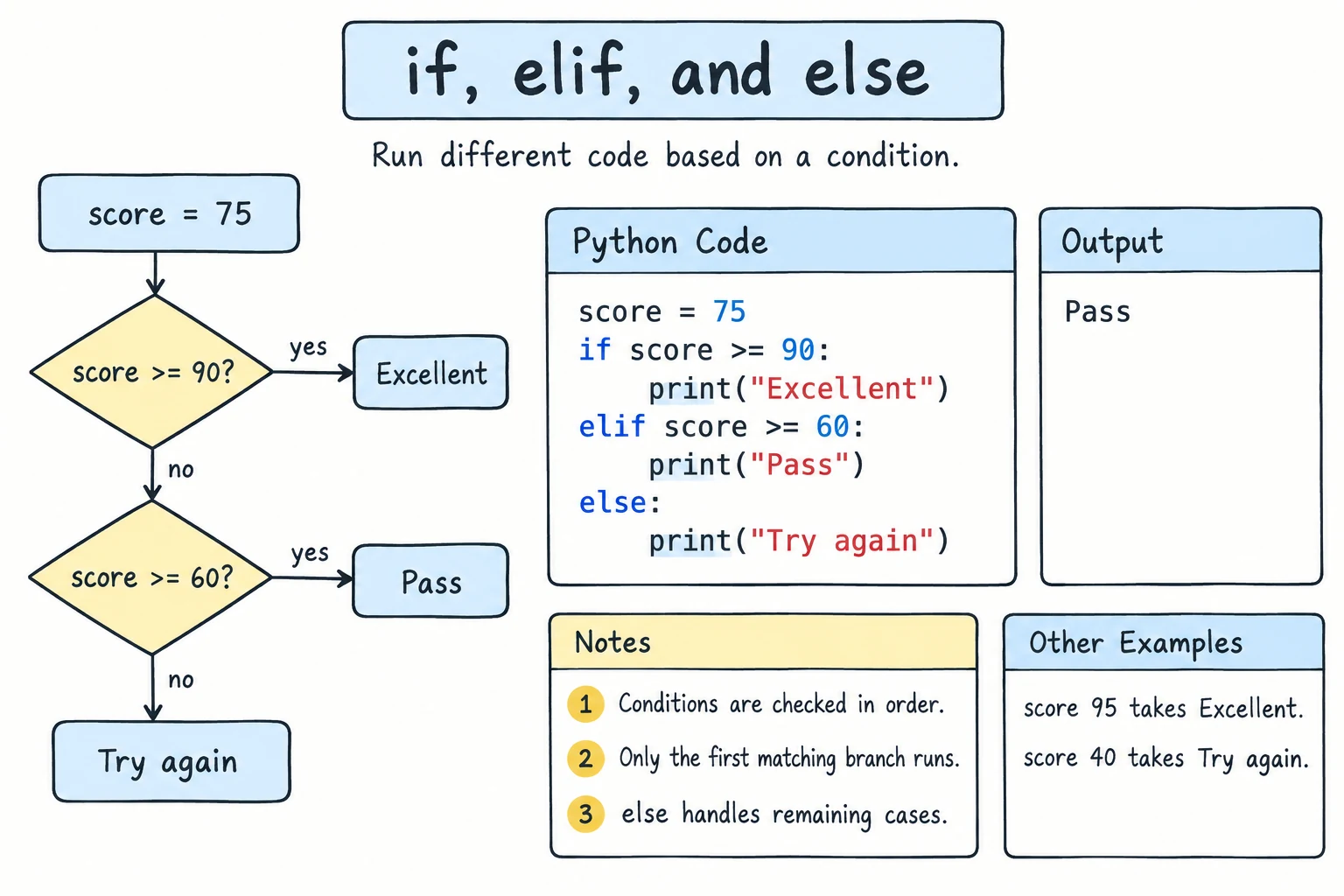
elif is short for "else if". It lets you check several conditions in order:
score = 76

if score >= 90:
    grade = "A"
elif score >= 80:
    grade = "B"
elif score >= 70:
    grade = "C"
elif score >= 60:
    grade = "D"
else:
    grade = "F"

print(f"Score {score} → grade {grade}")Score 76 → grade CHow Python runs this:
- Check each condition from top to bottom.
- Run the block of the first condition that's true.
- Skip all the rest, even if later conditions are also true.
- If none are true, run
else(if there is one).
For score = 76: 76 >= 90 is False, 76 >= 80 is False, 76 >= 70 is True, so the grade is "C" and Python stops checking.
You can have any number of elif blocks, and else is optional.
Order matters
Because only the first match runs, put the most specific conditions first. This version has a bug:
score = 95

if score >= 60:
    grade = "D"
elif score >= 90:
    grade = "A"      # never reached: every score >= 90 is also >= 60
else:
    grade = "F"

print(grade)D95 >= 60 is true, so the first block runs and nothing else is checked.
elif vs separate if statements
Separate if statements are all checked independently. An elif chain picks only one branch:
points = 95

# separate ifs: several can run
if points > 50:
    print("More than 50")
if points > 90:
    print("More than 90")

# one chain: only the first match runs
if points > 90:
    print("Excellent")
elif points > 50:
print("Good")More than 50
More than 90
ExcellentUse an if/elif/else chain when the options exclude each other (one grade, one ticket price). Use separate if statements for independent checks.
Nested decisions
A block can contain another if. Each level adds another 4 spaces of indentation:
has_ticket = True
age = 12

if has_ticket:
    if age < 14:
        print("Welcome! Please sit with an adult.")
    else:
        print("Welcome! Enjoy the show.")
else:
print("Please buy a ticket first.")Welcome! Please sit with an adult.Nesting is sometimes the clearest option, but deep nesting gets hard to read. Often you can flatten it with elif or with and/or, from the next lesson.
Checking for empty input
Because empty strings are falsy, you can check whether the user typed anything:
name = ""   # imagine: name = input("Name: ").strip()

if name:
    print(f"Hello, {name}!")
else:
print("You didn't enter a name.")You didn't enter a name.if name: reads as "if name is not empty".
Doing nothing: pass
A block can't be empty. If you need a placeholder, write pass, which does nothing:
stock = 10

if stock > 0:
    pass   # TODO: handle in-stock items later
else:
    print("Out of stock")
Conditional expressions (one-line if)
When you just need to pick one of two values, there's a compact form:
value_if_true if condition else value_if_falsecount = 1
word = "item" if count == 1 else "items"
print(f"{count} {word}")
temperature = -3
state = "ice" if temperature <= 0 else "water"
print(state)1 item
iceUse this only for short, simple choices. For anything longer, a regular if/else is easier to read.
Try it
Run the program and type a number when it asks. Try 0, -5, 7, and 12.
Common mistakes
1. Missing colon
if age >= 18
print("Adult")SyntaxError: expected ':'2. Using = in a condition
if age = 18:
print("Just turned 18")SyntaxError: invalid syntax. Maybe you meant '==' or ':=' instead of '='?Fix: if age == 18:. The := in the hint is the "walrus" operator, which assigns inside an expression. It's an advanced tool you don't need yet.
3. Wrong indentation
if age >= 18:
print("Adult")IndentationError: expected an indented block after 'if' statement on line 1Also watch for the opposite bug: forgetting to indent a line that belongs in the block, so it always runs.
balance = 100
price = 500

if balance < price:
    print("Not enough money.")
print("Purchase complete!") # meant to be in an else, but runs every timeNot enough money.
Purchase complete!4. Comparing input without converting
guess = "7"   # from input()
if guess == 7:
    print("Correct!")
print("Done")Done"Correct!" never prints, because a string is never equal to a number. Fix: int(guess) == 7.
Practice
1. Even or odd
Given number = 17, print 17 is odd or 17 is even using if/else.
Solution
number = 17

if number % 2 == 0:
    print(f"{number} is even")
else:
    print(f"{number} is odd")
2. The bigger number
Given two numbers a and b, print the bigger one, or They are equal if they're the same. (Don't use max().)
Solution
a = 12
b = 30

if a > b:
    print(a)
elif b > a:
    print(b)
else:
    print("They are equal")
3. Ticket price
A cinema's prices are:
- under 5: free
- 5 to 17: 25,000 som
- 18 to 64: 40,000 som
- 65 and over: 20,000 som
Given age, print the price. Test with 3, 5, 17, 18, 64, and 65.
Solution
age = 17

if age < 5:
    price = 0
elif age < 18:
    price = 25000
elif age < 65:
    price = 40000
else:
    price = 20000

if price == 0:
    print("Free")
else:
    print(f"{price:,} som")
Because the conditions run in order, elif age < 18 already knows age >= 5, so you don't need to check both ends.
4. Singular or plural
Given minutes, print 1 minute, 0 minutes, or 25 minutes, using a conditional expression.
Solution
minutes = 1
unit = "minute" if minutes == 1 else "minutes"
print(f"{minutes} {unit}")
5. Simple calculator
Read two numbers and an operator (+, -, *, or /) with input(). Print the result. Handle two problems with clear messages: dividing by zero, and an unknown operator.
Solution
a = float(input("First number: "))
operator = input("Operator (+ - * /): ").strip()
b = float(input("Second number: "))

if operator == "+":
    print(f"{a} + {b} = {a + b}")
elif operator == "-":
    print(f"{a} - {b} = {a - b}")
elif operator == "*":
    print(f"{a} * {b} = {a * b}")
elif operator == "/":
    if b == 0:
        print("Error: can't divide by zero.")
    else:
        print(f"{a} / {b} = {a / b}")
else:
    print(f"Unknown operator: {operator}")
The division check is nested inside the / branch. In The match Statement lesson you'll see another way to write this kind of menu.
Recap
if condition:runs its indented block only when the condition is truthy.else:runs when no earlier condition matched.elif condition:adds more options. Python runs only the first true branch, so order matters.- Use one
if/elif/elsechain for exclusive choices and separateifs for independent checks. if text:checks for non-empty text.passis an empty placeholder.a if condition else bpicks one of two values in a single expression.