

Dictionaries
What you'll learn
- Create a dictionary and read values by key
- Add, change, and remove entries safely
- Avoid
KeyErrorwithinand.get() - Loop over keys, values, and key-value pairs
- Use two everyday patterns: counting and grouping
Why it matters
A list is good when order matters and you find items by position: the first runner, the third song. But real data usually has names. You look up a contact by name, not by "contact number 47". A product price is found by product, and a word's definition by the word.
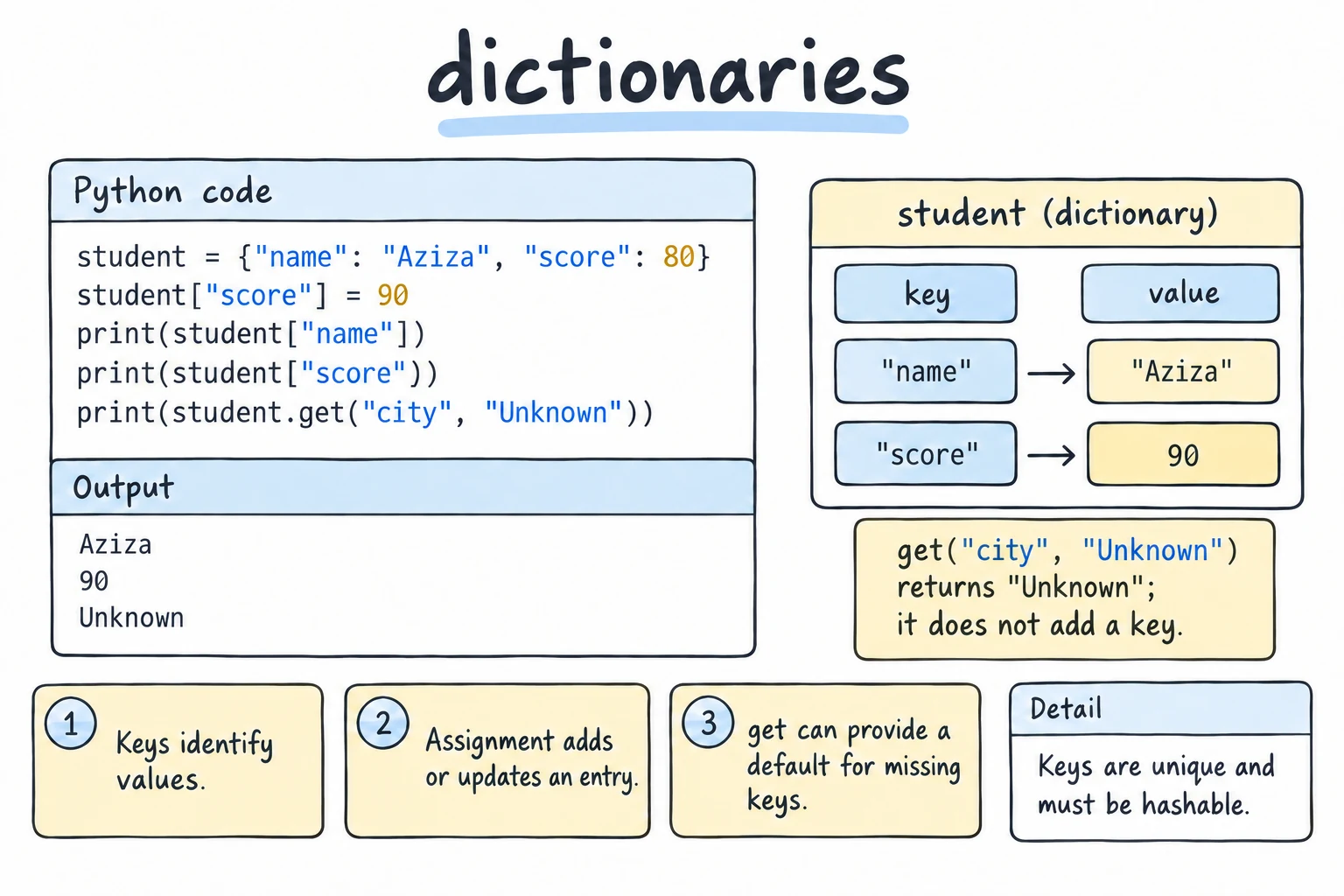
A dictionary (dict) stores data as key → value pairs. You give it a key and it gives back the value, fast, however big the dictionary is.
prices = {"apple": 1.20, "bread": 2.50, "milk": 0.99}
print(prices["bread"])2.5Creating a dictionary
Write pairs inside curly braces. Put a colon between each key and its value, and separate pairs with commas:
student = {
    "name": "Aziza",
    "age": 20,
    "courses": ["Math", "Physics"],
}
print(student)
For long dictionaries, put one pair per line with a trailing comma.
An empty dictionary is just {}. You'll often start empty and fill it up as the program runs.
The dict() constructor builds a dictionary from keyword arguments, or from pairs. zip() makes those pairs from two lists:
student = dict(name="Aziza", age=20)
print(student)

cities = ["Tashkent", "Samarkand", "Bukhara"]
people = [2956000, 551000, 280000]
print(dict(zip(cities, people))){'name': 'Aziza', 'age': 20}
{'Tashkent': 2956000, 'Samarkand': 551000, 'Bukhara': 280000}Keys and values have different rules:
| Can be | Examples | |
|---|---|---|
| Key | Unique, and an immutable (hashable) type | "name", 42, (3, 4) |
| Value | Anything at all | numbers, strings, lists, other dicts |
Keys are unique. If you write the same key twice, the last value wins:
colors = {"sky": "blue", "grass": "green", "sky": "grey"}
print(colors){'sky': 'grey', 'grass': 'green'}Reading values
Square brackets: d[key]
student = {"name": "Aziza", "age": 20}
print(student["name"])
If the key doesn't exist, Python raises a KeyError. That's useful when a missing key really is a bug, because the program stops right where the problem is.
Checking first: key in d
The in operator checks whether a key exists:
student = {"name": "Aziza", "age": 20}

if "email" in student:
    print(student["email"])
else:
    print("No email on file")
A default value: d.get(key, default)
.get() returns the value if the key exists. If it doesn't, you get the default (or None if you didn't give one). It never raises KeyError:
student = {"name": "Aziza", "age": 20}

print(student.get("age"))
print(student.get("email"))
print(student.get("email", "not provided"))20
None
not providedWhich one should you use?
- Use
d[key]when the key must be there. A crash tells you something is wrong. - Use
d.get(key, default)when a missing key is normal, for example an optional field.
Adding, changing, and removing
Assignment adds a key if it's new and replaces the value if it already exists:
stock = {"apple": 10}

stock["banana"] = 25   # add
stock["apple"] = 7     # change
stock["apple"] += 3    # update using the old value

print(stock){'apple': 10, 'banana': 25}There are three common ways to remove an entry:
stock = {"apple": 10, "banana": 25, "cherry": 40}

del stock["apple"]                 # remove; KeyError if missing
count = stock.pop("banana")        # remove AND return the value
missing = stock.pop("kiwi", 0)     # default instead of KeyError

print(stock, count, missing){'cherry': 40} 25 0To combine two dictionaries, use |. It builds a new dictionary, and keys from the right side win:
defaults = {"theme": "light", "font_size": 14}
user_choice = {"theme": "dark"}

config = defaults | user_choice
print(config){'theme': 'dark', 'font_size': 14}defaults.update(user_choice) does the same thing but changes defaults in place.
Looping over a dictionary
A dictionary remembers the order you inserted keys in. Pick the loop that matches what you need:
scores = {"Aziza": 92, "Bekzod": 78, "Dilnoza": 85}

for name in scores:                 # keys (same as scores.keys())
    print(name)

for score in scores.values():       # values only
    print(score)

for name, score in scores.items():  # both, unpacked
    print(f"{name}: {score}")
.items() gives you (key, value) pairs, and for name, score in ... unpacks each pair into two variables. This is the loop you'll use most.
To go through keys in sorted order, or sort by value:
scores = {"Aziza": 92, "Bekzod": 78, "Dilnoza": 85}

for name in sorted(scores):
    print(name, scores[name])

best = max(scores, key=scores.get)
print("Top student:", best)
max(scores, key=scores.get) looks at every key but compares them by their values.
Views: live, but not lists
.keys(), .values(), and .items() don't return lists. They return views: windows onto the dictionary that update when it changes. A view can't be indexed, so wrap it in list() when you need positions or a snapshot:
scores = {"Aziza": 92, "Bekzod": 78}
names = scores.keys()

scores["Dilnoza"] = 85
print(names)              # the view saw the new key
print(list(names)[0]) # names[0] would raise TypeErrordict_keys(['Aziza', 'Bekzod', 'Dilnoza'])
Azizalist(scores) gives the keys as a list directly.
Try it
Change the dictionary, add a student, or print only the students who passed (score ≥ 80).
Pattern 1: counting things
"How many times does each item appear?" comes up all the time. Start with an empty dictionary and add 1 for each item:
text = "the cat and the hat and the bat"

counts = {}
for word in text.split():
    counts[word] = counts.get(word, 0) + 1

print(counts){'the': 3, 'cat': 1, 'and': 2, 'hat': 1, 'bat': 1}The trick is counts.get(word, 0). The first time a word appears, there's no entry yet, so .get returns 0 and we store 1.
Later
The standard library has collections.Counter, which does this in one line (see collections and itertools). Write the loop yourself first, so you know what Counter does for you.
Pattern 2: grouping things
A value can be a list, so a dictionary can collect several items under one key:
words = ["apple", "avocado", "banana", "blueberry", "cherry"]

by_letter = {}
for word in words:
    first = word[0]
    if first not in by_letter:
        by_letter[first] = []
    by_letter[first].append(word)

print(by_letter){'a': ['apple', 'avocado'], 'b': ['banana', 'blueberry'], 'c': ['cherry']}The if ... not in check creates an empty list the first time each letter is seen. by_letter.setdefault(first, []).append(word) does the same thing in one line (but see mistake 4).
Dictionary or list?
| Question | Use |
|---|---|
| Do I find items by position or keep them in sequence? | list |
| Do I find items by a name or ID? | dict |
| Do I need to check "is X here?" quickly for many items? | dict (or set) |
| Does each item have named fields (name, age, email)? | dict |
Often you'll use both together, for example a list of dictionaries (a list of students). The Nested Data lesson covers that.
Common mistakes
1. Reading a key that doesn't exist
user = {"name": "Aziza"}
print(user["email"])KeyError: 'email'Fix: check with "email" in user first, or use user.get("email", default).
2. Expecting in to search values
capitals = {"Uzbekistan": "Tashkent", "Japan": "Tokyo"}
print("Tokyo" in capitals)            # checks KEYS
print("Tokyo" in capitals.values())False
True3. Changing a dictionary's size while looping over it
stock = {"apple": 0, "banana": 5, "cherry": 0}
for item in stock:
    if stock[item] == 0:
del stock[item]RuntimeError: dictionary changed size during iterationFix: loop over a snapshot of the keys, list(stock), so deleting doesn't disturb the loop:
stock = {"apple": 0, "banana": 5, "cherry": 0}
for item in list(stock):
    if stock[item] == 0:
        del stock[item]
print(stock){'banana': 5}Comprehensions shows another fix: build a new dictionary with only the items you keep.
4. Grouping with .get() instead of .setdefault()
words = ["apple", "avocado", "banana"]
by_letter = {}
for word in words:
    by_letter.get(word[0], []).append(word)
print(by_letter){}No error, and no data. .get() returns a new empty list that isn't stored in the dictionary, so every append goes into a list that is thrown away. Fix: by_letter.setdefault(word[0], []).append(word), which stores the empty list first and returns that stored list.
Practice
1. Phone book
Create a dictionary with three names and phone numbers. Print one person's number, then add a fourth person and print the whole phone book.
Solution
phone_book = {
    "Aziza": "+998 90 123 45 67",
    "Bekzod": "+998 91 765 43 21",
    "Dilnoza": "+998 93 111 22 33",
}
print(phone_book["Bekzod"])

phone_book["Farrukh"] = "+998 94 555 66 77"
print(phone_book)
2. Safe lookup
Given the menu dictionary and an item name, print the item's price, or the text not on the menu if the item doesn't exist. Do not use if. Test with "tea" and "pizza".
menu = {"tea": 1.5, "coffee": 2.0, "samsa": 1.0}
item = "pizza"
Solution
menu = {"tea": 1.5, "coffee": 2.0, "samsa": 1.0}
item = "pizza"

print(menu.get(item, "not on the menu"))
3. Letter counter
Build a dictionary counting each letter in text = "Hello World". Ignore spaces and treat uppercase and lowercase as the same.
Solution
text = "Hello World"

counts = {}
for char in text.lower():
    if char == " ":
        continue
    counts[char] = counts.get(char, 0) + 1

print(counts){'h': 1, 'e': 1, 'l': 3, 'o': 2, 'w': 1, 'r': 1, 'd': 1}4. Grade report
Given scores, print each student in alphabetical order with their score. Then print the class average (rounded to 1 decimal place) and the name of the lowest scorer.
scores = {"Dilnoza": 85, "Aziza": 92, "Bekzod": 78, "Farrukh": 64}Solution
scores = {"Dilnoza": 85, "Aziza": 92, "Bekzod": 78, "Farrukh": 64}

for name in sorted(scores):
    print(f"{name}: {scores[name]}")

average = sum(scores.values()) / len(scores)
lowest = min(scores, key=scores.get)

print(f"Average: {average:.1f}")
print(f"Lowest: {lowest}")
5. Invert a dictionary
Swap the keys and values of d = {"a": 1, "b": 2, "c": 1}. Several keys can share the same value, so each value in the result should map to a list of the original keys: {1: ['a', 'c'], 2: ['b']}.
Solution
d = {"a": 1, "b": 2, "c": 1}

inverted = {}
for key, value in d.items():
    if value not in inverted:
        inverted[value] = []
    inverted[value].append(key)

print(inverted){1: ['a', 'c'], 2: ['b']}This is the grouping pattern again: here we group keys by their value.
Recap
- A dictionary maps unique, immutable keys to values of any type:
{"key": value}. d[key]reads a value and raisesKeyErrorif the key is missing.d.get(key, default)never raises.key in dchecks keys, not values.- Assigning adds or updates.
deland.pop()remove.|merges into a new dictionary. - Loop with
.items()to get keys and values together. Views are live, so loop overlist(d)if you add or remove keys.