

Dates and Times
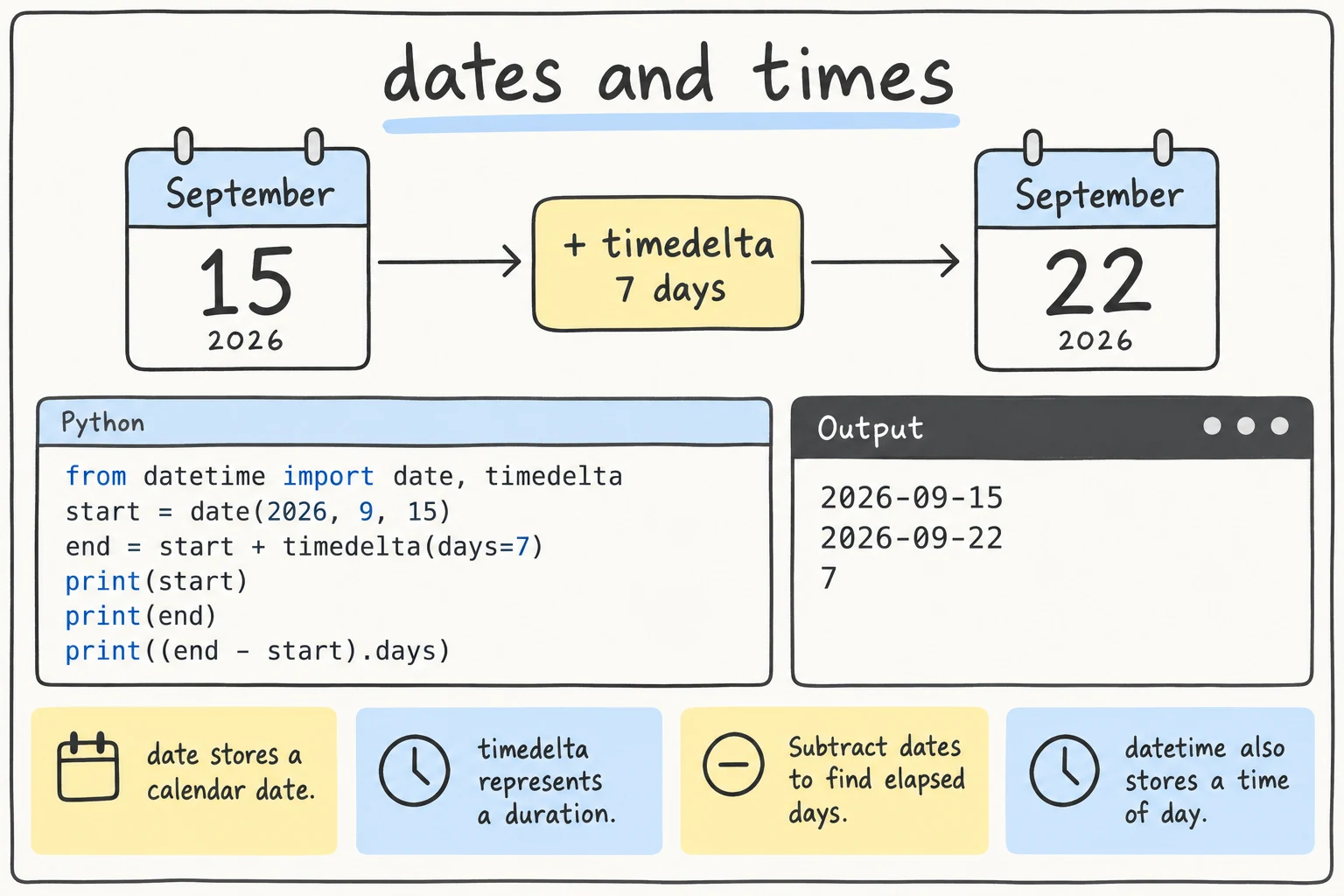
What you'll learn
- The main types in
datetime:date,datetime,time, andtimedelta - How to format dates with
strftimeand f-strings, and read them withstrptime - How to do date arithmetic: ages, deadlines, days until an event
- How to compare dates and find the day of the week
- The basics of time zones and the naive vs aware difference
Why it matters
A library tracks due dates, and a booking site shows departure times in Tashkent and Istanbul. Dates are full of traps: months have different lengths, leap years exist, and people write 05.09.2026 and 09/05/2026 for the same day. The datetime module handles this for you.
The datetime module
The datetime module has four main types: date (year, month, day), time (hour, minute, second), datetime (a date and a time), and timedelta (a duration).
The module and the type share a name
The module datetime contains a type also called datetime, which is why you often see from datetime import datetime.
Creating dates and times
from datetime import date, time, datetime

independence_day = date(2026, 9, 1)
lesson_start = time(9, 30)
flight = datetime(2026, 10, 5, 7, 45)

print(independence_day)
print(lesson_start)
print(flight)
print(flight.year, flight.month, flight.day, flight.hour, flight.minute)2026-09-01
09:30:00
2026-10-05 07:45:00
2026 10 5 7 45The order is always year, month, day, then hour, minute, second. Invalid dates are rejected: date(2026, 2, 30) raises ValueError: day 30 must be in range 1..28 for month 2 in year 2026.
Today and now
from datetime import date, datetime

print(date.today())       # e.g. 2026-09-15
print(datetime.now())     # e.g. 2026-09-15 14:03:27.518204
The output changes on every run, so the rest of this lesson uses fixed dates.
Formatting dates
Printing a date gives the ISO format YYYY-MM-DD. To show it differently, use strftime ("string format time") with format codes:
from datetime import datetime

meeting = datetime(2026, 3, 21, 16, 5)

print(meeting.strftime("%d.%m.%Y"))
print(meeting.strftime("%d/%m/%Y %H:%M"))
print(meeting.strftime("%A, %d %B %Y"))
print(f"Meeting on {meeting:%d.%m.%Y}") # the same codes in an f-string21.03.2026
21/03/2026 16:05
Saturday, 21 March 2026
Meeting on 21.03.2026| Code | Meaning | Example |
|---|---|---|
%Y | year, 4 digits | 2026 |
%m | month, 2 digits | 03 |
%d | day, 2 digits | 21 |
%H / %M | hour (24-hour clock) / minute | 16 / 05 |
%A / %a | weekday name / short | Saturday / Sat |
%B / %b | month name / short | March / Mar |
Note that %m is the month and %M is the minute: date(2026, 9, 15).strftime("%d.%M.%Y") gives 15.00.2026, a classic bug.
Parsing dates from text
Input and files give you dates as strings. datetime.strptime ("string parse time") turns one into a datetime, using the same format codes:
from datetime import datetime

text = "25.12.2026 18:30"
party = datetime.strptime(text, "%d.%m.%Y %H:%M")

print(party)
print(party.date())2026-12-25 18:30:00
2026-12-25The format must match the text exactly. .date() keeps only the date part.
ISO format
The ISO format YYYY-MM-DD is the standard for files and databases, with its own quick methods:
from datetime import date, datetime

d = date.fromisoformat("2026-04-18")
print(d.strftime("%d %B"))
print(d.isoformat())

dt = datetime.fromisoformat("2026-04-18T09:15:00")
print(dt.isoformat())18 April
2026-04-18
2026-04-18T09:15:00Date arithmetic with timedelta
A timedelta is a duration. Add it to a date to move forward, subtract it to move back:
from datetime import date, timedelta

borrowed = date(2026, 1, 25)
due = borrowed + timedelta(days=14)
reminder = due - timedelta(days=2)

print(f"Due:      {due}")
print(f"Reminder: {reminder}")
print(borrowed + timedelta(weeks=6))Due: 2026-02-08
Reminder: 2026-02-06
2026-03-08Python handles month ends and leap years. timedelta accepts days, weeks, hours, minutes, and seconds, but no months or years, because they have different lengths.
Subtracting two dates
Subtracting one date from another gives a timedelta. Its .days attribute is the number of days, and total_seconds() converts a whole duration, including hours and minutes, to seconds:
from datetime import date, datetime

left = date(2027, 1, 1) - date(2026, 9, 15)
print(f"{left.days} days until the New Year")

flight_time = datetime(2026, 10, 5, 11, 20) - datetime(2026, 10, 5, 7, 45)
print(flight_time)
print(flight_time.total_seconds() / 60, "minutes")108 days until the New Year
3:35:00
215.0 minutesComparing dates
Dates compare with <, >, ==: earlier dates are "smaller", so min, max, and sorted work on them too. weekday() gives the day of the week as a number, Monday 0 to Sunday 6:
from datetime import date

today = date(2026, 9, 19)
books = {"Python Basics": date(2026, 9, 10), "Samarkand Guide": date(2026, 9, 30)}

for title, due in books.items():
    if due < today:
        print(f"{title}: overdue by {(today - due).days} days")
    else:
        print(f"{title}: ok")

print("Earliest:", min(books.values()))
print(today.weekday(), today.strftime("%A"))Python Basics: overdue by 9 days
Samarkand Guide: ok
Earliest: 2026-09-10
5 SaturdayTwo more modules: calendar and time
calendar answers questions about whole months and years, such as calendar.isleap(2028), which is True.
time.perf_counter() measures how long code takes: call it before and after, and subtract. time.sleep(0.5) pauses for half a second.
Time zones
The dates so far are naive: datetime(2026, 10, 5, 7, 45) does not say whether that is 7:45 in Tashkent or in London. A datetime with a time zone is aware. The simplest way to make one is timezone with a fixed offset:
from datetime import datetime, timedelta, timezone, UTC

tashkent_tz = timezone(timedelta(hours=5))
call = datetime(2026, 9, 15, 15, 0, tzinfo=tashkent_tz)

print(call)
print(call.astimezone(UTC))2026-09-15 15:00:00+05:00
2026-09-15 10:00:00+00:00astimezone converts the same moment to another time zone: 15:00 in Tashkent (UTC+5) is 10:00 UTC. UTC (Python 3.11+) is short for timezone.utc, and the current time in UTC is datetime.now(UTC). For real places, zoneinfo knows the names and daylight saving rules:
from datetime import datetime
from zoneinfo import ZoneInfo

meeting = datetime(2026, 7, 1, 18, 0, tzinfo=ZoneInfo("Asia/Tashkent"))
print(meeting.astimezone(ZoneInfo("Europe/Berlin")))2026-07-01 15:00:00+02:00On some systems (notably Windows), zoneinfo needs the extra tzdata package to know the zone names.
UTC and the old utcnow()
Many tutorials use datetime.utcnow(). Don't copy it: it returns a naive datetime and is deprecated since Python 3.12:
from datetime import datetime

stamp = datetime.utcnow()
print(stamp.tzinfo)DeprecationWarning: datetime.datetime.utcnow() is deprecated and scheduled for removal in a future version. Use timezone-aware objects to represent datetimes in UTC: datetime.datetime.now(datetime.UTC).
NoneTry it
Change the dates and formats: find how many days are left until your birthday, or format a date the way you write it.
Common mistakes
1. The format does not match the text
from datetime import datetime

datetime.strptime("15/09/2026", "%Y-%m-%d")ValueError: time data '15/09/2026' does not match format '%Y-%m-%d'The text uses DD/MM/YYYY, but the format says YYYY-MM-DD. Fix: "%d/%m/%Y". The format must describe the text character by character.
2. Month and day in the wrong order
from datetime import datetime

d = datetime.strptime("05.09.2026", "%m.%d.%Y")   # meant: 5 September
print(d.strftime("%d %B %Y"))09 May 2026No error, just May 9 instead of September 5. Check whether your data puts the day or the month first, and store dates in ISO format (2026-09-05).
3. Mixing naive and aware datetimes
from datetime import datetime, timezone

naive = datetime(2026, 9, 15, 10, 0)
aware = datetime(2026, 9, 15, 10, 0, tzinfo=timezone.utc)
print(naive == aware)
print(naive < aware)False
TypeError: can't compare offset-naive and offset-aware datetimesOrdering (<, >) raises an error, but == is more dangerous: it quietly returns False although the clock readings are identical, so if deadline == now: never matches. Pick one style per program: all naive (simple local programs) or all aware (users in different places).
Practice
1. Pretty dates
Create the date March 21, 2027 (Navruz). Print it as 21.03.2027, then as Sunday, 21 March 2027 using an f-string format.
Solution
from datetime import date

navruz = date(2027, 3, 21)
print(navruz.strftime("%d.%m.%Y"))
print(f"{navruz:%A, %d %B %Y}")21.03.2027
Sunday, 21 March 20272. Library due date
A book is borrowed on "28.02.2028" for 3 weeks. Parse the text, and print the due date as DD.MM.YYYY with its weekday.
Solution
from datetime import datetime, timedelta

borrowed = datetime.strptime("28.02.2028", "%d.%m.%Y").date()
due = borrowed + timedelta(weeks=3)
print(f"{due:%d.%m.%Y} ({due:%A})")20.03.2028 (Monday)2028 is a leap year, and timedelta accounts for February 29 automatically.
3. Countdown
Write days_until(event, today) that returns the days from today to the next occurrence of the event's month and day (next year if it already passed). Test with birthdays on 3 November and 1 March, with today = date(2026, 9, 15).
Solution
from datetime import date

def days_until(event, today):
    next_time = date(today.year, event.month, event.day)
    if next_time < today:
        next_time = date(today.year + 1, event.month, event.day)
    return (next_time - today).days

today = date(2026, 9, 15)
print(days_until(date(2008, 11, 3), today))
print(days_until(date(2005, 3, 1), today))49
1674. Working hours
Farrukh's time log is a list of ("HH:MM", "HH:MM") start and end pairs. Parse them with strptime, add up the durations, and print the total like 7 h 35 min.
log = [("09:00", "12:30"), ("13:15", "17:00"), ("19:40", "20:00")]Solution
from datetime import datetime, timedelta

log = [("09:00", "12:30"), ("13:15", "17:00"), ("19:40", "20:00")]

total = timedelta()
for start_text, end_text in log:
    start = datetime.strptime(start_text, "%H:%M")
    end = datetime.strptime(end_text, "%H:%M")
    total += end - start

minutes = int(total.total_seconds() // 60)
hours, minutes = divmod(minutes, 60)
print(f"{hours} h {minutes} min")7 h 35 mintimedelta() is a zero duration, a good start for a running total.
5. Rental invoice
A car rental costs 350,000 som per started day (1 day and 2 hours counts as 2 days), and weekend days cost 20% more. For pickup "2026-09-18 10:00" and return "2026-09-21 12:00", print each charged day with its weekday and price, then the total.
Solution
import math
from datetime import datetime, timedelta

PRICE = 350_000

pickup = datetime.fromisoformat("2026-09-18 10:00")
returned = datetime.fromisoformat("2026-09-21 12:00")

hours = (returned - pickup).total_seconds() / 3600
days = math.ceil(hours / 24)

total = 0
for i in range(days):
    day = (pickup + timedelta(days=i)).date()
    price = PRICE * 1.2 if day.weekday() >= 5 else PRICE
    total += price
    print(f"{day:%d.%m %a}  {price:>9,.0f} som")

print(f"Total: {total:,.0f} som for {days} days")18.09 Fri 350,000 som
19.09 Sat 420,000 som
20.09 Sun 420,000 som
21.09 Mon 350,000 som
Total: 1,540,000 som for 4 daysThe rental lasts 74 hours, so 4 started days are charged.
Recap
date,time,datetime, andtimedeltatake arguments in the order year, month, day, hour, minute.strftimeand f-strings (f"{d:%d.%m.%Y}") turn dates into text, andstrptimeturns text into dates. The format must match exactly.- Add or subtract
timedeltato move dates, and subtract two dates to get atimedeltawith.days. - Dates compare with
<and==;weekday()is 0 for Monday. - Naive datetimes have no time zone, aware ones do. Don't mix them; use
datetime.now(UTC), notutcnow().