

Classes and Objects
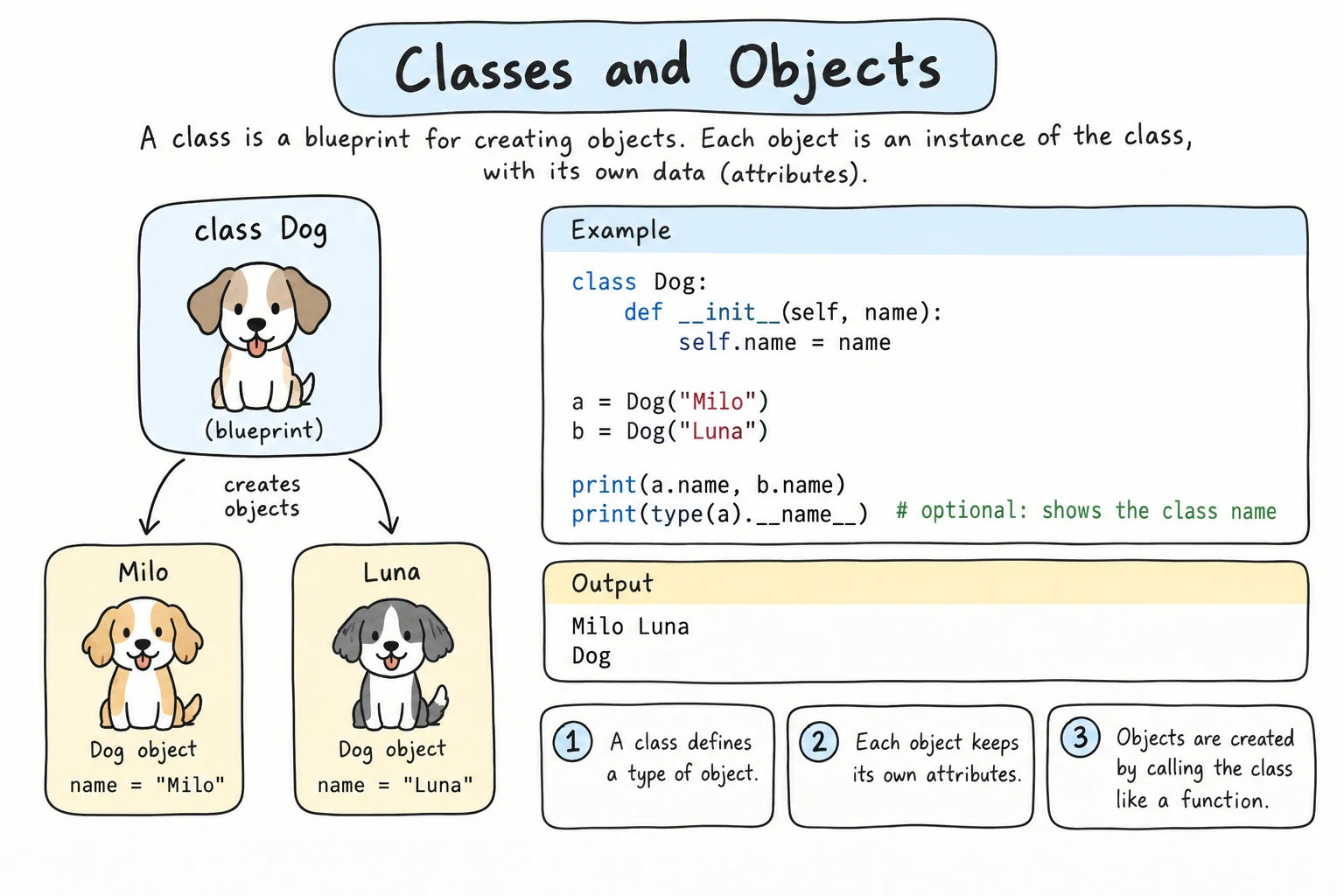
What you'll learn
- How to write and name a class, and create objects from it
- What
__init__does and when Python runs it - What
selfreally is, and howobj.method()passes it for you - How to give each object its own attributes, and explore them with
vars(),dir(), andgetattr() - How
isinstance(), aliasing, andisversus==work with your own objects
Why it matters
Most beginner confusion with classes comes down to two things: __init__ and self. Once those click, the rest of OOP builds on top. You'll also meet a fact that causes real bugs: two variables can point to the same object.
The simplest class
A class starts with class, a name, and a colon, followed by an indented body:
class Book:
    """A book in the library."""

first = Book()        # call the class to create an object
second = Book()

print(type(first))
print(first is second)<class '__main__.Book'>
FalseThe string under class Book: is a docstring: one line saying what the class represents. Each call Book() creates a new, separate instance. Class names use CapWords (Book, BankAccount), unlike snake_case functions and variables. Built-ins like str are lowercase only for historical reasons.
__init__: setting up a new object
To give each book a title and an author from the moment it exists, write __init__ ("dunder init", for double underscore):
class Book:
    def __init__(self, title, author):
        print(f"Setting up a new book: {title}")
        self.title = title
        self.author = author

book = Book("Silk Road Stories", "Dilnoza Karimova")
print(book.title)
print(book.author)Setting up a new book: Silk Road Stories
Silk Road Stories
Dilnoza KarimovaYou never call __init__ yourself. Book("Silk Road Stories", "Dilnoza Karimova") makes Python create a new, empty Book, call __init__ with that object as self and your arguments as title and author, and give the finished object back. __init__ must not return a value: it only fills in the object. It's often called the constructor.
What is self?
self is the object the method is working on: in __init__, the new object being set up; in any other method, the object you called it on. Python moves that object to the front of the argument list for you, so these two lines do the same thing:
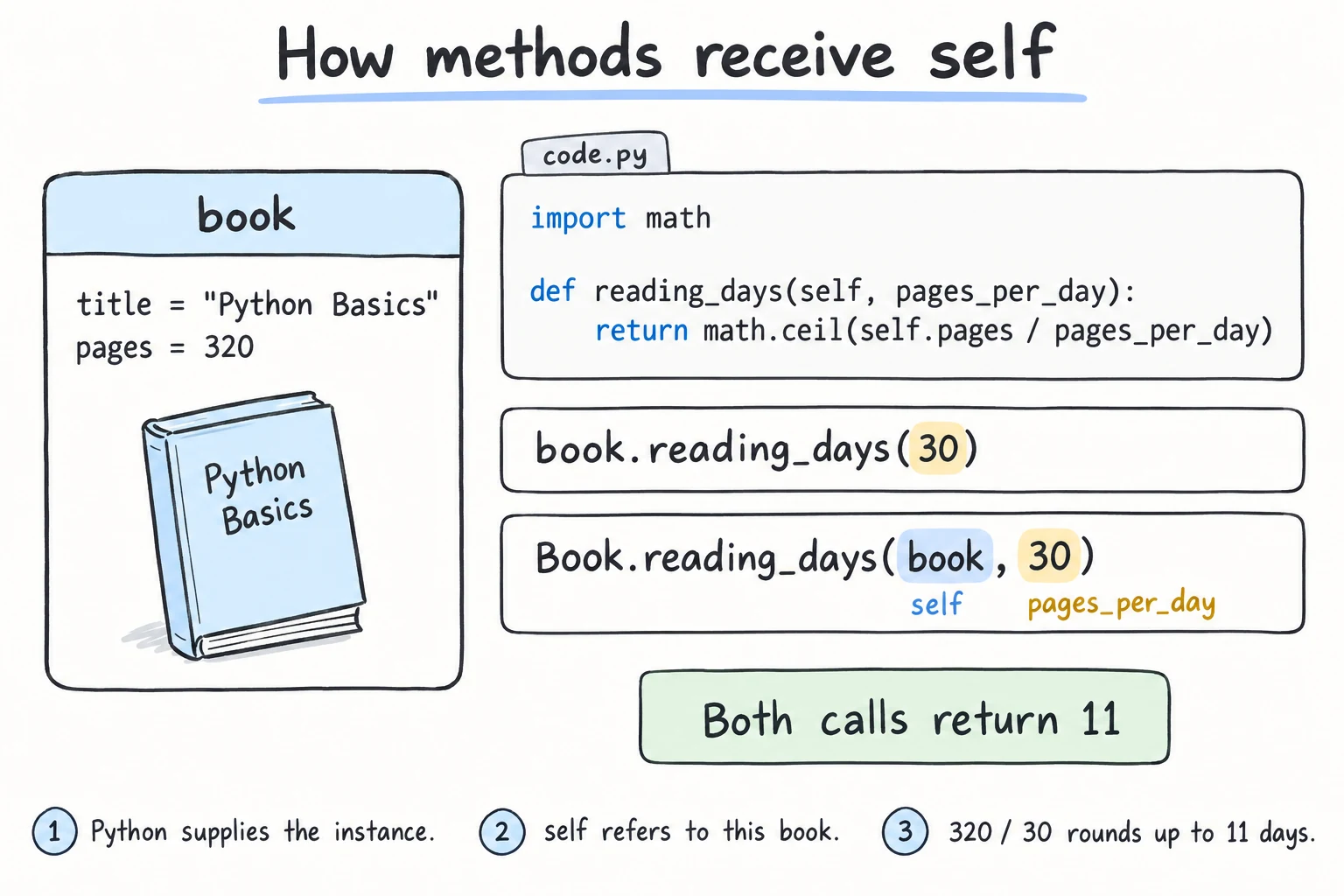
import math

class Book:
    def __init__(self, title, pages):
        self.title = title
        self.pages = pages

    def reading_days(self, pages_per_day):
        return math.ceil(self.pages / pages_per_day)

book = Book("Python Basics", 320)
print(book.reading_days(30))         # the usual way
print(Book.reading_days(book, 30)) # what Python does behind the scenes11
11That's why every method has self as its first parameter, even though you never pass it yourself. (The name is a convention, but a very strong one.) Variables created inside a method are local and vanish when it ends; self.pages = pages stores the value on the object, so reading_days() can use it later.
Each object has its own attributes
Values stored with self.name = ... are instance attributes: each instance has its own. __init__ can also calculate them or start them at a fixed value, and default values work as in any function:
class Product:
    """A product in a shop."""

    def __init__(self, name, price, discount_percent=0):
        self.name = name
        self.price = price
        self.final_price = price * (100 - discount_percent) // 100   # calculated
        self.sold = 0                                                  # fixed start

tea = Product("Green tea", 24000, 25)
bread = Product("Bread", 5000)
tea.sold += 3                       # changes only tea
print(tea.final_price, tea.sold, bread.final_price, bread.sold)18000 3 5000 0The mutable-default trap from Parameters and Arguments applies here too: def __init__(self, items=[]) would share one list between all objects. Use items=None and create the list inside __init__.
Exploring objects
A few built-ins let you look inside any object, which is handy while debugging:
class Product:
    def __init__(self, name, price):
        self.name = name
        self.price = price

tea = Product("Green tea", 24000)
print(vars(tea))                              # instance attributes as a dict
print(hasattr(tea, "price"), hasattr(tea, "color"))
print(getattr(tea, "color", "no color")) # read by name, with a default{'name': 'Green tea', 'price': 24000}
True False
no colordir(tea) lists every attribute and method name, including Python's built-in __...__ ones, and help(Product) shows the class with its docstring.
Printing an object
By default, print(book) shows only something like <__main__.Book object at 0x7f3a9c2b1e50>. For now, write a method such as describe() that returns a readable string; Representing and Comparing Objects shows __str__ and __repr__, which fix print() itself.
Identity, aliasing, and isinstance()
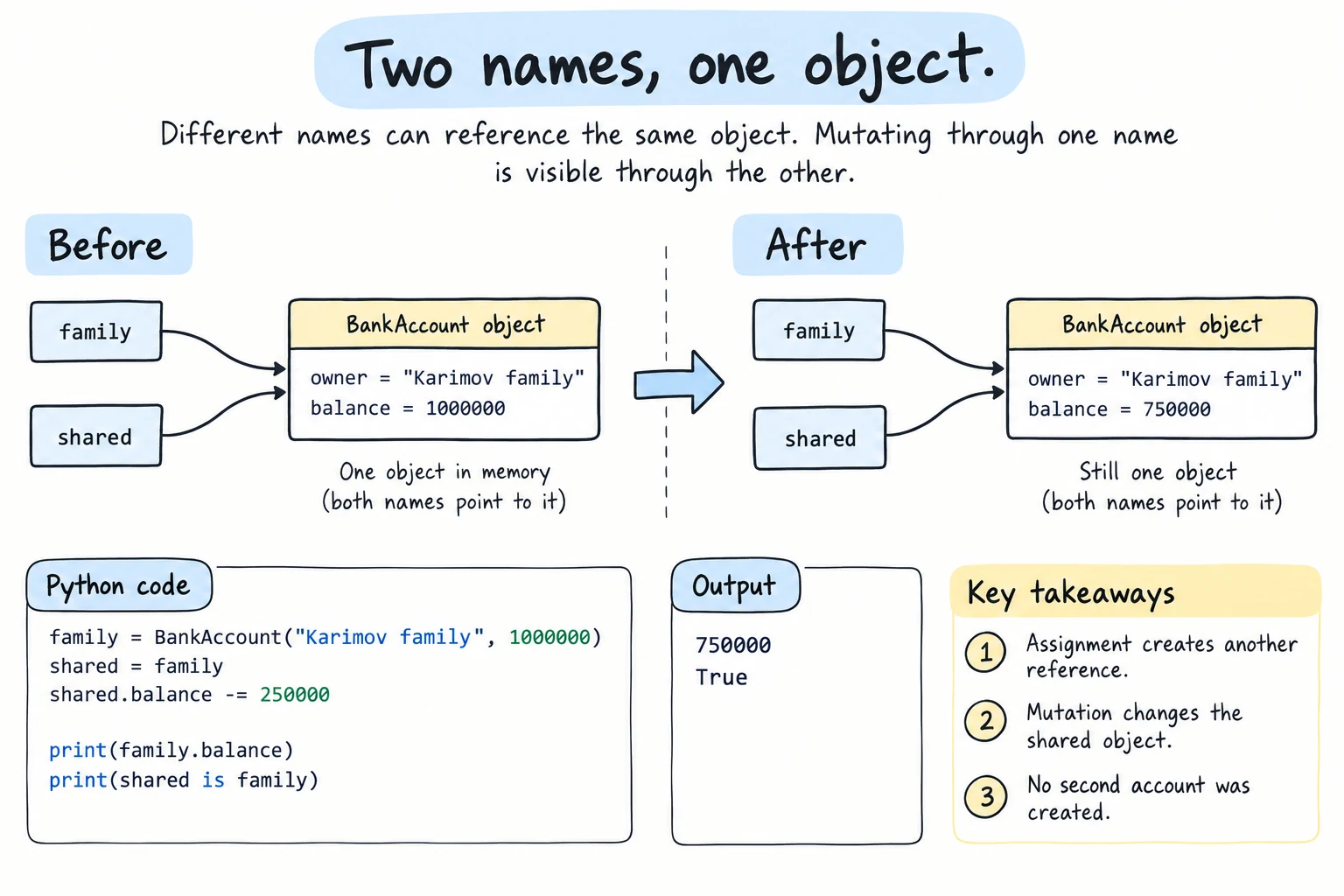
Assignment never copies an object: b = a makes a second name for the same object, just like with lists (and a function receives the object itself).
class BankAccount:
    def __init__(self, owner, balance):
        self.owner = owner
        self.balance = balance

family = BankAccount("Karimov family", 1000000)
shared = family                   # not a copy: the same account
shared.balance -= 250000          # spend through one name...
print(family.balance)             # ...and the change shows through the other

twin = BankAccount("Karimov family", 750000)
print(shared is family, twin is family)
print(twin == family)             # same data, but == compares identity by default
print(isinstance(twin, BankAccount), isinstance("twin", BankAccount))750000
True False
False
True Falsea is b asks "the same object?", and a == b asks "equal values?". Python doesn't know what "equal" means for your class, so by default == behaves like is; Representing and Comparing Objects shows how to define __eq__. isinstance(obj, SomeClass) asks "is this an instance of this class?". Prefer it over type(x) == SomeClass: it accepts a tuple of classes and works with inheritance (see Inheritance and super()).
Try it
Create more characters and give them items.
Common mistakes
1. Forgetting self in a method definition
class Book:
    def describe():
        return "A book"

Book().describe()TypeError: Book.describe() takes 0 positional arguments but 1 was givenPython always passes the object as the first argument, but describe() accepts none. Fix: def describe(self):.
2. Forgetting self. when saving an attribute
class Book:
    def __init__(self, title):
        title = title          # just a local variable

book = Book("Python Basics")
print(book.title)AttributeError: 'Book' object has no attribute 'title'Without self., the value is lost when __init__ ends. Fix: self.title = title. A misspelled name also gives an AttributeError, with a suggestion: book.tittle gives AttributeError: 'Book' object has no attribute 'tittle'. Did you mean: 'title'?
3. Misspelling __init__
class Book:
    def _init_(self, title):      # one underscore on each side
        self.title = title

book = Book("Python Basics")TypeError: Book() takes no argumentsPython only runs a method named exactly __init__, with two underscores on each side. _init_ is an ordinary method that never runs.
Practice
1. Cities
Write a City class with name, population, and country (default "Uzbekistan"). Create Tashkent (3,000,000), Samarkand (570,000), and Almaty (2,200,000, Kazakhstan), and print each one with f"{city.name:<10} {city.country:<11} {city.population:>10,}".
Solution
class City:
    def __init__(self, name, population, country="Uzbekistan"):
        self.name = name
        self.population = population
        self.country = country

cities = [
    City("Tashkent", 3000000),
    City("Samarkand", 570000),
    City("Almaty", 2200000, "Kazakhstan"),
]
for city in cities:
print(f"{city.name:<10} {city.country:<11} {city.population:>10,}")Tashkent Uzbekistan 3,000,000
Samarkand Uzbekistan 570,000
Almaty Kazakhstan 2,200,0002. Fix the class
This code has three bugs. Find and fix them so that it prints Tea costs 15000 som.
class product:
    def __init__(name, price):
        name = name
        self.price = price

    def label():
        return f"{self.name} costs {self.price} som"

tea = product("Tea", 15000)
print(tea.label())
Solution
class Product:
    def __init__(self, name, price):
        self.name = name
        self.price = price

    def label(self):
        return f"{self.name} costs {self.price} som"

tea = Product("Tea", 15000)
print(tea.label())Tea costs 15000 som__init__ and label were missing self, and name = name stored nothing on the object. Product also follows CapWords.
3. Predict the output
Without running it, write down what this prints. Then check.
class Counter:
    def __init__(self, start=0):
        self.value = start

a = Counter()
b = Counter(10)
c = a
c.value += 5
a.value += 1
b = Counter(b.value + a.value)

print(a.value, b.value, c.value)
print(a is c, a == b)
Solution
6 16 6
True False
c is another name for a, so both changes hit one object: 0 + 5 + 1 = 6. The new b starts at 10 + 6 = 16. By default == compares identity, so a == b is False.
4. Design a class: a cinema ticket
Design a Ticket class from this description:
A cinema in Samarkand sells tickets. Each ticket has a movie title, a seat like
"F7", and a price that defaults to 45,000 som. Every ticket starts unused and can be used exactly once: callinguse()a second time raisesValueError("Ticket B2 was already used").summary()returns a line likeThe Silk Road, seat F7, 45,000 som, valid.
Your class must work with this driver code and print the output below:
normal = Ticket("The Silk Road", "F7")
special = Ticket("Space Voyage", "B2", 60000)

special.use()
try:
    special.use()
except ValueError as error:
    print("Error:", error)

print(normal.summary())
print(special.summary())Error: Ticket B2 was already used
The Silk Road, seat F7, 45,000 som, valid
Space Voyage, seat B2, 60,000 som, usedSolution
class Ticket:
    def __init__(self, movie, seat, price=45000):
        self.movie = movie
        self.seat = seat
        self.price = price
        self.used = False

    def use(self):
        if self.used:
            raise ValueError(f"Ticket {self.seat} was already used")
        self.used = True

    def summary(self):
        status = "used" if self.used else "valid"
        return f"{self.movie}, seat {self.seat}, {self.price:,} som, {status}"

normal = Ticket("The Silk Road", "F7")
special = Ticket("Space Voyage", "B2", 60000)

special.use()
try:
    special.use()
except ValueError as error:
    print("Error:", error)

print(normal.summary())
print(special.summary())
It prints the expected output shown in the exercise.
5. A contact book
Write a Contact class (name, and city with default "Tashkent") and a ContactBook class that stores a list of contacts. ContactBook needs add(contact) and find(name), which returns the matching contact or None (ignore upper/lower case). Add Aziza and Farrukh (Bukhara) to a work book and Dilnoza (Samarkand) to a family book. Print the name and city of work.find("farrukh"), then work.find("Dilnoza"), then the number of contacts in each book.
Solution
class Contact:
    def __init__(self, name, city="Tashkent"):
        self.name = name
        self.city = city

class ContactBook:
    def __init__(self):
        self.contacts = []

    def add(self, contact):
        self.contacts.append(contact)

    def find(self, name):
        for contact in self.contacts:
            if contact.name.lower() == name.lower():
                return contact
        return None

work = ContactBook()
family = ContactBook()

work.add(Contact("Aziza"))
work.add(Contact("Farrukh", "Bukhara"))
family.add(Contact("Dilnoza", "Samarkand"))

found = work.find("farrukh")
print(found.name, found.city)
print(work.find("Dilnoza"))
print(len(work.contacts), len(family.contacts))Farrukh Bukhara
None
2 1self.contacts = [] runs in __init__, so each book gets its own list.
Recap
class Name:(CapWords, with a docstring) defines a class; calling it creates an instance.__init__runs automatically and fills in the new object's attributes.selfis the object a method works on:obj.method(x)meansClassName.method(obj, x). Store data withself.attr = value.vars(),dir(),hasattr(), andgetattr()let you look inside an object.isinstance()checks the class. Assignment shares one object; by default==compares identity, likeis.