

Tuples and Unpacking
What you'll learn
- How to create a tuple, including the one-item tuple
- Why tuples can't be changed, and how tuples compare
- How to unpack a sequence into separate variables
- How
*restcollects "everything else" - When to use a tuple instead of a list
Why it matters
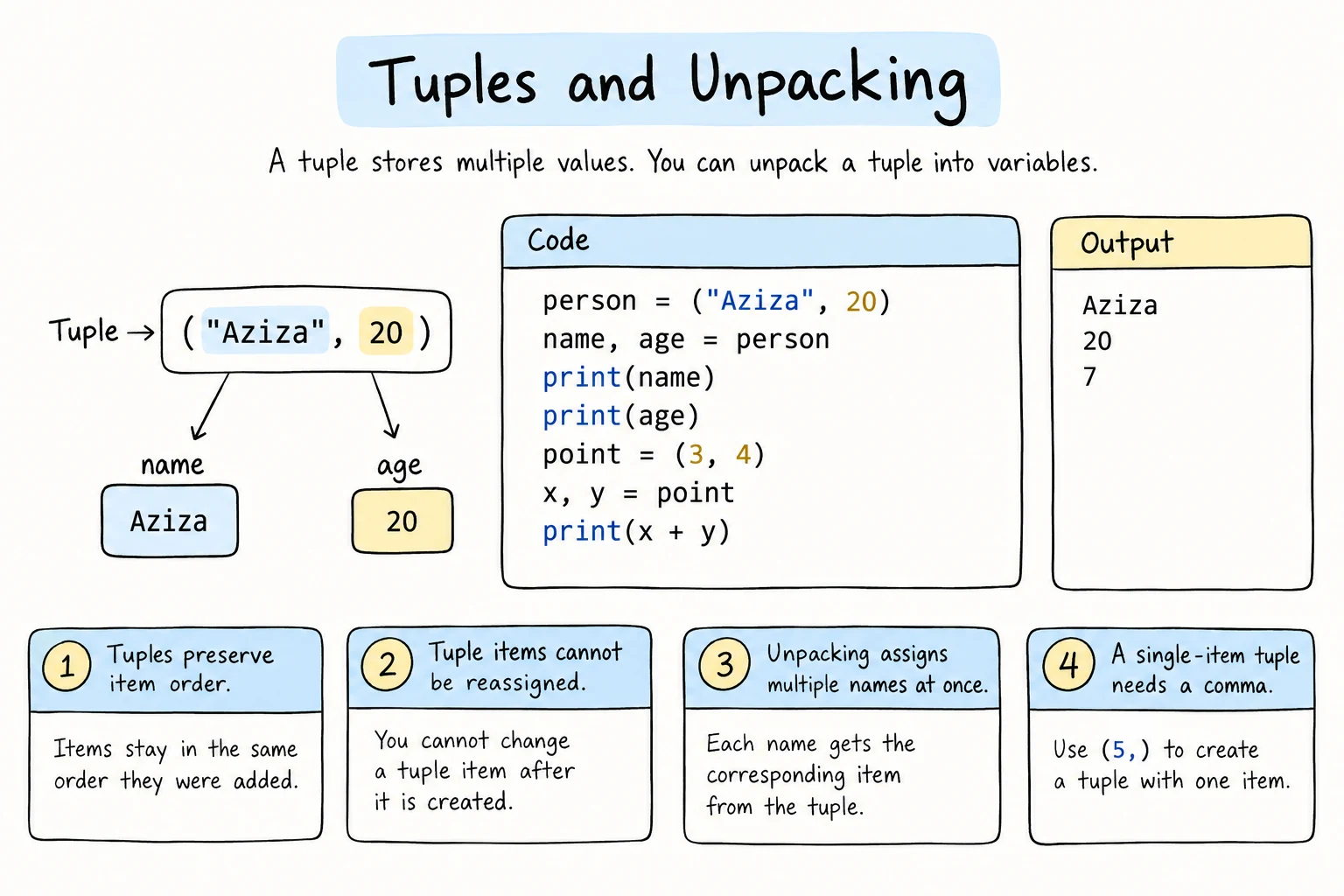
Some groups of values belong together and shouldn't change: a point's (x, y) coordinates, an RGB color (255, 128, 0), a date (2026, 9, 15). A tuple stores such a fixed group. Together with unpacking, tuples make code shorter and clearer, and you've already been using them without noticing, in a, b = b, a, enumerate(), and zip().
Creating a tuple
Put values in parentheses, separated by commas:
point = (3, 4)
color = (255, 128, 0)
birthday = (2004, 3, 21)

print(point)
print(type(color))
print(len(birthday))(3, 4)
<class 'tuple'>
3Actually, the comma makes the tuple, not the parentheses. The parentheses are usually added for readability:
size = 1920, 1080
print(size)(1920, 1080)Empty and one-item tuples
empty = ()
single = ("tea",)      # the trailing comma is required
not_a_tuple = ("tea")  # just a string in parentheses

print(type(single))
print(type(not_a_tuple))<class 'tuple'>
<class 'str'>Reading tuples
Tuples support everything that doesn't change them: indexing, slicing, len, in, count, index, and loops.
weekdays = ("Mon", "Tue", "Wed", "Thu", "Fri")

print(weekdays[0])
print(weekdays[-2:])
print("Sat" in weekdays)

for day in weekdays:
    print(day, end=" ")
print()Mon
('Thu', 'Fri')
False
Mon Tue Wed Thu FriComparing tuples
Tuples compare item by item, like words in a dictionary: the first items decide, and only if they're equal does Python look at the second, and so on.
print((1, "b") < (1, "c"))
print((2026, 3, 21) < (2026, 12, 1))
print(sorted([("Bekzod", 85), ("Aziza", 92), ("Aziza", 78)]))True
True
[('Aziza', 78), ('Aziza', 92), ('Bekzod', 85)]That's why sorted(zip(marks, names)) in Working with Lists and Sorting sorted by mark first, and why dates stored as (year, month, day) sort correctly.
Tuples are immutable
point = (3, 4)
point[0] = 10TypeError: 'tuple' object does not support item assignmentThere's no append, remove, or sort either. To "change" a tuple, create a new one:
point = (3, 4)
point = (10, point[1])
print(point)(10, 4)Why is that useful?
- Safety: you can't replace or remove a tuple's items by accident.
- Meaning: a tuple says "this is one fixed record", while a list says "this is a collection that may grow".
- Dictionary keys: tuples of immutable values (numbers, strings, other such tuples) can be used as keys in dictionaries and as items in sets. Lists can't. (See Dictionaries and Sets.)
distances = {("Tashkent", "Samarkand"): 300, ("Tashkent", "Bukhara"): 570}
print(distances[("Tashkent", "Bukhara")])570Immutable, but only one level deep
A tuple fixes which objects it holds, not what happens inside them. If one item is a list, that list can still change, and the tuple can no longer be a dictionary key:
team = ("Aziza", ["Bekzod"])
team[1].append("Dilnoza")
print(team)

try:
    groups = {team: "Group A"}
except TypeError as error:
print("TypeError:", error)('Aziza', ['Bekzod', 'Dilnoza'])
TypeError: cannot use 'tuple' as a dict key (unhashable type: 'list')try/except catches the error so the program can print it and keep going. You'll learn it in Handling Exceptions.
Unpacking
Unpacking assigns the items of a sequence to several variables at once:
point = (3, 4)
x, y = point

print(f"x = {x}, y = {y}")x = 3, y = 4It works with any iterable: tuples, lists, strings, and the results of .split():
first, last = "Aziza Karimova".split()
day, month, year = "15/09/2026".split("/")
a, b, c = "xyz"

print(last, year, c)Karimova 2026 zThe number of variables must match the number of items:
x, y = (1, 2, 3)ValueError: too many values to unpack (expected 2, got 3)Unpacking in loops
This is where unpacking really shines. You've seen it with enumerate() and zip(), which produce tuples:
students = [("Aziza", 92), ("Bekzod", 85), ("Dilnoza", 78)]

for name, score in students:
print(f"{name}: {score}")Aziza: 92
Bekzod: 85
Dilnoza: 78Compare that with student[0] and student[1]: the names make the code self-explanatory.
Swapping
Now you can see how the swap from Variables works:
a, b = 1, 2
a, b = b, a      # the right side builds the tuple (2, 1), then it's unpacked
print(a, b)2 1Ignoring values with _
Use _ for values you don't need:
record = ("Aziza", "Karimova", 20, "Tashkent")
first_name, _, age, _ = record
print(first_name, age)Aziza 20Collecting the rest with *
A starred variable collects all remaining items into a list:
scores = [95, 88, 72, 64, 58]

best, *others = scores
print(best)
print(others)

*earlier, last = scores
print(last)

first, *middle, final = scores
print(middle)95
[88, 72, 64, 58]
58
[88, 72, 64]Only one starred variable is allowed per unpacking. It can collect zero items, in which case it's an empty list.
A handy use is splitting a command from its arguments:
command, *arguments = "copy report.txt backup.txt".split()
print(command)
print(arguments)copy
['report.txt', 'backup.txt']Nested unpacking
If items contain tuples, you can unpack the structure in one go:
route = ("Bus 51", (41.31, 69.28), (41.35, 69.22))
name, (start_lat, start_lon), (end_lat, end_lon) = route
print(name, start_lat, end_lon)Bus 51 41.31 69.22The same works in a loop. enumerate(zip(items, prices)) gives pairs like (1, ("tea", 15000)), so the loop variables mirror that shape:
items = ["tea", "samsa", "juice"]
prices = [15000, 8000, 12000]

for number, (item, price) in enumerate(zip(items, prices), start=1):
print(f"{number}. {item}: {price:,} som")1. tea: 15,000 som
2. samsa: 8,000 som
3. juice: 12,000 somReturning several values
Functions (in the Functions module) often return a tuple to give back more than one value, and the caller unpacks it. A built-in example is divmod(), which returns the results of // and % together:
hours, minutes = divmod(135, 60)
print(f"{hours} h {minutes} min")2 h 15 minTuple or list?
| Use a tuple when… | Use a list when… |
|---|---|
| the number of items is fixed | items will be added or removed |
| each position has a meaning (x, y), (name, age) | all items are the same kind of thing |
| the data shouldn't change | you'll sort or modify it |
| you need a dictionary key or set item |
A good rule of thumb: a tuple is like one row of a table, and a list is like a whole column.
Try it
Unpack each record and print a formatted table. Then add a new record.
Common mistakes
1. Forgetting the comma in a one-item tuple
colors = ("red")
print(type(colors))<class 'str'>The parentheses alone do nothing. Fix: colors = ("red",).
2. zip() silently dropping items
names = ["Aziza", "Bekzod", "Dilnoza"]
marks = [92, 85]
for name, mark in zip(names, marks):
print(name, mark)Aziza 92
Bekzod 85Dilnoza vanished without any error: zip() stops at the shortest input. Fix: pass strict=True, so a length mismatch raises an error once the shorter list runs out:
ValueError: zip() argument 2 is shorter than argument 13. Wrong number of variables
name, age = ("Aziza", 20, "Tashkent")ValueError: too many values to unpack (expected 2, got 3)With too few values, the message is not enough values to unpack. Fix: match the count, or use *rest or _.
4. Unpacking a string by accident
first, second = "ab"      # works: 'a' and 'b'
print(first)first, second = "abc"ValueError: too many values to unpack (expected 2)Strings are sequences of characters, so they unpack character by character. Did you mean to .split() first?
Practice
1. Coordinates
Create a tuple location = (41.2995, 69.2401) and unpack it into latitude and longitude. Print them with 2 decimals.
Solution
location = (41.2995, 69.2401)
latitude, longitude = location
print(f"Latitude: {latitude:.2f}, longitude: {longitude:.2f}")
2. Parse a record
Unpack "Bekzod,Tursunov,22,Andijan" (split on commas) into four variables, and print Bekzod Tursunov (22) from Andijan.
Solution
first, last, age, city = "Bekzod,Tursunov,22,Andijan".split(",")
print(f"{first} {last} ({age}) from {city}")
3. Distance between points
Given a = (1, 2) and b = (4, 6), unpack both and calculate the straight-line distance with √((x2 − x1)² + (y2 − y1)²). The answer is 5.0.
Solution
import math

a = (1, 2)
b = (4, 6)

x1, y1 = a
x2, y2 = b

distance = math.sqrt((x2 - x1) ** 2 + (y2 - y1) ** 2)
print(distance)
math.dist(a, b) does the same calculation directly.
4. Head and tail
Given race = ["Dilnoza", "Aziza", "Bekzod", "Farrukh", "Gulnora"] (in finishing order), use starred unpacking to print the winner, the runner-up, and everyone else in one line.
Solution
race = ["Dilnoza", "Aziza", "Bekzod", "Farrukh", "Gulnora"]

winner, runner_up, *rest = race
print(f"Winner: {winner}")
print(f"Runner-up: {runner_up}")
print(f"Also finished: {', '.join(rest)}")
5. Grade report from tuples
Given a list of (name, [scores]) tuples:
records = [
    ("Aziza", [90, 85, 97]),
    ("Bekzod", [72, 64, 80]),
    ("Dilnoza", [88, 91, 79]),
]
For each student, print their name, average (1 decimal), best score, and worst score. At the end, print the name of the student with the highest average.
Solution
records = [
    ("Aziza", [90, 85, 97]),
    ("Bekzod", [72, 64, 80]),
    ("Dilnoza", [88, 91, 79]),
]

best_name, best_average = None, 0

for name, scores in records:
    average = sum(scores) / len(scores)
    print(f"{name:<8} avg {average:5.1f}  best {max(scores)}  worst {min(scores)}")
    if average > best_average:
        best_name, best_average = name, average

print(f"Top student: {best_name}")Aziza avg 90.7 best 97 worst 85
Bekzod avg 72.0 best 80 worst 64
Dilnoza avg 86.0 best 91 worst 79
Top student: AzizaRecap
- A tuple is an ordered, immutable sequence:
(a, b, c). The comma makes it, so write("x",)for one item. - Tuples support indexing, slicing,
len,in, and loops, but not changes. Tuples of immutable values can be dictionary keys and set items. - Tuples compare item by item, which is why sorting pairs sorts by the first item, then the second.
- Unpacking assigns items to variables:
x, y = point, including in loops. The counts must match,*restcollects the rest into a list, and_ignores a value. - Use tuples for fixed records and lists for collections that change.