

Sets
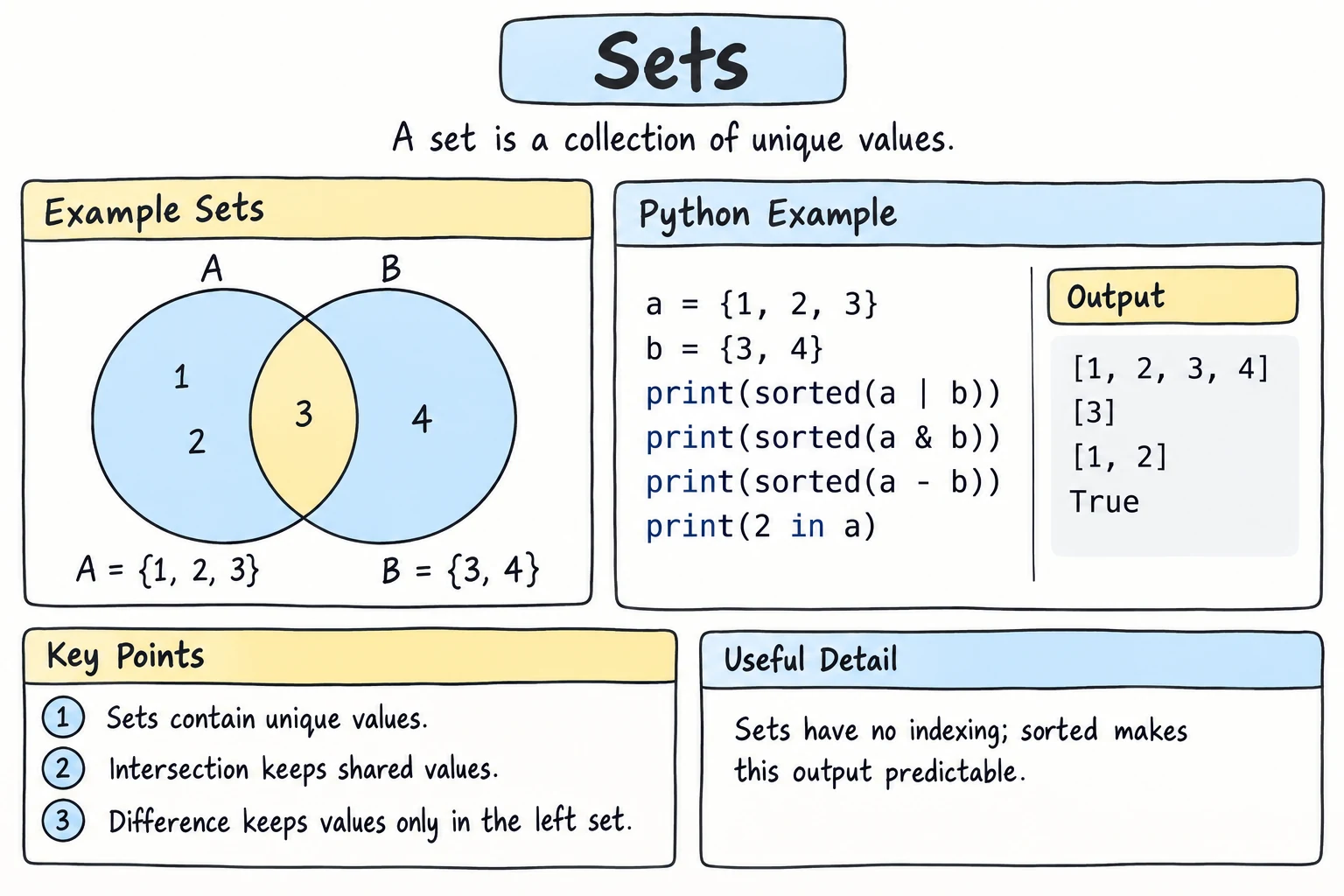
What you'll learn
- What a set is: an unordered collection of unique values
- How to create sets, including the empty set
- How to add and remove items safely
- Why checking
x in some_setis so fast - Set operations: union
|, intersection&, difference-, and symmetric difference^
Why it matters
Many questions are about uniqueness and overlap: How many different visitors came today? Which students take both math and physics? Which products are in stock but not on sale? With lists, these need loops. With sets, they're one line, and much faster on large data.
Creating a set
Use curly braces, or set() to convert another collection:
scores = {90, 85, 100, 90}
print(scores)
print(len(scores))

letters = set("banana")
print(letters){90, 100, 85}
3
{'a', 'n', 'b'} # order may differ when you run itTwo things to notice:
- Duplicates disappear.
90appears twice but is stored once, and"banana"has six letters but only three unique ones. - There's no order. The numbers didn't come out sorted or in the order you typed them. For strings it's even less predictable: the order of
letterscan change from one run to the next, so your output may not match the line above.
The empty set
{} creates an empty dictionary, not a set. Use set() for an empty set:
empty_set = set()
empty_dict = {}
print(type(empty_set), type(empty_dict))
Removing duplicates
The quickest way to get unique values is to convert to a set:
visitors = ["aziza", "bekzod", "aziza", "dilnoza", "bekzod", "aziza"]

unique_visitors = set(visitors)
print(len(visitors), "visits")
print(len(unique_visitors), "unique visitors")6 visits
3 unique visitorsIf you need a list again, especially a sorted one: sorted(set(visitors)).
If you need to keep the original order, use dict.fromkeys(), since dictionaries remember insertion order:
visitors = ["aziza", "bekzod", "aziza", "dilnoza", "bekzod", "aziza"]
print(list(dict.fromkeys(visitors)))['aziza', 'bekzod', 'dilnoza']Adding and removing
tags = {"python", "beginner"}

tags.add("loops")
tags.add("python")          # already there: nothing happens
print(tags)

tags.remove("beginner")     # KeyError if missing
tags.discard("advanced")    # no error if missing
print(tags)| Method | What it does |
|---|---|
s.add(x) | add one item (no effect if it's already there) |
s.update(items) | add many items |
s.remove(x) | remove x, raise KeyError if it's missing |
s.discard(x) | remove x if present, otherwise do nothing |
s.pop() | remove and return an arbitrary item |
s.clear() | remove everything |
No indexing
Sets have no positions, so there's no s[0]:
colors = {"red", "green"}
print(colors[0])TypeError: 'set' object is not subscriptableYou can still loop over a set and use len() and in. To process items in a predictable order, loop over sorted(the_set).
Fast membership tests
Checking x in some_set is very fast, no matter how big the set is. For a list, Python has to look at the items one by one. For a set, it jumps almost straight to the answer, using a technique called hashing.
banned_words = {"spam", "scam", "fake"}

message = "this is not a scam offer"
for word in message.split():
    if word in banned_words:
print(f"Blocked word found: {word}")Blocked word found: scamHow fast is it?
Time it yourself. This checks 100 times whether a missing ID is in a list and in a set, each with 100,000 items:
import time

ids_list = list(range(100_000))
ids_set = set(ids_list)

start = time.perf_counter()
for _ in range(100):
    -1 in ids_list
list_time = time.perf_counter() - start

start = time.perf_counter()
for _ in range(100):
    -1 in ids_set
set_time = time.perf_counter() - start

print(f"list: {list_time:.4f} s")
print(f"set: {set_time:.6f} s")list: 0.1050 s
set: 0.000009 sYour times will differ (the browser is slower than a local Python), but the gap is always huge. The list has to compare -1 with all 100,000 items every time. The set does about the same small amount of work whether it holds 10 items or 10 million.
The gap matters most inside a loop. Checking each of 10,000 new orders against a list of 10,000 known IDs means up to 10,000 × 10,000 = 100 million comparisons, which is a loop inside a loop. Against a set, it's about 10,000 quick lookups. When code feels slow, look for in on a list inside a for loop.
What can go in a set?
Items must be hashable, which roughly means immutable: numbers, strings, booleans, and tuples of those. Lists, dictionaries, and other sets can't be set items:
pairs = {[1, 2], [3, 4]}TypeError: cannot use 'list' as a set element (unhashable type: 'list')Use tuples instead: {(1, 2), (3, 4)}.
Set operations
This is where sets really shine. Imagine two classes:
math = {"Aziza", "Bekzod", "Dilnoza", "Farrukh"}
physics = {"Bekzod", "Farrukh", "Gulnora"}
Bekzod and Farrukh are in both classes. Aziza and Dilnoza take only math, and Gulnora takes only physics.
| Operation | Operator | Method | Meaning |
|---|---|---|---|
| Union | a | b | a.union(b) | in either set |
| Intersection | a & b | a.intersection(b) | in both sets |
| Difference | a - b | a.difference(b) | in a but not in b |
| Symmetric difference | a ^ b | a.symmetric_difference(b) | in exactly one of them |
math = {"Aziza", "Bekzod", "Dilnoza", "Farrukh"}
physics = {"Bekzod", "Farrukh", "Gulnora"}

print("Any class: ", sorted(math | physics))
print("Both:      ", sorted(math & physics))
print("Only math: ", sorted(math - physics))
print("Only one: ", sorted(math ^ physics))Any class: ['Aziza', 'Bekzod', 'Dilnoza', 'Farrukh', 'Gulnora']
Both: ['Bekzod', 'Farrukh']
Only math: ['Aziza', 'Dilnoza']
Only one: ['Aziza', 'Dilnoza', 'Gulnora'](sorted() just makes the output order predictable.)
Subsets and overlaps
required = {"python", "git"}
skills = {"python", "git", "sql", "docker"}

print(required <= skills)            # subset: every required skill is present
print(required.issubset(skills))     # same thing
print(skills >= required)            # superset
print(required.isdisjoint({"java"})) # no items in commonTrue
True
True
TrueComparing sets
Two sets are equal if they contain the same items, regardless of order:
print({1, 2, 3} == {3, 2, 1})Truefrozenset
A frozenset is an immutable set. It can be used as a dictionary key or as an item in another set. You won't need it often:
weekend = frozenset({"Sat", "Sun"})
print("Sun" in weekend)
Try it
Compare the ingredients you have with two recipes. Add or remove ingredients and see what changes.
Common mistakes
1. {} for an empty set
items = {}
items.add("x")AttributeError: 'dict' object has no attribute 'add'{} is an empty dictionary. Fix: items = set().
2. set("word") vs {"word"}
print(len(set("hello")))   # the letters h, e, l, o
print({"hello"}) # one item4
{'hello'}set() takes an iterable and adds each item. A string's items are its characters.
3. Using an operator with a list
math = {"Aziza", "Bekzod"}
print(math | ["Hasan"])TypeError: unsupported operand type(s) for |: 'set' and 'list'The operators need sets on both sides. Fix: math | set(["Hasan"]), or use the method, which accepts any iterable: math.union(["Hasan"]).
4. remove on a missing item
s = {"a"}
s.remove("b")KeyError: 'b'Fix: use discard when the item might not be there.
Practice
1. Unique letters
How many different letters are in "mississippi"? Print the count and the letters in alphabetical order.
Solution
word = "mississippi"
unique = set(word)
print(len(unique), sorted(unique))4 ['i', 'm', 'p', 's']2. Common friends
Aziza's friends are {"Bobur", "Charos", "Dilshod", "Eldor"} and Bekzod's are {"Charos", "Eldor", "Farida"}. Print their common friends and all friends who are not shared.
Solution
aziza = {"Bobur", "Charos", "Dilshod", "Eldor"}
bekzod = {"Charos", "Eldor", "Farida"}

print("Common:", sorted(aziza & bekzod))
print("Not shared:", sorted(aziza ^ bekzod))
3. Is it a pangram?
A pangram uses every letter of the English alphabet at least once. Check whether "The quick brown fox jumps over the lazy dog" is a pangram, and print any missing letters for "Hello world".
Solution
import string

alphabet = set(string.ascii_lowercase)

for sentence in ["The quick brown fox jumps over the lazy dog", "Hello world"]:
    missing = alphabet - set(sentence.lower())
    if not missing:
        print("Pangram!")
    else:
        print("Missing:", "".join(sorted(missing)))
string.ascii_lowercase is the text "abcdefghijklmnopqrstuvwxyz". Spaces and punctuation in the sentence don't matter, because we only look at what's missing from the alphabet.
4. New and lost customers
Given customer IDs from two months:
august = [101, 102, 103, 104, 105, 102, 101]
september = [102, 104, 106, 107, 104]
Print how many unique customers each month had, who is new in September, who didn't return, and who bought in both months.
Solution
august = [101, 102, 103, 104, 105, 102, 101]
september = [102, 104, 106, 107, 104]

aug = set(august)
sep = set(september)

print(f"August: {len(aug)} customers, September: {len(sep)} customers")
print("New:", sorted(sep - aug))
print("Didn't return:", sorted(aug - sep))
print("Loyal:", sorted(aug & sep))August: 5 customers, September: 4 customers
New: [106, 107]
Didn't return: [101, 103, 105]
Loyal: [102, 104]5. Duplicate finder
Given codes = ["A12", "B07", "A12", "C33", "B07", "D90", "A12"], print the codes that appear more than once, in the order they first became duplicates, using sets (not .count()).
Solution
codes = ["A12", "B07", "A12", "C33", "B07", "D90", "A12"]

seen = set()
duplicates = []

for code in codes:
    if code in seen and code not in duplicates:
        duplicates.append(code)
    seen.add(code)

print(duplicates)['A12', 'B07']seen answers "have I met this before?" instantly. Using .count() inside a loop would re-scan the whole list for every item, which is slow for big data.
Recap
- A set holds unique, hashable items with no order and no indexing:
{"a", "b"}. Useset()for an empty set. set(items)removes duplicates.list(dict.fromkeys(items))removes them and keeps the order.add,update,remove(error if missing),discard(no error), andclearchange a set.x in sis very fast, whilex in a_listchecks every item. Avoidinon a big list inside a loop.- Operations:
|union,&intersection,-difference,^symmetric difference, and<=subset.