

Variable Scope
What you'll learn
- The difference between local and global variables
- How Python finds a name: the LEGB rule
- Why assigning inside a function creates a local variable, and what
UnboundLocalErrormeans - When
globalandnonlocalare needed, and why to avoid them - Why functions can change a list you pass in, but not replace it
Why it matters
As programs grow, the same variable names get reused: total, count, name, result. If every variable were visible everywhere, a function could accidentally overwrite a value somewhere else, and bugs would be very hard to find. Scope is the set of rules that decides where each variable can be seen and changed. It keeps functions independent.
Local variables
Variables created inside a function, including its parameters, are local: they exist only while the function runs, and only inside it.
def calculate_area(width, height):
    area = width * height        # local variable
    return area

print(calculate_area(4, 5))def calculate_area(width, height):
area = width * height
return area
calculate_area(4, 5)
print(area)NameError: name 'area' is not definedOnce the function returns, area, width, and height are gone. Each call gets a fresh set of local variables.
This is a feature: two functions can both use a variable called total without interfering.
Global variables
Variables created at the top level of a file, outside all functions, are global. Functions can read them:
TAX_RATE = 0.12        # global

def price_with_tax(price):
    return price * (1 + TAX_RATE)   # reading a global: fine

print(round(price_with_tax(10000)))11200Reading global constants like this is common and fine.
Blocks don't create a scope
Only functions (and modules, and classes) create a new scope. An if, for, or while block does not, so names assigned inside it are still there afterwards:
for i in range(3):
    square = i * i

if square > 0:
    message = "positive"

print(i, square, message)2 4 positiveAfter the loop, i keeps its last value, and message exists because the if ran. If you've used languages where every { } block has its own variables, this is a surprise. In Python, when you think about scope, think about functions.
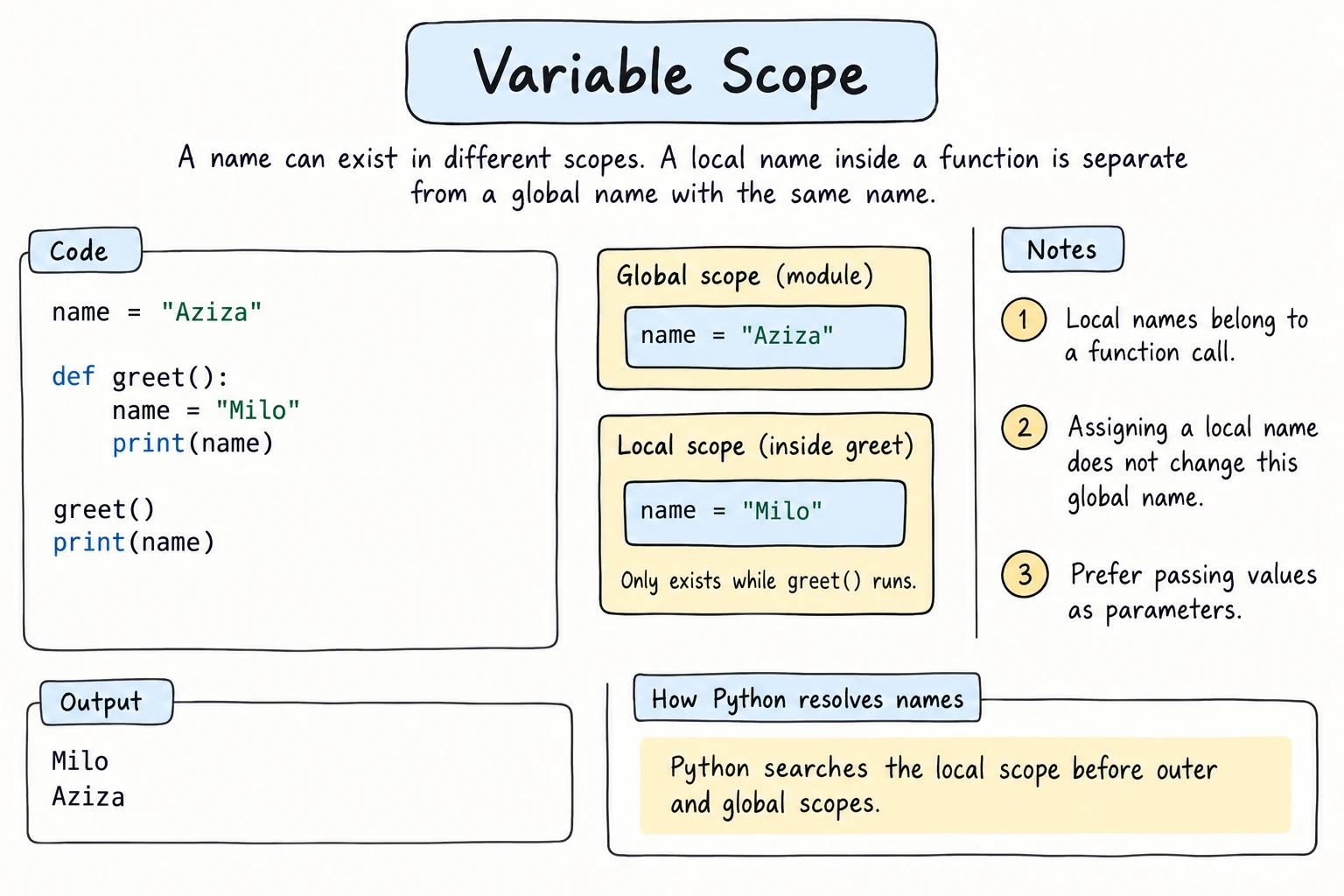
Assigning inside a function creates a local variable
Here's where people get surprised. If a function assigns to a name, that name is local for the whole function, even if a global variable has the same name:
count = 10

def reset():
    count = 0            # creates a NEW local 'count'
    print(f"inside: {count}")

reset()
print(f"outside: {count}")inside: 0
outside: 10The global count was never touched. The function had its own separate count.
UnboundLocalError
The same rule causes this error:
count = 10

def increment():
    count = count + 1     # 'count' is local here, because it's assigned
    return count

increment()UnboundLocalError: cannot access local variable 'count' where it is not associated with a valuePython decides before running the function that count is local, because it's assigned somewhere in the function. So when count + 1 runs, the local count doesn't have a value yet.
The best fix is to pass the value in and return the new value:
count = 10

def increment(value):
    return value + 1

count = increment(count)
print(count)11The global keyword (use sparingly)
global tells Python that a name inside a function refers to the global variable:
visits = 0

def record_visit():
    global visits
    visits += 1

record_visit()
record_visit()
print(visits)2It works, but avoid it in most code:
- Any function could change the value, so bugs are hard to trace.
- The function depends on hidden state, which makes it hard to reuse and test.
Prefer parameters and return values. Later, Classes and Objects shows a clean way to keep state together with the functions that change it.
How Python finds a name: LEGB
When your code uses a name, Python searches these scopes in order and uses the first match:
| Scope | What's there | |
|---|---|---|
| L | Local | names assigned in the current function |
| E | Enclosing | names in any outer functions (when a function is defined inside another) |
| G | Global | names at the top level of the file |
| B | Built-in | Python's built-in names: print, len, sum, … |
x = "global"

def outer():
    x = "enclosing"

    def inner():
        x = "local"
        print(x)

    inner()
    print(x)

outer()
print(x)local
enclosing
globalThe B level is why a global named list or sum hides the built-in one (Common mistake 4).
nonlocal: changing an enclosing variable
For nested functions, nonlocal is the equivalent of global. It lets the inner function assign to a variable of the enclosing function:
def make_counter():
    count = 0

    def increase():
        nonlocal count
        count += 1
        return count

    return increase

counter = make_counter()
print(counter())
print(counter())
print(counter())1
2
3make_counter returns the inner function, and that function remembers count even after make_counter has finished. This is called a closure. You don't need it often as a beginner, but you'll meet it again in Lambdas and Higher-Order Functions.
Mutating vs. reassigning arguments
When you pass a list or dictionary to a function, the parameter refers to the same object, just like b = a in Lists. That leads to two very different situations:
def add_bonus(scores):
    scores.append(100)      # MUTATES the same list: the caller sees it

def replace_scores(scores):
    scores = [0, 0, 0]      # REBINDS the local name only: the caller doesn't see it

my_scores = [80, 90]

add_bonus(my_scores)
print(my_scores)

replace_scores(my_scores)
print(my_scores)[80, 90, 100]
[80, 90, 100]- Changing the object, with a method such as
append,removeorsort, or with item assignment such asd[key] = …, affects the caller's object. - Assigning a new value to the parameter name only changes the local name.
Numbers and strings are immutable, so a function can never change the caller's number or string. It can only return a new one.
Don't surprise the caller
A function that quietly changes the list you gave it can cause confusing bugs. Either make it obvious (name it add_bonus_in_place, and don't return anything), or work on a copy and return a new list:
def with_bonus(scores):
    return scores + [100]      # new list; the original stays unchanged

original = [80, 90]
updated = with_bonus(original)
print(original, updated)
Try it
Predict the output before running. Then remove global total and see what error you get.
Common mistakes
1. += on a global inside a function
visits = 0

def record_visit():
    visits += 1

record_visit()UnboundLocalError: cannot access local variable 'visits' where it is not associated with a valuevisits += 1 is an assignment, so visits is local for the whole function, and it has no value yet when += reads it. Fix: pass the value in and return the new one (visits = record_visit(visits)). Use global only when you really must.
2. Expecting reassignment to change the caller's variable
def clear(items):
    items = []

data = [1, 2, 3]
clear(data)
print(data)[1, 2, 3]items = [] only points the local name at a new list. Fix: items.clear() mutates the list in place, or return a new list and reassign it in the caller.
3. Accidentally changing the caller's list
def top_three(scores):
    scores.sort(reverse=True)
    return scores[:3]

results = [72, 95, 58, 88]
print(top_three(results))
print(results)[95, 88, 72]
[95, 88, 72, 58]The function answered correctly, but it also reordered the caller's results. Fix: work on a copy, sorted(scores, reverse=True)[:3], if the caller shouldn't be affected.
4. Shadowing built-ins
def average(list):
    return sum(list) / len(list)

print(average([1, 2, 3]))
print(list("abc"))     # works here, because the parameter was local

list = [1, 2]          # but at the top level...
print(list("abc"))2.0
['a', 'b', 'c']
TypeError: 'list' object is not callableFix: use names like values or numbers instead of list, str, sum, or max.
Practice
1. Predict the output
name = "Global"

def show():
    name = "Local"
    print(name)

show()
print(name)
Solution
Local
Global
Assigning name inside show created a separate local variable.
2. Fix without global
This code raises UnboundLocalError. Fix it without using global.
score = 0

def add_points(points):
    score = score + points

add_points(10)
add_points(5)
print(score)
Solution
score = 0

def add_points(current, points):
    return current + points

score = add_points(score, 10)
score = add_points(score, 5)
print(score)153. Which ones change?
Predict the output, then run it.
def modify(numbers, text, count):
    numbers.append(4)
    text = text.upper()
    count += 1

nums = [1, 2, 3]
word = "hello"
n = 10

modify(nums, word, n)
print(nums, word, n)
Solution
[1, 2, 3, 4] hello 10Only the list changed, because append mutates the shared object. text.upper() creates a new string assigned to the local text, and count += 1 rebinds the local count. Strings and numbers are immutable.
4. Non-mutating version
Write remove_negatives(numbers) that returns a new list without negative numbers and leaves the original unchanged. Prove it with assert.
Solution
def remove_negatives(numbers):
    return [n for n in numbers if n >= 0]

original = [3, -1, 4, -1, 5]
cleaned = remove_negatives(original)

assert cleaned == [3, 4, 5]
assert original == [3, -1, 4, -1, 5]
print("OK")
5. Bank account closure
Write make_account(balance) that returns two functions, deposit(amount) and withdraw(amount), which share the same balance using nonlocal. Both return the new balance, and withdraw refuses (returns the balance unchanged and prints a message) if there isn't enough money.
deposit, withdraw = make_account(100000)
print(deposit(50000))     # 150000
print(withdraw(30000))    # 120000
print(withdraw(500000))   # prints a warning, returns 120000
Solution
def make_account(balance):
    def deposit(amount):
        nonlocal balance
        balance += amount
        return balance

    def withdraw(amount):
        nonlocal balance
        if amount > balance:
            print("Insufficient funds")
            return balance
        balance -= amount
        return balance

    return deposit, withdraw

deposit, withdraw = make_account(100000)
print(deposit(50000))
print(withdraw(30000))
print(withdraw(500000))150000
120000
Insufficient funds
120000The parameter balance belongs to make_account, and both inner functions share it through nonlocal. Nothing outside can change the balance directly. In Classes and Objects you'll build the same thing with a class.
Recap
- Variables assigned inside a function (including parameters) are local: they're created on each call and gone afterwards.
- Top-level variables are global. Functions can read them, and reading global constants is fine.
- Assigning to a name anywhere in a function makes it local for the whole function, and using it before assigning gives
UnboundLocalError. - Python looks names up in the order Local → Enclosing → Global → Built-in.
globalandnonlocalallow assignment to outer variables. Prefer parameters and return values instead.- Passing a list shares the object: mutating it affects the caller, but reassigning the parameter doesn't.