

Testing with pytest
What you'll learn
- How to name test files and functions so pytest finds them, and how to run them
- How to read pytest's failure reports
- How to test exceptions with
pytest.raisesand floats withpytest.approx - How to turn a table of cases into tests with
@pytest.mark.parametrize - How fixtures and
tmp_pathgive each test fresh objects and files
Why it matters
The tiny runner from Testing with assert made you list every test by hand. pytest, the most popular Python testing tool, finds your tests, runs them, and explains every failure in detail. And you already know how to write its tests: plain test_ functions with assert.
Installing pytest
pytest is not part of the standard library. Install it once in a terminal, then check the version:
python -m pip install pytest
python -m pytest --version
pytest 9.1.1
Run pytest on your computer
The editor on this site can import pytest, but collecting and running test files needs a terminal, so run the pytest files on this page locally. Save each file under the name shown above its code block (the name is not part of the file). Each Practice solution also has a runnable version without pytest.
Your first test file
Tests live in a separate file from the code. Create a folder shop_project with two files.
shop.py:
def apply_discount(price, percent):
    if not 0 <= percent <= 100:
        raise ValueError(f"percent must be between 0 and 100, got {percent}")
    return price * (100 - percent) / 100


def cart_total(prices):
return sum(prices)test_shop.py:
from shop import apply_discount, cart_total


def test_discount_ten_percent():
    assert apply_discount(50000, 10) == 45000


def test_no_discount():
    assert apply_discount(50000, 0) == 50000


def test_cart_total():
    assert cart_total([15000, 3000, 8000]) == 26000


def test_empty_cart():
    assert cart_total([]) == 0
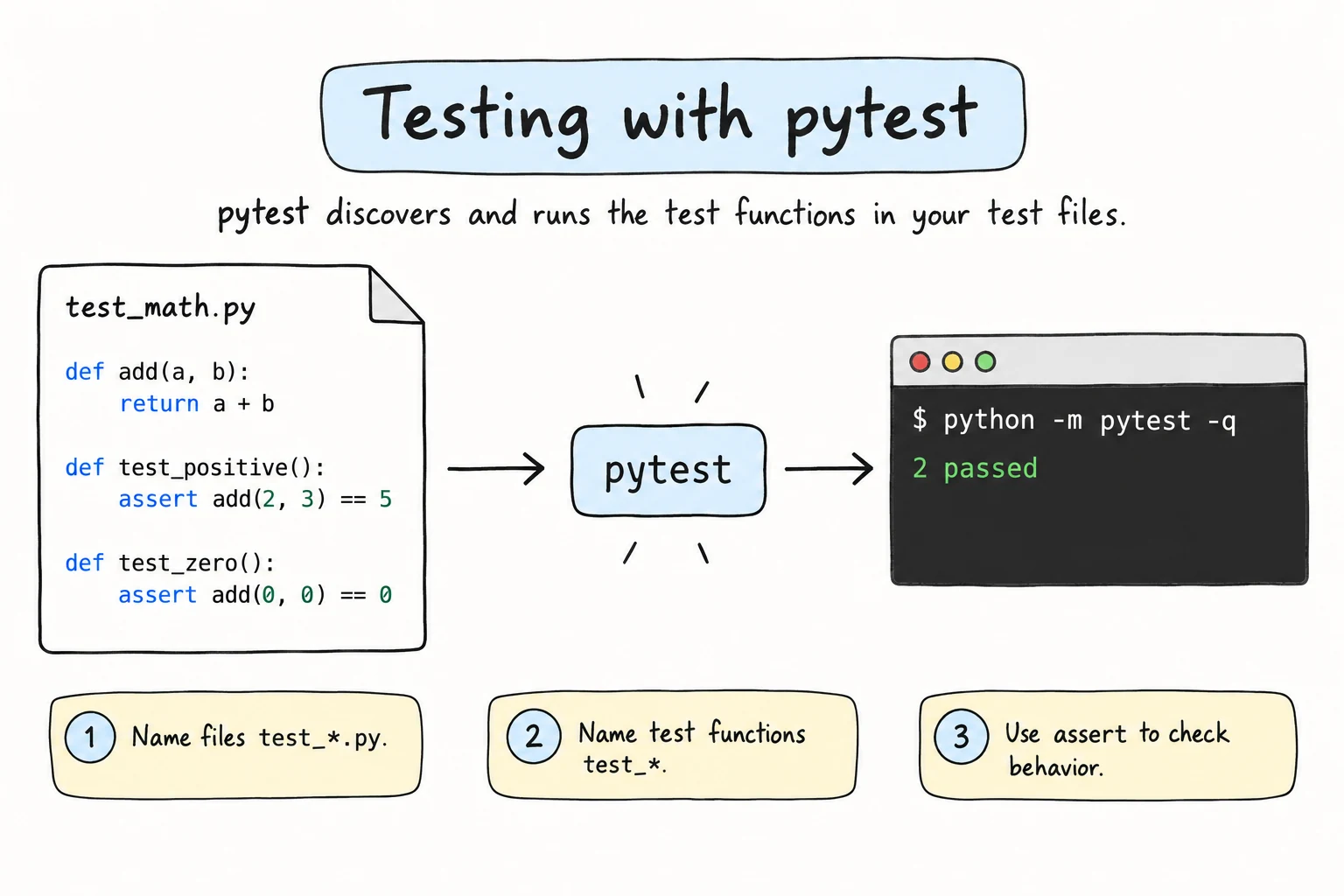
There are no calls to the tests and no runner loop. pytest discovers tests by name: files named test_*.py and functions starting with test. Anything else is silently skipped.
Running pytest
In a terminal in the project folder, run pytest (or python -m pytest):
============================= test session starts ==============================
platform linux -- Python 3.14.0, pytest-9.1.1, pluggy-1.6.0
rootdir: /home/aziza/shop_project
collected 4 items

test_shop.py ....                                                        [100%]

============================== 4 passed in 0.01s ===============================
Each dot is a passing test. Useful options:
| Command | What it does |
|---|---|
pytest -v | one line per test, with PASSED or FAILED |
pytest test_shop.py | run one file (test_shop.py::test_cart_total: one test) |
pytest -k discount | only tests whose names contain discount |
pytest -x | stop at the first failure |
Reading a failure
Now someone changes apply_discount to return price * percent / 100, which returns the discount instead of the new price. Run pytest again:
test_shop.py FF..                                                        [100%]

=================================== FAILURES ===================================
__________________________ test_discount_ten_percent ___________________________

    def test_discount_ten_percent():
>       assert apply_discount(50000, 10) == 45000
E       assert 5000.0 == 45000
E        +  where 5000.0 = apply_discount(50000, 10)

test_shop.py:5: AssertionError
(Only the first failure is shown; the report ends with a summary like 2 failed, 2 passed.) FF.. shows two failures and two passes, > marks the failing line, and test_shop.py:5 gives the file and line.
You wrote a plain assert with no message, yet the E lines show the actual value and the call that produced it. This is assert introspection. For two dictionaries, pytest shows only the items that differ:
E       AssertionError: assert {'name': 'Bek...passed': True} == {'name': 'Bek...assed': False}
E
E         Omitting 2 identical items, use -vv to show
E         Differing items:
E         {'passed': True} != {'passed': False}
Testing exceptions with pytest.raises
pytest replaces the try / except / else pattern with a with block. test_errors.py:
import pytest

from shop import apply_discount, cart_total


def test_error_message():
    with pytest.raises(ValueError, match="between 0 and 100"):
        apply_discount(50000, 150)


def test_error_details():
    with pytest.raises(ValueError) as excinfo:
        apply_discount(50000, -5)
    assert "got -5" in str(excinfo.value)


def test_float_total():
assert cart_total([0.1, 0.2]) == pytest.approx(0.3)- The test passes if the block raises
ValueError, and fails withDID NOT RAISE ValueErrorif not. match=also checks the message, as a regular expression (see Regular Expressions); plain words match themselves.as excinfokeeps the exception:excinfo.valueis the exception object.pytest.approx()compares floats with a tiny tolerance, likemath.isclose().
Tables of cases with parametrize
A table loop from Choosing Test Cases is one test: the first failing row stops it. @pytest.mark.parametrize makes each row a separate test. test_params.py:
import pytest

from shop import apply_discount


@pytest.mark.parametrize(
    "price, percent, expected",
    [
        (50000, 10, 45000),
        (50000, 100, 0),
        (12000, 25, 9500),
    ],
)
def test_apply_discount(price, percent, expected):
    assert apply_discount(price, percent) == expected
The decorator (the @ line) takes the parameter names and a list of rows; the test runs once per row. The last row is wrong on purpose (25% off 12,000 is 9,000). pytest -v shows:
test_params.py::test_apply_discount[50000-10-45000] PASSED               [ 33%]
test_params.py::test_apply_discount[50000-100-0] PASSED                  [ 66%]
test_params.py::test_apply_discount[12000-25-9500] FAILED                [100%]
The failure report then lists that row's values.
Fixtures: fresh objects for every test
When several tests need the same starting object, a fixture prepares it: a function marked with @pytest.fixture. test_bank.py:
import pytest


class BankAccount:
    def __init__(self, balance):
        self.balance = balance

    def deposit(self, amount):
        self.balance += amount


@pytest.fixture
def account():
    return BankAccount(100000)


def test_deposit(account):
    account.deposit(50000)
    assert account.balance == 150000


def test_starts_fresh(account):
    assert account.balance == 100000
The trick is the parameter name: for a parameter called account, pytest calls the fixture named account and passes the result in. Each test gets a brand new account, so the deposit in the first test cannot affect the second. (In a real project the class would live in its own module.)
Testing files with tmp_path
The built-in fixture tmp_path gives each test its own empty temporary folder as a pathlib.Path, so file tests never touch real data:
import json


def test_save_and_load(tmp_path):
    path = tmp_path / "contacts.json"
    contacts = {"Aziza": "+998 90 123 45 67"}

    path.write_text(json.dumps(contacts), encoding="utf-8")

    assert json.loads(path.read_text(encoding="utf-8")) == contacts
Like any fixture, you just ask for it by name.
Try it
Running a real test file needs a terminal, so practice the idea behind parametrize here: every row is reported separately. Fix the bug the failing row reveals.
Common mistakes
1. Wrong file or function names
def check_total():  # in totals.py: neither name starts with test
assert 1 + 1 == 2collected 0 items
============================ no tests ran in 0.00s =============================Fix: name files test_*.py and functions test_*, and run pytest, not python test_shop.py (which only defines the functions).
2. Extra code inside pytest.raises
def test_bad_percent():
    with pytest.raises(ValueError):
        apply_discount(50000, 150)
assert False # never runs!test_errors.py::test_bad_percent PASSED [100%]The exception leaves the with block, so assert False is skipped. Fix: put the assert after the with block, at the same indentation as with.
3. A parameter name that does not match the fixture
def test_deposit(acc):   # the fixture is called account
acc.deposit(50000)E fixture 'acc' not found
> available fixtures: account, capfd, capfdbinary, caplog, ...pytest matches fixtures by parameter name. Fix: def test_deposit(account):.
Practice
1. Your first pytest file
Put is_even(n) in number_tools.py and write test_number_tools.py with three tests: an even number, an odd number, and zero.
Solution
number_tools.py is the function in the runnable version. test_number_tools.py:
from number_tools import is_even


def test_even_number():
    assert is_even(4)


def test_odd_number():
    assert not is_even(7)


def test_zero_is_even():
assert is_even(0)def is_even(n):
return n % 2 == 0
assert is_even(4)
assert not is_even(7)
assert is_even(0)
print("All tests passed")All tests passedDo not name your module numbers.py: the standard library already has one.
2. Test an exception
Write withdraw(balance, amount) in bank_tools.py: it returns the new balance, or raises ValueError("not enough money") when amount > balance. Test the error and its message with pytest.
Solution
bank_tools.py is the function in the runnable version. test_bank_tools.py:
import pytest

from bank_tools import withdraw


def test_withdraw_too_much():
    with pytest.raises(ValueError, match="not enough money"):
withdraw(10000, 50000)def withdraw(balance, amount):
if amount > balance:
raise ValueError("not enough money")
return balance - amount
try:
withdraw(10000, 50000)
except ValueError as error:
assert str(error) == "not enough money", f"wrong message: {error}"
else:
raise AssertionError("DID NOT RAISE ValueError")
print("All tests passed")All tests passed3. Parametrize a grade function
Write a parametrized test for letter_grade(score) in grades.py (90+: "A", 80+: "B", 70+: "C", else "F") with at least six rows, including all boundaries.
Solution
import pytest

from grades import letter_grade


@pytest.mark.parametrize(
    "score, expected",
    [(90, "A"), (89, "B"), (80, "B"), (79, "C"), (70, "C"), (69, "F")],
)
def test_letter_grade(score, expected):
assert letter_grade(score) == expecteddef letter_grade(score):
for limit, letter in [(90, "A"), (80, "B"), (70, "C")]:
if score >= limit:
return letter
return "F"
cases = [(90, "A"), (89, "B"), (80, "B"), (79, "C"), (70, "C"), (69, "F")]
for score, expected in cases:
assert letter_grade(score) == expected, f"score {score}"
print(f"{len(cases)} cases passed")6 cases passed4. A fixture for a library
In library.py, write a class Library with a list available, add_book(title), and borrow(title), which removes the title or raises ValueError. Write a fixture that returns a library with two books, and two tests that use it.
Solution
library.py is the class in the runnable version. test_library.py:
import pytest

from library import Library


@pytest.fixture
def library():
    lib = Library()
    lib.add_book("Mehrobdan Chayon")
    lib.add_book("Python Basics")
    return lib


def test_borrow_removes_book(library):
    library.borrow("Python Basics")
    assert library.available == ["Mehrobdan Chayon"]


def test_borrow_missing_raises(library):
    with pytest.raises(ValueError):
library.borrow("Unknown Book")class Library:
def __init__(self):
self.available = []
def add_book(self, title):
self.available.append(title)
def borrow(self, title):
if title not in self.available:
raise ValueError(f"{title!r} is not available")
self.available.remove(title)
def make_library(): # plays the fixture's role
lib = Library()
lib.add_book("Mehrobdan Chayon")
lib.add_book("Python Basics")
return lib
library = make_library()
library.borrow("Python Basics")
assert library.available == ["Mehrobdan Chayon"]
try:
make_library().borrow("Unknown Book")
except ValueError:
print("All tests passed")All tests passed5. Test a file function with tmp_path
Write count_lines(path) in lines.py, returning the number of non-empty lines in a text file. Test it with tmp_path on a file with blank lines.
Solution
from lines import count_lines


def test_blank_lines_ignored(tmp_path):
    path = tmp_path / "cities.txt"
    path.write_text("Tashkent\n\nBukhara\n\n", encoding="utf-8")
    assert count_lines(path) == 2
tempfile.TemporaryDirectory() creates a folder and deletes it after the with block, roughly like tmp_path:
import tempfile
from pathlib import Path

def count_lines(path):
    with open(path, encoding="utf-8") as file:
        return sum(1 for line in file if line.strip())

with tempfile.TemporaryDirectory() as folder:
    path = Path(folder) / "cities.txt"
    path.write_text("Tashkent\n\nBukhara\n\n", encoding="utf-8")
    assert count_lines(path) == 2

print("All tests passed")All tests passedRecap
- pytest runs
test_*functions intest_*.pyfiles;-v,-k, and-xcontrol what it runs and shows. - In a failure report,
>marks the failing line andElines show the actual values. pytest.raises(ValueError, match=...)tests exceptions (as excinfoto inspect them), andpytest.approxcompares floats.@pytest.mark.parametrizeturns a table of cases into separate tests.- Fixtures give each test fresh setup by parameter name;
tmp_pathgives a temporary folder.