

Parameters and Arguments
What you'll learn
- The difference between positional and keyword arguments
- How to make parameters optional with default values
- Why you should never use a list as a default value
- How
*argsand**kwargsaccept any number of arguments - How
*and/force arguments to be passed by keyword or by position
Why it matters
Look at how flexible print() is: print("a"), print("a", "b", "c"), print("a", end=""), print("a", "b", sep="-"). It takes any number of values plus optional settings. With the techniques in this lesson, your own functions can be just as convenient to use.
Positional arguments
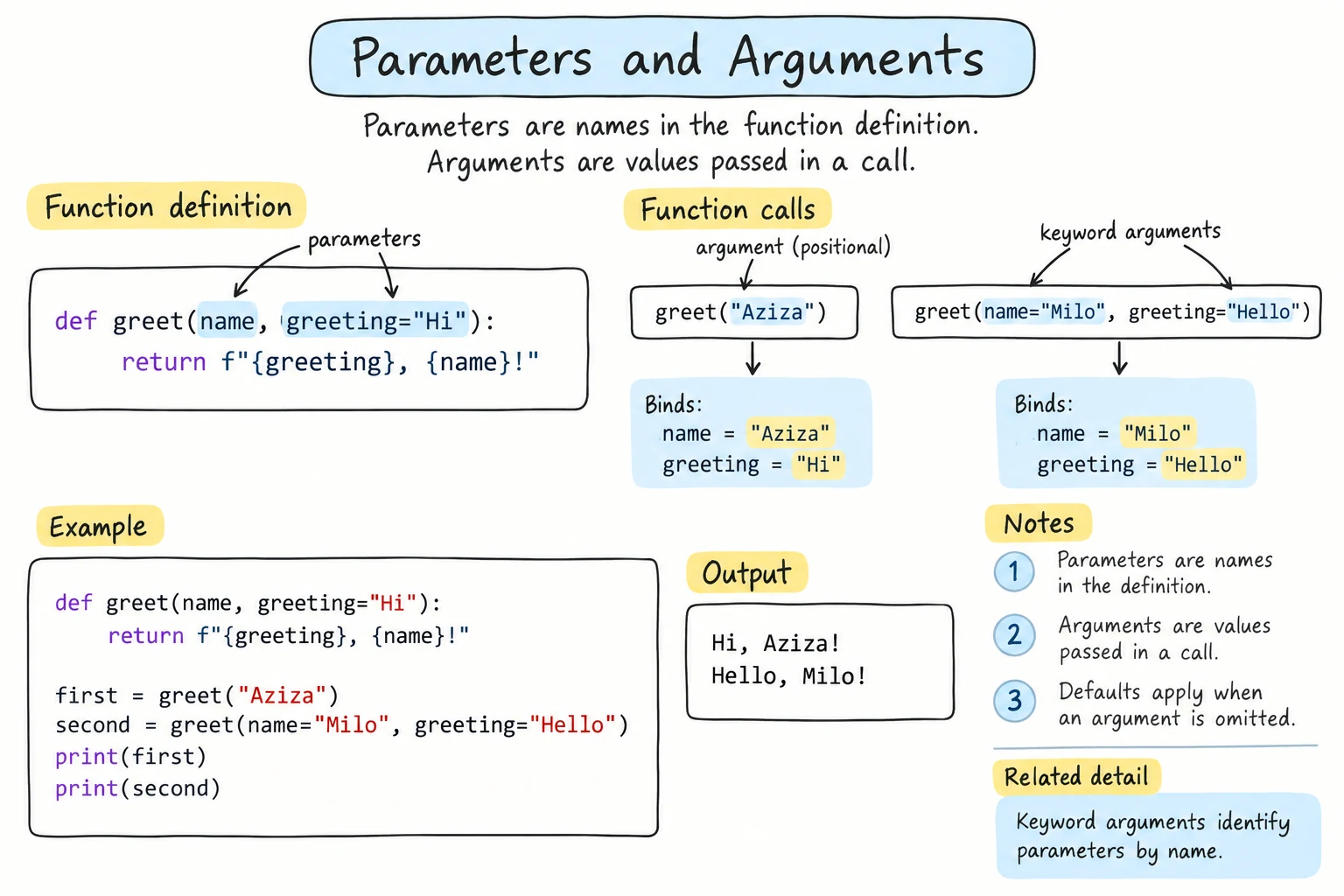
By default, arguments are matched to parameters by position, first to first and second to second:
def describe_pet(animal, name):
    print(f"{name} is a {animal}.")

describe_pet("cat", "Momo")
describe_pet("Momo", "cat") # wrong order, wrong resultMomo is a cat.
cat is a Momo.Python can't tell that the order is wrong. Both are strings.
Keyword arguments
You can name the parameter when calling. Then the order doesn't matter:
def describe_pet(animal, name):
    print(f"{name} is a {animal}.")

describe_pet(name="Momo", animal="cat")
describe_pet(animal="dog", name="Rex")Momo is a cat.
Rex is a dog.Keyword arguments make calls self-explanatory, especially for numbers and booleans:
def create_account(username, balance, is_admin):
    print(f"{username}: balance {balance}, admin={is_admin}")

create_account("aziza", 0, False)                           # what do 0 and False mean?
create_account("aziza", balance=0, is_admin=False)          # clear
You can mix both styles, but positional arguments must come first:
create_account(username="aziza", 0, False)SyntaxError: positional argument follows keyword argumentDefault values
Give a parameter a default value with = in the definition. If the caller leaves it out, the default is used:
def greet(name, greeting="Hello"):
    print(f"{greeting}, {name}!")

greet("Aziza")
greet("Bekzod", "Salom")
greet("Dilnoza", greeting="Good morning")Hello, Aziza!
Salom, Bekzod!
Good morning, Dilnoza!Parameters with defaults must come after parameters without them:
def greet(greeting="Hello", name):
print(f"{greeting}, {name}!")SyntaxError: parameter without a default follows parameter with a defaultA realistic example with several options:
def format_price(amount, currency="som", decimals=0, separator=","):
    text = f"{amount:,.{decimals}f}".replace(",", separator)
    return f"{text} {currency}"

print(format_price(1250000))
print(format_price(1250000, separator=" "))
print(format_price(19.5, currency="USD", decimals=2))1,250,000 som
1 250 000 som
19.50 USD(return sends a value back to the caller. It's the topic of the next lesson.)
Keyword arguments let callers skip over options they don't care about, like separator=" " without restating currency and decimals.
The mutable default trap
Default values are created once, when the function is defined, not each time it's called. For numbers and strings, that doesn't matter. For a list or dictionary, it causes a famous bug:
def add_item(item, basket=[]):     # the same list is reused on every call!
    basket.append(item)
    return basket

print(add_item("apple"))
print(add_item("bread")) # expected ['bread']['apple']
['apple', 'bread']The fix is to use None as the default and create a new list inside:
def add_item(item, basket=None):
    if basket is None:
        basket = []
    basket.append(item)
    return basket

print(add_item("apple"))
print(add_item("bread"))['apple']
['bread']Rule: never use a mutable value ([], {}, set()) as a default. Use None and create the value inside the function.
*args: any number of positional arguments
Put * before a parameter name to collect all extra positional arguments into a tuple:
def total(*numbers):
    print(f"received {numbers}")
    return sum(numbers)

print(total(5, 10))
print(total(1, 2, 3, 4, 5))
print(total())received (5, 10)
15
received (1, 2, 3, 4, 5)
15
received ()
0The name args is just a convention. Use a descriptive name like *numbers or *names when you can.
You can combine regular parameters with *args. The regular ones are filled first:
def log(level, *messages):
    print(f"[{level}]", " ".join(messages))

log("INFO", "Server", "started")
log("ERROR", "Disk", "is", "full")[INFO] Server started
[ERROR] Disk is fullUnpacking a list into arguments
The opposite direction also uses *: in a call, * spreads a list into separate arguments:
def describe(name, age, city):
    print(f"{name}, {age}, from {city}")

record = ["Aziza", 20, "Tashkent"]
describe(*record)        # same as describe("Aziza", 20, "Tashkent")

scores = [4, 8, 15]
print(*scores)           # print receives three arguments
print(*scores, sep=" | ")Aziza, 20, from Tashkent
4 8 15
4 | 8 | 15**kwargs: any number of keyword arguments
Two stars collect extra keyword arguments into a dictionary:
def create_profile(name, **details):
    print(f"Profile for {name}")
    for key, value in details.items():
        print(f"  {key}: {value}")

create_profile("Aziza", age=20, city="Tashkent", language="Uzbek")Profile for Aziza
age: 20
city: Tashkent
language: UzbekIn a call, ** unpacks a dictionary into keyword arguments:
def greet(name, greeting="Hello"):
    print(f"{greeting}, {name}!")

options = {"name": "Bekzod", "greeting": "Salom"}
greet(**options)Salom, Bekzod!Keyword-only parameters
Parameters listed after a bare * (or after *args) can only be given by keyword. This forces callers to write clear code for options that are easy to confuse:
def transfer(amount, *, from_account, to_account):
    print(f"Moving {amount:,} from {from_account} to {to_account}")

transfer(500000, from_account="A-100", to_account="B-200")Moving 500,000 from A-100 to B-200def transfer(amount, *, from_account, to_account):
print(f"Moving {amount:,} from {from_account} to {to_account}")
transfer(500000, "A-100", "B-200")TypeError: transfer() takes 1 positional argument but 3 were givenMixing up the two accounts would be a costly bug, so requiring names here is a good design.
Positional-only parameters
The opposite also exists. Parameters before a / can only be given by position. You meet this first in help() output for built-in functions:
help(len)Help on built-in function len in module builtins:
len(obj, /)
Return the number of items in a container.The / after obj means "pass this by position only", so len([1, 2]) works but len(obj=[1, 2]) raises TypeError: len() takes no keyword arguments. You can use / in your own functions when the parameter names are not meaningful to callers and you want to be free to rename them later:
def discount(price, percent, /, *, rounding=0):
    return round(price * (100 - percent) / 100, rounding)

print(discount(48500, 15))
print(discount(48500, 15, rounding=-2))41225.0
41200.0Here price and percent are positional-only, and rounding is keyword-only. Calling discount(price=48500, percent=15) raises TypeError: discount() got some positional-only arguments passed as keyword arguments: 'price, percent'. When you read / or * in documentation, you now know what they mean; in your own code you'll need * far more often than /.
The full order
When you combine everything, parameters go in this order:
def f(positional_only, /, positional, with_default=1, *args, keyword_only, **kwargs):def example(a, b=2, *args, c, d=4, **kwargs):
print(f"a={a} b={b} args={args} c={c} d={d} kwargs={kwargs}")
example(1, c=3)
example(1, 20, 30, 40, c=3, e=5)a=1 b=2 args=() c=3 d=4 kwargs={}
a=1 b=20 args=(30, 40) c=3 d=4 kwargs={'e': 5}In practice, most functions need only a few regular parameters and maybe some defaults. Reach for *args and **kwargs when you genuinely need flexibility.
Try it
Experiment with calling make_sandwich in different ways: only the bread, extra fillings, keyword options.
Common mistakes
1. Missing required arguments
def greet(name, greeting):
    print(f"{greeting}, {name}!")

greet("Aziza")TypeError: greet() missing 1 required positional argument: 'greeting'Fix: pass the argument, or give the parameter a default.
2. Unknown keyword
def greet(name):
    print(f"Hello, {name}!")

greet(nmae="Aziza")TypeError: greet() got an unexpected keyword argument 'nmae'3. Same argument twice
def greet(name, greeting="Hello"):
    print(f"{greeting}, {name}!")

greet("Aziza", name="Bekzod")TypeError: greet() got multiple values for argument 'name'"Aziza" already filled name by position.
4. Forgetting the names of keyword-only arguments
def transfer(amount, *, from_account, to_account):
    print(f"Moving {amount:,} from {from_account} to {to_account}")

transfer(500000)TypeError: transfer() missing 2 required keyword-only arguments: 'from_account' and 'to_account'The error says keyword-only, which tells you the fix: call transfer(500000, from_account="A-100", to_account="B-200"). Passing them by position doesn't work either, as the keyword-only section above showed.
Practice
1. Power with a default
Write power(base, exponent=2) that returns base ** exponent. Test power(5), power(2, 10), and power(exponent=3, base=4).
Solution
def power(base, exponent=2):
    return base ** exponent

print(power(5))
print(power(2, 10))
print(power(exponent=3, base=4))25
1024
642. Flexible average
Write average(*numbers) that returns the average of any number of values, or 0 if no values are given.
Solution
def average(*numbers):
    if not numbers:
        return 0
    return sum(numbers) / len(numbers)

print(average(4, 8, 15))
print(average())
3. HTML tag builder
Write tag(name, text, **attributes) that returns an HTML-like string. For example, tag("a", "Home", href="/", target="_blank") returns <a href="/" target="_blank">Home</a>, and tag("p", "Hi") returns <p>Hi</p>.
Solution
def tag(name, text, **attributes):
    attrs = "".join(f' {key}="{value}"' for key, value in attributes.items())
    return f"<{name}{attrs}>{text}</{name}>"

print(tag("a", "Home", href="/", target="_blank"))
print(tag("p", "Hi"))
4. Fix the shopping list
This function should start a new list each time it's called without a list. Explain the bug, then fix it.
def add_to_list(item, shopping=[]):
    shopping.append(item)
    return shopping

monday = add_to_list("milk")
tuesday = add_to_list("eggs")
print(monday, tuesday)
Solution
It prints ['milk', 'eggs'] ['milk', 'eggs']. The default list is created once, when the function is defined, so both calls append to the same list, and monday and tuesday are even the same object.
def add_to_list(item, shopping=None):
    if shopping is None:
        shopping = []
    shopping.append(item)
    return shopping

monday = add_to_list("milk")
tuesday = add_to_list("eggs")
print(monday, tuesday)['milk'] ['eggs']5. A configurable table printer
Write print_table(*rows, headers=None, width=10, align="left"), where each row is a tuple of values:
- if
headersis given, print them first, followed by a line of-, - every cell is padded to
widthcharacters, alignis"left"or"right".
Make headers, width, and align keyword-only.
print_table(("Tea", 15000), ("Coffee", 45000), headers=("Item", "Price"), align="right")Solution
def print_table(*rows, headers=None, width=10, align="left"):
    marker = "<" if align == "left" else ">"
    if headers is not None:
        print("".join(f"{str(value):{marker}{width}}" for value in headers))
        print("-" * (width * len(headers)))
    for row in rows:
        print("".join(f"{str(value):{marker}{width}}" for value in row))

print_table(("Tea", 15000), ("Coffee", 45000), headers=("Item", "Price"), align="right") Item Price
--------------------
Tea 15000
Coffee 45000Because *rows comes first, everything after it is automatically keyword-only. The format spec is built from variables: f"{text:{marker}{width}}" becomes {text:>10}. The same join expression formats the headers and each row.
Recap
- Positional arguments match by order. Keyword arguments (
name=value) match by name, and must come after positional ones. - Defaults (
param=value) make parameters optional, and must come after required parameters. - Never use
[]or{}as defaults. UseNoneand create the value inside. *argscollects extra positional arguments into a tuple, and**kwargscollects extra keyword arguments into a dictionary.- In a call,
*listand**dictunpack values into arguments. - Parameters after
*or*argsare keyword-only; parameters before/are positional-only, as inlen(obj, /).