

Numbers and Math
What you'll learn
- The two main number types:
intandfloat - All the arithmetic operators, including
//,%, and** - The order Python calculates in (operator precedence)
- Rounding and a few useful built-in functions
- Why decimal numbers are sometimes slightly off, and what to do about it
Why it matters
Prices, distances, scores, times, percentages: most programs calculate something. Python is a very good calculator, but it has a few rules (and surprises) you need to know to get correct results.
Two kinds of numbers
students = 32        # int: a whole number
height = 1.75        # float: a number with a decimal point

print(type(students))
print(type(height))<class 'int'>
<class 'float'>int(integer): whole numbers like0,42,-7. There's no size limit in Python, so2 ** 100works fine.float(floating-point): numbers with a decimal point, like3.14,-0.5, or2.0. Note that2.0is a float even though it's a whole number.
For readability, you can put underscores inside long numbers. Python ignores them:
population = 37_000_000
print(population)37000000Very large or very small floats can be written in scientific notation: e means "times 10 to the power of". Python also prints tiny floats this way:
speed_of_light = 3e8     # 3 × 10⁸ metres per second
grain = 2.5e-3           # 0.0025 grams
print(speed_of_light, grain)
print(0.00001)300000000.0 0.0025
1e-05A number written with e is always a float, even 3e8.
Arithmetic operators
| Operator | Meaning | Example | Result |
|---|---|---|---|
+ | Addition | 7 + 2 | 9 |
- | Subtraction | 7 - 2 | 5 |
* | Multiplication | 7 * 2 | 14 |
/ | Division | 7 / 2 | 3.5 |
// | Floor division | 7 // 2 | 3 |
% | Remainder (modulo) | 7 % 2 | 1 |
** | Power | 7 ** 2 | 49 |
print(7 + 2, 7 - 2, 7 * 2)
print(7 / 2, 7 // 2, 7 % 2)
print(2 ** 10)9 5 14
3.5 3 1
1024/ always gives a float
Regular division always returns a float, even when the result is whole:
print(10 / 2)5.0// and %: whole parts and leftovers
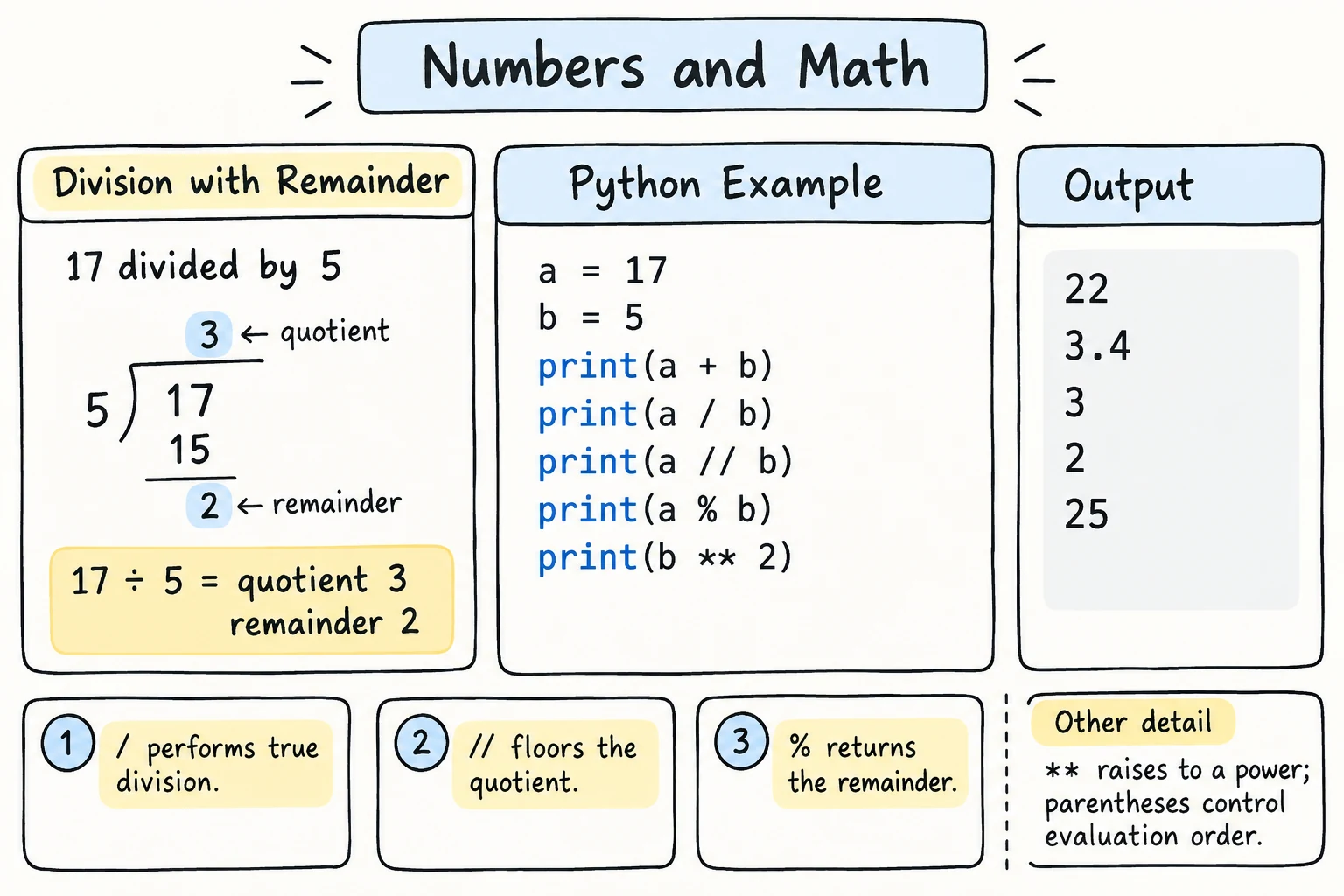
// gives how many whole times one number fits into another. % gives what's left over. They're a very useful pair:
total_minutes = 135

hours = total_minutes // 60     # 2 whole hours
minutes = total_minutes % 60    # 15 minutes left over

print(hours, "h", minutes, "min")2 h 15 minWith a float, // still rounds down, but the result is a float: 7.5 // 2 is 3.0, and 7.5 % 2 is 1.5.
When you need both answers, divmod() gives them in one step. It returns two values, which you can store in two variables at once:
hours, minutes = divmod(135, 60)
print(hours, "h", minutes, "min")2 h 15 minCommon uses of %:
- Even or odd:
n % 2is0for even numbers and1for odd numbers. - Last digit:
n % 10gives the last digit of a positive whole number. - Wrapping around:
(hour + 5) % 24keeps a clock hour between 0 and 23.
print(14 % 2)      # 0 → even
print(15 % 2)      # 1 → odd
print(2026 % 10)   # 6 → last digit
print((22 + 5) % 24)  # 3 → 22:00 plus 5 hours is 03:00
Negative numbers with // and %
// rounds down (toward negative infinity), not toward zero: -7 // 2 is -4, not -3. Then -7 % 2 is 1, because -4 * 2 + 1 == -7. You'll rarely need this, but it explains surprising results.
Mixing ints and floats
If an operation mixes an int and a float, the result is a float:
print(3 + 0.5)
print(2 * 1.5)3.5
3.0Order of operations
Python follows the usual math rules. From highest priority to lowest:
( )parentheses**power-xnegative sign*,/,//,%(left to right)+,-(left to right)
print(2 + 3 * 4)      # multiplication first
print((2 + 3) * 4)    # parentheses first
print(-2 ** 2)        # power before the negative sign
print((-2) ** 2)14
20
-4
4When in doubt, add parentheses. They make your intent clear to both Python and people:
price = 80000
discount_percent = 15
final_price = price - (price * discount_percent / 100)
print(final_price)68000.0Updating numbers
The shortcut operators from the Variables lesson work with every arithmetic operator:
balance = 1000
balance += 250    # 1250
balance -= 100    # 1150
balance *= 2      # 2300
balance //= 3     # 766
print(balance)
Useful built-in functions
print(abs(-12))            # absolute value
print(round(3.14159, 2))   # round to 2 decimal places
print(round(7.6))          # round to nearest whole number → int
print(max(4, 9, 2))        # largest
print(min(4, 9, 2))        # smallest
print(pow(2, 5)) # same as 2 ** 512
3.14
8
9
2
32How round() handles halves
round(2.5) gives 2 and round(3.5) gives 4. Python rounds exact halves to the nearest even number ("banker's rounding"), which avoids bias when rounding many values. This surprises many people, so remember it when a rounded result looks off by one.
Floats add one more surprise: round(2.675, 2) gives 2.67, not 2.68. That isn't banker's rounding. 2.675 is stored as a binary number slightly below 2.675, so it rounds down (more on this in Floats aren't perfectly exact below).
The math module
For more math, Python has a math module. You'll learn about modules later. For now, just know that import math makes these available:
import math

print(math.sqrt(49))    # square root
print(math.pi)          # π
print(math.floor(4.7))  # round down
print(math.ceil(4.2)) # round up7.0
3.141592653589793
4
5Floats aren't perfectly exact
Try this:
print(0.1 + 0.2)0.30000000000000004This isn't a Python bug. Computers store floats in binary (base 2), and some simple decimal numbers like 0.1 can't be stored exactly in binary, just as 1/3 can't be written exactly in decimal (0.3333…). Almost every programming language behaves this way.
What to do about it:
- For displaying results, round them:
round(0.1 + 0.2, 2)gives0.3. You'll also learn to format numbers with f-strings. - For comparing floats, don't check for exact equality. Use
math.isclose()(covered in Booleans and Comparisons). - For money, work in whole units where you can, for example tiyin or cents stored as
int. Python also has adecimalmodule for exact decimal math.
Try it
Convert a number of seconds into hours, minutes, and seconds. Try 3725, then 86399.
Common mistakes
1. Dividing by zero
print(10 / 0)ZeroDivisionError: division by zero// and % raise the same error. You'll learn to check for this with if in the next module.
2. Using ^ for power
print(2 ^ 3)    # 1, not 8!
print(2 ** 3)   # 8
In Python, ^ is a bitwise operator, not "to the power of". Use **.
3. Leaving out *
width = 4
area = 2widthSyntaxError: invalid decimal literalMath notation lets you write 2x, but Python needs the operator: 2 * width.
4. Forgetting precedence
average = 80 + 90 / 2
print(average)   # 125.0, not 85.0
Division happens before addition. Fix: (80 + 90) / 2.
Practice
1. Rectangle
A room is 4.5 m wide and 6 m long. Print its area (width × length) and perimeter (2 × (width + length)).
Solution
width = 4.5
length = 6

area = width * length
perimeter = 2 * (width + length)

print("Area:", area)
print("Perimeter:", perimeter)Area: 27.0
Perimeter: 21.02. Temperature
Convert 36.6 °C to Fahrenheit using F = C × 9 / 5 + 32, and print the result rounded to one decimal place.
Solution
celsius = 36.6
fahrenheit = celsius * 9 / 5 + 32
print(round(fahrenheit, 1))97.93. Sharing snacks
There are 50 samsas and 7 friends. Each friend gets the same whole number of samsas. Print how many each friend gets and how many are left over.
Solution
samsas = 50
friends = 7

each = samsas // friends
left_over = samsas % friends

print("Each friend gets:", each)
print("Left over:", left_over)Each friend gets: 7
Left over: 14. Digit sum
For a three-digit number such as number = 472, use // and % (no strings) to get each digit, and print the sum of the digits (4 + 7 + 2 = 13).
Solution
number = 472

hundreds = number // 100          # 4
tens = (number // 10) % 10        # 7
ones = number % 10                # 2

print(hundreds + tens + ones)
number // 10 removes the last digit (47), and % 10 then takes the new last digit (7).
5. Loan payment
You borrow P = 12_000_000 som at a monthly interest rate r = 0.02 for n = 12 months. The fixed monthly payment is:
payment = P × r × (1 + r)ⁿ / ((1 + r)ⁿ − 1)Calculate the payment and print it rounded to the nearest som. Then print the total you pay back over the year.
Solution
principal = 12_000_000
rate = 0.02
months = 12

growth = (1 + rate) ** months
payment = principal * rate * growth / (growth - 1)

print("Monthly payment:", round(payment))
print("Total paid:", round(payment * months))Monthly payment: 1134715
Total paid: 13616582Storing (1 + rate) ** months in its own variable avoids calculating it twice and makes the formula easier to read.
Recap
intis for whole numbers andfloatis for decimals. Mixing them gives a float.- Operators:
+ - * /plus//(floor division),%(remainder), and**(power)./always returns a float. - Precedence: parentheses →
**→ negative sign-x→* / // %→+ -. Use parentheses to be clear. - Useful functions:
abs,round,min,max, andmath.sqrt,math.floor,math.ceil. - Floats are approximate (
0.1 + 0.2), so round results for display and don't compare floats for exact equality.