

Lists
What you'll learn
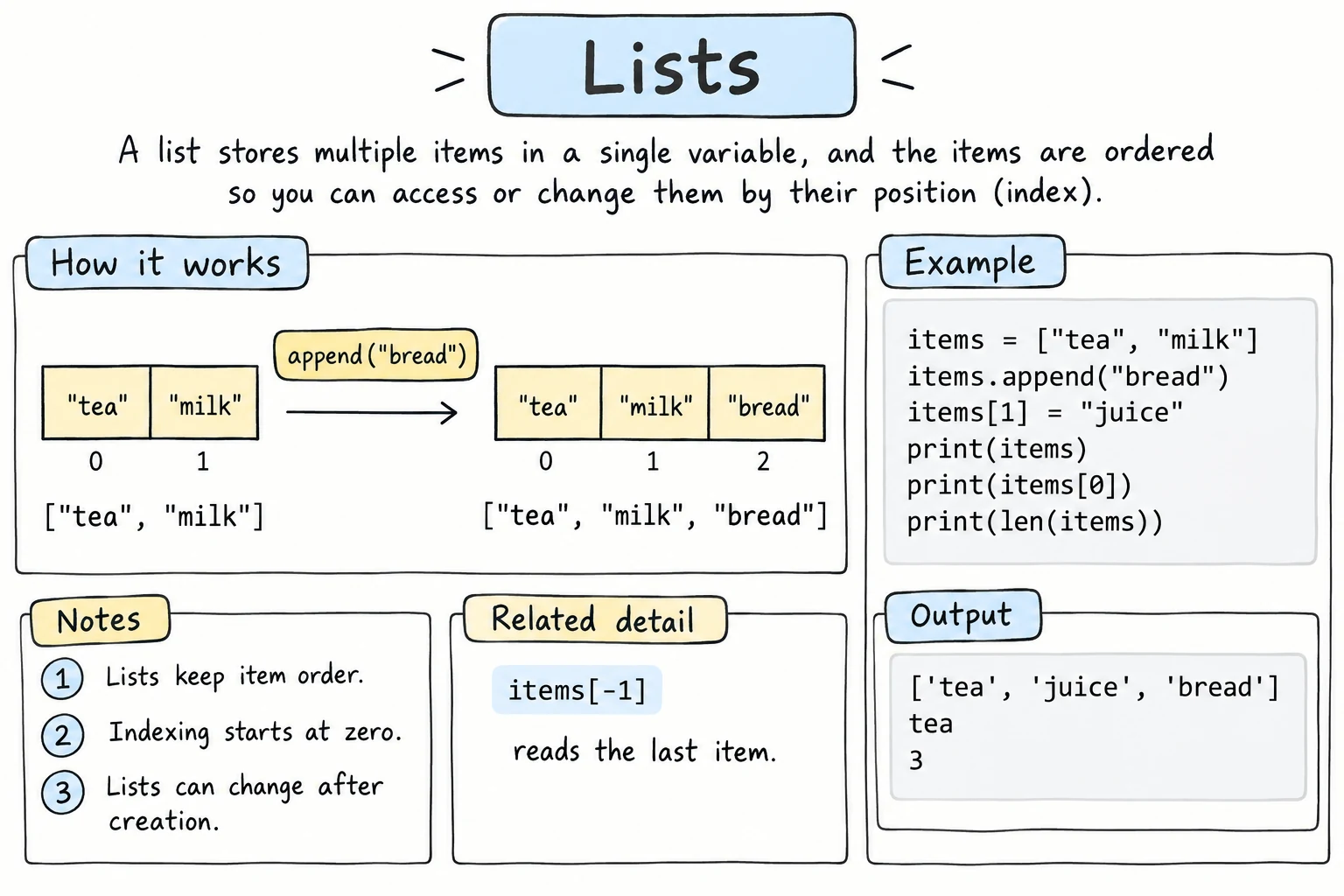
- How to create a list and read items by index and slice
- How lists differ from strings: they can be changed
- How to add items (
append,insert,extend, slices) and remove them (remove,pop,del) - How to check membership and loop over a list
- Why
b = ashares a list, and how to make a real copy
Why it matters
Programs rarely deal with just one value. A class has many students, a shop has many products, a playlist has many songs. A list stores many values in one variable, keeps them in order, and lets you add, remove, and change them. It's the most-used collection in Python.
Creating a list
Put items in square brackets, separated by commas:
cities = ["Tashkent", "Samarkand", "Bukhara"]
scores = [88, 92, 79]
empty = []

print(cities)
print(len(scores))
print(len(empty))['Tashkent', 'Samarkand', 'Bukhara']
3
0A list can hold any type, even a mix like ["Aziza", 20, True], although lists usually hold one kind of item.
You can also make lists from other sequences with list():
print(list("abc"))
print(list(range(1, 6)))
print("red green blue".split())['a', 'b', 'c']
[1, 2, 3, 4, 5]
['red', 'green', 'blue']Indexing and slicing
Lists use exactly the same indexing and slicing as strings (see Strings and String Methods and Slicing):
planets = ["Mercury", "Venus", "Earth", "Mars", "Jupiter"]

print(planets[0])      # first
print(planets[-1])     # last
print(planets[1:3])    # a slice is a new list
print(planets[::-1]) # reversed copyMercury
Jupiter
['Venus', 'Earth']
['Jupiter', 'Mars', 'Earth', 'Venus', 'Mercury']Lists can be changed
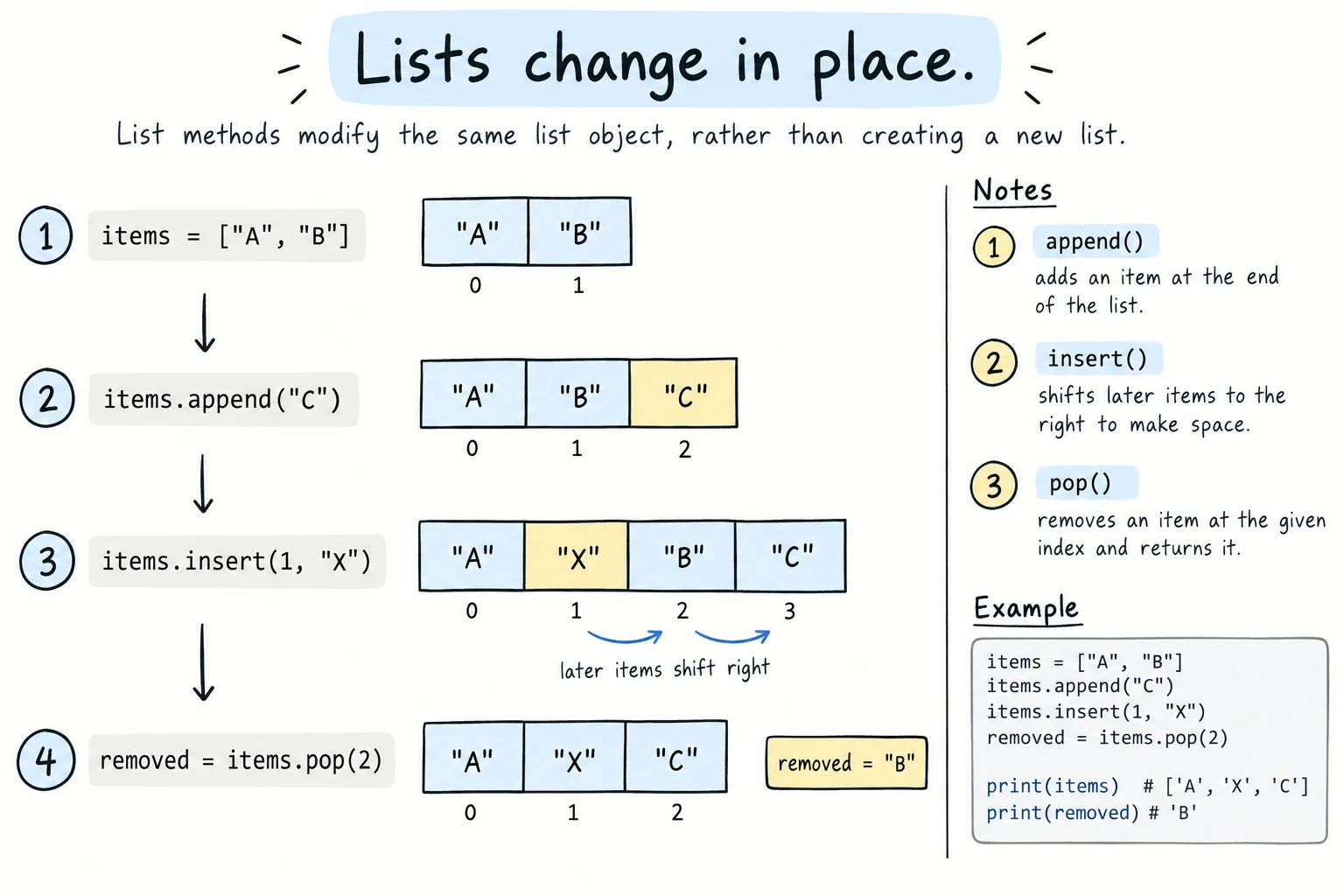
Unlike strings, lists are mutable. You can replace an item by assigning to its index:
colors = ["red", "green", "blue"]
colors[1] = "yellow"
print(colors)['red', 'yellow', 'blue']You can also assign to a slice. That replaces several items at once, and the new part doesn't have to be the same length. Assigning an empty list, or using del with a slice, removes items:
nums = [10, 20, 30, 40, 50, 60]
nums[1:3] = [21, 31]      # replace two items
print(nums)
nums[1:3] = []            # remove two items
print(nums)
del nums[::2]             # delete every second item
print(nums)[10, 21, 31, 40, 50, 60]
[10, 40, 50, 60]
[40, 60]Adding items
| Method | What it does |
|---|---|
lst.append(x) | Add x to the end |
lst.insert(i, x) | Insert x at position i (later items shift right) |
lst.extend(other) | Add every item from another sequence to the end |
queue = ["Aziza", "Bekzod"]

queue.append("Dilnoza")
queue.insert(0, "Farrukh")
queue.extend(["Gulnora", "Hasan"])

print(queue)['Farrukh', 'Aziza', 'Bekzod', 'Dilnoza', 'Gulnora', 'Hasan']append is the one you'll use most. A common pattern is the filter from Common Loop Patterns: start with an empty list and append only the items you want to keep:
scores = [72, 95, 58, 88, 64, 91]

high_scores = []
for score in scores:
    if score >= 85:
        high_scores.append(score)
print(high_scores)[95, 88, 91]append vs extend
queue.append(["x", "y"]) adds one item, the whole list, creating a list inside a list. queue.extend(["x", "y"]) adds two items.
Removing items
| Way | What it does |
|---|---|
lst.remove(x) | Remove the first item equal to x |
lst.pop() | Remove the last item and return it |
lst.pop(i) | Remove the item at index i and return it |
del lst[i] | Delete the item at index i (also works with slices) |
lst.clear() | Remove everything |
tasks = ["email", "meeting", "lunch", "report", "call"]

tasks.remove("lunch")      # by value
last = tasks.pop()         # remove and keep the last item
first = tasks.pop(0)       # remove and keep the first item
del tasks[0]               # delete by index

print(tasks)
print(f"Popped: {first}, {last}")['report']
Popped: email, callUse remove when you know the value, and pop or del when you know the position. Use pop when you also need the removed item.
Stacks and queues
With append and pop(), a list is a stack: last in, first out, like a browser's Back button. With pop(0) it's a queue: first come, first served.
history = ["home", "news"]
history.append("weather")
print(history.pop(), history)     # stack: take the newest

line = ["Aziza", "Bekzod"]
line.append("Dilnoza")
print(line.pop(0), line) # queue: take the oldestweather ['home', 'news']
Aziza ['Bekzod', 'Dilnoza']pop(0) shifts every remaining item left, which is slow for long lists. For big queues, use collections.deque and its fast popleft() (see collections and itertools).
Checking and searching
fruits = ["apple", "banana", "cherry", "banana"]

print("banana" in fruits)
print("mango" not in fruits)
print(fruits.index("banana"))   # position of the first match
print(fruits.count("banana"))True
True
1
2.index() raises a ValueError if the item isn't there, so check with in first if you're not sure.
Looping over a list
prices = [12000, 4500, 30000]

for price in prices:
    print(f"{price:,} som")
With positions, use enumerate() (from Common Loop Patterns):
guests = ["Aziza", "Bekzod", "Dilnoza"]

for seat, guest in enumerate(guests, start=1):
print(f"Seat {seat}: {guest}")Seat 1: Aziza
Seat 2: Bekzod
Seat 3: DilnozaCombining lists
a = [1, 2]
b = [3, 4]

print(a + b)      # new list
print(a * 3) # repeated[1, 2, 3, 4]
[1, 2, 1, 2, 1, 2]+ creates a new list and leaves a and b unchanged. extend changes the list in place.
Sharing vs. copying
This is the most important idea in this lesson. Remember from Variables that names are labels. With lists, that matters, because a list can change:
original = ["tea", "coffee"]
same_list = original          # a second label for the SAME list

same_list.append("juice")

print(original)
print(same_list)['tea', 'coffee', 'juice']
['tea', 'coffee', 'juice']same_list = original didn't copy anything. Both names refer to one list, so changing it through either name changes what both see.
To get an independent list, make a copy:
original = ["tea", "coffee"]
copy_1 = original.copy()
copy_2 = original[:]          # a full slice also copies
copy_3 = list(original)

copy_1.append("juice")

print(original)
print(copy_1)['tea', 'coffee']
['tea', 'coffee', 'juice']copy_1 is original is False: is asks "the same list?", while == only compares contents.
Shallow copies
These copies are shallow: if the list contains other lists, the inner lists are still shared. The Nested Data lesson explains this.
Try it
A to-do list manager. Try adding, removing, and marking tasks as done.
Common mistakes
1. Index out of range
items = ["a", "b", "c"]
print(items[3])IndexError: list index out of rangeThe last index is len(items) - 1.
2. Removing something that isn't there
items = ["a", "b"]
items.remove("z")ValueError: list.remove(x): x not in listFix: if "z" in items: items.remove("z").
3. Assigning the result of append
numbers = [1, 2]
numbers = numbers.append(3)
print(numbers)NoneList methods like append, insert, extend, remove, and sort change the list in place and return None. Fix: just call numbers.append(3).
4. Removing items while looping over the same list
numbers = [1, 2, 2, 3]
for n in numbers:
    if n == 2:
        numbers.remove(n)
print(numbers)[1, 2, 3]One 2 survived. Removing shifts the remaining items left, so the loop skips the item that moved into the removed one's place. Fix: loop over a copy (for n in numbers[:]:) or build a new list with only the items you want to keep.
Practice
1. Favorite foods
Create a list of three favorite foods. Print the first and the last, then add one more to the end and print the whole list and its length.
Solution
foods = ["plov", "manti", "shashlik"]
print(foods[0], foods[-1])

foods.append("lagman")
print(foods, len(foods))
2. Replace and remove
Starting from week = ["Mon", "Tue", "Wednesday", "Thu", "Fri", "Sat", "Sun"], replace "Wednesday" with "Wed", then remove the weekend days so only workdays remain.
Solution
week = ["Mon", "Tue", "Wednesday", "Thu", "Fri", "Sat", "Sun"]

week[2] = "Wed"
del week[5:]          # delete from index 5 to the end

print(week)['Mon', 'Tue', 'Wed', 'Thu', 'Fri']3. Remove the negatives
Remove every negative number from numbers = [3, -1, -2, 4, -5], changing that list in place. First run the naive loop below and explain why it prints [3, -2, 4]. Then fix it so it prints [3, 4].
numbers = [3, -1, -2, 4, -5]
for n in numbers:
    if n < 0:
        numbers.remove(n)
print(numbers)
Solution
When -1 is removed, -2 slides into its position, and the loop moves on to the next position, so it never sees -2. Loop over a copy instead, so removing items from numbers doesn't shift what the loop visits:
numbers = [3, -1, -2, 4, -5]
for n in numbers[:]:
    if n < 0:
        numbers.remove(n)
print(numbers)[3, 4]4. Predict the sharing
Predict what this prints, then run it.
a = [1, 2, 3]
b = a
c = a[:]
b.append(4)
c.append(5)
a[0] = 99
print(a)
print(b)
print(c)
Solution
[99, 2, 3, 4]
[99, 2, 3, 4]
[1, 2, 3, 5]
a and b are the same list, so both see 4 and 99. c was copied before any changes and only got 5.
5. Rotate a list
Rotate numbers = [1, 2, 3, 4, 5] to the right by k = 2 positions, so it becomes [4, 5, 1, 2, 3]. Solve it twice: once with slicing, and once with a loop using pop() and insert(). Make sure it also works when k is bigger than the length (for example k = 7).
Solution
numbers = [1, 2, 3, 4, 5]
k = 7

# 1. Slicing
shift = k % len(numbers)          # 7 % 5 = 2
rotated = numbers[-shift:] + numbers[:-shift]
print(rotated)

# 2. pop and insert (changes the list in place)
for _ in range(shift):
    last = numbers.pop()
    numbers.insert(0, last)
print(numbers)[4, 5, 1, 2, 3]
[4, 5, 1, 2, 3]k % len(numbers) handles large k, because rotating 5 times brings the list back to where it started. A shift of 0 still works: numbers[-0:] is the whole list and numbers[:-0] is empty, so nothing moves. The real edge case is an empty list, where k % len(numbers) raises ZeroDivisionError.
Recap
- A list is an ordered, changeable sequence:
items = [a, b, c]. - Indexing and slicing work as they do for strings, and
items[i] = xreplaces an item. - Add with
append,insert,extend, or slice assignment. Remove withremove(by value),popanddel(by position), andclear. These change the list in place and returnNone. append+pop()makes a stack, andpop(0)a queue. Don't remove items from a list while looping over it.in,index, andcountsearch,lengives the size, andforloops over the items.b = ashares one list. Usea.copy()ora[:]for an independent copy.