

Working with JSON
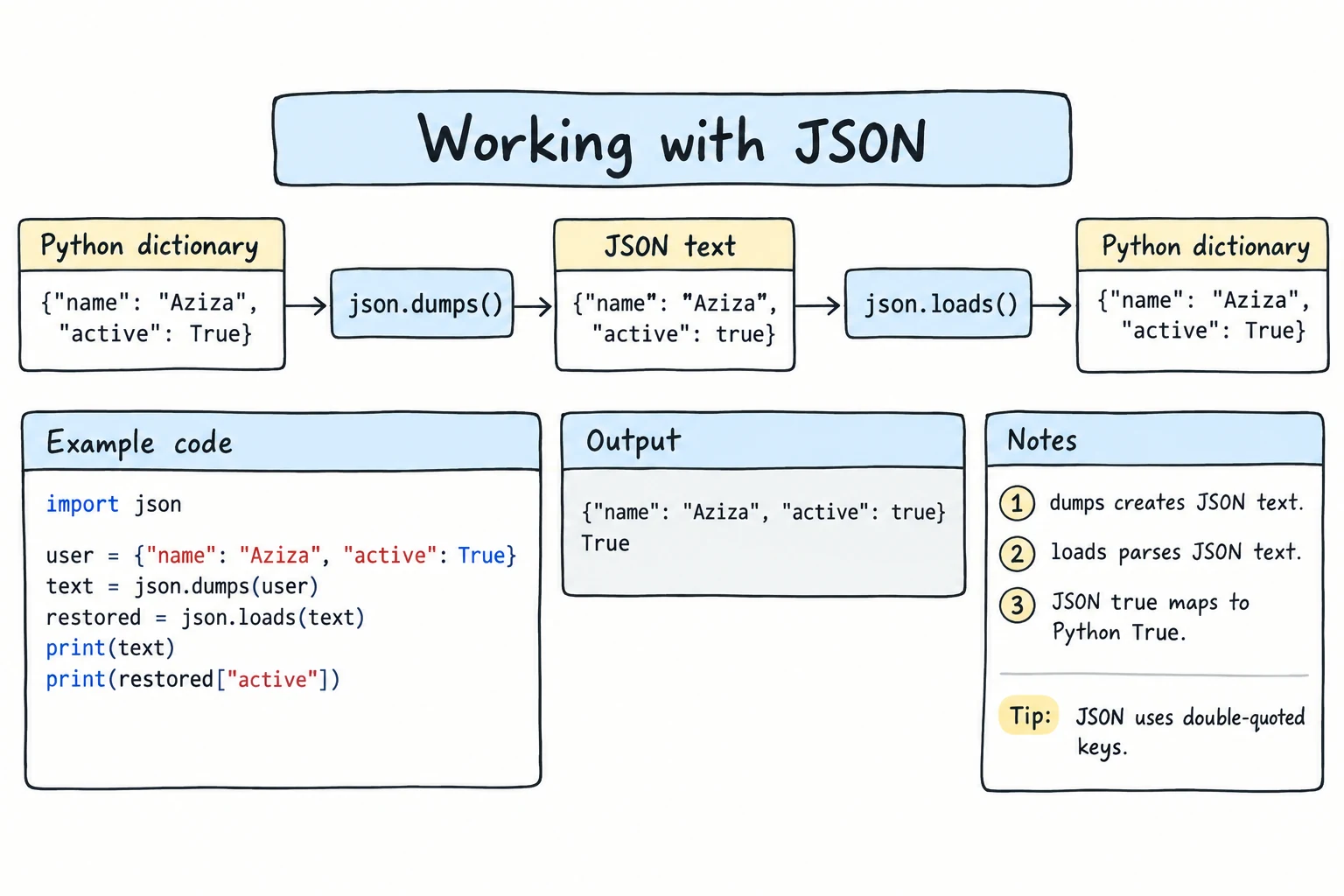
What you'll learn
- What JSON is and how its types map to Python types
- How to convert with
json.dumps()/json.loads()and save or load files withjson.dump()/json.load() - How
indent,sort_keys, andensure_ascii=Falsemake JSON readable, including Uzbek text - How to navigate nested JSON and use it to save settings
- What cannot be turned into JSON, and how to catch broken JSON with
JSONDecodeError
Why it matters
CSV suits flat tables, but most data is nested: an order has a customer, a list of items and an address. JSON (JavaScript Object Notation) stores such data as text. Web services and apps speak JSON, and it is the easiest way to save a program's settings.
What JSON looks like
{
  "name": "Aziza",
  "age": 20,
  "student": true,
  "phone": null,
  "courses": ["Python", "English"],
  "address": {"city": "Tashkent", "zip": "100000"}
}
It looks like a Python dictionary, but with true/false/null and only double quotes.
| JSON | Python |
|---|---|
object {...} | dict |
array [...] | list |
string "..." | str |
number 42, 3.5 | int, float |
true / false | True / False |
null | None |
A tuple is also written as an array, and JSON object keys are always strings (see Common mistakes below).
dumps and loads: strings
json.dumps() ("dump string") turns Python data into a JSON string. json.loads() ("load string") parses a JSON string back into Python data:
import json

student = {"name": "Aziza", "age": 20, "student": True, "phone": None, "courses": ["Python", "English"]}

text = json.dumps(student)
print(text)

back = json.loads(text)
print(back == student, type(back)){"name": "Aziza", "age": 20, "student": true, "phone": null, "courses": ["Python", "English"]}
True <class 'dict'>The JSON string has true, null and double quotes; after loads, you have a normal dictionary again. That is how you handle JSON arriving as text from a web service.
Pretty output: indent, sort_keys, ensure_ascii
By default, dumps writes everything on one line and replaces every non-ASCII letter with an escape code: valid, but unreadable. indent=2 spreads the output over lines, sort_keys=True orders the keys, and ensure_ascii=False keeps letters like ʻ:
import json

city = {"country": "Oʻzbekiston", "capital": "Toshkent"}

print(json.dumps(city))
print(json.dumps(city, ensure_ascii=False, sort_keys=True))
print(json.dumps(city, indent=2, ensure_ascii=False)){"country": "O\u02bbzbekiston", "capital": "Toshkent"}
{"capital": "Toshkent", "country": "Oʻzbekiston"}
{
"country": "Oʻzbekiston",
"capital": "Toshkent"
}When you save such JSON to a file, open it with encoding="utf-8".
dump and load: files
Without the s, the functions work with files: json.dump(data, file) writes, and json.load(file) reads:
import json

library = {
    "name": "Samarkand City Library",
    "books": [{"title": "Oʻtkan kunlar", "year": 1926, "available": False}],
}

with open("library.json", "w", encoding="utf-8") as file:
    json.dump(library, file, indent=2, ensure_ascii=False)

with open("library.json", encoding="utf-8") as file:
    print(file.read())

with open("library.json", encoding="utf-8") as file:
    loaded = json.load(file)

print(loaded["books"][0]["title"]){
"name": "Samarkand City Library",
"books": [
{
"title": "Oʻtkan kunlar",
"year": 1926,
"available": false
}
]
}
Oʻtkan kunlar| Function | From | To |
|---|---|---|
json.dumps(data) | Python data | JSON string |
json.loads(text) | JSON string | Python data |
json.dump(data, file) | Python data | JSON file |
json.load(file) | JSON file | Python data |
With pathlib, the string functions work too: json.loads(path.read_text(encoding="utf-8")).
Navigating nested JSON
Real JSON is often several levels deep. Navigate it one step at a time, exactly as in Nested Data:
import json

response = """
{
  "data": {"base": "USD", "rates": {"UZS": 12650.5, "EUR": 0.92}},
  "branches": [
    {"city": "Tashkent", "hours": "09:00-18:00"},
    {"city": "Nukus", "hours": null}
  ]
}
"""

info = json.loads(response)

uzs = info["data"]["rates"]["UZS"]
print(f"100 {info['data']['base']} = {100 * uzs:,.0f} som")

for branch in info["branches"]:
    print(f"{branch['city']}: {branch['hours'] or 'closed'}")

print(info["data"].get("fees", "no fee information"))100 USD = 1,265,050 som
Tashkent: 09:00-18:00
Nukus: closed
no fee information.get() with a default handles fields a service leaves out.
Saving and loading app settings
Keep settings in a JSON file, fall back to defaults when there is no file yet, and save changes:
import json
from pathlib import Path

SETTINGS_FILE = Path("settings.json")
SETTINGS_FILE.unlink(missing_ok=True)       # start this demo with no file
DEFAULTS = {"language": "uz", "theme": "light", "font_size": 14}

def load_settings():
    try:
        with SETTINGS_FILE.open(encoding="utf-8") as file:
            saved = json.load(file)
    except FileNotFoundError:
        return dict(DEFAULTS)
    return DEFAULTS | saved

def save_settings(settings):
    with SETTINGS_FILE.open("w", encoding="utf-8") as file:
        json.dump(settings, file, indent=2, ensure_ascii=False)

settings = load_settings()
print("First run:", settings)

settings["theme"] = "dark"
save_settings(settings)

print("Next run:", load_settings())First run: {'language': 'uz', 'theme': 'light', 'font_size': 14}
Next run: {'language': 'uz', 'theme': 'dark', 'font_size': 14}DEFAULTS | saved merges two dictionaries (see Dictionaries): values from saved win, so new defaults still work with old files. The unlink() line only resets this demo; a real app keeps the file and loads it on each start.
What cannot be serialized
Turning data into JSON is called serializing. Stick to the types in the table above. Sets, dates and your own objects cause a TypeError:
import json

print(json.dumps({"tea", "green"}))TypeError: Object of type set is not JSON serializableA date gives TypeError: Object of type date is not JSON serializable. One value slips through without an error: json.dumps({"x": float("nan")}) writes {"x": NaN}, which is not valid JSON; pass allow_nan=False to get a ValueError instead.
Two ways to fix this:
1. Convert before saving, which gives you full control: date(2027, 3, 21).isoformat() gives the string "2027-03-21", sorted(tags) turns a set into a list, and after loading, date.fromisoformat() and set() rebuild the originals. Exercise 4 practices this.
2. Use default= for a quick fix. Python calls this function for any value it cannot handle; default=str turns such values into strings:
import json
from datetime import datetime

log_entry = {"user": "Farrukh", "time": datetime(2026, 9, 15, 14, 30)}
print(json.dumps(log_entry, default=str)){"user": "Farrukh", "time": "2026-09-15 14:30:00"}The values come back as strings: JSON has no date type.
Handling invalid JSON
For text that is not valid JSON, json.loads and json.load raise json.JSONDecodeError, which says where the problem is:
import json

broken_texts = [
    '{"name": "Aziza", "age": 20,}',
    "{'name': 'Aziza'}",
    '{"name": "Aziza" "age": 20}',
]

for text in broken_texts:
    try:
        json.loads(text)
    except json.JSONDecodeError as e:
print(f"Invalid JSON: {e.msg} (line {e.lineno}, column {e.colno})")Invalid JSON: Illegal trailing comma before end of object (line 1, column 28)
Invalid JSON: Expecting property name enclosed in double quotes (line 1, column 2)
Invalid JSON: Expecting ',' delimiter (line 1, column 18)Trailing commas and single quotes are the most common hand-editing mistakes, so never build JSON by hand with f-strings: use json.dumps(). JSONDecodeError is a child of ValueError.
A robust loader catches both FileNotFoundError and json.JSONDecodeError (see exercise 5).
Try it
Add a book, mark one as borrowed, and watch the JSON change.
Common mistakes
1. Mixing up load and loads
import json

with open("data.json", "w", encoding="utf-8") as f:
    f.write('{"a": 1}')

with open("data.json", encoding="utf-8") as f:
data = json.loads(f)TypeError: the JSON object must be str, bytes or bytearray, not TextIOWrapperloads expects a string; for an open file, use json.load(f). Likewise dump (file) and dumps (string).
2. Expecting number keys and tuples back
import json

medals = {1: "gold", 2: "silver"}
point = (41.3, 69.2)

print(json.loads(json.dumps(medals)))
print(json.loads(json.dumps(point))){'1': 'gold', '2': 'silver'}
[41.3, 69.2]JSON keys are always strings, and arrays load as lists. Convert after loading if you need the original types.
Practice
1. Round trip
Make a product dictionary (name, price, in stock, list of colors). Print it as JSON with indent=2, load it back, and print the price.
Solution
import json

product = {"name": "Backpack", "price": 180000, "in_stock": True, "colors": ["black", "blue"]}

text = json.dumps(product, indent=2)
print(text)

loaded = json.loads(text)
print(loaded["price"]){
"name": "Backpack",
"price": 180000,
"in_stock": true,
"colors": [
"black",
"blue"
]
}
1800002. Read a weather response
Parse this JSON, print the city, then each day as Mon: 34 C:
{"city": "Tashkent", "forecast": [{"day": "Mon", "max": 34}, {"day": "Tue", "max": 36}, {"day": "Wed", "max": 33}]}Solution
import json

text = '{"city": "Tashkent", "forecast": [{"day": "Mon", "max": 34}, {"day": "Tue", "max": 36}, {"day": "Wed", "max": 33}]}'

data = json.loads(text)
print(data["city"])
for day in data["forecast"]:
print(f"{day['day']}: {day['max']} C")Tashkent
Mon: 34 C
Tue: 36 C
Wed: 33 C3. High scores file
Write add_score(name, score) that loads scores.json (name to best score, {} if missing), keeps only each player's higher score, and saves. Call it for Aziza 120, Bekzod 95, Aziza 80, Bekzod 140, then print the file.
Solution
import json
from pathlib import Path

SCORES = Path("scores.json")

def add_score(name, score):
    try:
        scores = json.loads(SCORES.read_text(encoding="utf-8"))
    except FileNotFoundError:
        scores = {}
    if score > scores.get(name, 0):
        scores[name] = score
    SCORES.write_text(json.dumps(scores, indent=2), encoding="utf-8")

for name, score in [("Aziza", 120), ("Bekzod", 95), ("Aziza", 80), ("Bekzod", 140)]:
    add_score(name, score)

print(SCORES.read_text(encoding="utf-8")){
"Aziza": 120,
"Bekzod": 140
}4. Serialize an event
For trip = {"to": "Xiva", "start": date(2026, 10, 3), "people": {"Aziza", "Kamola"}}, print a JSON string with the date as isoformat() and the set as a sorted list. Load it back, rebuild the original types, and print trip == restored.
Solution
import json
from datetime import date

trip = {"to": "Xiva", "start": date(2026, 10, 3), "people": {"Aziza", "Kamola"}}

text = json.dumps(
    {"to": trip["to"], "start": trip["start"].isoformat(), "people": sorted(trip["people"])},
    ensure_ascii=False,
)
print(text)

raw = json.loads(text)
restored = {
    "to": raw["to"],
    "start": date.fromisoformat(raw["start"]),
    "people": set(raw["people"]),
}
print(trip == restored){"to": "Xiva", "start": "2026-10-03", "people": ["Aziza", "Kamola"]}
True5. Safe contacts book
Write load_contacts(path) and save_contacts(path, contacts). Loading returns [] for a missing file; for a damaged one it prints a warning, moves it to a .bak name with Path.replace, and returns []. Demo: save two contacts, write {"oops" into the file, load, add a contact, save, and print the file.
Solution
import json
from pathlib import Path

def load_contacts(path):
    path = Path(path)
    try:
        return json.loads(path.read_text(encoding="utf-8"))
    except FileNotFoundError:
        return []
    except json.JSONDecodeError as e:
        backup = path.with_suffix(".bak")
        path.replace(backup)
        print(f"Warning: {path.name} was damaged ({e.msg}). Moved to {backup.name}.")
        return []

def save_contacts(path, contacts):
    text = json.dumps(contacts, indent=2, ensure_ascii=False)
    Path(path).write_text(text, encoding="utf-8")

path = "contacts.json"
save_contacts(path, [
    {"name": "Aziza", "phone": "+998901234567", "city": "Tashkent"},
    {"name": "Bekzod", "phone": "+998917654321", "city": "Samarqand"},
])
print(len(load_contacts(path)), "contacts loaded")

Path(path).write_text('{"oops"', encoding="utf-8")
contacts = load_contacts(path)

contacts.append({"name": "Gʻayrat", "phone": "+998931112233", "city": "Fargʻona"})
save_contacts(path, contacts)
print(Path(path).read_text(encoding="utf-8"))
print(Path("contacts.bak").exists())2 contacts loaded
Warning: contacts.json was damaged (Expecting ':' delimiter). Moved to contacts.bak.
[
{
"name": "Gʻayrat",
"phone": "+998931112233",
"city": "Fargʻona"
}
]
TrueRecap
- JSON stores nested data as text: objects become
dict, arrayslist,true/false/nullbecomeTrue/False/None. dumps/loadswork with strings,dump/loadwith files.indent=2makes output readable;ensure_ascii=Falsewithencoding="utf-8"keeps Uzbek letters.- Keys become strings and tuples come back as lists; sets and dates need converting first, or
default=str. - Catch
json.JSONDecodeError(aValueError) for broken JSON, andFileNotFoundErrorfor missing files.