

Iterators and Generators
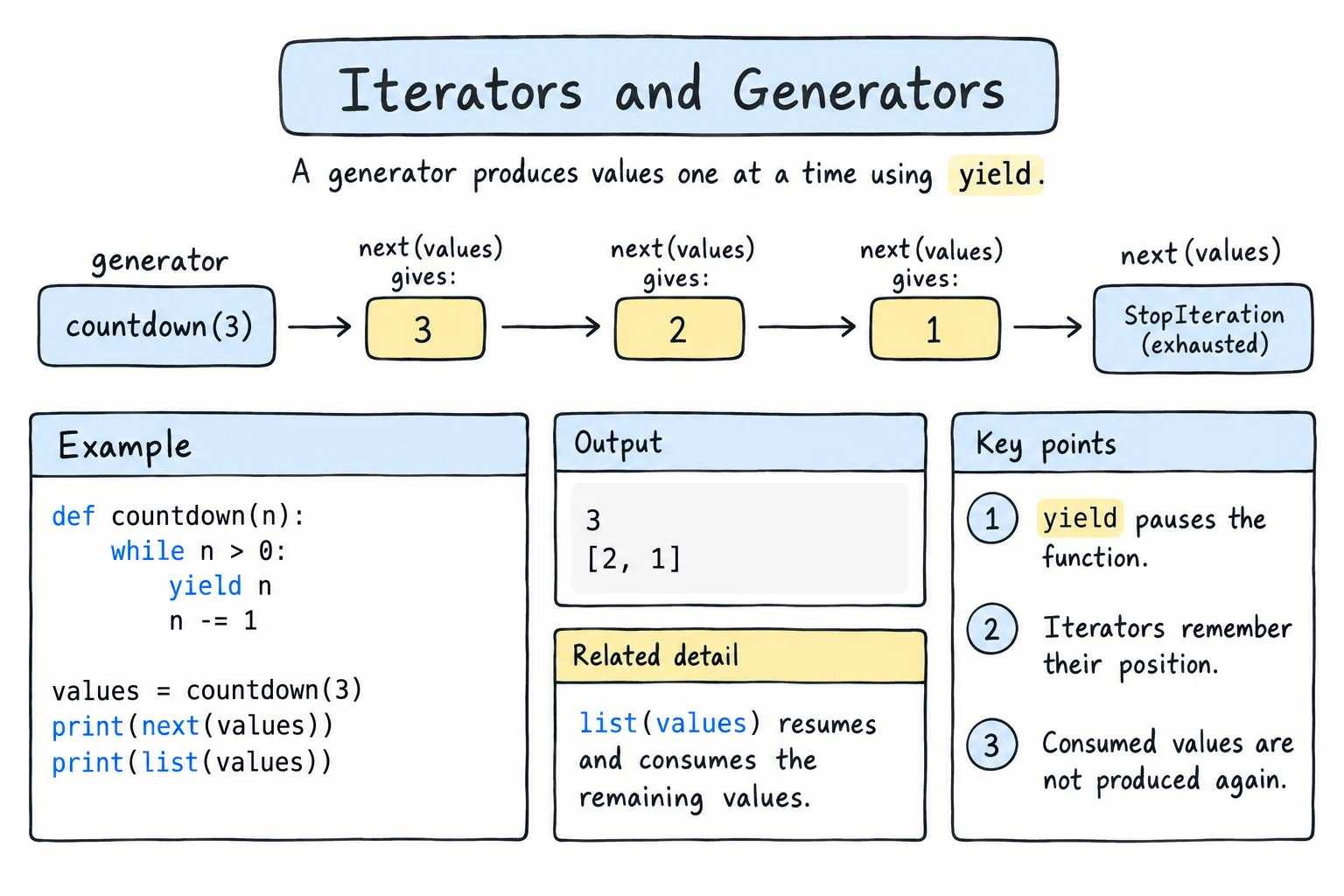
What you'll learn
- The difference between an iterable and an iterator, and how
forusesiter()andnext() - How to write an iterator class, and why
__iter__as a generator makes it reusable - How to write generator functions with
yield - Why generators are lazy, and how that allows infinite sequences
- How to build generator pipelines for large files
Why it matters
A log file from a busy Tashkent online shop can have 20 million lines. Load it into a list and your program may run out of memory. With a generator you read, clean, and filter one line at a time, and memory use stays tiny. And once you understand iterators, you understand what a for loop really does.
Iterables vs. iterators
Lists, strings, dictionaries, and range() are iterables: you can loop over them. An iterator does the actual walking: it remembers where it is and hands out the next item.
| Iterable | Iterator | |
|---|---|---|
| Examples | list, str, dict, set, range | what iter() returns, files, generators |
| Remembers a position? | ||
Works with next()? | ||
| Can be looped many times? | , it gets used up |
The built-in iter() turns an iterable into an iterator, and next() asks the iterator for one item. When nothing is left, next() raises StopIteration, or returns a default if you give one:
cities = ["Tashkent", "Samarkand"]

it = iter(cities)
print(type(it))
print(next(it))
print(next(it))
print(next(it, "no more cities"))<class 'list_iterator'>
Tashkent
Samarkand
no more citiesThe list did not change; the iterator moved through it like a bookmark.
How a for loop works
A for loop is iter(), next(), and StopIteration wrapped in nice syntax. for price in prices: print(price) does exactly this:
prices = [15000, 8000, 22000]

it = iter(prices)
while True:
    try:
        price = next(it)
    except StopIteration:
        break
print(price)15000
8000
22000An iterator only goes forward. Once it has handed out every item, it is exhausted (empty for good):
scores = [90, 85, 97]
it = iter(scores)

print(list(it))
print(list(it))     # the iterator is already used up
print(sum(scores)) # the list itself is fine[90, 85, 97]
[]
272Files, generators, and the results of map(), filter(), and zip() are iterators too, and get used up the same way.
Writing your own iterator class
In Operators and Containers you saw __iter__. A full iterator class has two methods: __iter__ returns the iterator (for an iterator, that is self), and __next__ returns the next value or raises StopIteration:
class Countdown:
    def __init__(self, start):
        self.current = start

    def __iter__(self):
        return self

    def __next__(self):
        if self.current <= 0:
            raise StopIteration
        value = self.current
        self.current -= 1
        return value

countdown = Countdown(3)
print(list(countdown))
print(list(countdown))[3, 2, 1]
[]The second pass is empty. Countdown is its own iterator, so the position lives in the object and one pass uses it up. A list does not behave like that: each loop gets a fresh iterator from iter(). Generators, coming up next, make the fix easy.
Generator functions with yield
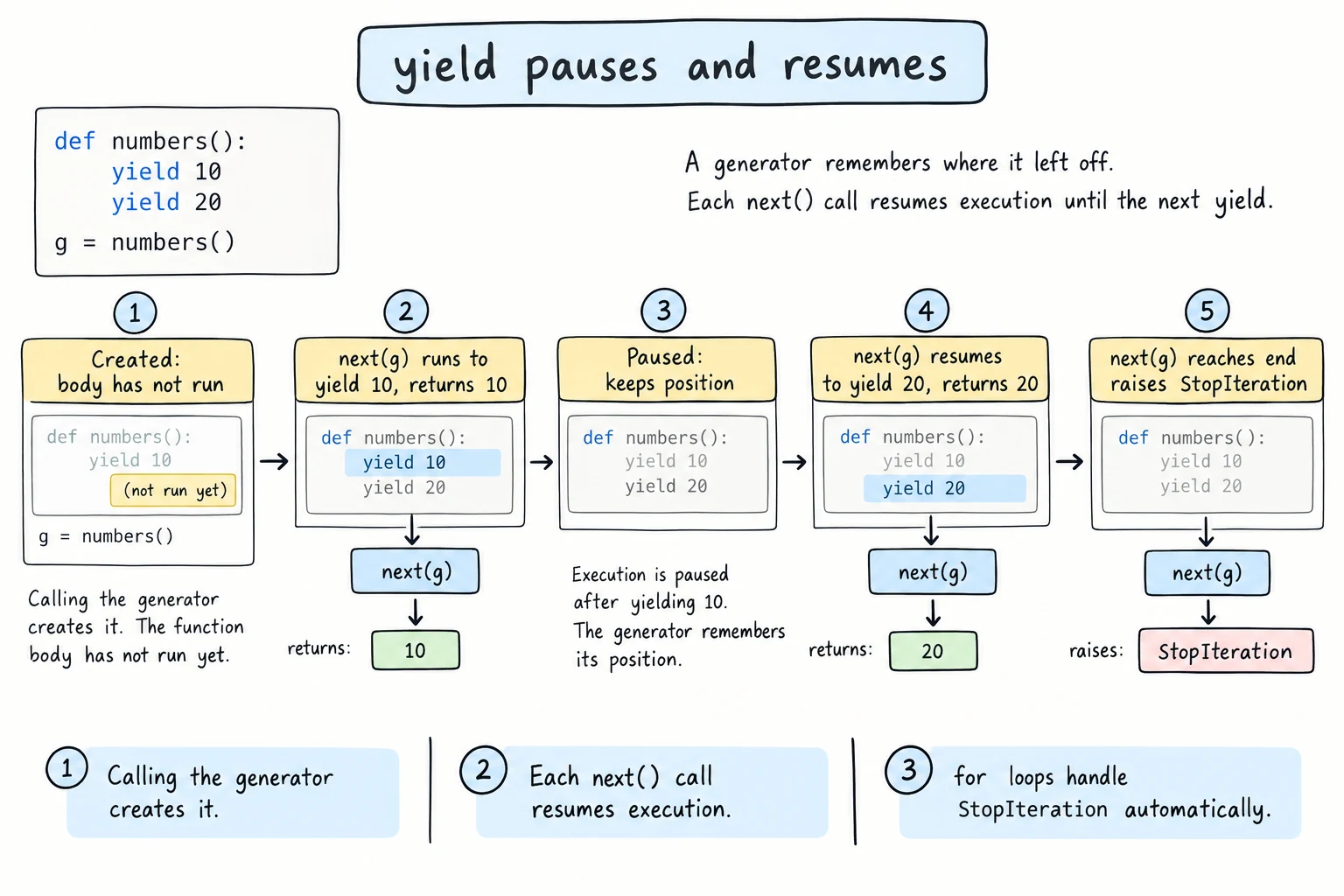
A generator function uses yield instead of return. Calling it does not run the body. It returns a generator object, which is an iterator. yield hands out a value and pauses the function, and the next next() call resumes it right after the yield:
def make_tea():
    print("  [boil water]")
    yield "water ready"
    print("  [add tea leaves]")
    yield "tea served"
    print("  [function ends]")

steps = make_tea()
print("Generator created, nothing ran yet")
print(next(steps))
print(next(steps))
print(next(steps, "no more steps"))Generator created, nothing ran yet
[boil water]
water ready
[add tea leaves]
tea served
[function ends]
no more stepsThe third next() ran the function to its end, so the generator raised StopIteration and next returned the default. Python keeps the local variables and position for you, so a countdown takes a few lines:
def countdown(start):
    current = start
    while current > 0:
        yield current
        current -= 1

print(list(countdown(3)))[3, 2, 1]A reusable iterable class
Now the fix for Countdown: store only the starting value, and write __iter__ as a generator method. Every loop calls __iter__ again and gets a fresh generator, just like a list:
class Countdown:
    def __init__(self, start):
        self.start = start

    def __iter__(self):
        current = self.start
        while current > 0:
            yield current
            current -= 1

countdown = Countdown(3)
print(list(countdown))
print(list(countdown))[3, 2, 1]
[3, 2, 1]This is the usual way to make a class loopable.
Generators are lazy
A list stores all its items in memory now. A generator stores only its current state and produces each item when asked. Compare their sizes with sys.getsizeof():
import sys

numbers_list = [n * n for n in range(1_000_000)]
numbers_gen = (n * n for n in range(1_000_000))

print(f"list:      {sys.getsizeof(numbers_list):>9,} bytes")
print(f"generator: {sys.getsizeof(numbers_gen):>9,} bytes")
print(sum(numbers_gen))list: 8,448,728 bytes
generator: 208 bytes
333332833333500000The byte counts differ between Python versions and platforms (this site's editor runs a 32-bit build, so its numbers are roughly half of these), but the list takes megabytes and the generator a couple of hundred bytes, however many items it produces. The (... for ...) form is the generator expression from Comprehensions.
Values are made on demand, so a generator can even run forever. itertools.islice takes just the first few items:
from itertools import islice

def fibonacci():
    a, b = 0, 1
    while True:
        yield a
        a, b = b, a + b

print(list(islice(fibonacci(), 10)))[0, 1, 1, 2, 3, 5, 8, 13, 21, 34]Generator pipelines for large files
Generators chain: each step takes an iterable and yields processed items, so one line flows through all steps before the next line is even read. A file object is already an iterator over lines, so nothing is loaded into memory at once:
from pathlib import Path

Path("sales.txt").write_text(
    "Tashkent,tea,15000\n"
    "\n"
    "Samarkand,samsa,8000\n"
    "Tashkent,coffee,45000\n"
    "bad line\n",
    encoding="utf-8",
)

def read_lines(path):
    with open(path, encoding="utf-8") as file:
        for line in file:
            yield line.strip()

def skip_blank(lines):
    for line in lines:
        if line:
            yield line

def parse_sales(lines):
    for line in lines:
        parts = line.split(",")
        if len(parts) != 3:
            print(f"  skipping: {line!r}")
            continue
        city, product, amount = parts
        yield {"city": city, "product": product, "amount": int(amount)}

sales = parse_sales(skip_blank(read_lines("sales.txt")))   # nothing read yet
tashkent = (sale["amount"] for sale in sales if sale["city"] == "Tashkent")
print(f"Tashkent total: {sum(tashkent):,} som") skipping: 'bad line'
Tashkent total: 60,000 somsum() drives the whole pipeline: each value it asks for is pulled through every step. Each function is tiny, easy to test on a list, and works on a 10-gigabyte file. Use a list instead when you need len(), indexing, or to loop over the result more than once.
Try it
Filter a different city, or add a step that keeps amounts above 10,000 som.
Common mistakes
1. Looping over an exhausted iterator twice
evens = (n for n in range(10) if n % 2 == 0)

print(sum(evens))
print(max(evens, default="nothing left"))20
nothing leftsum() used up the generator. Fix: make a list if you need the values twice.
2. Calling next() on a list
cities = ["Tashkent", "Bukhara"]
print(next(cities))TypeError: 'list' object is not an iteratorA list is iterable, not an iterator. Fix: next(iter(cities)).
3. Returning a generator from inside with
def read_lines(path):
    with open(path, encoding="utf-8") as file:
        return (line.strip() for line in file)

for line in read_lines("cities.txt"):
print(line)ValueError: I/O operation on closed file.return leaves the with block, which closes the file before the loop reads a single line. Fix: yield inside the with block, as read_lines in the pipeline does, so the file stays open while values are pulled.
Practice
1. Manual loop
Without a for loop, use iter() and next() inside a while loop to print every character of "Samarkand" separated by -.
Solution
it = iter("Samarkand")
letters = []
while True:
    try:
        letters.append(next(it))
    except StopIteration:
        break
print("-".join(letters))S-a-m-a-r-k-a-n-d2. Even numbers generator
Write a generator function evens(limit) that yields the even numbers from 0 up to and including limit. Print list(evens(10)).
Solution
def evens(limit):
    n = 0
    while n <= limit:
        yield n
        n += 2

print(list(evens(10)))[0, 2, 4, 6, 8, 10]3. Chunks
Write a generator chunks(items, size) that yields lists of size items at a time (the last chunk may be shorter). Use it to split 7 student names into groups of 3.
Solution
def chunks(items, size):
    chunk = []
    for item in items:
        chunk.append(item)
        if len(chunk) == size:
            yield chunk
            chunk = []
    if chunk:
        yield chunk

names = ["Aziza", "Bekzod", "Dilnoza", "Farrukh", "Malika", "Jasur", "Nodira"]
for i, group in enumerate(chunks(names, 3), start=1):
print(f"Group {i}: {group}")Group 1: ['Aziza', 'Bekzod', 'Dilnoza']
Group 2: ['Farrukh', 'Malika', 'Jasur']
Group 3: ['Nodira']The final if chunk: yields the leftover items.
4. Running balance
Write a generator running_balance(start, transactions) that yields the balance after each transaction. Print each balance for start=100000 and transactions [-25000, 40000, -60000, 15000].
Solution
def running_balance(start, transactions):
    balance = start
    for amount in transactions:
        balance += amount
        yield balance

for balance in running_balance(100000, [-25000, 40000, -60000, 15000]):
print(f"{balance:>8,} som") 75,000 som
115,000 som
55,000 som
70,000 som5. Log pipeline
Create app.log as the solution does. Build a pipeline of generators that reads stripped lines, keeps only ERROR lines, and yields just the message. Print each message, the number of errors, and the first error found with next().
Solution
from pathlib import Path

Path("app.log").write_text(
    "2026-09-01 INFO user login\n"
    "2026-09-01 ERROR payment failed\n"
    "\n"
    "2026-09-02 ERROR card declined\n"
    "2026-09-03 WARNING slow response\n",
    encoding="utf-8",
)

def read_lines(path):
    with open(path, encoding="utf-8") as file:
        for line in file:
            yield line.strip()

def errors_only(lines):
    for line in lines:
        parts = line.split(" ", 2)
        if len(parts) == 3 and parts[1] == "ERROR":
            yield parts[2]

messages = list(errors_only(read_lines("app.log")))
for message in messages:
    print("-", message)
print("Errors:", len(messages))

first = next(errors_only(read_lines("app.log")), None)
print("First error:", first)- payment failed
- card declined
Errors: 2
First error: payment failedsplit(" ", 2) splits at most twice, so the message keeps its spaces. next() reads only up to the first error line.
Recap
- An iterable can be looped over; an iterator remembers its position, works with
next(), and is exhausted after one pass. forcallsiter()once, thennext()untilStopIteration.- A function with
yieldpauses at eachyieldand resumes on the next request. A generator__iter__makes a class loopable many times. - Generators are lazy: tiny memory use, work only when needed, even infinite sequences (take a few with
islice). - Chains of small generators form pipelines for large files; keep the
yieldinside thewithblock.