

Comprehensions
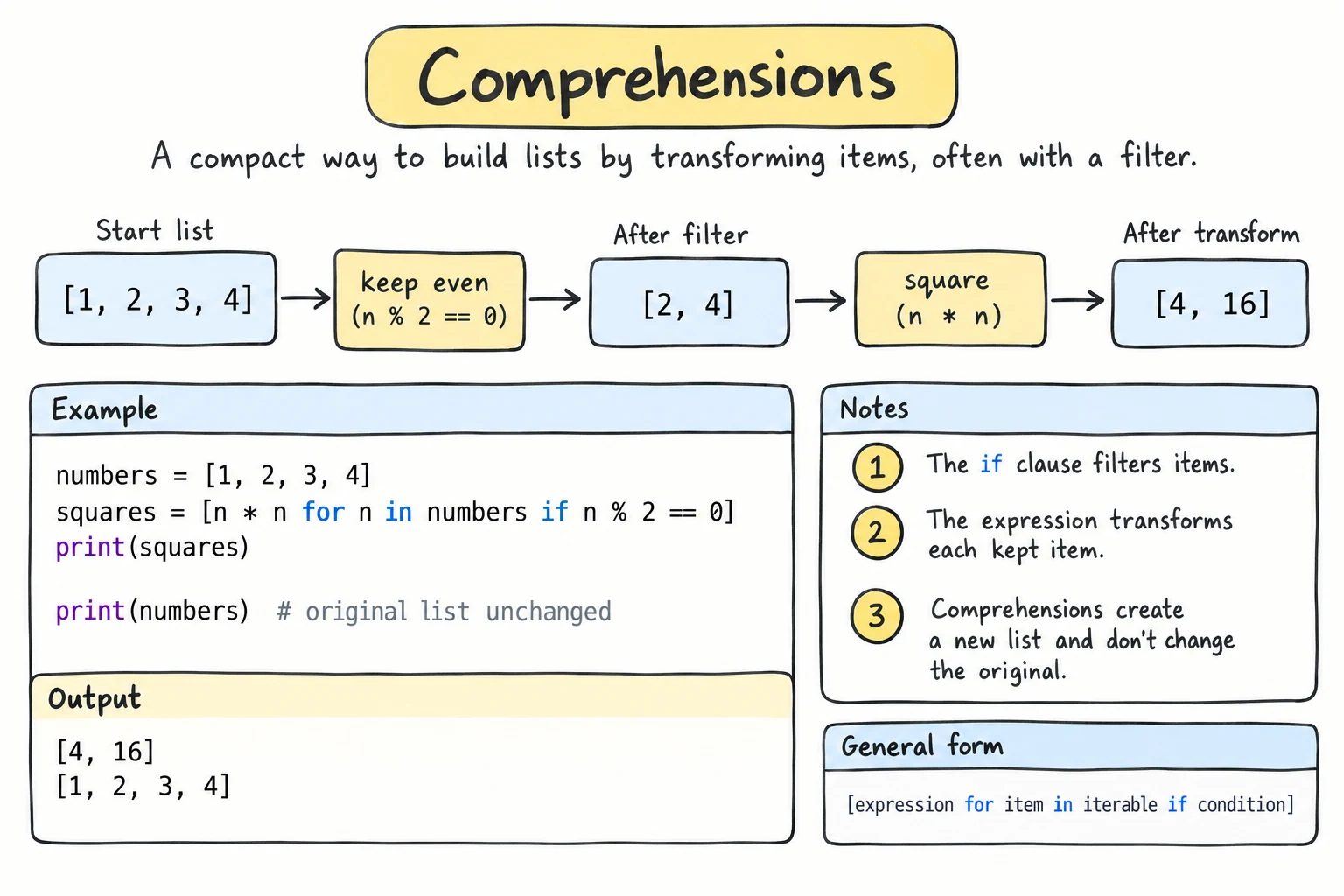
What you'll learn
- How to turn a "build a list in a loop" into a one-line list comprehension
- How to filter with
ifand choose values withif … else - Dictionary and set comprehensions, and comprehensions with two
forclauses - Generator expressions with
sum(),any(), andall(), and why they work only once - When a normal loop is the better choice, and how list, tuple, dict, and set compare
Why it matters
Much everyday code has one shape: take a collection, transform or filter each item, collect the results. Comprehensions express that shape directly, in less code than a loop, and they're everywhere in real Python.
From loop to comprehension
Here's the familiar pattern:
numbers = [1, 2, 3, 4, 5]

squares = []
for n in numbers:
    squares.append(n * n)

print(squares)
The same thing as a list comprehension:
numbers = [1, 2, 3, 4, 5]

squares = [n * n for n in numbers]

print(squares)[1, 4, 9, 16, 25]Read it as: "n * n, for each n in numbers". The general shape is [expression for item in iterable]: first what to collect, then where the items come from.
The expression can be anything:
names = ["aziza", "bekzod", "dilnoza"]
prices = [12000, 4500, 30000]

print([name.title() for name in names])
print([len(name) for name in names])
print([f"{p:,} som" for p in prices])['Aziza', 'Bekzod', 'Dilnoza']
[5, 6, 7]
['12,000 som', '4,500 som', '30,000 som']The loop variable stays inside
A comprehension's loop variable doesn't leak out or overwrite a variable of the same name. A for loop's does:
x = "outer"
squares = [x * x for x in range(3)]
print(x)

for x in range(3):
    pass
print(x)outer
2Filtering with if
Add if condition at the end to keep only some items. This replaces the "filter" loop from Lists: an empty list, a for, an if, and .append().
scores = [72, 95, 58, 88, 64, 91]

high = [s for s in scores if s >= 85]
curved = [s + 5 for s in scores if s < 60]     # transform and filter

print(high)
print(curved)[95, 88, 91]
[63]Choosing a value with if … else
To give every item a value that depends on a condition, put a conditional expression (from if, elif, and else) at the front:
scores = [72, 95, 58, 88]

results = ["pass" if s >= 60 else "fail" for s in scores]
print(results)['pass', 'pass', 'fail', 'pass']Where does the if go?
[x for x in items if condition]: theifat the end filters, so the result may be shorter.[a if condition else b for x in items]: theif … elseat the front chooses a value, so the result has the same length.
An if at the end can't have an else.
Dictionary comprehensions
Use curly braces with key: value. They're great for transforming or filtering an existing dictionary via .items():
prices = {"tea": 15000, "coffee": 45000, "juice": 12000}

with_vat = {item: round(price * 1.12) for item, price in prices.items()}
cheap = {item: price for item, price in prices.items() if price < 20000}

print(with_vat)
print(cheap){'tea': 16800, 'coffee': 50400, 'juice': 13440}
{'tea': 15000, 'juice': 12000}To pair two lists with no change to the values, dict(zip(keys, values)) from Dictionaries is simpler than a comprehension.
Set comprehensions
Curly braces without a colon build a set, so duplicates are removed:
emails = ["ali@mail.uz", "vali@gmail.com", "gani@mail.uz", "sami@yahoo.com"]

domains = {email.split("@")[1] for email in emails}
print(sorted(domains))['gmail.com', 'mail.uz', 'yahoo.com']Two for clauses
A comprehension can contain several for clauses. They run in the same order as nested loops written out:
pairs = [(x, y) for x in range(1, 3) for y in "ab"]
print(pairs)[(1, 'a'), (1, 'b'), (2, 'a'), (2, 'b')]That's the same as for x in range(1, 3): with for y in "ab": nested inside it.
A common use is flattening a list of lists:
matrix = [[1, 2, 3], [4, 5, 6], [7, 8, 9]]

flat = [value for row in matrix for value in row]
print(flat)[1, 2, 3, 4, 5, 6, 7, 8, 9]A comprehension can also build nested lists, which is the safe way to create a grid: [[0] * 4 for _ in range(3)] (see Nested Data).
Generator expressions
Use parentheses instead of square brackets, and you get a generator expression. It produces items one at a time, without building a list. That's ideal when the values go straight into a function like sum(), max(), any(), all(), or "".join():
prices = [12000, 4500, 30000, 8000]

total_with_vat = sum(p * 1.12 for p in prices)
has_expensive = any(p > 25000 for p in prices)
all_affordable = all(p < 50000 for p in prices)

print(round(total_with_vat))
print(has_expensive, all_affordable)
print(", ".join(str(p) for p in prices))61040
True True
12000, 4500, 30000, 8000any() is the one-line version of the flag-and-break search from Common Loop Patterns.
When the generator is the only argument, you don't need extra parentheses. And there's no tuple comprehension: (x for x in items) is a generator, so write tuple(x for x in items) for a tuple.
When not to use a comprehension
Comprehensions are for building a collection. Prefer a regular loop when:
- It gets hard to read.
data = [[1, -2], [3, 4], [-5, 6]]

# Bad: too clever
result = [x * 2 if x > 0 else 0 for row in data for x in row if x != 4]

# Good: clearer
result = []
for row in data:
    for x in row:
        if x == 4:
            continue
        result.append(x * 2 if x > 0 else 0)
print(result)- You only want side effects.
[print(x) for x in items]builds a useless list ofNones. - You need
break, several statements, or error handling inside the loop.
If a comprehension doesn't fit on one or two lines, use a loop.
Choosing a collection
All four built-in collections, side by side:
| list | tuple | dict | set | |
|---|---|---|---|---|
| Written as | [1, 2] | (1, 2) | {"a": 1} | {1, 2} |
| Keeps order? | yes | yes | yes (insertion order) | no |
| Can change? | yes | no | yes | yes |
| Duplicates? | allowed | allowed | keys are unique | no |
| Find items by | position | position | key | in only |
Of the four, only a tuple of immutable values can be a dict key or set item.
Try it
Try filtering by a different price, or build a different dictionary.
Common mistakes
1. else in a filter
evens = [n for n in range(10) if n % 2 == 0 else 0]SyntaxError: invalid syntaxIf you want a value for every item, move the condition to the front: [n if n % 2 == 0 else 0 for n in range(10)].
2. Wrong order of nested for clauses
matrix = [[1, 2], [3, 4]]
flat = [value for value in row for row in matrix]NameError: name 'row' is not defined. Did you mean: 'pow'?row is used before the clause that defines it. Fix: write the for clauses in the same order as nested loops, outer first: [value for row in matrix for value in row].
3. Using a generator expression twice
prices = [12000, 4500, 30000, 8000]
cheap = (p for p in prices if p < 10000)
print(sum(cheap))
print(sum(cheap))12500
0A generator produces its items once. The first sum() used them all up, so the second sees nothing, and there's no error to warn you. Fix: use a list ([...]) if you need the values more than once.
Practice
1. Celsius to Fahrenheit
Convert celsius = [0, 12.5, 25, 37, 100] to a list of Fahrenheit values (c * 9 / 5 + 32) with one comprehension.
Solution
celsius = [0, 12.5, 25, 37, 100]
fahrenheit = [c * 9 / 5 + 32 for c in celsius]
print(fahrenheit)[32.0, 54.5, 77.0, 98.6, 212.0]2. Only the vowels' positions
For word = "education", build a list of the positions of all vowels, using enumerate() inside a comprehension.
Solution
word = "education"
positions = [i for i, letter in enumerate(word) if letter in "aeiou"]
print(positions)[0, 2, 4, 6, 7]3. Word lengths dictionary
For sentence = "comprehensions make python code short and clear", build a dictionary mapping each word to its length, but only for words longer than 4 letters.
Solution
sentence = "comprehensions make python code short and clear"
lengths = {word: len(word) for word in sentence.split() if len(word) > 4}
print(lengths){'comprehensions': 14, 'python': 6, 'short': 5, 'clear': 5}4. Rewrite the loop
Rewrite this code as a single comprehension:
result = []
for n in range(1, 21):
    if n % 3 == 0:
        result.append(n * n)
    else:
        result.append(-n)
Then write a second comprehension that keeps only the squares of multiples of 3.
Solution
result = [n * n if n % 3 == 0 else -n for n in range(1, 21)]
squares_of_threes = [n * n for n in range(1, 21) if n % 3 == 0]

print(result)
print(squares_of_threes)
Choosing a value: condition at the front. Filtering: at the end.
5. Transpose a matrix
Transposing a matrix turns rows into columns. Transpose matrix = [[1, 2, 3], [4, 5, 6]] into [[1, 4], [2, 5], [3, 6]] using a nested list comprehension. Then do the same with zip().
Solution
matrix = [[1, 2, 3], [4, 5, 6]]

rows = len(matrix)
cols = len(matrix[0])

transposed = [[matrix[r][c] for r in range(rows)] for c in range(cols)]
print(transposed)

with_zip = [list(column) for column in zip(*matrix)]
print(with_zip)[[1, 4], [2, 5], [3, 6]]
[[1, 4], [2, 5], [3, 6]]zip(*matrix) passes the rows as separate arguments, so it pairs up the items at each position: the columns.
Recap
[expr for item in items]builds a list,{k: v for …}a dictionary, and{expr for …}a set.- An
ifat the end filters. Anif … elseat the front chooses a value for every item. - Several
forclauses run like nested loops, outer first:[x for row in grid for x in row]. - Generator expressions
(expr for …)feedsum,any,all, andjoinwithout building a list, but work only once. - Use a regular loop when a comprehension gets hard to read, or when you need side effects,
break, or several statements.